
Key Insights
Security teams have become highly effective at detection. Behavioral models now identify subtle deviations that reveal account takeover, insider abuse, and targeted compromise. Abnormal has helped drive this shift by demonstrating that behavior-based detection can uncover attacks that static rules and signatures routinely miss.
But even the most advanced detection system is limited by what it can see. When configurations drift, risky integrations remain active, and permissions expand beyond their intended scope, attackers gain new paths to exploit. These weaknesses aren’t visible through behavior alone; they are embedded in the configuration of the environment itself.
These issues are not the result of negligence but of complexity. Securing Microsoft 365 means managing thousands of interconnected policies across Entra, Exchange, Teams, SharePoint, and other services. No team can manually verify every configuration at scale with the required level of precision.
Abnormal built Security Posture Management (SPM) to extend our behavioral approach to the configuration layer of Microsoft 365. SPM continuously evaluates posture health across identity, collaboration, and application layers, helping organizations find and fix the quiet gaps that make new attacks possible.
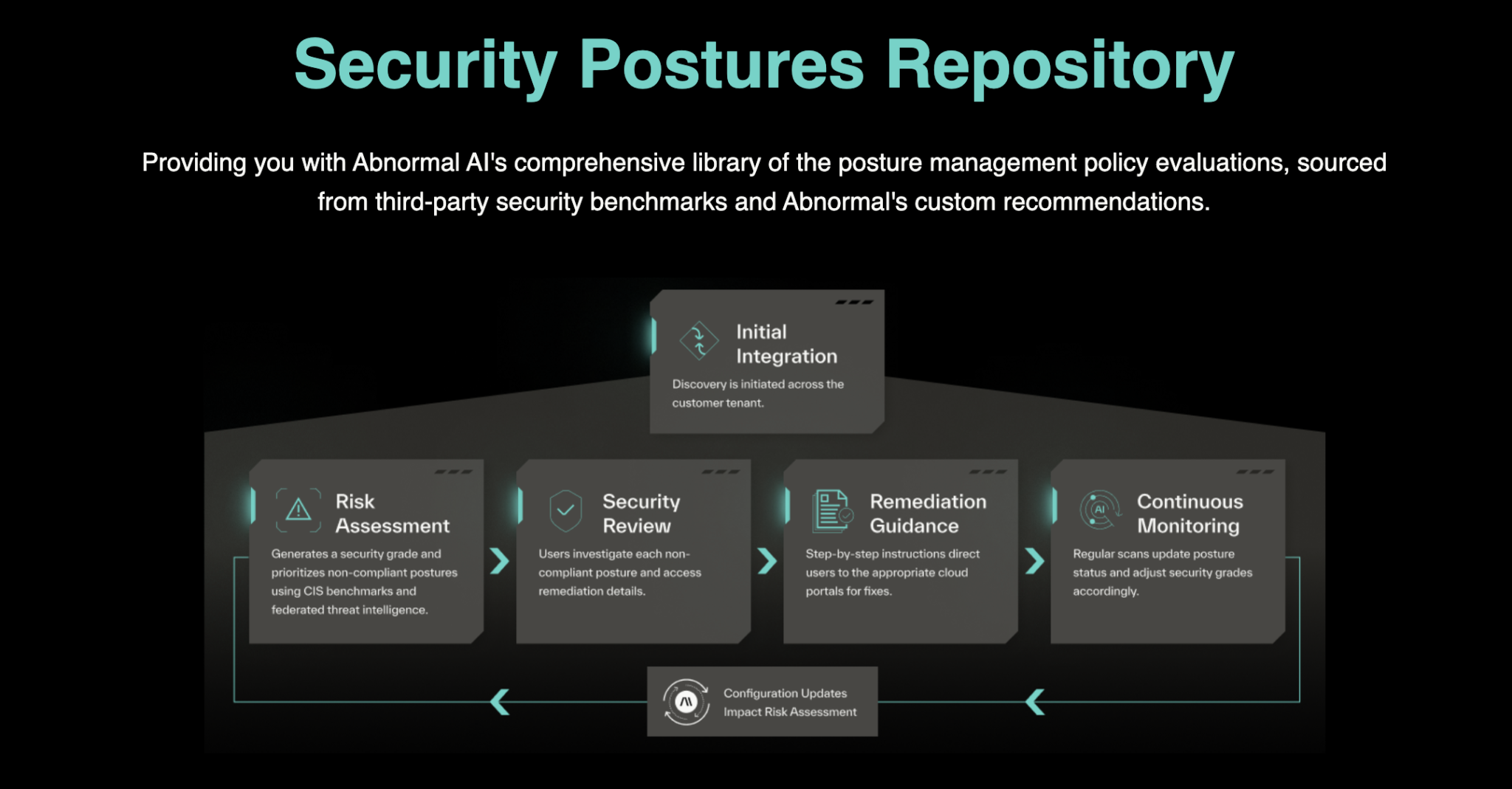
Today, we are proud to unveil the Security Postures Library, a public catalog of every configuration posture that SPM monitors across Microsoft 365. This is the first resource of its kind to show, in detail, the breadth and depth of Abnormal posture coverage. Each entry explains what is being monitored, why it matters, and how to remediate it.
Complexity Creates Risk; Continuous Visibility Restores Control
Microsoft 365’s extensive capabilities create substantial configuration complexity. Each service, including Entra, Exchange, Teams, SharePoint, Defender, and Purview, has its own configuration model and control surfaces. Together, they form thousands of interconnected settings that few teams can track with consistency.
Securing Entra alone can require reviewing hundreds of configuration screens related to conditional access, authentication, and permissions. Even a single review takes hours, and environments continue to change as integrations are added and temporary policies persist. What begins as a secure configuration quickly drifts, creating small but compounding risks.
Security Posture Management continuously evaluates these configurations to maintain security hygiene as environments evolve. The Security Postures Library makes this coverage visible by outlining what SPM monitors, why it matters, and the steps required to remediate misconfigurations.
Examples from the Library include:
Critical: Restrict additional storage providers in Outlook on the web
High: Require reauthentication for SharePoint file access
Medium: Disable external meeting chats with untrusted organizations
Each Library entry explains:
What is being monitored
Why it matters
How to remediate the issue
Which industry benchmarks it aligns with (CIS, Microsoft Secure Score, etc.)
How the posture is prioritized (Critical, High, Medium, or Low)
Each posture includes validated remediation steps so engineers can act quickly and with confidence. Continuous visibility shifts configuration management from a manual chore into a proactive layer of defense.
Taking a Proactive Approach to Posture
Modern defense must operate on two fronts: detecting active threats and preventing the conditions that make those threats possible. This is the role of Security Posture Management. Each posture evaluated by SPM and documented in the Security Postures Library represents a safeguard that reduces exposure before attackers can breach. Examples include verifying that multi-factor authentication is enforced in Entra, ensuring OAuth app consent is properly restricted, and managing data-sharing permissions within SharePoint.
Every new posture added to SPM is documented in the Library as soon as it is validated by Abnormal’s R&D team. As new risks emerge, they are incorporated into SPM and published in the Library, ensuring the external catalog stays aligned with the most current posture coverage.
Defense is not about reacting to attacks. It’s about eliminating the conditions that make them possible.
Explore the Library
Security Posture Management operates continuously, identifying configuration risks as environments change. The Security Postures Library extends this visibility by showing exactly which posture checks SPM evaluates and why each one matters. Because the Library is kept in sync with SPM, customers can clearly see what is monitored and understand how coverage evolves as new risks emerge.
Cloud environments shift constantly. New integrations appear, permissions expand, and policies drift from their intended baseline. The only effective defense is one that adapts at the same pace. Continuous posture visibility ensures that configuration issues do not go unnoticed and that safeguards remain aligned with how the environment actually operates.
The Security Postures Library is now available at postures.abnormal.ai, offering a detailed view of the configuration coverage that supports Abnormal’s Security Posture Management across Microsoft 365.
Explore the Library