
Key Insights
Email remains the backbone of business communication, but a steady stream of newsletters, marketing blasts, automated alerts, and non-essential notifications bury real work. This clutter, known as graymail, drains focus from employees and creates friction across the organization.
Abnormal’s Email Productivity is built to eliminate that friction and return focus to the work that matters. Using behavioral AI and more than 45,000 detection signals, it precisely identifies low-priority messages and reroutes them into a dedicated folder within Outlook or Gmail. Rather than relying on brittle rules that require constant tuning, Email Productivity continuously learns and adapts based on how employees engage with their inboxes, improving over time without adding administrative overhead.
The impact is measurable, with organizations seeing more than a 12% reduction1 in total inbox volume. And because graymail isn’t evenly distributed—executives receive 2.3x more graymail1 than the average employee—Email Productivity gives teams a practical way to protect the people most affected while increasing efficiency.
1Based on internal Abnormal data.
Introducing the Revamped Email Productivity Dashboard
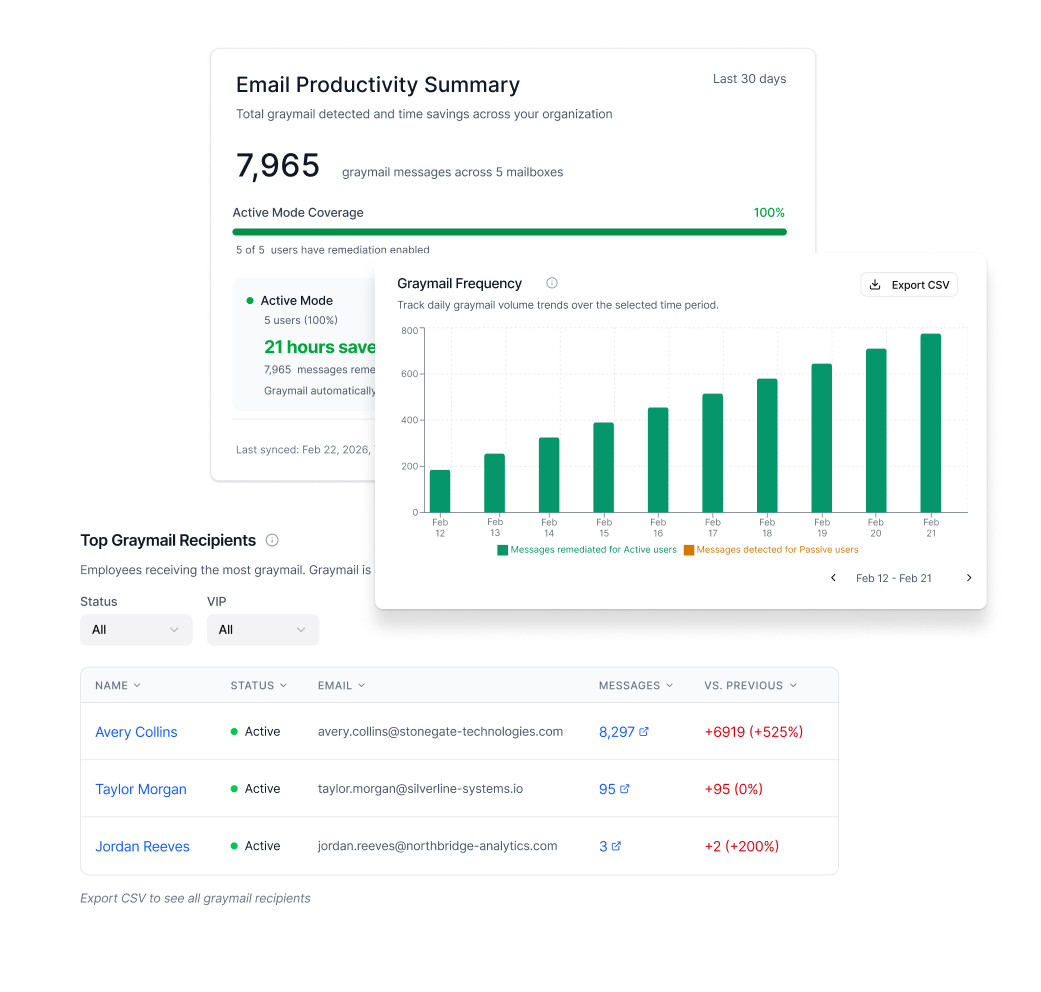
Stopping graymail is only part of the equation. Security teams also need clarity on where graymail originates, who is most affected, and how much value is being delivered through reduction. Messages may be remediated, but teams still need a clear, credible way to measure that impact and communicate it to stakeholders.
That’s why we rebuilt the Email Productivity Dashboard—now live as part of Email Productivity (EPR). The redesigned experience makes rollout progress easier to manage, impact easier to measure, and day-to-day administration faster and clearer.
Mode-Aware Visibility into Coverage and Opportunity
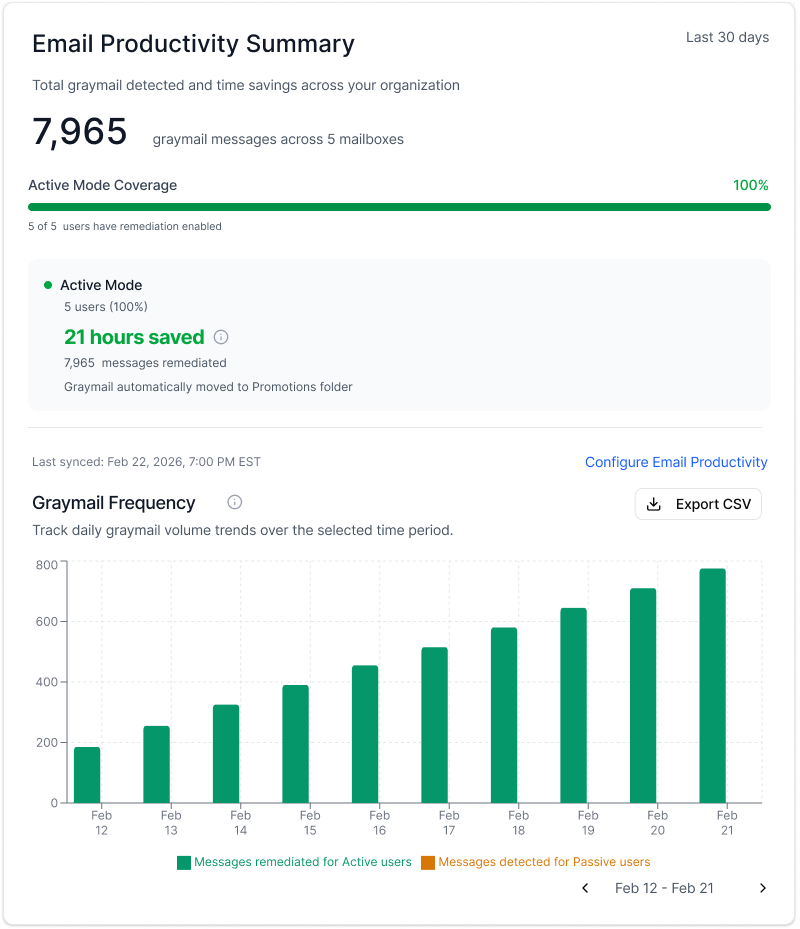
Email Productivity deployments often happen in stages, progressing from Passive to Partial to fully Active. Teams typically begin in Passive mode to assess the graymail landscape without changing the inbox experience. From there, they move to Partial coverage—rolling out Active mode to a subset of employees while they validate workflows and tune controls—before expanding into full Active deployment across the organization.
The revamped dashboard is built to reflect this progression. It is now mode-aware, recognizing whether a tenant is Passive, Partial, or fully Active and surfacing that state directly in the UI.
Most importantly, the dashboard draws a clear line between realized value and remaining opportunity. It shows how much graymail is being remediated today in Active coverage and how much additional volume could be remediated as rollout expands, enabling teams to communicate progress and build a crisp case for full deployment.
Expanded Reporting and Self-Service Exports
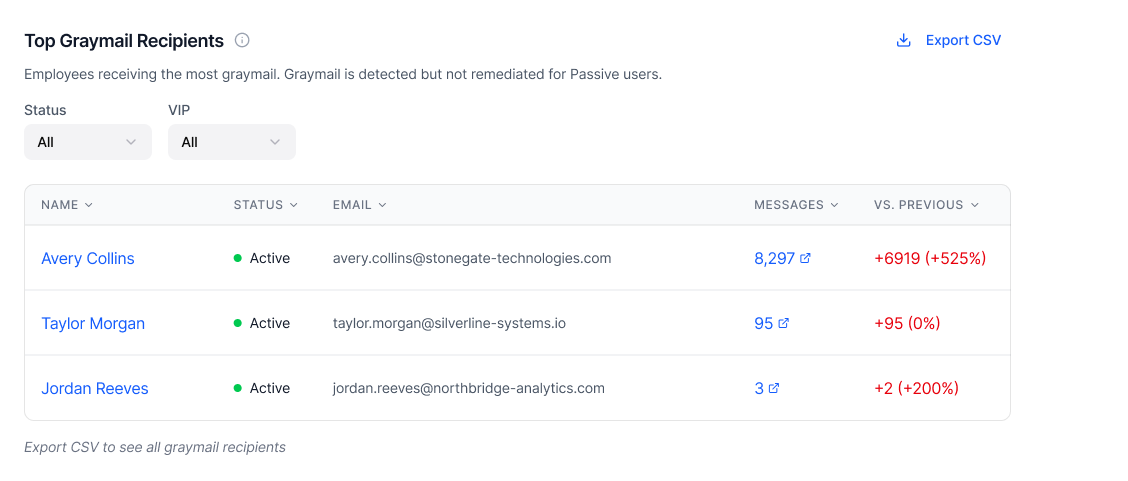
For many teams, the dashboard isn’t just a place to check performance—it’s the reporting system they rely on for operational reviews, leadership updates, and decisions about policy and deployment.
The revamped dashboard now provides full, organization‑wide visibility. Customers can see:
All senders and recipients, not just the top fifty, so the data reflects the real graymail landscape across the organization.
Day‑by‑day reporting on remediated messages versus detected but unremediated volume.
This level of detail makes it easier to understand which senders generate the most graymail, which parts of the business are most affected, and how graymail patterns change over time.
Every major view, including frequency, senders, and recipients, can be exported to CSV in seconds. Security teams can access the data they need for analysis and stakeholder reporting without filing a ticket, waiting on support, or maintaining manual workarounds.
Built for Security Workflows
The revamped dashboard uses clearer language and a streamlined structure, making key insights easier to communicate internally. Filters are designed to be practical and intuitive, helping teams quickly isolate what matters without wading through irrelevant noise.
Admins can now:
Filter by VIP versus non‑VIP users
Filter by Active versus Passive status
Hide bypassed senders so already‑excluded sources do not clutter the dashboard
Move directly from dashboard insights into Search & Respond for deeper investigation
Behind the scenes, performance improvements help ensure the dashboard stays fast and responsive even for high-volume tenants. The outcome is a reporting and administrative surface teams can rely on without adding operational friction.
Measuring the Impact of Email Productivity
At Abnormal, we build for the everyday realities our customers face: inboxes that are constantly changing, teams that need to prove outcomes, and leaders who expect operational clarity.
The evolved dashboard enables teams to distinguish between graymail addressed today and additional volume that could be remediated with broader deployment. It also provides executive-ready reporting on hours saved, deployment progress, and graymail trends, with self-service exports that make reporting repeatable and defensible.
As graymail volume continues to grow and organizations look for demonstrable productivity wins, this level of visibility becomes a strategic advantage, enabling security teams to show how they reduce risk while giving time back to the business.
To see Email Productivity and the new dashboard in action, schedule a personalized demo.
