Impersonation means pretending to be someone else, and an impersonation attack is a cyberattack in which someone poses as a known person or organization to obtain money, data, or access. The word also covers harmless imitation, such as a comedian mimicking a public figure. Impersonation meant to trick someone into handing over money or information is a form of fraud, and depending on the jurisdiction and whom the impersonator claims to be, it can be a criminal offense.
Attackers use social engineering tactics to assume that identity, either by compromising a real account or by registering a lookalike domain, and then ask victims to complete routine tasks like paying an invoice, sharing a file, or clicking a link. Because these requests resemble everyday work and arrive from a name the victim recognizes, victims often do not realize they are being targeted. Impersonation is common in CEO fraud, business email compromise, and supply chain attacks, and it is hard to detect and stop because it exploits human trust and technical weaknesses.
Key Takeaways
An impersonation attack is one in which someone poses as a known person or organization to obtain money, data, or access.
Attackers research a target's role and contacts, then use a lookalike address or a compromised real account to make their request credible.
Impersonation drives CEO fraud, business email compromise, and supply chain fraud, where the request looks like routine work.
Because impersonation messages often carry no malicious links or attachments, detection relies on spotting unusual behavior such as odd timing, unfamiliar locations, or changed payment details.
How Do Impersonation Attacks Work?
Impersonation attacks often arrive by email and follow a predictable sequence. The attacker's research decides which identity to borrow, and that identity decides what the request can plausibly ask for:
The attacker selects a target who controls financial transactions or has access to sensitive data. Employees in accounting, legal and human resources are frequent targets.
The attacker gathers intelligence from public sources such as company websites, social media profiles, press releases and LinkedIn. This reveals who the target works with, which vendors they manage and which executives they report to.
The attacker chooses someone to impersonate, such as a CEO, a department head or a frequent business contact. The attacker chooses the person's name to prompt attention and trust.
The attacker may spoof an email address so it looks nearly identical to the real one, such as by switching a single letter, or may compromise the real account instead so the message appears legitimate.
The attacker makes contact, usually by email, sometimes followed by a text message or phone call to add urgency. The request, such as paying a fake invoice, sharing confidential files or clicking a seemingly harmless link, is written to look routine.
Because the sender, the context and the request each match what the target expects, the request is often acted on before anything seems off.
Common Examples of Impersonation Attacks
Each of these impersonation attacks borrows the trust of a different relationship, whether with an executive, a vendor or a colleague:
CEO Fraud: Criminals pose as a company's CEO or another top executive. They exploit the authority and urgency associated with these roles to pressure employees to release sensitive data or approve payments quickly, without the usual verification.
Supply Chain Compromise: Attackers target an organization's supply chain by phishing or compromising vendors and suppliers. By gaining access to a legitimate vendor account, they send authentic-looking payment requests or invoices. The trust between the two businesses then carries a fraudulent payment through without raising alarms.
Account Takeover: In an account takeover fraud scheme, attackers hijack an employee's email or system access and use that account to impersonate the employee. Because the account is genuine, the impersonation appears credible to coworkers, which makes requests for invoice payments, confidential files or other sensitive actions more likely to succeed.
In each case, the request itself is ordinary, and the signal sits in the context around the message: who is asking, from where, and whether the request fits the relationship. A payment request from a genuine vendor address can still be fraudulent, while an abrupt note from a real executive can be entirely legitimate.
Channels Attackers Use to Impersonate
Email carries most impersonation attempts, though the same deception travels over whichever channel the target already uses for work. Each channel changes what an attacker can forge and what a recipient is able to check:
Email: An attacker registers a cousin domain, a near-identical spelling of a real one, or alters the display name so the inbox shows a familiar sender while the underlying address differs. Targeted spear-phishing messages written for one recipient carry none of the bulk-sending traits a filter matches.
Text Message: Smishing, phishing by text message, moves the request to a phone, where the sender appears only as a number and there is no address to inspect. A short message asking an employee to confirm a payment detail can seem plausible when it follows an email from the same supposed sender.
Voice Call: Vishing, phishing by voice call, adds a voice to a request already made in writing, which makes the request feel confirmed when it has only been repeated. Attackers often call shortly after sending an email so the call appears to verify it.
Social and Workplace Messaging: Online impersonation through a fake profile or a compromised account reaches colleagues in a space where people expect informality and rarely stop to check who is writing.
Attackers frequently combine two of these in a single attempt, and the second channel makes the first look legitimate. A request that arrives by email and is followed by a call has not been confirmed by anyone, because the same sender has made it twice.
Impersonation, Spoofing and Identity Theft
Impersonation, spoofing and identity theft describe different parts of the same deception and are often treated as interchangeable. Separating them clarifies what any given control actually addresses:
Term | What It Describes | What the Attacker Wants |
|---|---|---|
Impersonation | Posing as a known person or organization in a message or call | An action from the recipient, such as a payment or a file |
Spoofing | Forging or closely mimicking a sender address, domain or number | A message that passes as genuine at a glance |
Identity Theft | Taking a person's personal data to pose as them with third parties | Accounts, credit or benefits opened in the victim's name |
Spoofing is one technique an impersonation attack can use, and an attacker who controls a real account needs no spoofing at all. Identity theft sits further along the same path, because the stolen data is used against banks or government services rather than against the victim's colleagues. A control that verifies sender addresses covers the spoofing step alone and leaves the request itself unchecked.
AI-Generated Impersonation
AI has changed what an impersonation attempt costs to prepare, not how it works. A model can draft a message in a particular person's register, translate it without the errors that once marked a forgery, and produce many variants of the same request. Synthesized voice can carry that request into a phone call without the accent and phrasing cues a recipient might once have relied on.
For years, advice on spotting impersonation rested on spelling, grammar, and awkward phrasing, and a well-written message was treated as safe. Fluent AI-generated text has removed that signal. The checks that remain do not depend on how a message reads: whether the request fits the relationship, whether the sending pattern matches the account's history, and whether the request survives a callback on a known number.
Detection that compares a message against an organization's normal communication patterns is less affected by this shift, because it weighs context such as timing, location and the relationship between sender and recipient rather than the quality of the writing.
How Organizations Can Detect and Stop Impersonation Attacks
Organizations catch impersonation attacks by weighing the context around a request rather than scanning its content, because impersonation messages often carry nothing a content filter can flag. Tools built around known indicators, such as secure email gateways (SEGs), often struggle with these threats, though they remain a useful layer alongside tools that assess message context.
SEGs scan for known red flags such as malicious attachments and suspicious URLs. Blocking those remains important, but impersonation emails often carry neither. They may be plain text from a familiar name, and when an attacker controls a real account, they come from a genuine sender. SEG rules built around payloads may have little to act on in this kind of message.
A system or analyst can compare each request against the sender's usual pattern. A message from a known coworker that arrives at an odd hour, or from an unfamiliar geographic location, departs from that pattern even when the display name and address look familiar.
Messages that demand time-sensitive action, ask for confidential company information, or request invoice payments warrant extra scrutiny. Security teams can give additional review to messages that pair urgency with a payment or data request.
A supplier's account can be compromised without the customer knowing, and invoices sent from it will look authentic. Signals include changes to payment details and unusual invoice patterns. Finance teams can confirm any change to a supplier's payment details through a contact already on file before paying the next invoice.
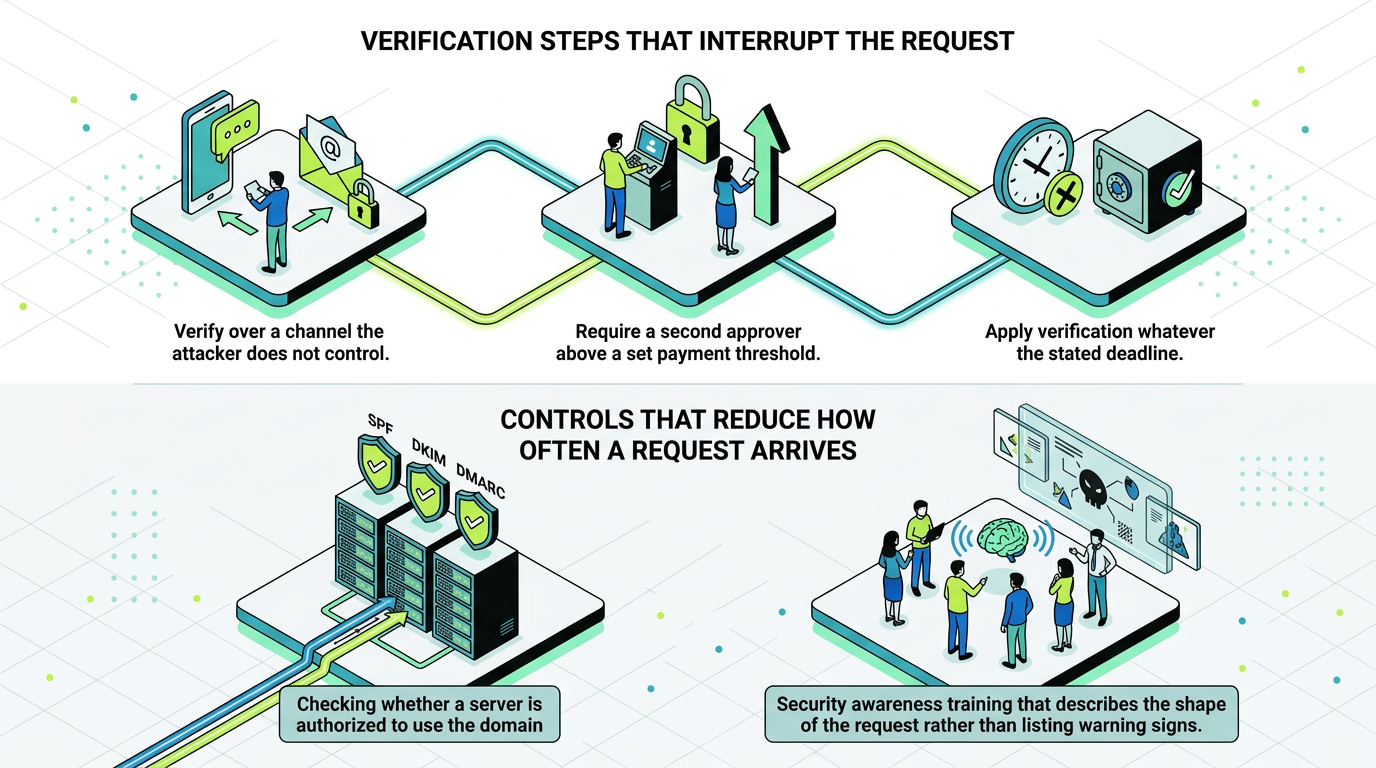
Verification Steps That Interrupt the Request
Verification works when it runs over a channel the attacker does not control. A callback to a number already held on file, rather than one supplied in the message, breaks an impersonation even when every detail of the request looks right. Confirming in person, or through a separate workplace system, achieves the same thing.
A second approver above a set payment threshold gives the check a clear trigger, so it does not rest on one person's judgment at a busy moment. Changes to payment details deserve the same treatment whatever the amount, because a changed bank account is the step that turns a convincing message into a loss.
Urgency is the pressure attackers apply to remove verification steps, which makes a standing rule useful: the verification applies whatever the stated deadline, and whoever appears to be asking. Multi-factor authentication on email and finance accounts narrows the other route in, by making a stolen password alone insufficient to send the request from a genuine account. When an account is protected that way, an attacker is pushed back toward a lookalike address, which leaves the recipient something to inspect.
Controls That Reduce How Often a Request Arrives
Email authentication limits the simplest forgeries: Sender Policy Framework (SPF), DomainKeys Identified Mail (DKIM) and Domain-based Message Authentication, Reporting and Conformance (DMARC) let a receiving server check whether a message claiming to come from a domain was sent by a server authorized to use it. SPF, DKIM and DMARC do not address a lookalike domain the attacker owns outright or a compromised genuine account, and they reduce the volume of attempts rather than closing the gap.
Security awareness training holds up better when it describes the shape of the request than when it lists warning signs. An employee who knows that a payment change always goes through a callback has a rule to apply, while an employee taught to look for spelling errors has nothing to catch a well-written message from a real address.
Limiting how much role and reporting detail an organization publishes raises the cost of the research stage. Attackers assemble the request from public sources, and an organization chart naming who approves payments shortens that work considerably. The same applies to finance and payroll roles listed publicly, which identify the people an impersonator most wants to reach.
How a Routine Request Hides an Impersonation Attack
Impersonation attacks pose as a known person or organization to obtain money, data or access, and they can arrive through email, messaging and other channels. The request an impersonator sends, such as paying an invoice or sharing a file, is usually one the target handles routinely. The wording of the message therefore rarely gives the attack away. The signal sits in the surrounding behavior, such as an unfamiliar sending location, an unusual hour or a changed payment detail.
Frequently Asked Questions
What does impersonation mean in cybersecurity?
Impersonation means posing as a trusted person or organization to deceive a target into acting on the attacker's behalf. It is not limited to email. Attackers can also work through social media, workplace messaging, text messages or phone calls, and they sometimes combine these channels to add urgency.
How is email impersonation different from email spoofing?
Spoofing is one technique in which an attacker forges or closely mimics a sender's address, such as by changing a single letter. Impersonation is the broader act of posing as a trusted person. It can also use a lookalike domain or a compromised real account that sends from a genuine address.
How is AI impersonation detected?
AI-based detection learns what normal communication looks like across an organization, then flags messages that depart from it. A familiar sender writing at an odd hour, writing from an unfamiliar location or asking to change payment details would stand out against that baseline.
Can an impersonation attack come from a real email address?
Yes, and those are the hardest to catch. When an attacker controls a genuine account, the message passes sender authentication and arrives from an address the recipient has corresponded with before. The remaining signals are behavioral, such as a request that does not fit the relationship or a sending pattern that differs from the account's history.
What is brand impersonation?
Brand impersonation uses a company's name, logo or domain style so that a message appears to come from the company itself rather than from a named individual inside it. The targets are usually that brand's customers or partners and common forms include fake invoices, delivery notices and account security warnings sent from a lookalike domain.