Salesforce threat detection has become an urgent priority for security teams protecting customer relationship management platforms where sales data, financial information, and business intelligence converge across integrated systems connecting marketing automation, analytics tools, and communication channels. Attackers exploit authenticated access, social engineering, and approved integrations to blend into normal CRM operations, which makes detection difficult without specialized behavioral monitoring.
Organizations need broad visibility across their Salesforce deployments to identify suspicious activity earlier in an incident. Advanced threat detection extends beyond basic authentication to analyze access patterns, application behaviors, and administrative activities that indicate potential security incidents.
Key Takeaways
- Behavioral monitoring establishes normal Salesforce activity patterns, so unusual login times, data exports, or object access can trigger investigation before a compromise escalates.
- Malicious OAuth applications abuse permissions users already granted, which is why continuous API monitoring catches more than one-time permission reviews.
- Streaming Salesforce's Real-Time Event Monitoring into a SIEM correlates identity, email, and CRM signals to catch attacks that span multiple systems.
- Automated threat hunting and compliance-driven reporting turn continuous Salesforce activity data into both early warning signals and audit-ready evidence.
Why Cybercriminal Groups Target Salesforce Platforms
Salesforce platforms concentrate business-critical data and trusted operational channels in one place, which is exactly why sophisticated attackers build campaigns around them.
These platforms contain strategic customer information, sales forecasts, and business relationships accessible through a single compromised account. Enterprise implementations typically integrate with many business applications, creating expanded attack surfaces through API connections, OAuth applications, and data synchronization tools that each represent potential entry points for malicious actors.
Modern attackers exploit Salesforce's administrative functionality to avoid detection. Google's Threat Intelligence Group tracked UNC6040, a financially motivated cluster whose operators impersonated IT support on phone calls, obtained credentials, and directed employees to authorize a malicious version of Salesforce's Data Loader app, often renamed to appear legitimate. Attacks linked to the associated ShinyHunters extortion activity hit Qantas, Allianz Life, and LVMH, among others, according to reported attacks. These targeted campaigns often evade traditional security controls because they operate within already-authenticated environments using authorized applications.
Security incidents on CRM platforms can create several business impacts:
- Customer Trust Pressure: Breach notifications can weaken confidence in how the organization protects customer relationships and sensitive records.
- Regulatory Exposure: Data protection failures can trigger scrutiny when access controls, monitoring, or response evidence appears incomplete.
- Competitive Risk: Stolen business intelligence can expose forecasts, account strategies, and relationship data that competitors or extortion actors could exploit.
The convergence of centralized customer data, extensive third-party integrations, and critical sales processes turns these environments into high-value targets where one compromise can yield enterprise-wide intelligence.
Why Salesforce Threat Detection Requires SaaS Visibility
Legacy security tools designed for on-premises environments often struggle to monitor cloud-based CRM platforms where authenticated users interact through browsers and APIs.
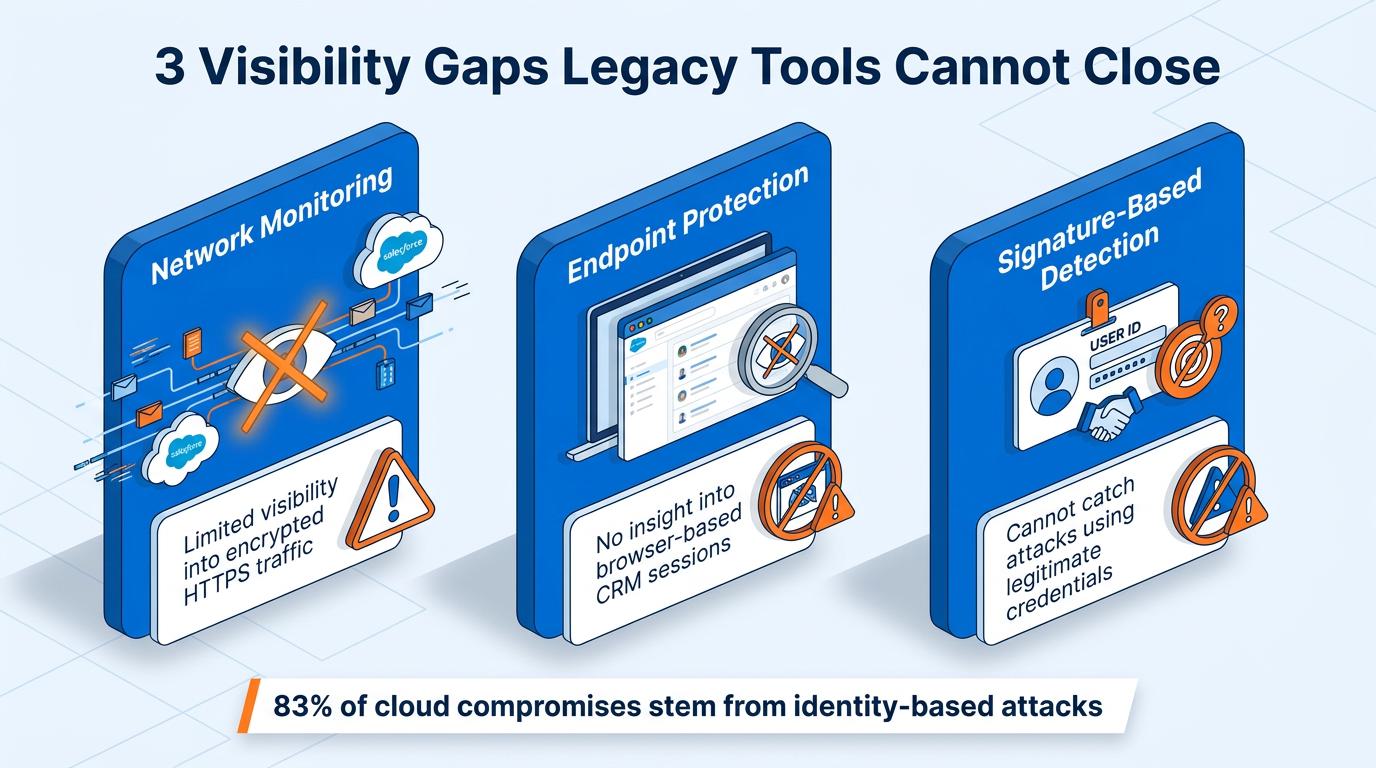
Cloud CRM platforms create three specific visibility gaps that legacy tools weren't built to close:
- Network Monitoring: Provides limited visibility into encrypted HTTPS traffic between users and Salesforce.
- Endpoint Protection: Has limited insight into web application interactions occurring entirely within browser sessions.
- Signature-Based Detection: Rarely identifies attacks that use legitimate credentials and administrative tools rather than known malware signatures.
An FBI FLASH advisory on the Salesforce campaigns warned that a malicious connected app "bypasses many traditional defenses such as MFA, password resets and login monitoring, and because OAuth tokens are issued by Salesforce itself, activity coming from the malicious app can look like it's from a trusted integration," according to the FBI's Internet Crime Complaint Center (IC3). Google's Cloud Threat Horizons Report found that identity compromise underpinned 83% of compromises it tracked. Without behavioral visibility, security teams remain blind to insider threats, account compromises, and data harvesting occurring through standard interfaces.
Salesforce's cloud architecture removes the network perimeter traditional monitoring tools require, so API-based monitoring approaches become necessary. The scale and velocity of CRM activity in enterprise environments can overwhelm manual analysis. Most security teams also lack specialized expertise in Salesforce-specific threat patterns, creating configuration gaps that attackers exploit systematically.
5 Best Practices for Salesforce Threat Detection
The practices below address the specific ways attackers operate inside authenticated Salesforce environments, where traditional perimeter and endpoint controls offer limited coverage. Together, they give security teams the behavioral, API, and compliance visibility needed to catch compromise early rather than after data has already left the platform.
1. Deploy Behavioral Monitoring for User Activity Patterns
Behavioral monitoring strengthens Salesforce threat detection by establishing normal activity patterns for users, then flagging deviations that indicate account compromise or insider risk.
AI-driven systems track login timing, data access patterns, export volumes, and user locations across the organization. NIST identifies related signals, including geolocation, request timing, usage patterns, and device characteristics, as inputs for risk-based authentication decisions. When accounts deviate from established patterns, automated alerts trigger investigation.
Teams can prioritize these Salesforce user activity signals:
- Access Timing: A user who normally works during business hours begins accessing sensitive records overnight.
- Record Volume: A user who normally reviews a small set of accounts suddenly exports hundreds of customer records.
- Location Context: A session starts from an unfamiliar region while the account continues to use valid credentials.
- Object Access: A user begins querying objects or reports unrelated to their normal role.
For example, a sales director might normally access a small set of customer records during business hours from a familiar location, then suddenly export hundreds of records overnight from an unfamiliar location. This kind of monitoring typically produces fewer false positives than static rules, and it surfaces attacks that evade traditional controls. Security teams gain visibility into credential abuse, data harvesting attempts, and insider threats through continuous pattern analysis that adapts to legitimate business changes without losing sensitivity to genuine anomalies.
2. Integrate Real-Time Event Monitoring with SIEM Systems
Salesforce threat detection improves when Real-Time Event Monitoring streams security events into a security information and event management (SIEM) platform for correlation with identity, email, and network signals.
Configuring Salesforce's Event Monitoring to stream security-relevant events directly into existing SIEM platforms, using vendor-specific integration pathways, enables correlation of CRM activities with identity provider logs, email security events, and network behavior. Salesforce's native Threat Detection layer covers six event types:
- Credential Stuffing: Brute-force username and password combinations targeting the same endpoint, or enumerating multiple passwords against one account.
- API Anomaly: User or integration activity that differs significantly from that account's historical behavior.
- Session Hijacking: Malware on a user's device manipulating browser activity to collect sensitive information.
- Login Anomaly: Login attempts that deviate from a user's typical behavior, such as unusual times, unfamiliar devices, or unexpected locations.
- Report Anomaly: Report-generation activity that deviates from a modeled baseline for that user.
- Guest User Anomaly: Suspicious, unauthenticated access attempts on Experience Cloud sites.
Streaming these six event types into a SIEM turns isolated Salesforce alerts into correlated, cross-system evidence.
An attacker who compromises employee credentials through phishing can trigger related events in email systems, identity providers, and Salesforce at the same time. SIEM correlation helps detect these patterns and trigger automated response workflows that isolated monitoring would miss.
Integrated monitoring often improves Mean Time to Detect (MTTD) for multi-system attacks. It also gives investigators richer context for deciding how to respond. Security teams identify lateral movement attempts, coordinated data extraction campaigns, and account compromise chains through centralized visibility that connects disparate security signals into coherent threat intelligence.
3. Implement Advanced OAuth Application Monitoring
OAuth application monitoring helps Salesforce security teams identify compromised integrations that use legitimate permissions for suspicious API activity.
The risk extends beyond apps users approve directly. In the UNC6395 campaign, attackers used OAuth tokens tied to a third-party application to query Salesforce customer instances, running Salesforce Object Query Language (SOQL) queries against Cases, Accounts, Users, and Opportunities objects and hunting for AWS keys and Snowflake tokens in the results. Google's Cloud Threat Horizons Report found that third-party and supply chain compromise involved 21% of cases.
Teams can prioritize these Salesforce OAuth signals:
- API Frequency: A connected application suddenly increases its query rate or access volume.
- Permission Use: An application begins using privileges that sit outside its expected business function.
- Bulk Exports: An integration generates large exports that do not match normal workflow patterns.
- New Object Access: An application approved for a narrow use case begins querying sensitive Salesforce objects.
Deploy monitoring that tracks data access patterns, API usage frequency, and permission utilization for connected applications. Advanced analytics help identify applications conducting unauthorized data extraction or exhibiting behavioral changes suggesting compromise. A productivity application approved for calendar integration that suddenly accesses customer records and generates bulk exports should trigger investigation.
OAuth monitoring extends beyond simple permission reviews to continuous behavioral analysis. Applications deviating from established patterns can face suspension while security teams investigate, limiting extended campaigns where attackers maintain persistence through approved integrations that bypass user-level controls.
4. Establish Automated Threat Hunting Workflows
Automated threat hunting helps Salesforce security teams search continuously for coordinated account activity that manual analysis may miss at enterprise scale.
Automated workflows increasingly apply machine learning to continuously scan for coordinated advanced persistent threats, reducing how much of this scanning depends on manual review.
Security teams can configure hunting logic to look for coordinated behaviors:
- Multi-Account Access: Several accounts that do not normally collaborate begin accessing the same customer records.
- Administrative Exploration: Recently compromised accounts start testing administrative functions or permission boundaries.
- Data Staging: Users or applications collect records in patterns that suggest preparation for exfiltration.
- Privilege Escalation: Accounts request or use elevated permissions outside expected workflows.
These workflows run continuously without constant human intervention. They surface high-confidence threats for investigation and filter out the noise that overwhelms traditional approaches. Security teams focus on genuine incidents rather than drowning in false positives, which improves response effectiveness and reduces analyst burnout.
5. Configure Compliance-Driven Monitoring and Reporting
Compliance-driven Salesforce monitoring creates audit-ready evidence while helping security teams verify controls for regulated customer data.
General Data Protection Regulation (GDPR) and the Health Insurance Portability and Accountability Act (HIPAA) mandate specific technical safeguards requiring documentation that many organizations cannot produce during regulatory audits. The U.S. Department of Health and Human Services (HHS) technical guidance outlines HIPAA safeguards for access controls, audit controls, integrity controls, authentication, and transmission security.
Teams can structure Salesforce compliance monitoring around evidence auditors commonly request:
- Access Reviews: Systems track personal data access and summarize permission changes for review.
- Security Testing: Monitoring records testing activities with timestamped logs and clear ownership.
- Control Evidence: Dashboards show access control effectiveness, data minimization practices, and incident response metrics.
- Audit Readiness: Evidence packages connect monitoring activity to regulatory requirements and internal policies.
HHS's Office for Civil Rights has proposed updates to the HIPAA Security Rule that would require periodic compliance audits and mandatory multi-factor authentication. Automated monitoring helps auditors receive complete evidence packages demonstrating proactive security measures rather than scrambled documentation attempts during investigations.
This approach turns compliance from a reactive burden into an operational advantage. Organizations maintain continuous readiness for regulatory scrutiny while using compliance requirements to justify security investments that protect customer data from sophisticated threats.
Implementing Salesforce Threat Detection at Enterprise Scale
Enterprise-grade Salesforce threat detection combines behavioral monitoring, OAuth oversight, SIEM correlation, automated hunting, and compliance reporting into a single cloud-native security model. The UNC6040 vishing campaign and the UNC6395 OAuth token compromise both show how adversaries turn trusted administrative tools and API access into cover for lateral movement and data exfiltration. Security teams that treat Salesforce as a distinct monitoring surface, rather than an extension of endpoint or network defenses, close the visibility gap attackers rely on to operate undetected inside authenticated sessions.
Frequently Asked Questions
What Is Salesforce Threat Detection?
Salesforce threat detection is the practice of monitoring user behavior, application activity, and administrative changes inside a Salesforce environment to identify account compromise, malicious OAuth applications, and insider risk. It relies on behavioral analysis rather than signature matching, since attackers typically operate through valid, authenticated sessions rather than exploiting a software flaw.
How Is Salesforce Threat Detection Different From Endpoint Or Network Security?
Endpoint and network tools monitor devices and traffic outside the browser session, while Salesforce activity happens entirely inside an authenticated cloud application with no network perimeter to inspect. Threat detection built for Salesforce instead analyzes login patterns, API calls, and object-level access to spot deviations from a user's or application's normal behavior.
Can A Small Security Team Realistically Monitor Salesforce Continuously?
Automated behavioral monitoring and threat hunting workflows reduce the manual burden by surfacing only high-confidence anomalies for review rather than requiring analysts to watch every event. Teams without dedicated Salesforce security expertise can start with OAuth application audits and Real-Time Event Monitoring, then expand coverage as their program matures.
What Should A Security Team Do First After Finding A Suspicious Connected App?
Suspend or revoke the app's OAuth token immediately to cut off further data access, then review its permission scope and recent API activity to determine what data it reached. Checking affected user accounts for related login anomalies helps confirm whether the compromise extends beyond the application itself.