
Key Insights
Attackers love exploiting legitimate platforms, using tools like Gamma, Canva, and Google Drive to host phishing pages and other malicious content. But a new pattern of platform abuse has recently emerged: instead of simply hosting content on trusted services, threat actors manipulate platforms' own infrastructure to deliver attacks.
In this newly uncovered campaign, attackers exploit Microsoft Entra ID (formerly Azure AD) tenant branding features to inject scam messages directly into legitimate Microsoft system notifications. This technique transforms the platform itself into an unwitting accomplice, forcing it to send malicious messages on the attacker's behalf.
This system notification abuse attack creates a phishing flow that is technically "authentic" at every step. Because the messages originate from Microsoft's legitimate infrastructure, they pass domain-based email authentication standards. This technical authenticity, combined with users' inherent trust in official security communications, allows attackers to deceive even security-aware recipients.
Breaking Down the Microsoft System Notification Abuse Attack
Unlike traditional spoofing attacks that impersonate Microsoft, this campaign forces Microsoft's legitimate infrastructure to send phishing emails on the threat actors’ behalf.
To understand the scale of this threat, we analyzed 2,000 unique messages across over 250 abused Microsoft 365 tenants. This data revealed a highly organized "burn-and-churn" operation where attackers script the creation of disposable tenants to launch attacks using specific evasion techniques:
The "Subject Line Hijack": Injecting 60+ characters of scam text into the tenant name field to force legitimate system text off the screen.
Obfuscation: Using "ogonek" substitutions (e.g., replacing “a” with the Polish “ą”) and homoglyphs to defeat optical character recognition (OCR) and keyword blockers.
Regex Evasion: Formatting phone numbers by replacing digits with letters (e.g., swapping “0” for “O”) to blind security gateways.
The attack begins with the bad actor spinning up a disposable Microsoft 365 tenant. Unlike compromised legitimate accounts, these are purpose-built malicious instances or free trials registered on subdomains (e.g., onmicrosoft[.]com).
Manipulating Tenant Branding to Inject the Payload
The core exploit lies in the Tenant Branding configuration within Microsoft Entra ID. The attacker navigates to Tenant Properties and modifies the "Name" field to contain a fraudulent financial alert message.
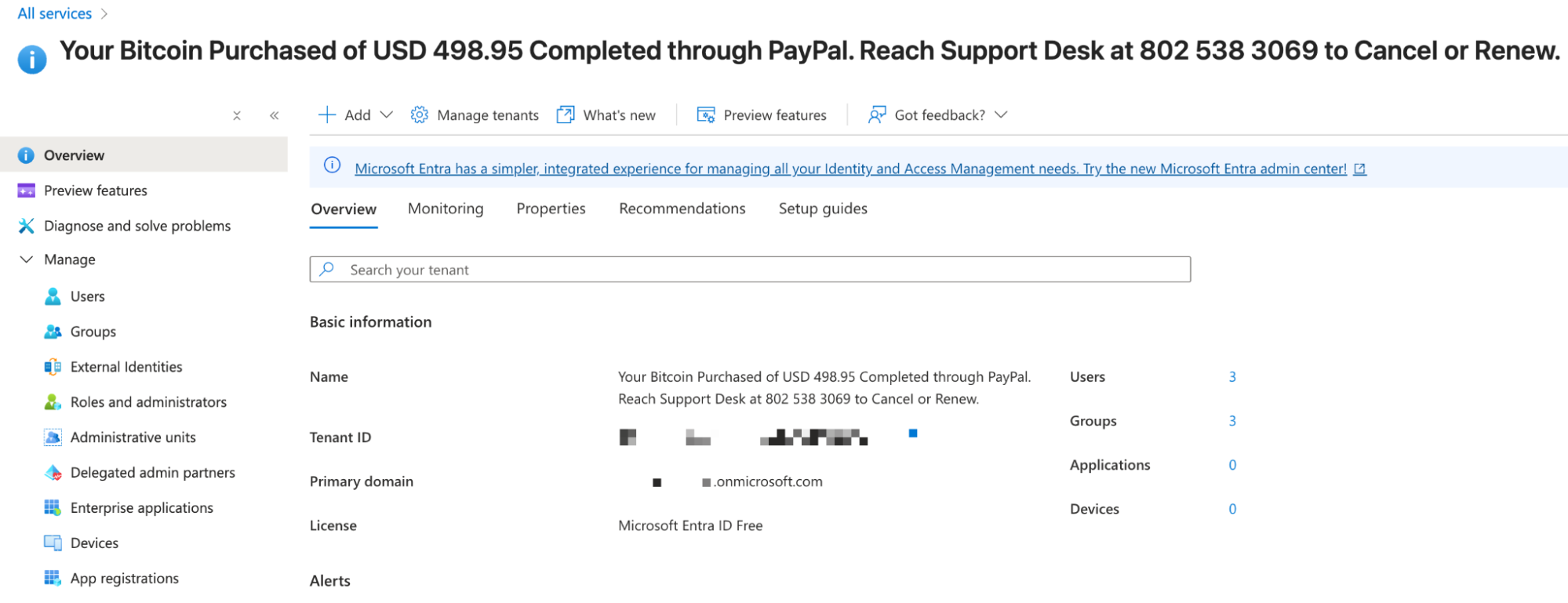
In this specific attack, they changed the Tenant Name to: "Your Bitcoin Purchased of USD 498.95 Completed through PayPal. Reach Support Desk at 802 538 3069 to CanceI or Renew."
Forcing Microsoft to Deliver the Payload
To force Microsoft to email the target, the attacker utilizes the legitimate Security Info registration portal.
Step 1: They create a wide variety of users within the malicious tenant (e.g.,
CarlyVargas@Williford316.onmicrosoft[.]com).Step 2: They log into the user’s My Account, specifically Security info,
mysignins.microsoft[.]com/security-info.
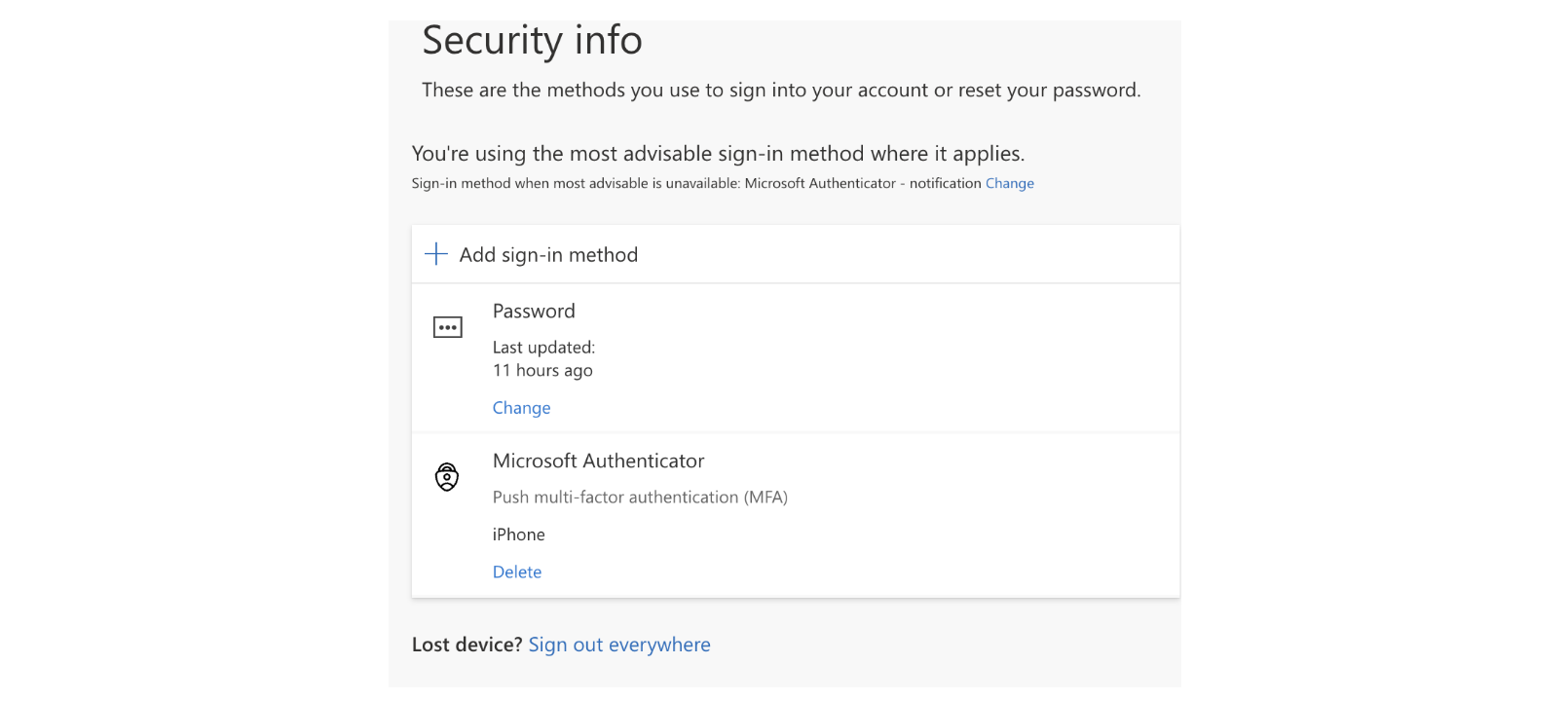
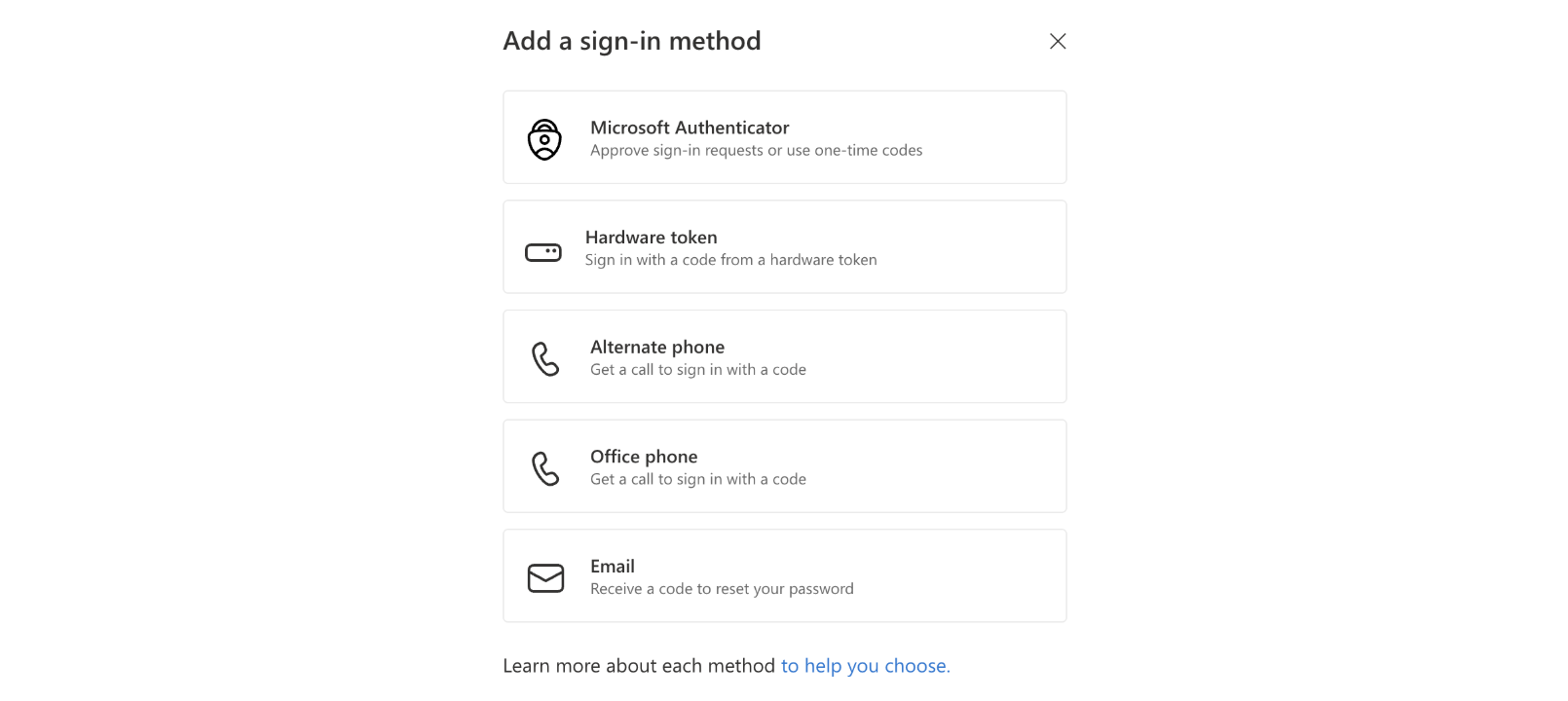
- Step 3: They select "Add sign-in method," then choose "Email."
Step 4: In the input field, instead of entering their own email, they enter the target’s email address.
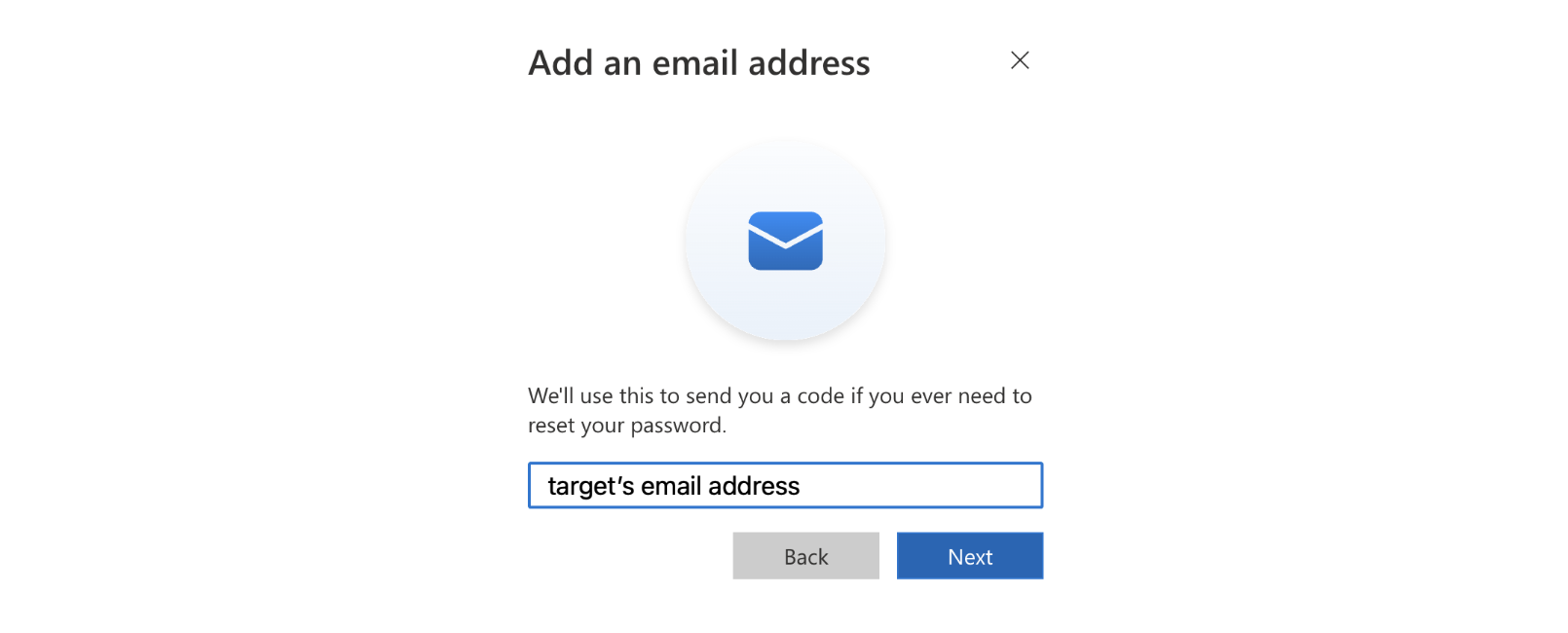
This action triggers Microsoft’s automated security logic to generate a one-time passcode (OTP) to verify the "backup" email address.
Attackers likely automate this setup using scripts to rapidly spin up tenants and inject these payloads at scale. This is easily achievable via the Microsoft Graph PowerShell SDK (specifically the New-MgUserAuthenticationMethod cmdlet), which allows threat actors to programmatically batch-configure these "fake" authentication methods across thousands of ephemeral accounts in a single operation.
How the Malicious Payload Appears in the Email
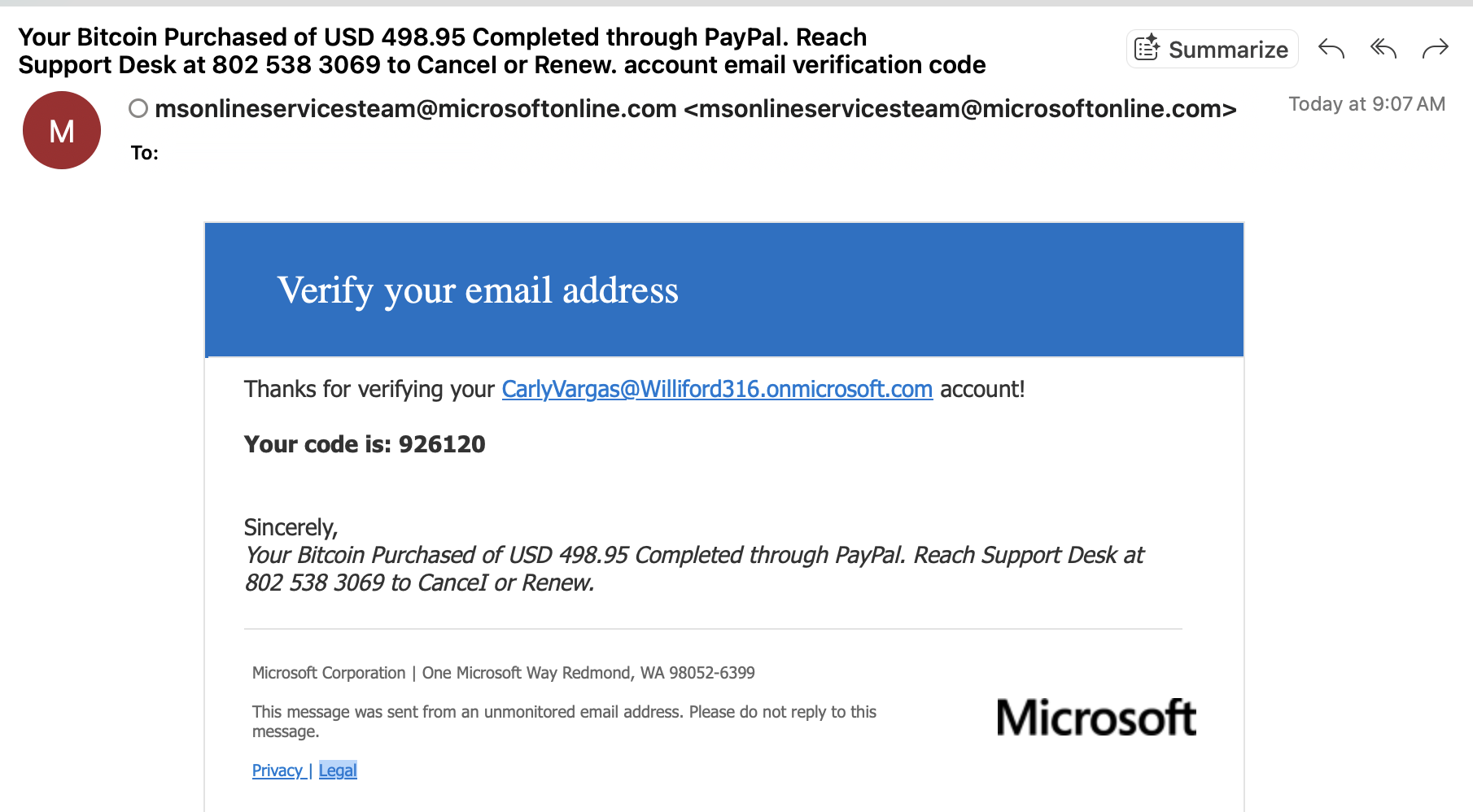
Microsoft’s automated template constructs the subject line using the variable {Tenant Name} + account email verification code. Because the attacker changed the Tenant Name to a financial alert, the resulting subject line becomes “Your Bitcoin Purchased of USD 498.95 Completed through PayPal. Reach Support Desk at 802 538 3069 to CanceI or Renew. account email verification code.”
The template also uses the Tenant Name in the signature block, reinforcing the scam.
What Makes This Attack Unique
While we frequently see attackers use platforms like Google Drive or Canva to host malicious content, this attack goes a step further by manipulating the platform’s core infrastructure to deliver the payload.
In traditional impersonation attacks, threat actors try to mimic a trusted sender. Here, the attacker is forcing Microsoft’s legitimate infrastructure (msonlineservicesteam@microsoftonline[.]com) to send the email on their behalf. Because the email originates from Microsoft's own high-reputation servers, it authentically passes SPF, DKIM, and DMARC checks, allowing it to bypass secure email gateways that rely on sender authentication.
Additionally, the attack does not rely on a compromised account or a code vulnerability. Instead, it weaponizes standard tenant configuration features—specifically the "Tenant Name" field—to inject a fraudulent message directly into a system notification template.
In the samples we observed, the emails contained no malicious attachments or deceptive links for traditional security filters to flag. The only URLs present are legitimate links to Microsoft’s Privacy and Legal pages. By keeping the payload entirely text-based (e.g., a phone number), the attack evades standard threat detection signals while exploiting the user's trust in official security verification requests.
Why Is This Attack Difficult to Detect?
This attack flow is designed specifically to bypass standard detection rules and exploit security teams' allowlists.
First, the email originates from Microsoft's own high-reputation infrastructure. It passes SPF, DKIM, and DMARC checks because it is a genuine email from Microsoft—no spoofing involved. Most organizations have allowlist rules to bypass filtering for emails from msonlineservicesteam@microsoft[.]com to ensure employees receive legitimate MFA codes.
The message also lacks standard indicators of compromise (IOCs) for security systems to flag, as there are no malicious attachments or URLs. The only hyperlinks present are the legitimate Microsoft Privacy (privacy.microsoft[.]com) and Legal (www.microsoft[.]com) pages, which lend credibility to the message while offering no threat signal for defenders to detect.
To defeat optical character recognition (OCR) and keyword filters, the attackers utilize Unicode obfuscation. By swapping standard letters with look-alike Unicode characters, the text remains readable to the human eye but effectively breaks the regex-based rules used by security scanners.
Finally, users are trained to trust verification codes. By piggybacking on a "Verify your email" workflow, the attackers gain immediate credibility. The juxtaposition of a real security code with a fake fraud alert creates a high-urgency cognitive dissonance that drives users to bypass their critical thinking and call the number to "resolve" the issue.
Defending Against System Notification Abuse
Detecting and blocking system notification abuse requires looking beyond the sender address or authentication results to understand the true intent and context of the message content—even when it originates from a "trusted" source like Microsoft.
Attackers are increasingly weaponizing legitimate platforms themselves, injecting malicious content into routine security workflows. Their messages arrive as authentic account alerts that pass email authentication protocols, contain only legitimate Microsoft links, and blend in with expected verification traffic.
To stop these threats, organizations must move away from static allowlists and adopt behavioral AI that learns what normal system notifications look like for each tenant and flags anomalies. This includes high-pressure financial language about Bitcoin, urgent prompts to call a “support desk” number, Unicode lookalike characters like “CanceI” (with an uppercase I instead of a lowercase L), and unusual patterns in who is sending and receiving the messages.
By correlating these signals, security layers can accurately detect the underlying intent to steal personal information and block these attacks despite their legitimate origins.
For additional insight into the threat landscape and more step-by-step attack breakdowns, visit our threat intelligence data and research hub, Abnormal Intelligence.
Visit Abnormal Intelligence