




Key Insights
A credential theft campaign has been systematically targeting C-suite executives and senior officers at major global organizations over a five-month period from November 2025 through March 2026. Recipients—including CEOs, CFOs, and VP-level personnel across more than 20 industry verticals—are selected by name, not harvested at random, with 60% of titled recipients holding a C-level, President, or Chairman title. The campaign impersonates SharePoint document-sharing notifications, using financial report themes to compel targets to scan a QR code embedded directly in the email body.
Investigation of the campaign's backend infrastructure revealed a previously undocumented phishing-as-a-service (PhaaS) platform called VENOM, featuring a licensing and activation model, structured token storage, and a full campaign management interface. At the time of analysis, VENOM does not appear in any public threat intelligence database and has not been identified in open seller marketplaces or underground forums, suggesting a closed-access platform distributed through vetted channels.
In this post, we walk through what makes this campaign technically distinct—from an email engineered to defeat every layer of automated analysis, to a credential harvester that establishes persistent access before the target's browser has moved on.
An Email Built to Be Invisible
The campaign operates through a rotating pool of compromised business email accounts. The email impersonates a SharePoint document-sharing notification. The recipient sees what appears to be an internal alert—a document has been shared via their organization's SharePoint environment—with a QR code to scan for access.
The sender address is dynamically generated from the target's domain (e.g., sharepointadmin@{target_domain}), and the company name appears in the footer (e.g., "{Company}'s use of O365"), creating the appearance that the notification originated from inside the target's organization.
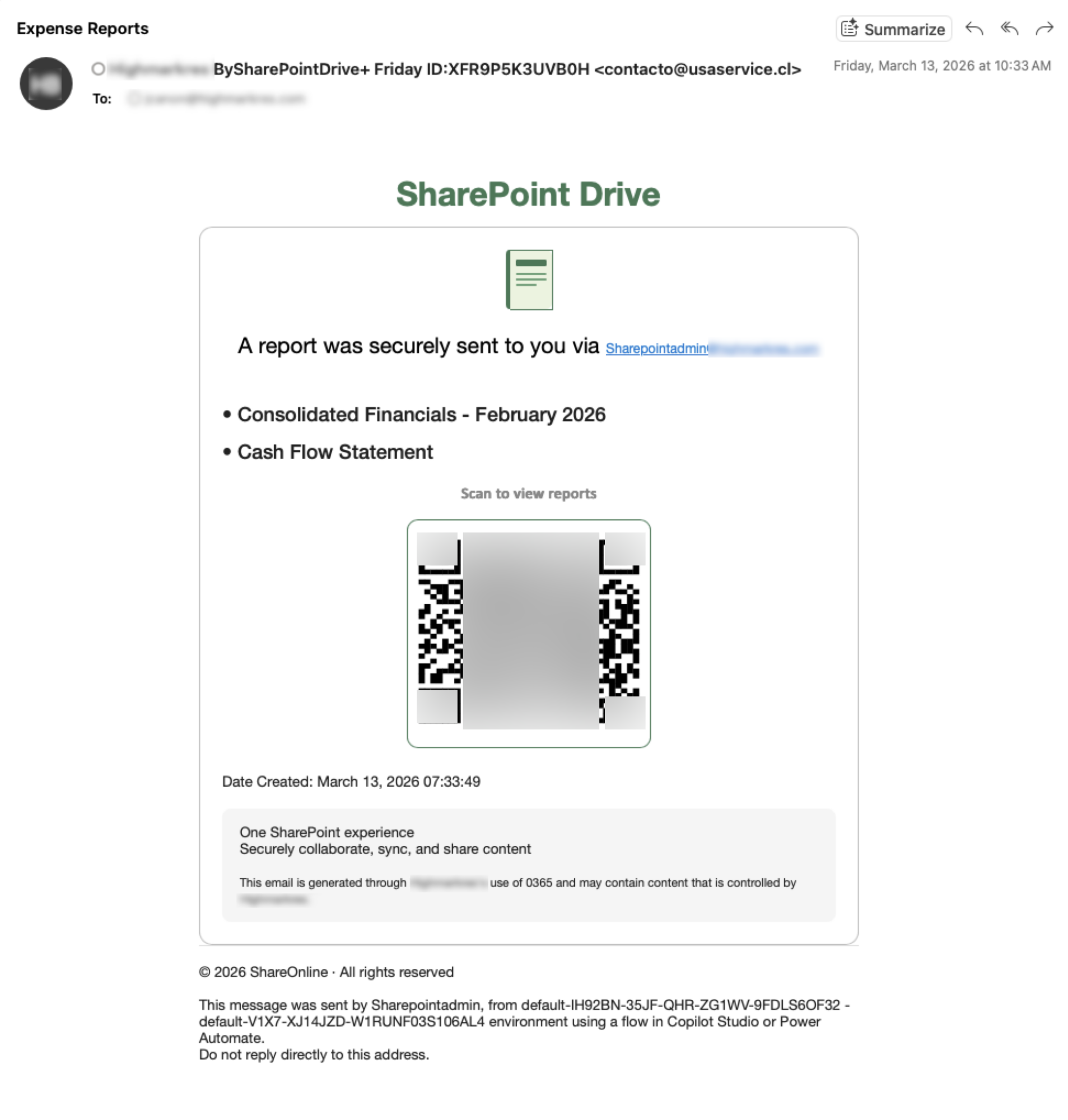
But personalization is only one layer of the email's design. The template uses several techniques working in concert to evade detection.
To evade signature-based detection, every email contains throwaway HTML elements whose values are randomized on each send, ensuring no two emails produce the same hash or string match. The injected elements include exactly 13 fake CSS classes, exactly 13 fake element IDs, and a variable number of fake data attributes and HTML comments. These attributes and comments are invisible to the recipient and exist solely to inject noise for automated analyzers.
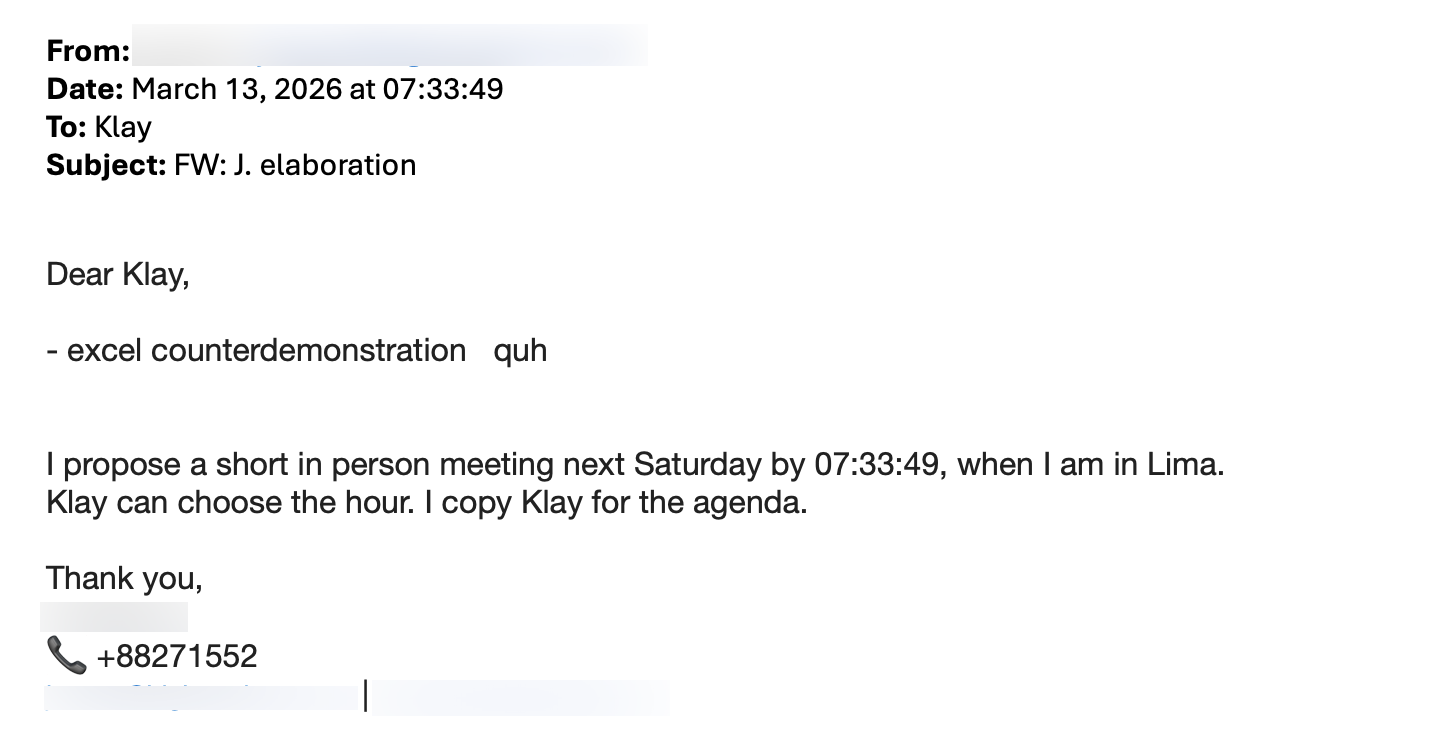
Below the visible lure, the HTML contains a fabricated 5-message email conversation thread. The thread is built around the target: their email prefix is parsed into a display name, placed in the "From" field of each message, and accompanied by a generated signature block containing their name, a fabricated phone number, their real email address, and their real company website.
A second randomly generated persona acts as the correspondent. Message bodies are drawn from fixed templates—e.g., meeting proposals, business dissolution requests, or fake financial tables—with multilingual vocabulary injected throughout to add token diversity. To a spam classifier evaluating the full HTML body, the message appears to be legitimate corporate correspondence.
A QR Code with No Image
The campaign constructs QR codes entirely from Unicode block characters rendered inside an HTML <pre> tag—a technique that emerged in 2024 to circumvent image-based QR scanning. With no image file attached, there is nothing for conventional scanners to process or detonate.

A link-based phishing attack keeps the interaction on the same device, within the organization's purview and under its security controls. Using a QR code, however, moves the attack to the target's personal mobile device, which lacks the endpoint protection and posture management available in a managed corporate environment.
The target's email address is double Base64-encoded in the URL fragment—the portion after the # character. Fragments are never transmitted in HTTP requests, making the target's email invisible to server-side logs and URL reputation feeds.
A Gate That Filters Out Everyone but the Target
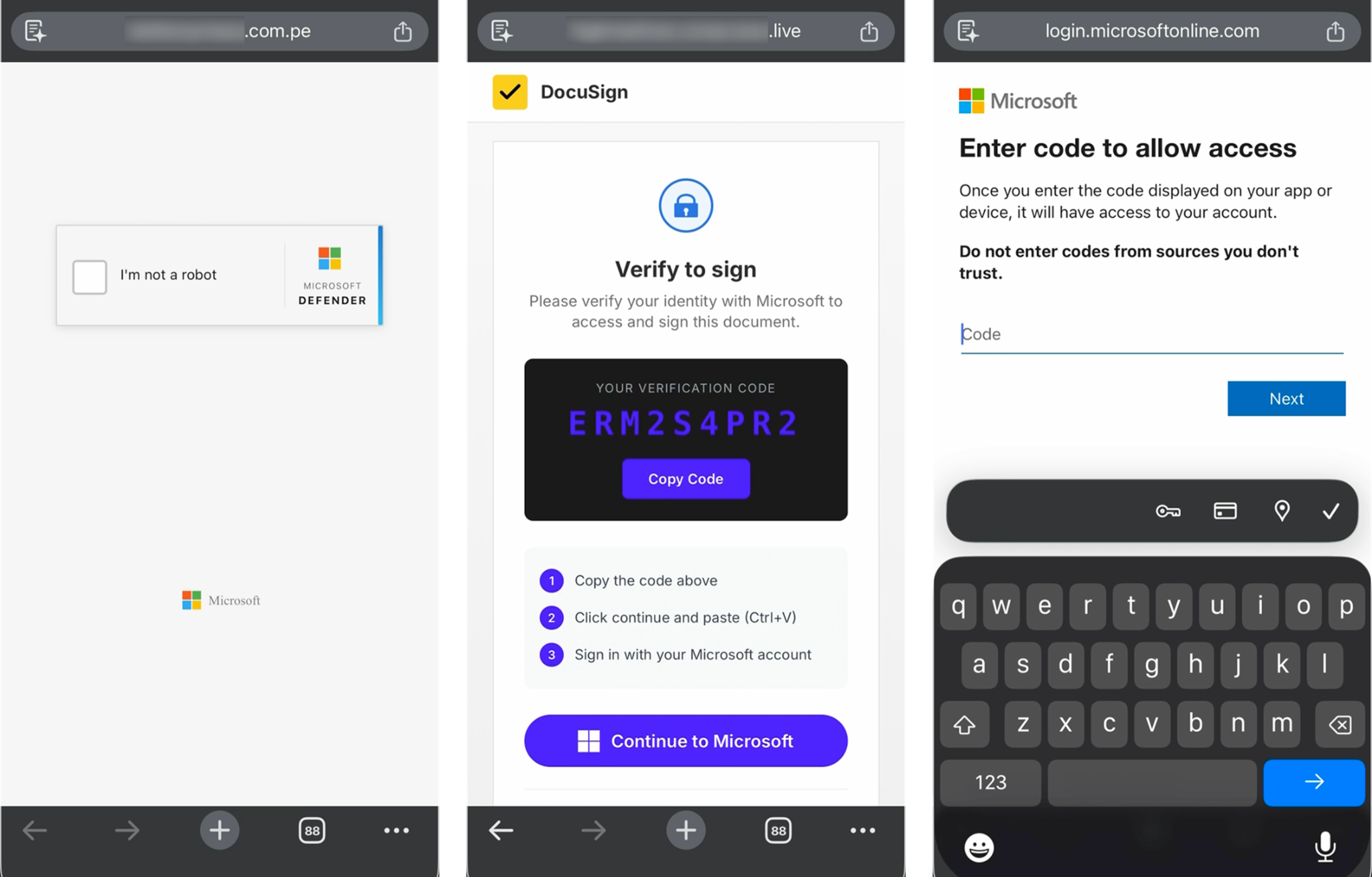
When a target scans the QR code, the initial landing page is the gate—a fake verification checkpoint, indistinguishable at first glance from the bot-challenge pages that appear legitimately across the web every day. The gate's sole function is to determine whether the visitor is a real human target or something else, such as a security scanner, a sandbox, a researcher, or an automated tool. Visitors who pass all checks are routed to the credential harvester. Everyone else hits a dead end, with no indication that anything suspicious was encountered.
The gate runs a multi-stage pipeline: client-side User-Agent filtering—including a 385-entry blocklist spanning security vendors, headless browsers, cloud providers, and penetration testing tools; a live IP reputation check; hidden honeypot elements that catch automated tools interacting with invisible page elements; and API verification. In more recent deployments, proof-of-work challenges are also integrated into the gate itself.
Whether a visitor was flagged by User-Agent screening, the IP reputation lookup, or honeypot interaction, they are sent to one of four decoy destinations selected at random—X, Google, Amazon, or Tesla—with no error messages or suspicious behavior.
Behind the Decoy: Two Modes of Credential Theft
Targets who clear the gate are redirected to a harvesting page hosted on an attacker-registered domain. The URL carries a #SandBox fragment—the harvester's activation key. Scanners and automated systems that navigate to the harvester URL directly see nothing suspicious. The JavaScript checks for the fragment. Without it, the page renders as a convincing AI-generated business website.
One deployment presents as ACHOMESOLUTIONS, an HVAC company complete with a service listing and contact form; another as SteelDealRoofing. Anyone who pastes the bare domain into a browser or URL scanner sees a functional, unremarkable small business site. URL fragments are never sent in HTTP requests, so a URL scanner submitting the harvester URL as a plain GET request will never see the credential form.
For visitors who arrive with the correct fragment, two distinct harvesting modes have been observed.
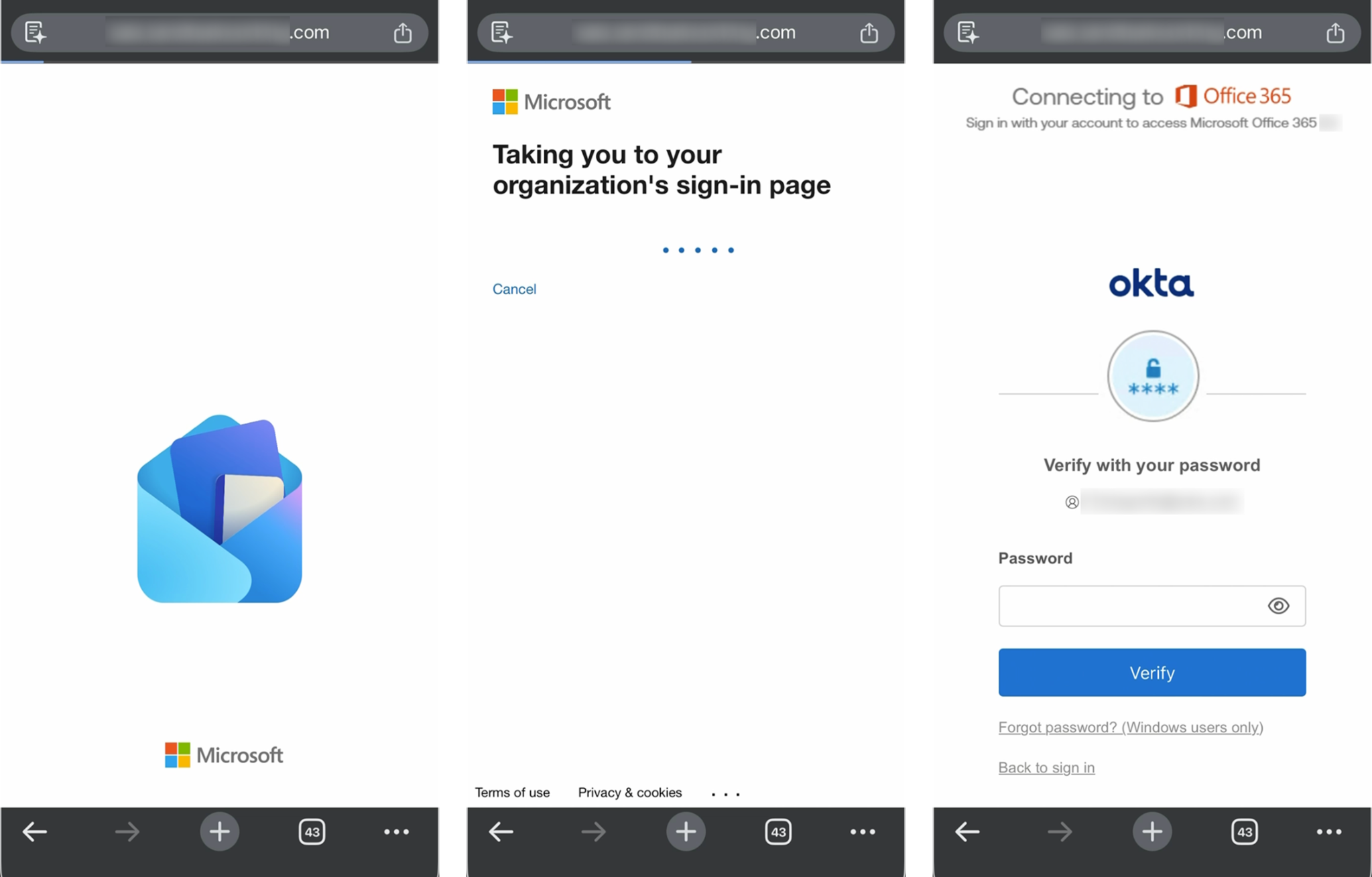
In adversary-in-the-middle (AiTM) mode, the harvester presents the target's real identity provider—their organization's logo, their own email address pre-filled, and if their account is federated, their actual IdP login page rather than a generic Microsoft form. The experience is indistinguishable from a genuine sign-in because it is, in every visible respect, genuine. The branding is real, the federation handoff is real, and the login form that the target types into mirrors exactly what they would see during a legitimate sign-in. Credentials and MFA codes are relayed to Microsoft's live API in real time.
In Device Code mode, the target never sees a login form. The page presents as a Docusign notification—a protected document pending verification. The target copies a code, clicks through to microsoft[.]com/devicelogin, enters it, and approves what Microsoft presents as a routine device sign-in request. That approval is the attack. Microsoft authenticates the target against its own infrastructure and delivers the resulting access and refresh tokens directly to the attacker's polling backend. There is no credential form to detect, no proxy to identify, and no MFA to intercept.
Persistence Before the Browser Moves On
In both modes, the platform establishes persistent access before the target's session ends.
In AiTM mode, the PHP backend uses the authenticated session it just proxied to register an attacker-controlled MFA device on the target's real Microsoft 365 account. By the time the browser redirects, the enrollment is already complete. In Entra ID logs, this surfaces as a SoftwareTokenActivated event with display name NO_DEVICE. The attacker does not touch existing MFA methods; the target's original authenticator remains intact. A second authenticator is simply added alongside it—with no alerts, no visible change, and no reason for the target to suspect anything is wrong.
In Device Code mode, the refresh token itself is the persistence mechanism. A forced password reset does not revoke a refresh token that has already been captured. Unless the target's administrator explicitly revokes all active sessions and token grants in Entra ID—a step that is not part of most organizations' default incident response runbooks—the attacker's access survives the remediation entirely.
MFA Alone Is No Longer Enough
This campaign is one of the more technically complete phishing operations we've documented—less for any single novel technique than for how deliberately each component has been engineered to work together.
The operator has built an end-to-end pipeline where every stage actively protects the next: the email evades scanners so the QR code reaches the target; the QR code moves the session off-network so the gate goes unmonitored; the gate filters out researchers so the harvester stays unexposed, and the harvester completes its work—including persistence—before the target's browser has moved on.
The most consequential finding is not the sophistication of any individual mechanism but what the campaign achieves structurally: MFA is rendered ineffective not by exploiting a vulnerability in the protocol, but by operating within it. Whether through real-time session relay or Microsoft's own Device Code flow, the attacker obtains persistent access through the authentication system itself.
The discovery of VENOM adds a force multiplier dimension. A closed-access PhaaS platform with licensing, campaign management, and structured token storage suggests this capability is not limited to a single operator. Organizations should assume that the techniques documented here will proliferate and that defensive strategies relying on MFA as a final barrier require immediate reassessment.
Download the Complete Report
This blog post only scratches the surface of the campaign. The full report includes:
- The gate's JavaScript source code
- Step-by-step AiTM relay protocol
- Device Code token capture flow
- The VENOM admin panel's capabilities and token storage schema
- Complete victimology and IOCs
- Strategic actions for CISOs
Get your copy of the complete Exposing VENOM threat intelligence report today.
Download the Report