
Key Insights
Microsoft Teams has become a critical collaboration hub for modern organizations. Attackers have taken notice.
What looks like a routine message from a trusted colleague or vendor can quickly turn into a high-impact security incident. Links get clicked, files are opened, and malicious content spreads laterally across chats and channels in minutes.
The following scenario reflects a common attack pattern observed in Microsoft Teams environments and illustrates how automated detection and remediation can interrupt these threats before they escalate.
How a Single Teams Message Becomes a Major Risk
Finance teams frequently collaborate with long-time vendors in Microsoft Teams, often under tight timelines and with shared access to active channels. In one such channel, a familiar vendor account posts a message requesting an urgent contract review and signature by end of day.
The message includes both a link and a PDF attachment. The sender is known. The channel is active. The request aligns with real business activity.
What isn’t immediately visible is that the vendor’s account has been compromised. The message itself becomes the attacker’s entry point into the environment.
Using the compromised account, the attacker can introduce multiple forms of risk in a single interaction. A phishing link may be used to harvest credentials, while a malicious attachment can establish an initial foothold inside the environment.
Because the message comes from a trusted external collaborator in an existing channel, employees are far more likely to engage. A single click or download is often enough.
If the message goes unaddressed, the impact escalates quickly. Credentials are captured, malware is introduced, and the message may be forwarded or replied to, allowing the threat to propagate across Teams. What begins as a single message can rapidly turn into lateral movement and a serious security incident.
How Modern Teams Messaging Security Detects Risk in Real Time
With Abnormal’s Microsoft Teams Messaging Security in place, the outcome is very different.
As soon as the message is delivered, Abnormal evaluates both links and attachments for signs of malicious intent. If either component is deemed risky, the message is immediately classified as a threat.
This process requires no waiting and no reliance on user reporting, allowing suspicious content to be identified as it appears.
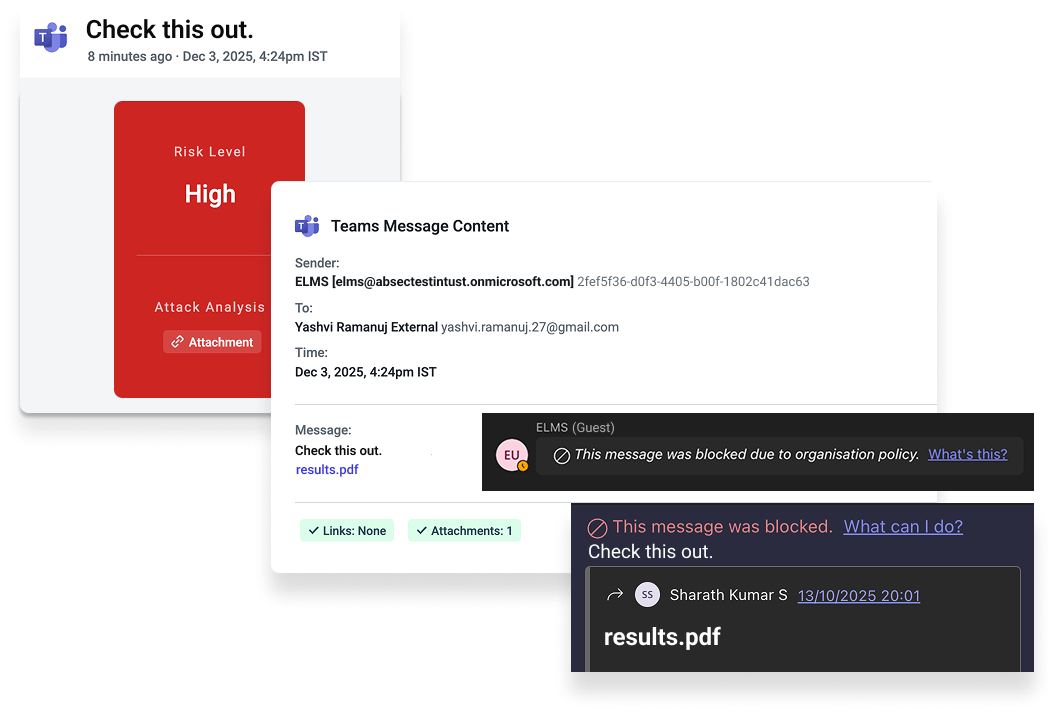
Automated Remediation: Containment in Near Real Time
Detection is only part of the equation. The real difference comes from automated remediation.
Based on organization-specific policies, Abnormal can automatically remove malicious Teams messages as soon as they’re identified. When remediation is triggered:
The message is removed from the relevant chat or channel
Recipients no longer have access to the malicious content
The sender is notified that the message was removed in accordance with policy
The remediation occurs in near real time, before most users ever have the chance to click, open, or forward the message.
By eliminating dangerous content immediately, automated remediation breaks the chain of attack and dramatically reduces the risk of lateral movement.
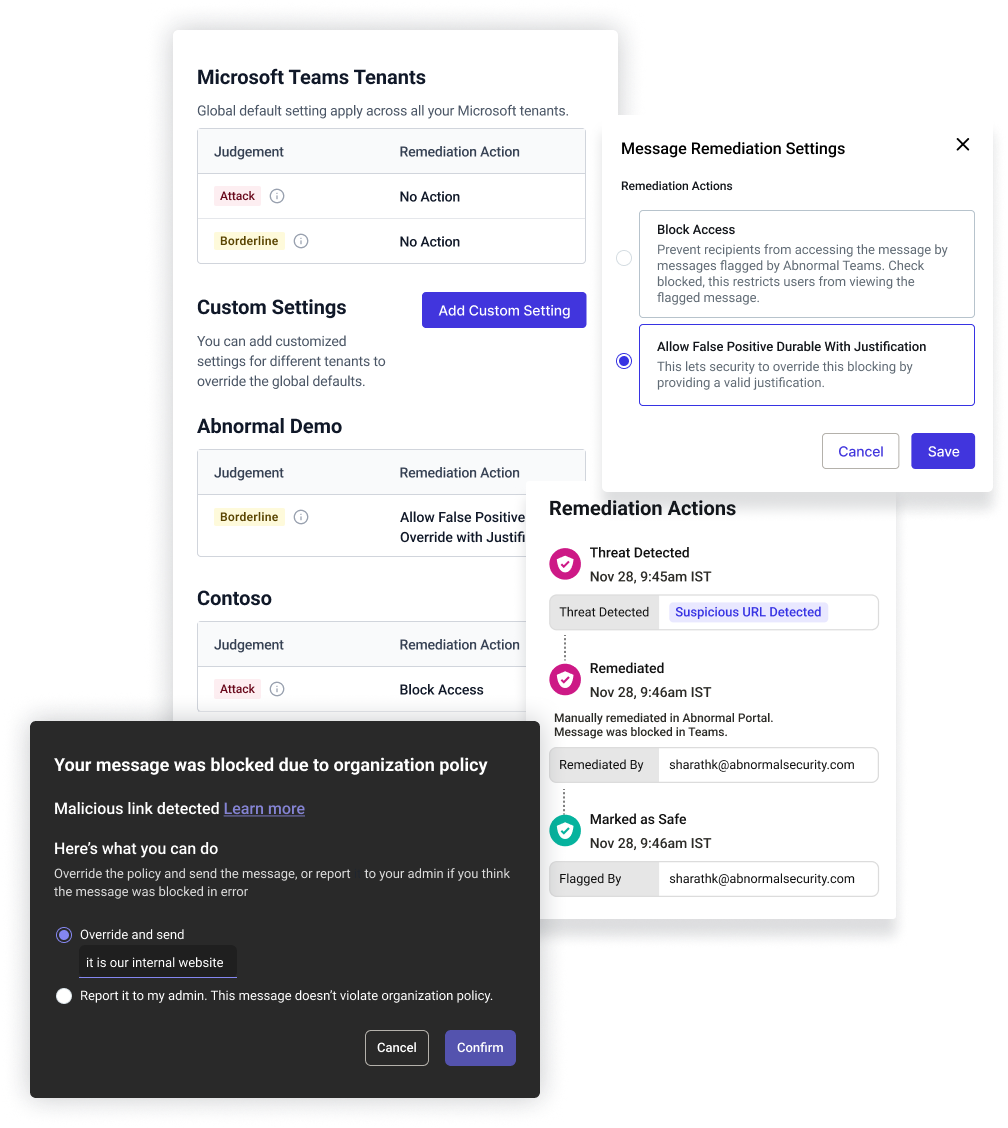
What Security Teams See
While the message disappears from Teams, security teams retain full visibility behind the scenes.
Within the Abnormal platform, analysts can see:
Who sent the message
Where it appeared
Which users were targeted
What triggered the detection
Security teams can quickly confirm the verdict, investigate related activity, and close the loop without scrambling to manually hunt down and delete messages across chats and channels.
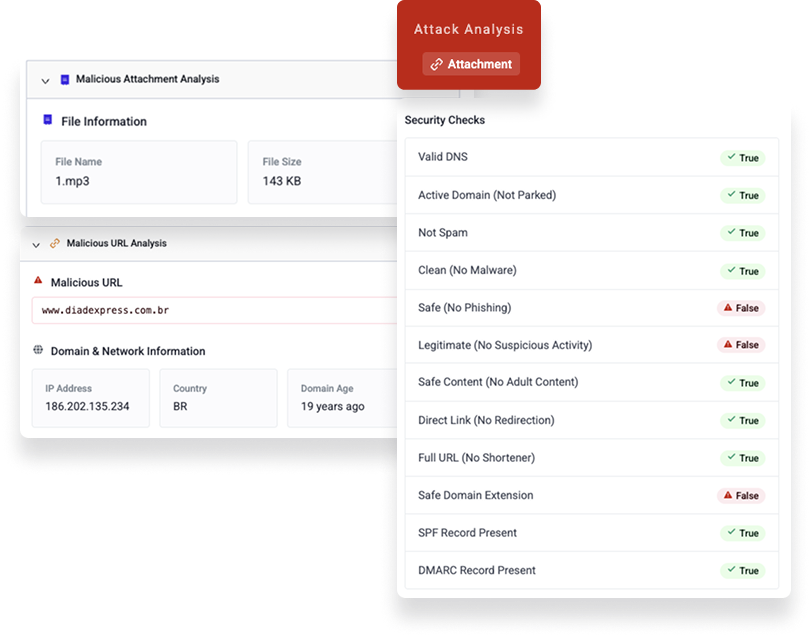
Effective Teams security shouldn’t disrupt how work gets done. With automated remediation in place, end users continue collaborating naturally, legitimate business communication isn’t silently blocked, and security teams manage policies and investigations from a single, centralized view.
Containing Risk at the Pace of Teams
Attackers increasingly rely on collaboration tools like Microsoft Teams because they move fast and operate on implicit trust. Automated detection and remediation changes that dynamic by addressing malicious messages as they appear—before users have a chance to interact and before threats can propagate across chats and channels.
The result is a shift in how Teams security operates: away from reactive cleanup and toward proactive containment that aligns with real-world collaboration.
To see Microsoft Teams Messaging Security in action, schedule a personalized demo.