
Key Insights
For years, security teams treated phishing, malware, and account takeover as an email problem. That approach worked, until attackers changed how they operate.
Today, the inbox is often just the starting point.
As email defenses improve, bad actors continue to adapt their tactics. Modern campaigns increasingly begin with email or identity compromise, then pivot into Microsoft Teams, where employees collaborate in fast-paced environments and messages carry built-in trust.
This shift has created a growing class of multi-channel attacks that exploit the gap between email and collaboration security.
The Rise of Multi-Channel Attacks
Attackers no longer think in terms of individual tools. They operate across workflows.
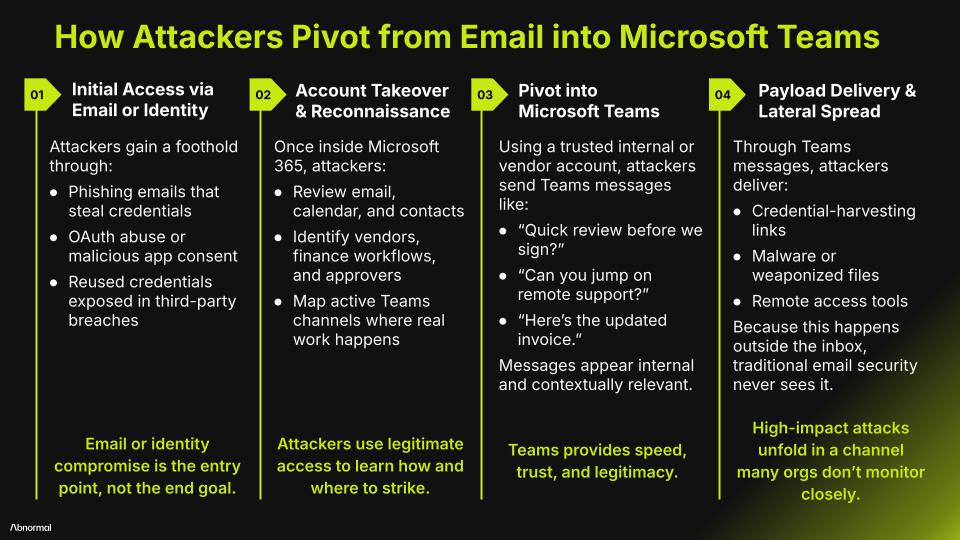
A common attack sequence looks like this:
Initial access through email or identity
A user interacts with a phishing email or approves a malicious OAuth application. In other cases, an attacker reuses previously exposed credentials.Account takeover and reconnaissance
With access to Microsoft 365, the attacker reviews email, calendars, and contacts to understand relationships and workflows.- Pivot into Microsoft Teams
Using the compromised user or vendor account, the attacker sends Teams messages that appear routine:“Can you review this before we move forward?”
“IT flagged an issue and needs quick access.”
“Here’s the updated invoice.”
Payload delivery and expansion
Links and files shared in Teams facilitate phishing, malware delivery, or remote access tool deployment. Because these messages come from trusted identities in a familiar channel, users are more likely to click. Traditional email defenses often fail to detect this downstream activity.
For defenders, this creates a difficult challenge: high-impact attacks unfolding in a channel that often lacks the same level of inspection and response capabilities built around cloud email.
Why Microsoft Teams Appeals to Attackers
Microsoft Teams has become central to how work gets done across the enterprise, making it a valuable target for multi-channel attacks.
Trust-first communication
Teams messages are perceived as safe and conversational. Employees move quickly and focus on keeping work moving forward. Avatars, presence indicators, and ongoing threads reinforce the appearance of legitimacy, even when the content itself is malicious.
Blended internal and external access
Teams environments commonly include vendors, contractors, partners, and guest users. From an employee’s perspective, everyone appears to be part of the same workspace. That ambiguity makes impersonation and vendor-based attacks easier to execute.
Limited default inspection
Out of the box, Teams does not consistently inspect every message, link, and file in real time. Native controls focus on platform hygiene rather than detecting targeted social engineering or lateral movement.
Speed increases impact
Teams is designed for real-time collaboration. Once attackers gain access, they can reach many users in minutes, leaving little time for detection or intervention.
The Security Gap Organizations Didn’t Plan For
Email security is rapidly evolving. Behavioral detection, identity context, and automated response are now standard expectations.
Teams security has not kept pace.
Many organizations assume default platform settings provide sufficient protection, but native controls were not designed to detect targeted impersonation, social engineering, or lateral movement within conversations—especially when attackers use legitimate accounts.
As a result, high-value decisions and sensitive workflows now run through Teams without equivalent security oversight.
Treating Teams as a Core Attack Surface
As Teams becomes central to how work gets done, it must be treated as a first-class attack surface, subject to the same security standards as cloud email.
Effective protection requires:
Continuous inspection of messages, links, and files
Behavioral detection that understands users, relationships, and context
Visibility into employee and guest activity
Automated response that matches the speed of collaboration
Most importantly, any effective security strategy must acknowledge that modern attacks do not respect tool boundaries and cannot be confined by them.
See how Abnormal extends advanced threat detection beyond the inbox to protect Microsoft Teams and other collaboration channels.