
Key Insights
The Message That Passed Every Check Came From an Attacker
Social engineering attacks don't announce themselves. They arrive looking exactly like the messages users trust most, from the right sender, at the right moment, through the right channel. Microsoft Teams has become the next frontier for exactly this kind of attack, a platform where the trust users extend to colleagues, vendors, and IT is the vulnerability.
A finance team gets a message in Microsoft Teams from a vendor they work with all the time. The file looks like a routine update. The timing makes sense. No one hesitates to open it.
A few hours later, security discovers the vendor's account was compromised and the file was malicious. By then, the message has already spread across multiple chats and channels. A handful of employees have opened it, and containment becomes a cleanup exercise.
This Isn't Theoretical; It's Black Basta
This scenario reflects a real, documented campaign.
Starting in October 2024, Black Basta affiliates began using Microsoft Teams as a direct attack vector, messaging victims from external accounts while posing as IT help desk personnel. The approach was a calculated evolution of a tactic the attackers had been refining all year.
The attack typically begins not with malware, but with noise. Operators flood a target's inbox with hundreds or thousands of emails: sign-up confirmations, newsletter subscriptions, form verifications, and others. Eventually, the victim is overwhelmed and desperate for help.
Next, attackers reach out through Microsoft Teams as external users, impersonating corporate IT help desk staff offering to resolve the spam problem.
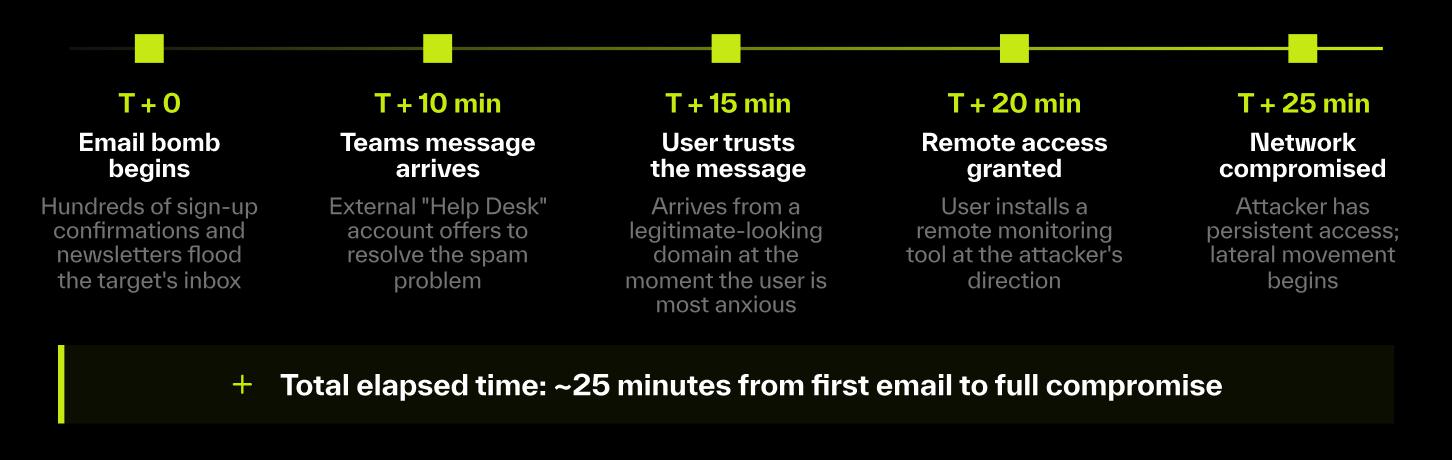
In late 2024, ReliaQuest responded to incidents where the Teams messages originated from a legitimate organization's domain, indicating that the organization itself had been compromised, and its tenant was being weaponized to target others. Roughly three-quarters of targeted users were executives, directors, managers, or held similarly high-value roles.
The result: a message that passes every policy check, comes from an apparently trusted source, and arrives at exactly the moment a user is primed to accept help.
The Problem Isn't Access; It's Trust
Teams has become one of the most trusted communication channels in modern organizations. It's where people collaborate with coworkers, partners, and vendors in real time.
Parts One and Two of this series covered how attackers exploit that trust by pivoting from email into Teams, and how real-time attachment scanning defends against the malicious files they deliver. This post focuses on the operational layer: how to structure your Teams security posture around three interconnected components, and why all three are necessary.
Layer 1: Policies—Reducing the Blast Radius
This is where most teams start:
External access policies: restrict which external domains can initiate contact with your users.
Guest access controls: limit what external users can do inside Teams, including contact search and channel file access.
Microsoft Defender Safe Links and Safe Attachments: provide time-of-click URL analysis and file scanning for known threats.
Conditional access policies: require MFA and compliant devices.
These controls matter. They eliminate commodity threats, limit who can get in, and reduce unnecessary exposure.
But they share a key limitation: they can't stop threats that operate within permitted parameters. Black Basta's use of legitimate compromised tenants is a direct exploit of this gap. A message arriving through an allowed domain, in what looks like a routine support interaction, passes every policy check. Detection requires something policies weren't built to provide.
Layer 2: Playbooks—Responding When Something Slips Through
Most SOC teams have strong playbooks for email security. Teams is newer territory. Without documented procedures, Teams incidents get handled inconsistently, and critical steps are overlooked under pressure.
At minimum, security teams should document response procedures for these scenarios:
IT impersonation via Teams: Verify account legitimacy out-of-band (e.g., call the employee's manager at a known number or check the account creation date in Entra Admin Center; never verify through Teams itself). Suspend suspected accounts across all M365 services. Audit what access was granted before suspension.
Malicious files from external accounts: Isolate the message, quarantine affected devices, and search the sender's full Teams activity for the prior 72 hours. Determine whether the external account is compromised or purpose-built for the attack.
OAuth app abuse via fake meeting invites: Immediately revoke the OAuth token, audit permissions granted across the tenant, and review all app actions taken before revocation.
Calendar persistence after email remediation: Search for and remove associated calendar invites tenant-wide. Phishing links removed from email frequently persist in calendar entries that users encounter days or weeks later.
Playbooks bring structure to the response. But they still depend on someone spotting the issue and acting on it, and that's where the timing problem emerges.
Layer 3: Automated Remediation—Closing the Timing Gap
This is where things tend to break down, and where the Black Basta campaign exposes the stakes most clearly.
Researchers have observed attackers achieve remote access within minutes of the first sign of an email bomb. A malicious message in a shared channel with hundreds of members can spread before an analyst is even paged. By the time someone investigates an alert, the conversation has already happened and the user may have already granted access.
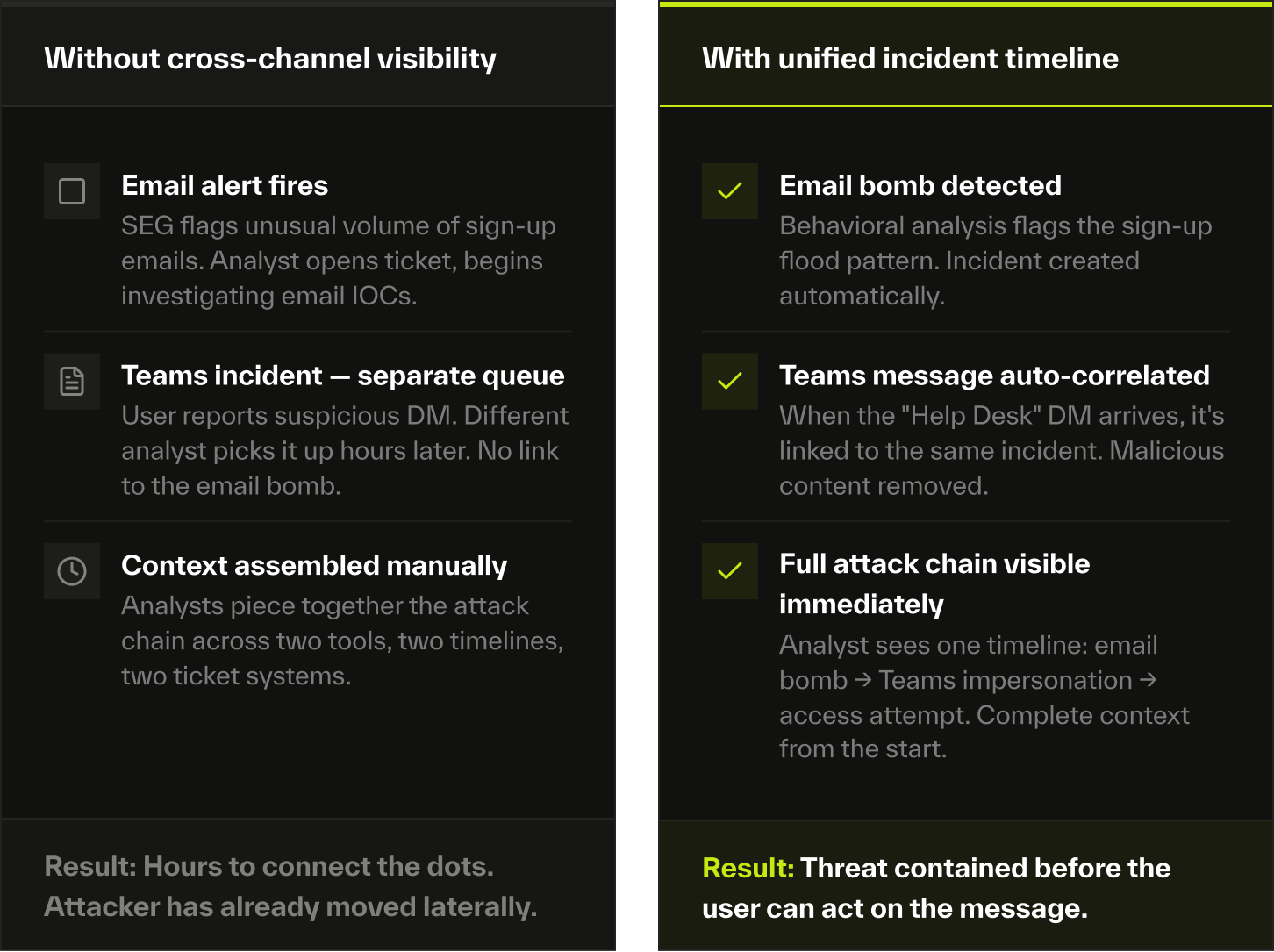
That's why more teams are adding automation into the mix: detecting suspicious messages in near real time, blocking malicious content before it spreads, and unifying threat activity across channels.
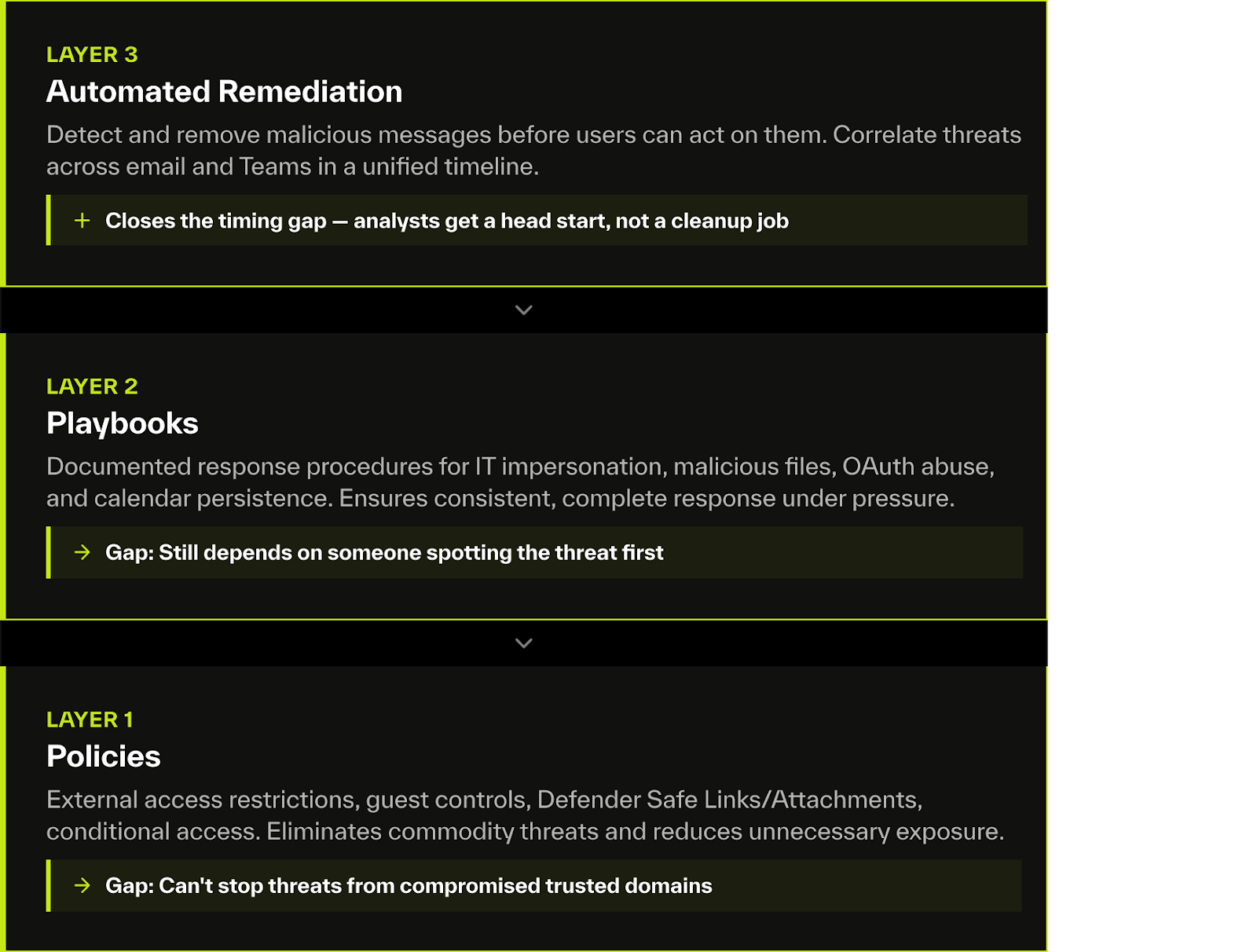
When Abnormal detects a malicious Teams message, whether a file or phishing URL, it blocks the content rapidly, limiting its reach before users can act on it. When both email and Teams are monitored by Abnormal, the platform displays activity in a unified Threat Log, surfacing a single correlated view rather than two disconnected investigations.
It's about giving analysts a head start before the window closes.
Security Teams Are Rethinking Collaboration Security
Only a few years ago, securing collaboration tools was mostly a configuration exercise, requiring security teams to lock down access and enable the right policies.
That's no longer sufficient. Attacks like Black Basta's move through trusted channels with speed and coordination that policies and playbooks alone can't match. Attackers don't need to break through technical defenses; they simply need to blend into daily workflows.
The SOC teams adapting to this shift are layering all three components: policies to reduce blast radius, playbooks to ensure consistent response, and automated remediation to close the gap between detection and action.
See how Abnormal extends real-time detection and automated remediation to Microsoft Teams.