Shadow IT is any system, service, hardware, or software that employees use for work without vetting or approval from the IT or cybersecurity department. It develops when workplace technology use outpaces the processes meant to govern it, as employees solve immediate problems while leaving information technology (IT) and security teams without a complete view of where organizational data resides or how people access it. That visibility gap matters because unknown technology can quietly accumulate security and operational exposure. Legal exposure can build alongside it, and the longer unsanctioned technology goes undetected, the more of each it accumulates.
Closing that gap depends on treating shadow IT as something to find and govern, not simply ban.
Key Takeaways
- Shadow IT includes any technology employees or departments adopt for work without IT approval.
- Employees' motives are typically practical: they adopt unapproved tools to work faster and fill gaps in the approved technology stack.
- Unsanctioned technology sits outside patching, monitoring, and compliance controls, so incidents involving it can take longer to detect and carry greater regulatory exposure.
- Effective programs treat unauthorized technology as a visibility problem to govern because blanket bans can push the behavior further underground.
How Shadow IT Enters the Organization
Unknown Technology Bypasses Established Oversight
The behavior can be as small as forwarding a work document to a personal email account or photographing a whiteboard with a personal phone, or as large as a department running a mission-critical server that IT has never inventoried.
It enters organizations through two main pathways. The first is unapproved tool adoption: an employee or department selects unauthorized software to access, store, or share corporate data, such as choosing a personal file-sharing service when the organization has only approved a managed collaboration platform. The second is unauthorized access methods: employees use approved tools through unsanctioned channels, for example logging into a sanctioned platform with a personal account rather than a corporate-managed one, which sidesteps the security controls attached to corporate identities.
The boundaries of the term matter. Attackers deploy malicious software, or malware, and other malicious assets, so those assets do not qualify as shadow IT. Shadow IT also differs from business-managed IT, which describes sanctioned technology that a business unit runs with IT's knowledge. The defining trait of shadow IT is that IT does not know it exists.
Types of Shadow IT
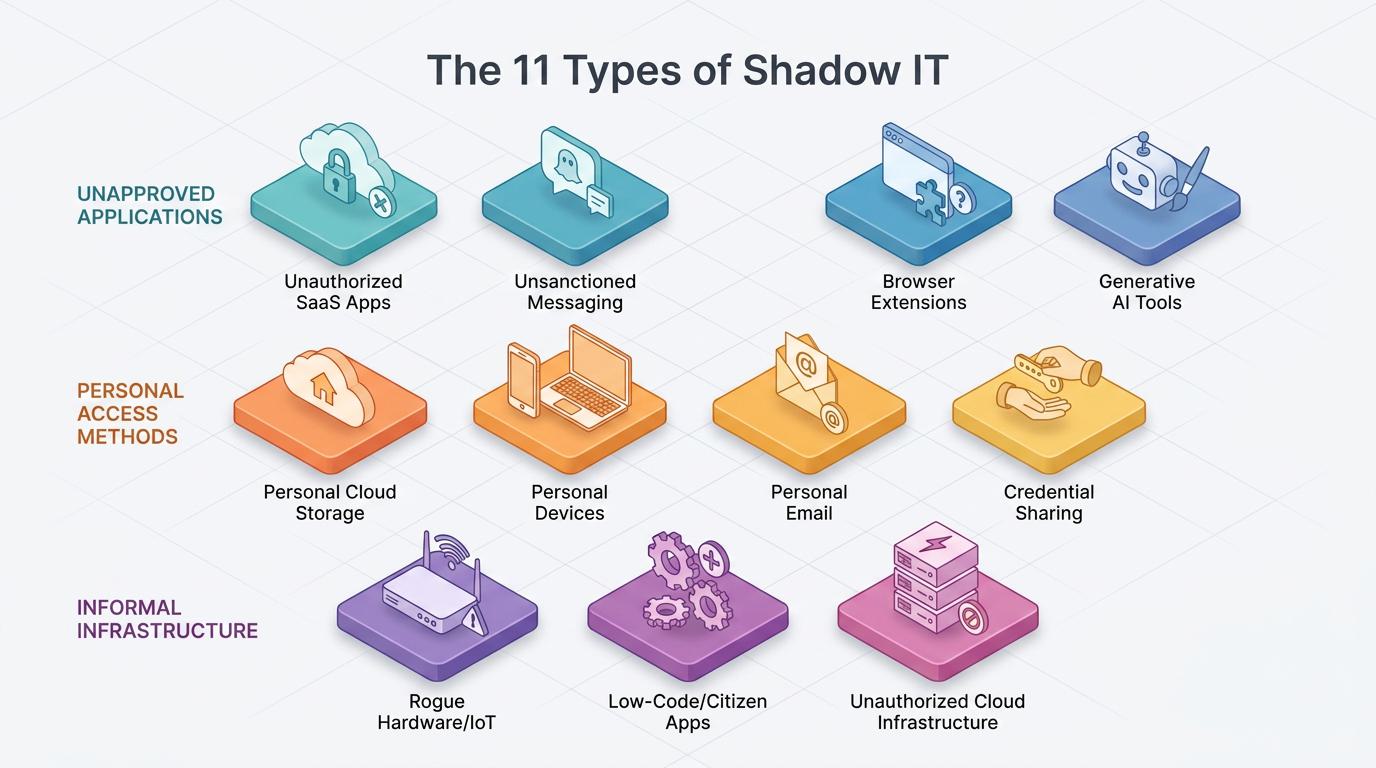
Shadow IT appears in at least eleven distinct forms, spanning software as a service (SaaS) applications, hardware, cloud infrastructure, and user behavior.
Unapproved Applications and AI Tools Evade Software Governance
Unapproved applications share a governance gap: employees can activate them without centralized provisioning or review. That bypasses identity standards, retention rules, permission checks, and ongoing security monitoring. Although these tools serve different tasks, each can process organizational data before IT evaluates how the provider stores it, who can access it, or whether the organization can recover it.
- Unauthorized SaaS Applications: Employees adopt productivity tools, including project management and note-taking software, through self-created local accounts. Because IT never provisions them, they typically lack single sign-on (SSO) and multi-factor authentication (MFA) enforcement and fall outside patching and compliance checks.
- Unsanctioned Messaging Platforms: Employees use consumer messaging applications and free collaboration workspaces for business conversations. Messages sent through them sit beyond IT's archival and electronic discovery (eDiscovery) reach, a serious problem in regulated industries.
- Browser Extensions: Employees install productivity and artificial intelligence (AI)-powered extensions without review. Many request permissions broad enough to read cookies, passwords, and full page contents, and attackers have used compromised extensions to steal session tokens that bypass MFA.
- Generative AI Tools: Employees access public chatbots and online code assistants through unmanaged accounts. This category is shadow AI.
Together, these applications create a software portfolio that changes faster than formal inventories, access policies, and compliance reviews can track.
Personal Accounts, Access Methods, and Devices Move Data Beyond Corporate Control
Personal technology and access methods create a related governance problem because they separate corporate data from corporate identities. IT may recognize the underlying service or device category while remaining unable to audit the specific account, enforce security settings, recover records, or revoke access when an employee changes roles or leaves.
- Personal Cloud Storage and File Sharing: Employees hold work files in personal storage and file-transfer accounts. Sensitive data lands in accounts the organization cannot audit, recover, or revoke, and it moves without data loss prevention controls applied.
- Personal Devices Outside Management: Employees use laptops and smartphones for work without enrollment in mobile device management (MDM). Tablets may also remain outside management. These devices may lack corporate encryption and miss security patches entirely.
- Personal Email Accounts: Employees use personal webmail to send or receive work documents, which breaks centralized archiving and complicates incident response.
- Credential Sharing and Personal Accounts on Approved Platforms: Employees use shared logins and personal accounts on otherwise sanctioned tools, which strips away the identity controls that make those tools safe.
In each case, the organization loses the connection between a known employee, a managed identity, and the information that person can access or share.
Informal Software, Hardware, and Cloud Infrastructure Expand the Attack Surface
The final category includes technology that employees or departments build, connect, or deploy outside established asset management. Unlike a personal account on an external service, these systems can become part of the organization's operational environment. They may store authoritative data, connect directly to corporate networks, or support important workflows even though no central team manages their configurations, credentials, updates, or continuity.
- Rogue Hardware and Internet of Things (IoT) Devices: Employees connect unauthorized wireless access points and removable storage drives to corporate networks. They also connect personal smart devices. These frequently ship with default credentials and can open backdoors for eavesdropping.
- Citizen-Developed and Low-Code Applications: Employees create departmental databases, unauthorized low-code builds, and spreadsheets that are unofficial systems of record and move data outside the organization's known boundary.
- Unauthorized Cloud Infrastructure: Developers or business units stand up unapproved public cloud environments that often carry misconfigurations no one monitors.
These assets expand the attack surface because their operational importance can grow without corresponding ownership, documentation, backup processes, or security oversight. The longer they remain hidden, the harder they become to replace or govern without disrupting work.
Why Employees Turn to Shadow IT
Employees adopt shadow IT to get work done. Their intent is usually benign.
Tool Gaps and Approval Friction Favor Faster Alternatives
The most common driver is a tool gap: the approved option is missing a feature, collaborates poorly, or simply works worse than an alternative the employee already knows. When workers believe following the rules will slow them down, many choose the faster path and accept the policy violation as a cost of doing their jobs well. The immediate need to complete a task can outweigh an approval process whose benefits are less visible to the employee.
Approval friction compounds the problem. Signing up for a SaaS tool takes minutes, while formal procurement review can stretch across weeks or months, and generative AI has shrunk the distance between discovering a tool and being productive with it to almost nothing. Purchasing has decentralized at the same time; business units now buy meaningful amounts of technology directly, on corporate cards and expense reports, without IT ever seeing the transaction. Remote and hybrid work amplifies all of it, since distributed employees hit gaps in the corporate tool stack that office-based workflows never exposed, and they resolve those gaps on their own.
The Security and Compliance Risks of Shadow IT
Shadow IT converts everyday convenience into unmonitored attack surface and unmanaged regulatory exposure.
Lost Visibility Creates Security, Compliance, and Cost Exposure
- Lost Visibility and Unpatched Vulnerabilities: Security teams cannot patch, monitor, or defend assets they do not know exist. Shadow IT sits outside vulnerability management programs and asset inventories by definition, and every unknown tool adds entry points that attackers can probe unopposed.
- Slower Breach Detection: Incidents involving unknown systems and data stores take longer to identify and contain because no one is watching them, which raises both the damage and the cost of a breach.
- Health Insurance Portability and Accountability Act (HIPAA) Exposure: When employees move electronic protected health information (ePHI) into an unsanctioned cloud service, that provider becomes a business associate under HIPAA. Doing so without a business associate agreement in place is a direct violation under Department of Health and Human Services (HHS) privacy guidance.
- Recordkeeping and Payment Card Failures: The Payment Card Industry Data Security Standard (PCI DSS) requires organizations to confirm their compliance scope by identifying every system connected to the cardholder data environment (Requirement 12.5.2), which shadow systems silently expand. Off-channel messaging carries similar liability. Financial firms have received penalties after employees routinely conducted business over personal messaging applications without preserving the communications: the SEC fined 11 firms a combined $88.2 million in one recent enforcement round for exactly this failure.
- Duplicate Spend and SaaS Sprawl: When business units buy tools independently, organizations pay for overlapping functionality while unused licenses accumulate undetected across dozens of untracked subscriptions.
- Data Loss at Offboarding: Standard offboarding cannot revoke access to accounts IT never knew existed, so corporate data leaves with departing employees in personal cloud and email accounts.
Shadow AI: The Fastest-Growing Form of Shadow IT
Shadow AI is the unsanctioned use of generative AI tools for work, and it is expanding faster than any other shadow IT category.
Personal AI Accounts Expose Prompt Data Outside Governance
Employees draft documents through personal chatbot accounts or troubleshoot code with unapproved assistants. Unreviewed AI browser extensions create another form of shadow AI. Its risk profile differs from traditional shadow IT in one important way: an unapproved file-sharing application mainly exposes stored data and infrastructure, while a consumer AI tool exposes whatever employees type into prompts, which the tool may retain or use for model training.
The scale and cost are measurable. The Verizon 2026 Data Breach Investigations Report (DBIR) found that 67% of employees who use AI tools do so through personal, non-corporate accounts on their corporate devices, and employees submitted source code more often than any other data type to external AI models. IBM found in its 2026 Cost of a Data Breach Report that shadow AI incidents now affect 43% of breached organizations, up from 20% a year earlier, and those breaches average $5.39 million. Governance has not kept pace with adoption because many organizations still lack a formal process for evaluating AI tools, while employees who build valuable skills through private experimentation often prefer not to disclose how they actually work.
Common Misconceptions About Shadow IT
Several persistent myths distort how organizations respond to unsanctioned technology.
Misread Motives and Blanket Bans Hide the Real Problem
- It Is Driven by Rogue Employees: Most people using unapproved tools are trying to fill a gap. Their intent is usually benign. Treating them as insider threats to punish misreads the problem and damages the trust needed to surface hidden tools. That response can also discourage employees from disclosing the applications and accounts they already use.
- It Is a Niche Behavior: Unsanctioned technology accounts for a substantial share of enterprise technology activity, and most organizations run far more cloud services than IT has cataloged. Decentralized purchasing and personal accounts allow that activity to accumulate without appearing in standard inventories.
- Banning It Works: Prohibition alone is less effective than engagement and structured governance, which surface more unauthorized technology than enforcement alone. Employees who still need an unavailable capability may simply move the behavior further underground.
- It Is Purely a Problem: Employee-driven adoption can reveal unmet needs, speed experimentation, and show IT exactly where its service catalog falls short. Managing the risk and reading that signal are compatible goals. A discovered tool can be both an exposure that needs review and evidence that an approved workflow needs improvement.
How to Manage Shadow IT Without Banning It
Eliminating shadow IT is impractical at the scale most organizations now operate. Modern security programs use visibility and governance to manage it, often formalized in a shadow IT policy that ties discovery, approval paths, and enforcement together.
Continuous Discovery Builds an Accurate Technology Inventory
Automated, continuously updated inventories of software, services, and devices are the foundation. Comparing accessed services against identity and access management logs and auditing expense reports for technology purchases are practical discovery methods, and analysis of network traffic can supplement both. The Cybersecurity and Infrastructure Security Agency includes shadow IT detection in CISA guidance for federal agencies, and the Center for Internet Security (CIS), whose CIS Controls make asset and software inventories the first two priorities of a security program.
Architectural Controls Enforce Policy Without Relying on Employees
A cloud access security broker (CASB) sits between users and cloud providers, discovers unsanctioned applications through traffic analysis, and applies policy to what it finds. Secure access service edge (SASE) extends that CASB enforcement to users regardless of location, and SaaS management platforms address a different layer by tracking application inventory, spend, and configuration.
Faster Approval Paths Remove the Incentive to Go Around IT
Pre-approved tool catalogs, lightweight intake portals, and tiered review based on risk shrink the gap between requesting a tool and receiving it, which removes the main reason employees route around official channels.
Education and Amnesty Surface What Scanning Misses
Training that explains the consequences of policy violations and amnesty periods that let employees register existing tools without penalty surface shadow IT that technical scanning misses.
Procurement Governance Closes the Financial Pathway
Making procurement accountable for routing technology purchases through IT review, with a cross-functional team overseeing exceptions, closes the financial pathway that decentralized buying opened.
Turning Unsanctioned Tools Into a Governance Signal
Shadow IT persists wherever official channels move slower than employee needs, and generative AI has widened that gap. The organizations that handle it best treat every discovered tool as two things at once: a risk to assess and a signal about what their approved stack is missing. Continuous discovery and faster approval paths help organizations find hidden tools. A culture where employees can disclose tools without fear turns an invisible liability into a map of where the technology portfolio should go next.
Frequently Asked Questions
Is Shadow IT Illegal?
Shadow IT itself is legal, though its use can create legal liability. Using unapproved tools to store or transmit regulated data can violate healthcare privacy rules and payment card standards. It can also violate financial recordkeeping laws. Financial firms have received penalties after employees conducted business over unapproved messaging applications. Legal risk usually comes from the regulated data flowing through the tool.
What Is the Difference Between Shadow IT and Bring Your Own Device?
Governance separates them. Bring your own device (BYOD) is an authorized program in which IT approves and manages employees' personal devices for work use. Shadow IT is what happens when employees use personal devices, or any other technology, for work without that oversight. A sanctioned, MDM-enrolled personal phone is BYOD; the same phone used for work with no enrollment is shadow IT.
Is Shadow IT Always Bad?
Employee-driven adoption often reveals where approved tools fall short, and employees working with tools that fit their needs tend to be more productive. The risks of unmonitored data exposure are serious. Modern governance prioritizes visibility and risk management because heavy-handed bans mostly drive the behavior underground.
Who Is Responsible for Shadow IT?
IT and security teams, department heads, compliance teams, and individual employees share responsibility. IT and security teams own detection and governance, department heads own the purchasing decisions that bypass official channels, compliance teams own the regulatory exposure, and individual employees own the choice to adopt tools outside approved paths. Programs that assign the problem to IT alone tend to miss the purchasing and cultural drivers behind it.