A data leak can begin with an ordinary action and remain unnoticed until sensitive information has reached the wrong audience. What looks routine at first can quickly create difficult questions about exposure, trust, and responsibility.
Key Takeaways
Effective detection combines configuration checks with traffic, access, credential, and secret monitoring.
An orderly response connects scoping, containment, access determination, legal review, and process correction.
AI tools require the same access controls, acceptable-use policies, audits, and vendor reviews as other applications.
Prevention works across the data lifecycle by combining inventory, limited access, monitoring, retention, and secure disposal.
Data Leak vs. Data Breach
A data leak describes exposure. A data breach describes unauthorized access to or acquisition of that exposed information. Access and acquisition, rather than intent alone, draw the practical line between a data leak and a data breach.
Everyday usage often treats a data leak as accidental and internal and a data breach as deliberate, but the terms overlap more than that split suggests. Security teams commonly describe a leak as exposure from misconfigurations, vulnerabilities, or human error, and a breach as an attack that obtains data. U.S. government definitions are broader and can count unauthorized disclosure or potential access as a breach, which places an accidentally open database inside the term.
The leak-versus-breach split is therefore useful shorthand for origin and intent, but it carries no legal weight. The practical test asks whether an unauthorized party actually obtained or reached the data, turning exposure into a data breach.
Neighboring terms cover adjacent situations:
Term | What It Describes | Typical Trigger |
|---|---|---|
Data leak | Sensitive information becomes visible to unauthorized parties | Misconfiguration, misdelivery, lost device |
Data breach | An unauthorized party gains access to or acquires the data | Hacking, credential abuse, or an exploited leak |
Data exfiltration | Deliberate transfer of data out of a system | Deliberate theft by an attacker or insider |
Spillage | Classified or controlled data lands on a system not approved to hold it | Someone saves or sends data to the wrong system |
These distinctions help teams describe whether information was merely reachable, actually accessed, or deliberately transferred. In practice, the label matters less than documenting the exposure clearly enough to support containment, access review, and any required notification.
How a Data Leak Becomes a Data Breach
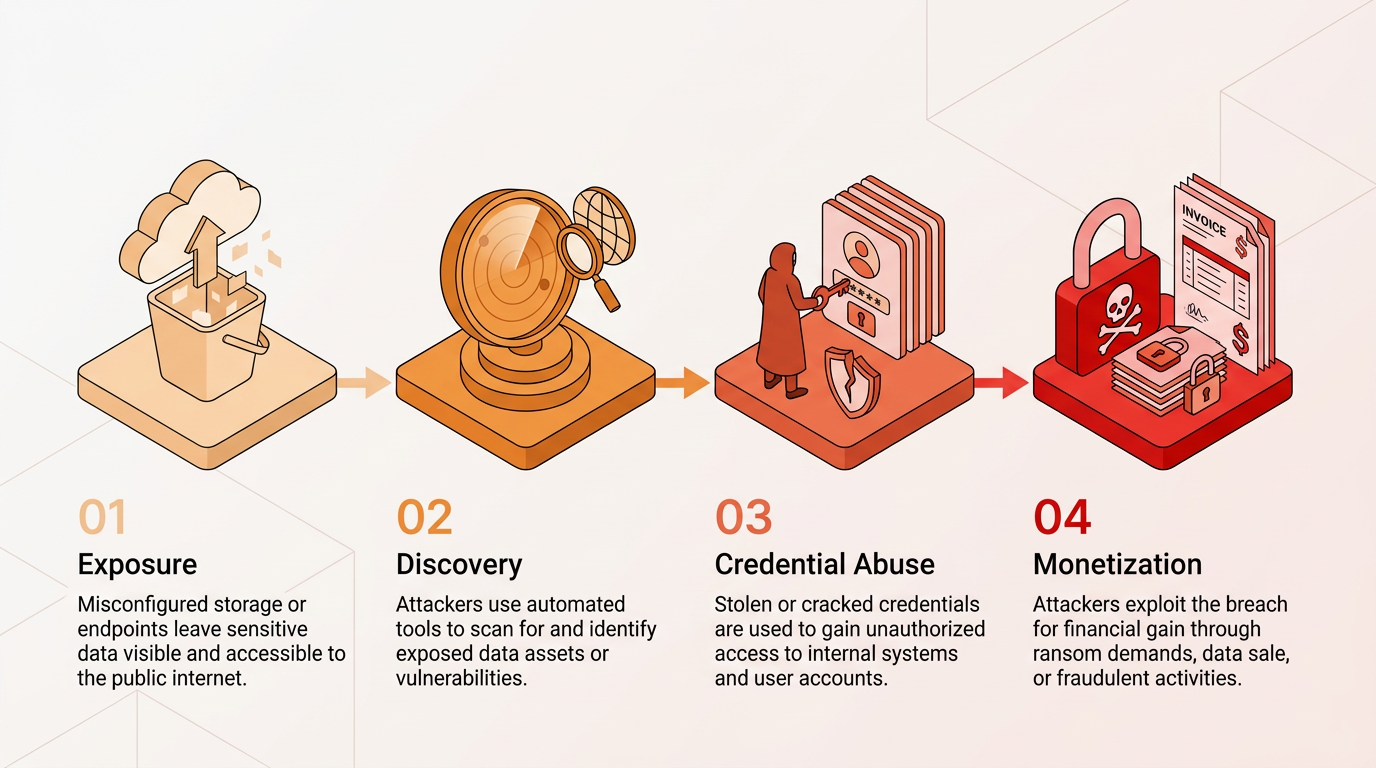
Exposure typically escalates into real damage across four predictable stages:
Exposure: Teams leave a storage bucket open, an unrelated website compromise exposes credentials in a dump, or a developer pushes an application programming interface key to a public code repository.
Discovery: Attackers run automated scanners that catalog internet-facing systems and find newly exposed storage quickly.
Credential Abuse: Because people reuse passwords across personal and business accounts, attackers can use a password from one site's leak in credential stuffing attacks against others.
Monetization: Attackers who control an email account can conduct business email compromise attacks and invoice fraud; they can also erase, encrypt, or ransom exposed databases and use leaked cloud keys to fund unauthorized computing.
Each stage builds on exposure left uncorrected, which is why early detection and containment matter more than any single defense.
12 Common Data Leak Causes
Ordinary operational failures cause most data leaks, and misdelivery is one recurring example.
Misdelivery: An email, letter, or file goes to the wrong recipient, often because of autocomplete or a typo in the domain.
Cloud and Database Misconfiguration: A team makes storage public, a database accepts connections without authentication, or an access token grants far more access than intended.
Publishing Errors: Teams post internal pages or documents where search engines can index them, or release a spreadsheet that still contains hidden data.
Lost or Stolen Devices and Media: An unencrypted laptop, phone, or removable drive leaves the building and never comes back.
Excessive Permissions and Weak Authentication: Accounts and service identities accumulate rights nobody reviews, teams never rotate credentials, and important systems lack multifactor authentication (MFA).
Unpatched Systems: A known vulnerability stays open long enough for someone to reach the data behind it, making consistent patch management practices important.
Secrets in Code Repositories: Developers commit application programming interface keys, passwords, or certificates to public repositories and leave them exposed for long periods.
Insider Negligence and Malice: Staff bypass controls for convenience or copy data on their way out, while unusual access patterns can reveal misuse.
Phishing and Social Engineering: An employee hands over credentials or sends a file because convincing phishing and social engineering asked for it.
Third-Party and Supply Chain Exposure: A vendor, contractor, or software dependency exposes organizational data through its own mistakes or compromised packages.
Shadow Information Technology and Shadow AI: Employees route sensitive information through unsanctioned applications and AI assistants the organization cannot see or control.
Forgotten Legacy Data: Old servers, backups, and legacy data storage outlive the people who knew they existed, then surface after a migration or acquisition.
Together, these causes show why prevention has to address routine workflows as well as technical configuration.
Real-World Data Leak Examples
Two recent disclosures show how internal process failures, not external attacks, created regulatory exposure:
Northern Ireland Police Disclosure: A freedom-of-information response included a spreadsheet containing hidden data on every officer and staff member. The Information Commissioner's Office findings identified inadequate disclosure sign-off procedures.
U.S. Health Information Exposure: A webpage setting allowed search engines to index internal pages containing protected health information. The U.S. Department of Health and Human Services (HHS) found in its official breach report that the organization had not completed a HIPAA risk analysis.
Both cases began with internal process or configuration failures, yet each created regulatory and operational consequences once sensitive information became reachable.
The data at risk in leaks like these includes:
Login credentials
Application programming interface keys and tokens
Source code
Customer personal information
Health records
Payment and financial data
Employee records
Trade secrets
Legal documents
Location data
AI prompts and chat logs
System logs
Consequences can include regulatory enforcement, lost intellectual property, damaged customer trust, and operational disruption during cleanup.
Generative AI and Shadow AI Data Leak Risks
Generative AI creates data leak risk when employees send sensitive information to systems the organization has not approved, inspected, or included in its data governance.
Prompts can carry confidential data into an underlying AI system or grant a connected tool access to chat histories and document repositories. Features embedded in third-party software may also go unnoticed, so employees can expose information without realizing that an AI component is processing it.
Large models can reproduce sensitive training data. Autonomous agents may also operate with broad standing access. As a result, AI tools need the same governance as other applications: an acceptable-use policy, regular audits for unsanctioned tools, and inclusion in vendor risk reviews. These controls also reduce weak points that could support data exfiltration elsewhere.
Detecting and Responding to a Data Leak
Data leak detection relies on configuration and traffic signals. An effective response confirms exposure, contains it, and applies the correct notification requirements.
Configuration and Traffic Signals
Several signals indicate exposure before an attacker exploits it:
Cloud Posture Monitoring: Continuous checks flag storage open to the public, over-privileged identities, and logging gaps.
Outbound Monitoring and Data Loss Prevention: Data loss prevention (DLP) tools inspect outbound email and uploads for classified content. Outbound monitoring separately alerts on unexpectedly large transfers to unknown destinations.
Access Log Review: Reviews flag out-of-hours logins, concurrent sign-ins from distant locations, and the sudden appearance of file-transfer tools or scheduled tasks.
Secret Scanning and Breached-Password Screening: Scanners search code repositories for exposed keys, and password screening compares new passwords against known breach corpuses.
Dark Web Monitoring: Monitoring services provide warning when employee credentials or company data appear for sale.
A posture alert can establish that information was reachable, but traffic and access evidence show whether someone may have acted on that exposure. Secret scanning and password screening add another layer by identifying credentials that could support account takeover attempts. Taken together, these signals give teams a clearer basis for deciding whether they are correcting a configuration mistake or investigating unauthorized activity.
Containment and Notification Sequence
An effective response plan assigns ownership before an incident so teams can scope, contain, assess, and notify in order. The following sequence outlines each step:
Confirmation and Scoping: Teams establish what information the incident exposed, for how long, and who could have reached it.
Internal Escalation: Teams bring in legal, communications, and leadership early so they do not make notification decisions in isolation.
Containment: Teams close the exposed setting, revoke the leaked token, or pull the file.
Copy Search: Teams remove improperly posted information and search for copies elsewhere.
Access Determination: Log review shows whether anyone actually reached the data, which determines whether the leak is also a breach.
Credential Rotation: Teams reset exposed passwords and keys and apply MFA controls to affected accounts.
Legal Assessment: The HIPAA Breach Notification Rule requires notice to individuals within 60 days of discovery. The SEC requires public companies to file a Form 8-K within four business days of determining that an incident is material, and its final disclosure rule states, "In general, we believe that an accidental occurrence is an unauthorized occurrence."
Individual Notification: Affected people learn what information the incident exposed and what they can do in response.
Process Correction: Corrections address the workflow that allowed the exposure as well as the immediate setting.
Lessons-Learned Review: Teams document what failed and update the response plan before the next incident.
This sequence keeps containment, evidence review, legal analysis, and communication connected rather than treating them as separate efforts.
12 Best Practices to Prevent Data Leaks
Organizations prevent data leaks by controlling data throughout creation, access, storage, transfer, retention, and disposal. The following practices work together across that lifecycle:
Data Inventory and Classification: Knowing what sensitive data exists, where it resides, and who can access it is the step every other control depends on.
Least Privilege Access: Teams grant access per request, scope it to the role, and review it regularly, so a misdelivered file or compromised account reaches less.
Secure Cloud Configuration Baselines: Published baselines for major cloud and productivity platforms give teams a known-good state for measuring drift.
Encryption at Rest and in Transit: Full-disk encryption on endpoints, encrypted storage and backups, and encrypted network communications limit exposure from a lost device or intercepted transfer.
DLP Policies: DLP tools can automatically block or encrypt outbound email containing classified information, and policy can restrict removable media.
Retention Limits and Media Sanitization: Organizations delete data that no longer serves a purpose on schedule and sanitize retired drives rather than shelving them.
Phishing-Resistant MFA: Strong authentication options reduce reliance on reusable passwords and make many account takeover attempts harder.
Training That Covers Misdelivery: Awareness programs that address recipient checks alongside phishing target a common source of error directly.
Third-Party and Supply Chain Risk Management: Vendor assessments, data-handling contract terms, and exit plans limit what a partner can expose.
Lost-Device Readiness: Device encryption and a clear reporting path limit what a lost laptop exposes.
Defined Off-Boarding: A documented process revokes access, recovers tokens and devices, and disables inactive accounts for contractors, vendors, and employees.
AI Tool Governance: An approved list of AI services, logging of data sent to them, and audits for unsanctioned use keep prompts visible.
These practices work as a system: inventory defines what needs protection, access controls reduce reach, monitoring catches mistakes, and retention limits reduce the amount of data available to leak.
Data Leak Readiness as Ongoing Resilience
Every exposed file, credential, database, or prompt requires a clear decision about access, containment, and notification. Organizations can reduce the impact by pairing data classification with limited permissions, configuration monitoring, and practiced response steps. Future reviews should focus on the ordinary workflows where preventable mistakes are most likely to occur.
Frequently Asked Questions
Is a Data Leak the Same as Data Loss?
The terms overlap but are not identical. A leak means unauthorized people can see information that remains available to its owner. Data loss also includes information that becomes unavailable or is destroyed, as in a ransomware incident or accidental deletion.
How Do I Know If My Data Has Been Leaked?
Most people find out through a breach notice. Warning signs that attackers are already using leaked data include unfamiliar account activity, bills for services never received, password-reset messages that were not requested, and official notices involving transactions or records the person does not recognize.
Can Leaked Data Be Removed from the Internet?
Partially. The organization can take down the original source and ask search engines to remove cached copies, but it cannot recall copies that other people already downloaded. Response therefore focuses on removing the source, resetting exposed credentials, and monitoring for misuse.
Is a Data Leak Illegal?
Not by itself in most cases. Legal exposure comes from the circumstances around the leak, including inadequate security, missed notification duties, or inaccurate claims about data protection practices. Those failures can lead to regulatory enforcement, settlements, and corrective action plans.