Fraudulent email schemes are built to make a false message feel trustworthy enough to act on. They work because the inbox is where routine decisions happen quickly: approving requests, opening documents, answering questions, and following up on everyday tasks.
Attackers take advantage of that familiarity. They use messages that appear normal at first glance but are designed to bypass skepticism. Understanding how these schemes operate turns email from an open door into a guarded one.
What Are Email Scams?
At their core, these are fraudulent schemes that use email as the delivery channel to manipulate recipients into harmful actions. They include old-fashioned bait-and-switch operations and phishing schemes that combine email with bogus websites to trick victims into divulging sensitive information. The term covers multiple attack types.
At the heart of nearly every email scam is social engineering: deception that persuades someone to reveal information, approve a request, or trust the wrong sender. Email gives that tactic scale, speed, and a familiar setting. A scammer does not need to defeat every technical control if one person believes the message is real long enough to click, reply, pay, or share sensitive data.
Social engineering is the parent technique behind email scams, using confidence or pressure to influence a person's decision. Phishing applies that technique through authentic-looking but fake emails that request information or redirect users to fraudulent websites. Business email compromise is a more targeted form: attackers may compromise real accounts or impersonate trusted parties to conduct unauthorized transfers.
In practice, these categories overlap. A single campaign can blend a spoofed sender, a phishing link, and a fraudulent payment request, which is why a broad understanding works better than memorizing rigid definitions.
How Email Scams Work
Email scams make a harmful action feel safe by pairing a false source with psychological pressure that leads to a harmful payoff. The specific lure changes, but the pattern is consistent: establish trust in the sender, apply pressure to act, and convert that moment into credential theft, malware, or a fraudulent payment.
False Sender Trust
Attackers make the message appear to come from someone trustworthy. This can be easier than many people assume, because email was not originally designed with strong sender verification in mind. When the visible sender appears legitimate, the recipient may trust the message before checking whether the address and reply path actually fit the context.
Attackers create false trust in several ways. Direct domain spoofing forges the visible From address. Look-alike domains use small changes that are easy to miss. Account takeover gives attackers access to a real mailbox, which makes the message especially convincing. Unicode spoofing uses character replacement to make different characters look visually identical.
Account takeover is especially dangerous because the message appears to come from a real, compromised mailbox. It can pass authentication checks and look like correspondence the recipient expects.
Psychological Pressure
Once a message looks credible, the scam applies pressure to shorten the time between reading and acting. Phishing scams often create urgency or fear so recipients respond before critical thinking can intervene. A frozen account notice or a confidential request from leadership uses the same basic tactic: make delay feel risky.
The most damaging variants pair urgency with authority. BEC schemes can involve criminals spoofing a company email or assuming the identity of a CEO or trusted vendor. These attackers often research employees who manage money and use language specific to the targeted company. When a message references a real project or familiar vendor, the recipient's guard drops.
Harmful Payoff
The scam succeeds when the recipient takes the harmful action. Credential theft often starts with a link that redirects the victim to a fake login page that closely resembles the real one. When the victim enters a username and password, the information goes directly to the attacker.
Malware can arrive through an attachment or link that installs malicious software. Some information-stealing malware is delivered as an attachment in phishing emails. Attackers can use it to log keystrokes and capture stored passwords.
Fraudulent payment requests ask the recipient to change banking details or approve a time-sensitive transfer. These scams are associated with some of the largest reported losses, and they can be difficult for defenses tuned only to malicious files or links. The deception may be nothing more than a believable request.
Common Types of Email Scams
Common types of email scams differ in who they target and how they impersonate trusted senders.
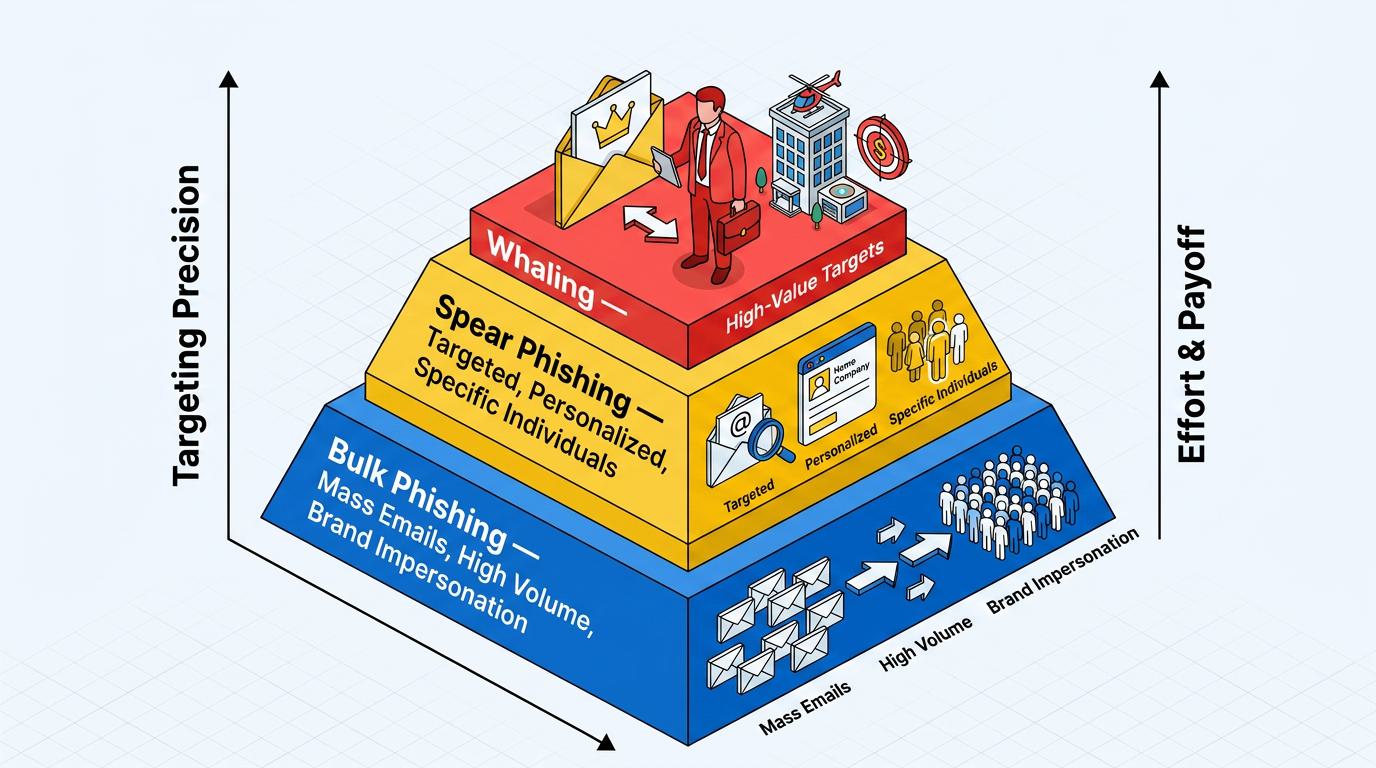
1. Phishing by Target Scope
Phishing attacks vary mostly in how narrowly they aim. Bulk phishing uses mass emails sent to large groups. It often impersonates well-known brands to harvest credentials or personal data from anyone who responds. Spear phishing is more targeted and aimed at specific people or organizations. A spear-phishing email may appear to relate to a specific personal or organizational matter, such as a payroll discrepancy or a legal issue.
Whaling attacks target high-profile executives, including CEOs and CFOs, who can authorize large payments or release sensitive data. Targeting scope usually correlates with effort and payoff. Bulk phishing relies on volume, while spear phishing and whaling invest in research to compromise a smaller number of higher-value targets.
2. Account Compromise and Impersonation
Scams that impersonate trusted entities may hijack real accounts. BEC attackers impersonate or take over executive, employee, customer, or vendor accounts to trick people into wiring payments or sharing sensitive data. Some BEC variants seek W-2 forms, personal data, or cryptocurrency.
CEO fraud is a BEC subtype in which a spoofed or compromised CEO account instructs finance staff to execute transfers or disclose confidential information. Vendor email compromise works through a supplier's email account.
Attackers can use that access to find real invoices and redirect payments. Email spoofing forges the From header or uses look-alike domains, while clone phishing copies a legitimate message and swaps in a malicious link or attachment.
3. Channel-Based and Redirect Scams
Some scams expand beyond a standard email link or rely on redirection. URL phishing embeds deceptive hyperlinks that lead to fraudulent websites disguised as legitimate ones. Pharming attacks redirect users to a fake site through DNS manipulation rather than a deceptive link.
Other variants move the interaction outside the inbox. Smishing messages deliver phishing by text message. Vishing calls use voice-based deception over the phone. Some now use AI-generated audio.
Quishing attacks embed QR codes in emails that, when scanned, redirect to malicious sites. Advance-fee scams sit at the least technical end of the spectrum. They promise a large payout in exchange for an upfront payment.
How to Tell if an Email Is a Scam
You can often tell if an email is a scam by comparing sender details with the request's context and pressure. Several warning signs, in combination, warrant caution.
Sender and Address Anomalies
The sender's address often gives a scam away before the message content does. Emails that claim to come from a reputable company but are sent from a misspelled or mismatched domain, such as micros0ft.com or pavpal.com, are likely fraudulent. Display names can also mislead because an attacker can set any name they want while the underlying address tells a different story.
Checking the actual email address rather than the display name matters. The FBI also advises watching for hyperlinks containing misspellings of the actual domain name. Slow down whenever the visible sender, reply-to address, and linked destination do not line up.
Pressure, Content, and Request Signals
The body of the message carries its own tells. Watch for these recurring patterns:
- Urgency and Threats: Demands to act immediately are designed to prevent careful thinking.
- Generic Greetings: Phrases like "Dear Customer" can suggest a mass mailing, especially when the sender should know your name.
- Requests for Sensitive Information: Legitimate organizations do not request passwords or financial details via email.
- Unusual Payment Methods: Requests for cryptocurrency or gift cards are a frequent hallmark of fraud.
- Suspicious Links and Attachments: Hovering over a link on a desktop can reveal its true destination, and unexpected attachments deserve caution even from known contacts.
Spelling and grammar errors can still be useful as a signal. On their own, they are unreliable. Highly relevant, well-written phishing messages can be difficult to spot, especially when they refer to real work or familiar relationships. When a message feels off, verify it through an independent channel using contact information you already know is real.
What to Do if You Receive or Fall for an Email Scam
If you receive or fall for an email scam, the goal is to limit damage quickly and report it through the right channels. The right first step depends on whether you only received the message, clicked something, shared credentials, or sent money.
Immediate Damage Control
If you only received a suspicious message and did not interact with it, avoid clicking links or opening attachments, then report it and delete it. If you clicked a link or opened an attachment, the FTC advises updating security software, running a full scan, and removing anything it flags. Changing passwords for potentially exposed accounts immediately afterward closes the most common follow-on path.
When money has moved, time is critical. The FBI's Internet Crime Complaint Center recommends contacting the originating financial institution as soon as fraud is recognized to request a recall or reversal, noting that acting quickly may reduce or eliminate financial losses. Reporting the fraudulent transfer to both the bank and the IC3 gives recovery efforts the best chance.
Reporting Channels
Reporting does more than document a loss; it can support investigations and potential recovery. The main U.S. channels include:
- FBI IC3: File cyber-enabled crime complaints through the IC3 portal, even if no money was lost.
- Federal Trade Commission: Report scams through FTC fraud reports to help the agency build cases and spot emerging trends.
- Anti-Phishing Working Group: Forward phishing emails to reportphishing@apwg.org and suspicious texts to SPAM (7726).
- IdentityTheft.gov: Use this FTC resource if personal data was exposed and identity theft is a concern.
One warning matters after the initial scam. Scammers may impersonate IC3 employees, contact victims, and claim they have recovered lost funds as a ruse to steal financial information again. Legitimate recovery efforts do not begin with an unsolicited message asking for account details.
How to Protect Against Email Scams
Protection against email scams works best as a layered approach because no single control catches every message. Technical safeguards reduce exposure, while verification habits reduce the chance that one convincing message becomes a costly mistake.
Email Authentication Standards
SPF, DKIM, and DMARC work together to verify that an email came from the domain it claims. Sender Policy Framework (SPF) lets a domain owner publish which servers are authorized to send on its behalf.
DomainKeys Identified Mail (DKIM) adds a cryptographic signature that helps prove a message was not altered in transit. Domain-based Message Authentication, Reporting, and Conformance (DMARC) ties the two together, connects the result to the visible From address, and tells receiving servers whether to deliver, quarantine, or reject messages that fail.
A strict DMARC reject policy provides the strongest protection against spoofed email. These standards authenticate that a sending server is authorized for a domain rather than the specific person behind the message. BEC attacks sent from legitimately compromised accounts can still fall outside the full scope of their protection.
Multi-Factor Authentication and Awareness
Because authentication alone cannot close every gap, additional layers matter. Multi-factor authentication (MFA) requires more than a password to access an account.
As CISA notes, MFA makes it more difficult for threat actors to gain access to systems such as remote access technology, email, and billing systems, even if passwords are compromised through phishing.
MFA methods vary, and CISA strongly encourages phishing-resistant methods that withstand push fatigue and interception. Human-focused measures round out the defense: strong password policies, current security software, employee reporting habits, and out-of-band verification for payment changes. Build processes that assume mistakes can happen, so one click does not become a single point of failure.
Common Misconceptions About Email Scams
Misconceptions about email scams create a false sense of security and make suspicious messages easier to trust. Correcting those assumptions changes how people approach the inbox.
Spam filters miss malicious mail. Spam filtering is inherently imperfect. Some malicious mail gets through, and legitimate messages are occasionally misclassified. Anti-phishing filters also struggle with messages sent from compromised legitimate accounts because nothing about those messages looks technically wrong.
Careful people can still fall for convincing messages, especially as scams become more sophisticated and more precisely targeted. Susceptibility tracks with stress and context, not intelligence.
Obvious errors are an unreliable signal. Well-crafted phishing messages can be difficult to spot precisely because they lack the errors people are trained to notice. As attackers adopt AI to generate fluent, context-aware messages, grammar mistakes have become an unreliable filter, and Verizon's research notes that synthetically generated text in malicious emails has roughly doubled in recent years.
Staying One Step Ahead of the Inbox
Email scams endure because they target judgment, trust, and routine behavior. Strong protection combines sender authentication, MFA, verification habits, and fast reporting when something goes wrong. Attackers craft messages that look more polished and more personal, which makes obvious red flags less reliable. Treat unusual requests as worth verifying before acting.
Frequently Asked Questions
What Is the Difference Between Phishing and an Email Scam?
Email scam is the broad umbrella term for fraudulent schemes delivered through email, while phishing is one specific form of email scam. Phishing typically tricks recipients into revealing credentials or personal data, often via fake login pages. Other email scams, such as advance-fee fraud or payment redirection, may not involve credential theft at all.
Can Opening an Email Infect My Device?
The main risk usually comes from interacting with the message, such as clicking a link, opening an attachment, or enabling risky content. Email-delivered malware often relies on links or attachments, so unexpected files and suspicious destinations deserve caution even when a message appears to come from someone familiar.
Are Email Scams Only a Problem for Businesses?
No. Businesses face major risks from business email compromise, but individuals are frequent victims of phishing, impersonation, advance-fee fraud, and account theft. Anyone with an email address can be targeted, which is why personal awareness matters as much as workplace defenses.
Why Do Some Scam Emails Pass Spam Filters and Authentication Checks?
Authentication standards can confirm that a message came from an authorized server for a domain, but they cannot confirm the human behind the message. When an attacker compromises a real email account, messages sent from it can appear technically legitimate. That is why business email compromise remains difficult for automated tools alone to catch.
