Cost-effective threat detection in education means protecting learning continuity and meeting compliance requirements without the dedicated security budget most districts don't have. Ransomware that locks classroom technology, phishing campaigns aimed at administrative staff, and breaches that expose student records all exploit that funding gap, since most districts still cover security costs from general operating budgets. The strongest response uses tools schools already own: existing platform logs, tighter access controls, and automation that cuts operational drag instead of building new infrastructure.
Key Takeaways
- Ransomware incidents against schools continue to climb while many districts still cover cybersecurity from general operating budgets rather than dedicated funding.
- Existing Microsoft 365 and Google Workspace logs can support baseline monitoring without added hardware costs.
- Automating routine triage and consolidating overlapping tools frees budget and staff time for higher-impact controls.
- Layering multifactor authentication, least-privilege access, DNS filtering, and ongoing staff training closes the most common attack paths at modest cost.
Why Threat Detection in Education Needs Practical Investment
Threat detection in education protects learning continuity, budget control, and compliance readiness when attacks disrupt school operations. Ransomware that locks classroom technology, phishing that compromises administrative accounts, and data breaches that expose student records can each halt operations that districts aren't staffed to recover from quickly, and most districts absorb these costs from general operating budgets rather than dedicated cybersecurity funding.
That risk is growing faster than most district budgets. Ransomware attacks against schools, colleges, and universities rose 23% year over year in the first half of 2025, according to school ransomware trends tracked by K-12 Dive, with each wave of confirmed attacks exposing more student and staff records than the last.
A GAO review found that districts hit by cyberattacks can lose substantial instructional time and take months to fully recover. Regulatory exposure adds another layer, since violating the Family Educational Rights and Privacy Act (FERPA) puts a school's eligibility for federal funding at risk, the General Data Protection Regulation (GDPR) carries steep fines for institutions handling European student data, and the Children's Internet Protection Act (CIPA) ties E-Rate discounts to compliance.
Malware that shuts down learning platforms, delays payroll, or forces districts offline turns a single incident into an operational crisis, not just a security one, and expensive tools alone won't close that gap without a focused deployment plan. Cloud-native, AI-driven defenses can improve detection economics when teams deploy them strategically, and the five strategies below focus on maximizing that return while protecting students, faculty, and budgets.
Five Practical Strategies for Cost-Effective Threat Detection
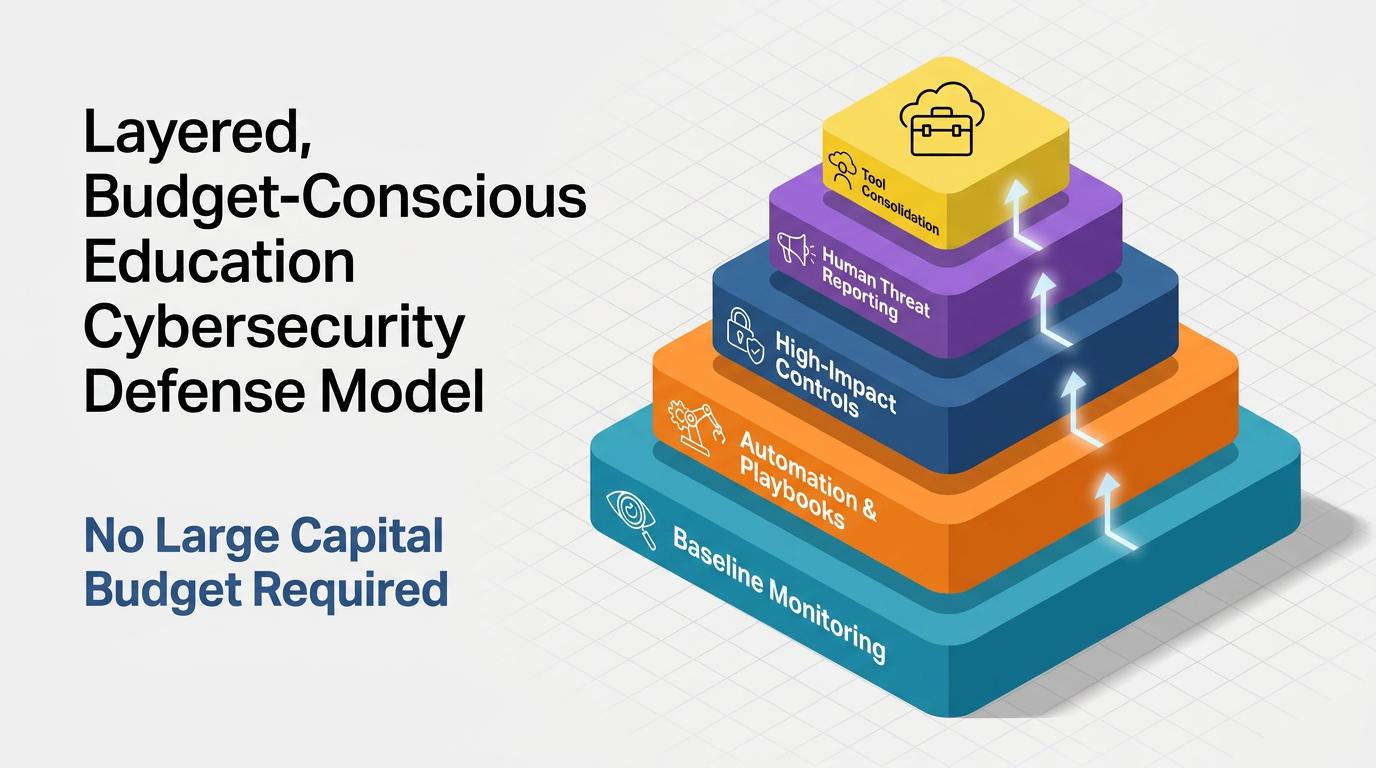
Districts don't need enterprise budgets to close their biggest detection gaps. The strategies below start with tools schools already own, then layer in automation, high-impact controls, human reporting, and tool consolidation.
Baseline Monitoring Using Existing Logs
Baseline monitoring turns existing log data into an early warning system that can help identify account compromise before attackers cause significant damage. This approach aggregates everyday signals, including login times, file access patterns, and email volumes, from platforms such as Microsoft 365 or Google Workspace, to define normal activity ranges for each user.
The data already flows into a security information and event management (SIEM) system or native dashboard, so teams can use it without adding hardware or sensors. Once teams establish baselines, subtle anomalies trigger alerts, such as logins from new locations at unusual hours or unexpected spikes in file downloads.
A practical baseline monitoring checklist can include:
- Centralize Logs: Route existing logs from cloud email, identity, endpoint, and network systems into a lightweight collector or SIEM.
- Record Activity: Capture enough user and system activity to establish normal ranges for high-risk accounts and core administrative systems.
- Route Alerts: Automate anomaly thresholds and send alerts to the channels a team already monitors, such as email or chat.
- Tune Thresholds: Review thresholds weekly to reduce noise and improve the quality of alerts sent to analysts.
This checklist helps districts increase visibility without adding hardware or expanding headcount. Baseline monitoring maps directly to the Detect function of the NIST Cybersecurity Framework, which calls for monitoring personnel activity and technology usage to find potentially adverse events. This work also supports FERPA and GDPR audit readiness, though additional controls remain necessary to fully satisfy those regulations.
Automating Threat Detection Workflows
Automation lets lean education security teams cut manual triage and focus limited staff time on genuine threats. Automated analytics can correlate firewall logs, email events, and access patterns continuously, while these automation workflows group related signals, suppress repetitive low-value notifications, and route alerts to the right responder with consistent context. Documented playbooks built on that foundation also make handoffs clearer when staff rotate coverage across schools, departments, or shared-service teams.
Teams can start by cataloging repetitive tasks that still require human intervention. Low-code security orchestration, automation, and response (SOAR) playbooks can then take over many of them directly:
- Quarantine Infected Endpoints: Auto-isolate suspicious devices as soon as indicators of compromise appear.
- Revoke Compromised Credentials: Cut off access immediately once a login or account shows signs of compromise.
- Roll Out Firewall Policy Updates: Push consistent policy changes across campus firewalls from a single console.
- Close Known False Positives: Auto-resolve repeat low-risk alerts through APIs already built into existing licensing agreements.
Starting with email security automation before expanding to network monitoring and access management keeps the rollout manageable for a small team.
That kind of repeatable, documented process is exactly what updated NIST incident guidance recommends, since consistent response steps matter even for a one-person security function.
Prioritizing High-Impact Security Controls
With automated workflows in place, teams can focus remaining budget on controls that cut the most risk per dollar spent. Generative AI now helps attackers craft convincing lures at scale, and the FBI Internet Crime Complaint Center added a dedicated AI section to its IC3 report for the first time, noting that AI-enabled synthetic content is becoming harder to detect and easier to produce.
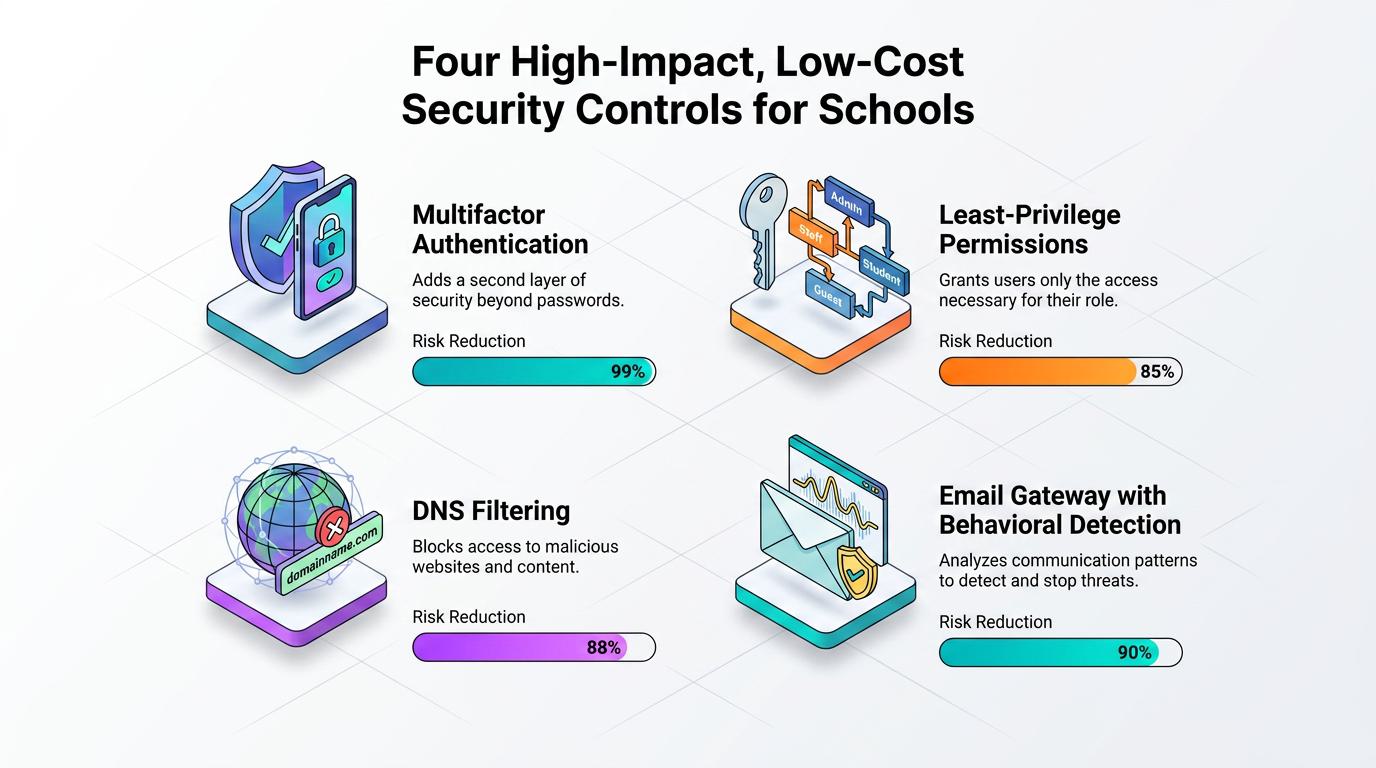
A first wave of investment can focus on four controls that require minimal hardware but close the largest gaps:
- Multifactor Authentication Across Accounts: MFA is the first barrier against credential theft, and teams can deploy it for students, faculty, and administrators while prioritizing high-risk roles like financial staff and IT administrators.
- Role-Based, Least-Privilege Permissions: Removing standing access once a project ends limits lateral movement, so permissions for departing student aides or contractors should expire automatically to block insider threats and compromised accounts.
- DNS Filtering That Blocks Malicious Domains: Cloud-based Domain Name System (DNS) filtering can stop users from reaching known malicious sites before a suspicious click resolves, catching phishing pages, malware distribution points, and command-and-control servers.
- Email Gateway With Behavioral Detection: Email remains a primary entry point for attacks, so an email gateway that analyzes sender and workflow patterns, including vendor interaction history, timing, and engagement flows, can help surface impersonation attempts that legacy filters often miss.
Together, these four controls address the identity, network, and email paths attackers use most often against schools.
Improving Human Threat Reporting
Faculty, staff, and students can expand detection coverage when training helps them report suspicious activity quickly and accurately. Rallying the campus community as a distributed detection network addresses human error at a fraction of breach recovery costs. Phishing remains the most commonly reported threat among surveyed education institutions, according to the UK government's education findings, part of its most recent cyber security breaches survey.
A practical training cadence can begin with concise, monthly micro-modules targeting current attack tactics, including AI-generated social engineering, vendor email compromise, and credential harvesting, paired with realistic simulations where users who fall for fake lures immediately see what they missed. Training works best as a complement to technical detection, not a replacement for it.
Districts can launch an effective program without new budget allocations, drawing on resources already available:
- CISA's K-12 Toolkit: No-cost training and resources built for district needs.
- CYBER.ORG: Free curricula distributed to K-12 educators through this CISA-funded program.
- Existing Licenses: Baseline training modules already bundled into many districts' email and productivity suite subscriptions.
Programs can maximize impact by auto-enrolling repeat offenders in follow-up modules, sending post-incident debriefs that map attacks to training takeaways, and publicly recognizing quick reporters.
Consolidating Security Tools
Stack consolidation can reduce duplicate coverage, simplify investigations, and free budget for controls that improve detection quality. Teams can start by mapping current security infrastructure, documenting endpoint agents, firewall modules, email gateways, and monitoring consoles already deployed. Cataloging each tool's feature set, including data loss prevention, web filtering, and sandboxing capabilities, helps identify functional overlaps. Teams can also assess which tools no longer align with cloud infrastructure or current compliance requirements.
A practical audit checklist can include:
- Inventory Tools: Document each security tool, owner, renewal date, and core function.
- Map Functions: Compare capabilities feature-by-feature to identify overlap across email, endpoint, network, and cloud controls.
- Flag Waste: Identify underused licenses, duplicate alerts, and tools that no longer match current architecture.
- Retire Hardware: Review on-premises appliances where cloud alternatives can reduce maintenance overhead.
- Document Gaps: Confirm which requirements remain uncovered before selecting one platform to fill each gap.
This process helps teams make consolidation decisions based on coverage and operational impact, not just license cost. When evaluating replacement platforms, teams can prioritize direct integration with Microsoft 365 and Google Workspace, flexible per-student licensing models, and vendor security practices. Vendor consolidation can also improve threat detection efficiency through tighter integration and higher-fidelity alerts, according to an ISSA survey of cybersecurity professionals.
Building Layered, Budget-Conscious Defense
Cost-effective threat detection in education works best when monitoring, automation, controls, reporting, and consolidation all align to the same risk priorities. None of these strategies require large capital budgets, since most rely on logs, licenses, and staff time districts already have. The strongest programs treat each layer as reinforcement for the others rather than a standalone fix. Districts that revisit these priorities every budget cycle will keep pace with evolving attacks without needing to expand headcount or infrastructure.
Frequently Asked Questions
What Is AI-Based Threat Intelligence in Education?
It uses machine learning and language models to help schools and universities collect, filter, enrich, analyze, and distribute information about relevant cyber threats. Analysts verify the results and make final decisions.
How Can a School Start a Threat Intelligence Program With Limited Staff?
A school can name one owner, establish a short list of priority questions, and begin with existing authentication and endpoint logs. Email records can supplement those sources. External advisories and education sharing communities can then fill specific information gaps.
What Is the Difference Between K-12 and Higher Education Threat Intelligence?
K-12 priorities usually center on identity attacks, ransomware, aging systems, and vendors holding student data. Higher education adds open networks, research data, espionage concerns, and a larger SaaS environment.
How Should Schools Protect Student Data When Using AI Security Tools?
Schools should minimize student information in AI systems, de-identify necessary data, restrict access, define retention limits, and log activity for audit. Contracts should explain how vendors manage the data throughout storage and deletion.