
製品アップデート
新着情報
最近のリリース
Know What AI Is Running in Your Organization: AI Governance Now Available as a Standalone Product
AI Governance is now available as a standalone product, bringing the Behavioral Security Platform trusted by more than 5,000 organizations to the questions you're being asked about AI: Which AI tools and agents are in use? What can they access? And what are you spending on them?
リリースブログを読むRight Message, Wrong Person: When Legitimate Emails Become Data Breaches
A trusted contact can still be the wrong recipient. Discover how Abnormal’s Misdirected Email Prevention uses behavioral AI to catch recipient mistakes before confidential information reaches the wrong person.
リリースブログを読むThe AI Security Suite Powered by Behavioral AI
Abnormal’s AI Security suite gives enterprises visibility and governance over the AI running in their business, control over the AI their employees use, and protection against AI-driven attacks being used against them.
リリースブログを読むProactive Identity Risk Reduction for the Attacks That Matter
ISPM prioritizes identity misconfigurations based on real attack risk, helping security teams address the gaps attackers are most likely to exploit.
リリースブログを読む日々のアップデート
2026年11月16日 の週
- 2026年11月20日Detection改善
今週の検知アップデート
Weekly Detection Enhancements - Week of November 20
Expanded brand impersonation protection to more social media, collaboration, and AI brands that attackers commonly spoof
Improved detection of phishing phrases and phone numbers disguised with invisible characters or look-alike digits
- 2026年11月20日Account Takeover Protection改善
Account Takeover and Identity Threat Protection Detection Improvements
Attackers have gotten better at staying under the radar by impersonating trusted internal senders, operating during off-hours to blend in with normal traffic, and spacing out login attempts over days. These three detection improvements close gaps in each of those areas.
With this release:
- Compromised internal-sender detection from user phishing reports: When employees report phishing from a colleague’s account, that report now feeds compromise detection, even if the individual message scored as safe. Available for Microsoft 365.
- Login-timing (time-of-week) anomaly: Detection now profiles each user’s typical weekly login pattern and flags sign-ins outside their normal hours, adding a behavioral timing dimension to risk scoring. Available for Microsoft 365 / Entra ID.
- Low-and-slow brute-force*: Failed sign-in patterns are now evaluated across up to 7-day windows, catching credential-guessing campaigns deliberately paced to avoid velocity-based triggers. Available for Microsoft 365 / Entra ID.
Together, these improvements add earlier and more independent signals for catching compromised accounts, with no new workflows or configuration required.
*Low-and-slow brute-force detection is available for Identity Threat Protection customers only.
- 2026年11月19日AI Phishing Coach新機能
Interactive Coaching
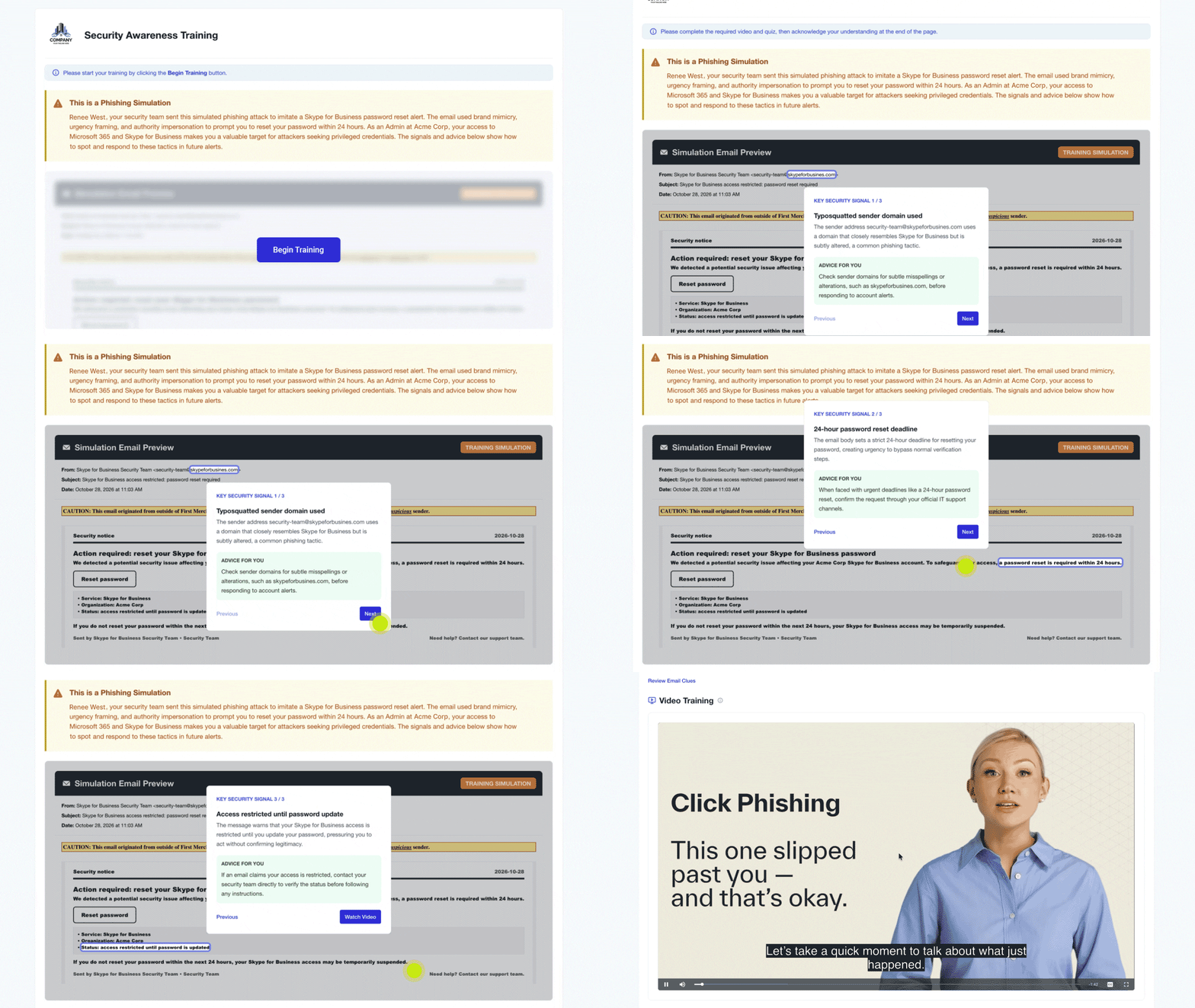
People remember what they practice, not what they skim. Interactive Coaching brings that approach to phishing training: instead of skimming a static coaching page, employees walk back through the email they clicked and practice spotting the warning signs they missed.
With this release:
- Employees review each red flag they missed along with advice for what to look out for next time
- A closing quiz flags wrong answers right away, so employees can correct mistakes and try again
- Interactive Coaching appears automatically on every Just-in-Time Coaching page, with no setup required
Learning by doing helps employees move from knowing what phishing looks like to acting on it consistently. Security teams get coaching that drives lasting behavior change, without adding manual work.
- 2026年11月19日Detection改善
Quarterly Abnormal Detection Enhancements
Attacks sent from a real vendor account, or from someone posing as a coworker, look like routine business email. Other attacks hide the lure inside a file or behind a legitimate-looking link, or bury it under a flood of real email. This quarter, we shipped upgrades across vendor compromise and impersonation, lateral phishing, attachments and links, and spam bombs.
Broader Detection of Vendor Email Compromise
When a vendor's mailbox is compromised, the attacker's email passes SPF, DKIM, and DMARC because it is sent from the vendor's real account. A new vendor AI agent investigates suspicious vendor emails in context. It compares each one with that vendor's past emails to the customer and inspects its links and attachments. When it confirms a takeover with high confidence, it opens a vendor case and remediates the email automatically. Weekly vendor compromise cases have increased about 350% since the agent launched, averaging about 133 high-confidence verdicts a week.1
Faster Containment of Lateral Phishing and Account Takeover
Once an account is taken over, the attacker uses it to phish coworkers who already trust that account. A new lateral AI agent reviews suspicious internal emails by reading the thread and weighing the sender's normal relationships and account takeover status. High-confidence detections are remediated automatically, so verdicts and remediation arrive sooner. Since going live in September, the lateral AI agent has given verdicts on an average of about 2,100 messages a day. Lateral phishing detections confirmed by the agent also also open an account takeover case on the sending account, and detectors are better tuned to how lateral phishing spreads in corporate and education organizations.
AI Triage for User-Reported Emails
When employees report a suspicious email, AI Security Mailbox now triages it with a new AI agent classifier.
New Detectors for Calendar Invites, QR Codes, Callback Scams, and More
A new detector catches phishing hidden inside calendar invite files, including fake invites the rest of detection missed. A new callback scam model catches emails and attachments that push the recipient to call an attacker’s phone number.
New signals also expose text designed to fool readers and AI models, such as punycode lookalike subdomains and invisible Unicode characters that may be used to hide prompt-injection instructions.
A new detection layer also provides added protection against emails that impersonate a real coworker, such as fake file-sharing notifications and messages from lookalike personal email accounts.
Expanded Coverage of Threats in Attachments and Links
Fake invoices and callback-phishing notices often arrive as attachments, where the lure sits inside the file instead of the email body. Attachment text detection now reads more file types, including HTML, EML, calendar invites, and Office documents, leading to approximately 349 additional attacks detected per week over a four-week period ending October 11. Visual attachment analysis looks at how an attachment actually renders, scanning QR codes and links inside attachments to catch attacks that text-based models and logo rules miss.
Stronger Spam Bomb Protection
Spam bombs flood a mailbox with real newsletters and sign-up confirmations, burying the emails that matter. Because most of that flood looks like ordinary graymail, it’s hard to separate from legitimate mail. Abnormal now remediates those messages even when they look like graymail, and new enhancements have made remediation more consistent and reliable. Detection now also covers lower-volume attacks, and protection extends to government customers.
Each of these enhancements builds on the same foundation: behavioral AI that understands what normal looks like for every person and vendor, so more attacks are caught and remediated automatically.
1 Based on internal Abnormal production data for US-hosted customers collected from August 1 – October 31, 2026. Weeks are complete Monday-start weeks unless noted.
2026年11月9日 の週
- 2026年11月13日Detection改善
今週の検知アップデート
Weekly Detection Enhancements - Week of November 13
Enhanced QR code detection to catch malicious codes split across frames of animated GIFs.
Extended QR code and text scanning to images and PDFs inside emails attached as .eml files.
2026年11月2日 の週
- 2026年11月7日Identity Security新機能
Case Reports for Identity Threat Protection
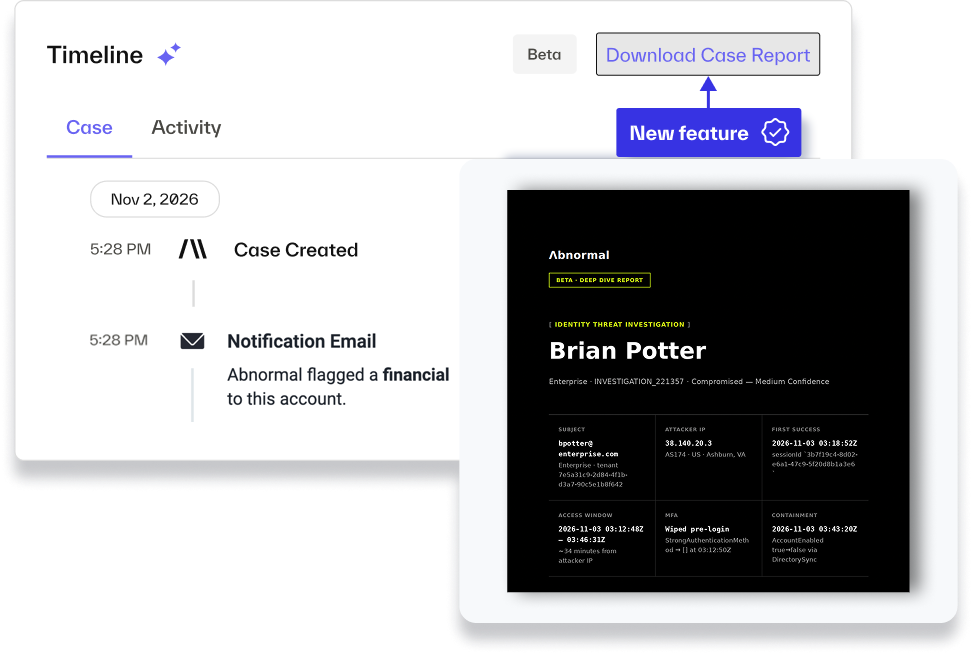
Identity Threat Protection now includes an AI agent that investigates every case after detection. It reviews the user’s recent activity, including interactive and non-interactive sign-ins, suspicious email, and admin changes. It pulls signals the initial detection didn’t weigh and re-evaluates the ones already on the case. When it finds that a low-confidence case looks like a real compromise, it can raise that case to medium confidence.
With this release:
Find compromise activity in signals the initial detection didn’t weigh, such as non-interactive sign-ins, email, and admin activity in one view.
Based on investigation, the AI agent may raise case confidence from low to medium confidence and sends the associated notifications
Understand why a case was raised, with case promotion added to the case timeline and a plain-language reason drawn from the agent’s investigation
Review the agent’s verdict, key evidence, timeline, and primary indicators of compromise (IOCs) in one report, without rebuilding the investigation yourself
Download the report as a PDF from the case view to share with your team or attach to an email
The AI investigation agent helps analysts focus on the cases most likely to be real and shows its work. If you’ve configured auto-remediation for medium-confidence cases, promoted cases follow that configuration.
- 2026年11月6日Identity Security新機能
SharePoint and OneDrive Activity Detection
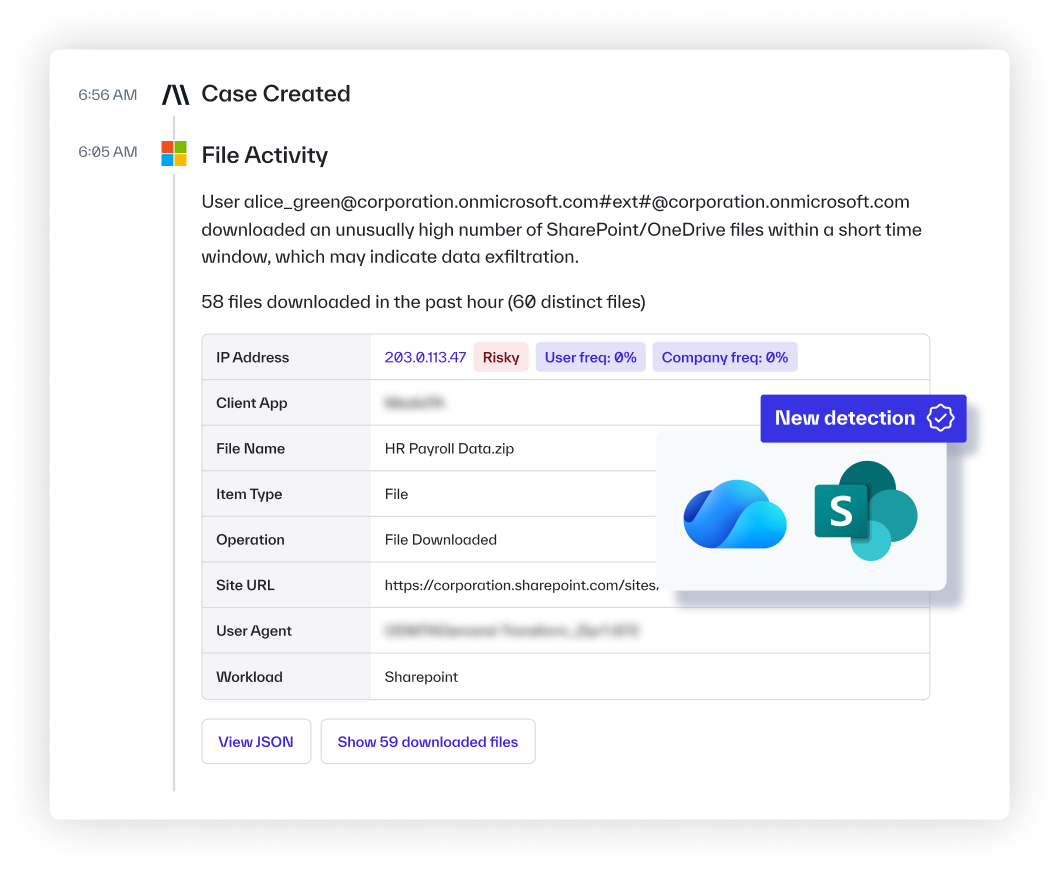
Identity Threat Protection now detects suspicious file activity in SharePoint and OneDrive.
A compromised account rarely stops at the inbox. Attackers go after your files next, searching for sensitive items and then pulling data down in bulk. Now your team can catch that activity as it happens and investigate it as part of one case, instead of piecing it together across tools.
With this release:
— Catch mass downloads and deletions that look like automation, before an attacker walks out with your files
— Spot scripted or programmatic file access by a compromised account
— Spot searches for sensitive keywords in SharePoint, an early sign an attacker is hunting for data to steal
— Investigate file activity in the same case as related sign-in signals, with no stitching together of separate alerts
Security teams can now see data theft in progress and respond before sensitive files leave the organization.
- 2026年11月4日AI Phishing Coach新機能
Custom Sender Domains for AI Phishing Coach
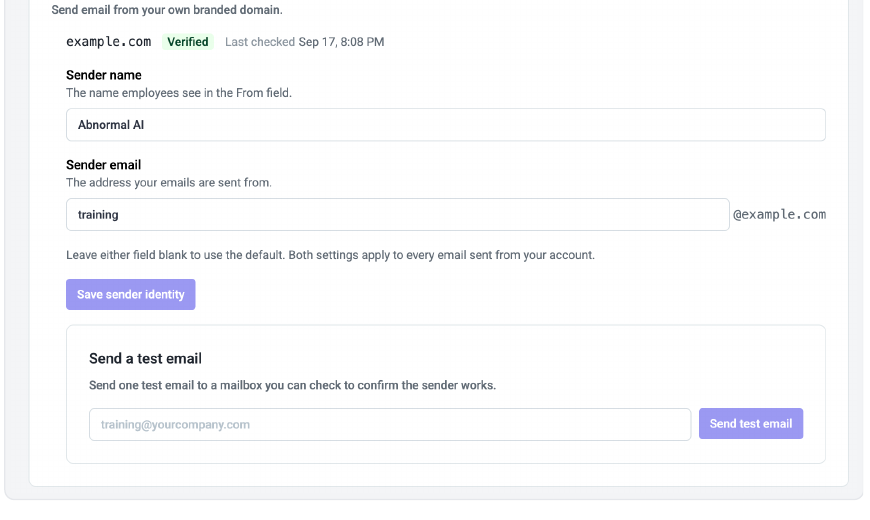
Instead of arriving from an Abnormal AI address, AI Phishing Coach emails can come from a domain or subdomain you control, with the sender name and address you choose. The portal generates the DNS records you need, verifies the domain, and lets you send a test email before employees see anything.
With this release:
Send phishing simulations, Just-in-Time Coaching, video training, reminders, invitations and acknowledgments from your custom domain
Authenticate the domain with generated SPF, DKIM and DMARC records
Set the sender name and address, then confirm them with a test email
Your awareness program now look like it is coming from the security team. Simulations look like the email employees actually receive, while coaching and training arrive from a sender they already trust.
To get started, see Configure a Custom Sender Domain for AI Phishing Coach.
- 2026年11月4日Inbound Email Security改善
Custom Rules Replace Safelist and Blocklist with More Granular Control
With Custom Rules you can:
Define more precise policies: Combine 50+ message attributes with AND/OR logic and exclusions, including authentication results, domain age, subject patterns, and attachment types.
Test before enforcing: Validate rules against historical messages from the last 10-30 days, test in passive mode against real mail before enforcing, and keep unfinished rules in draft.
Control access: Use role-based permissions to manage who can view, create, and edit rules.
Gain greater visibility: Track rule changes, monitor match counts and see which rules acted on specific messages.
What to expect:
On November 11, existing Safelist and Blocklist entries will automatically migrate to Custom Rules in passive mode, and Safelist and Blocklist becomes delete-only. Your existing lists will continue to enforce during a seven-day review period. On November 18, migrated rules will become active and the legacy lists will be retired. No action is required to maintain your existing policies
- 2026年11月3日AI Phishing Coach新機能
Know Who to Coach, Delivered on Your Schedule
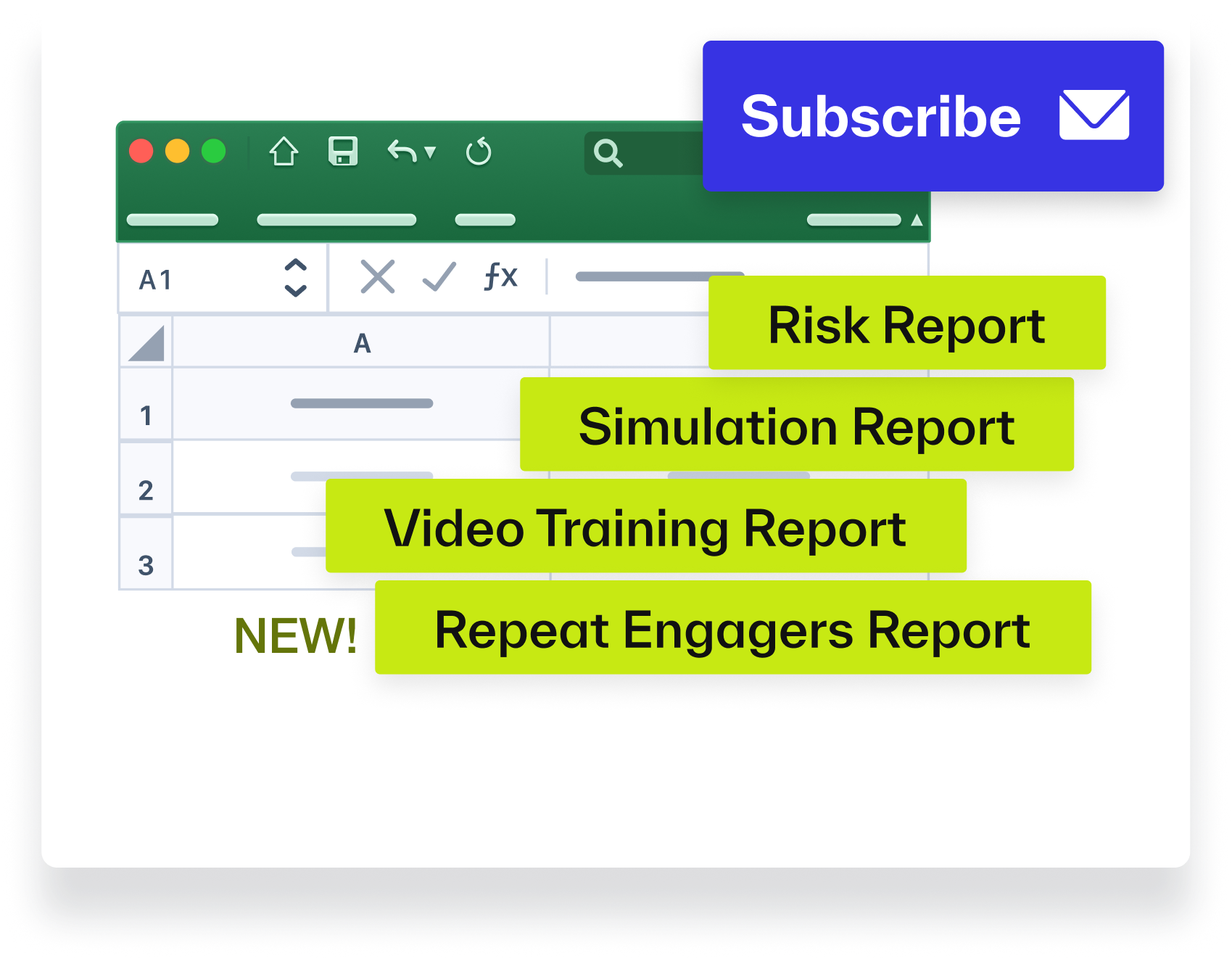
Instead of pulling the same reports by hand every week or month, subscribe to the AI Phishing Coach reports you need and get them delivered automatically. A one-time click and repeat risky behavior can look the same in a standard report, so the new Repeat Engagers report shows exactly who keeps engaging and where coaching matters most.
With this release:
Subscribe to the Executive, Simulation, Training and Risk reports
Each recipient gets one email per period with only the reports they subscribe to
The new Repeat Engagers report lists employees who engaged with simulations consecutively, along with their overall engagement rate. Run it on demand or add it to a Simulation subscription.
Every report becomes evidence of progress, delivered on schedule to the people who need to see it.
2026年10月26日 の週
- 2026年10月30日Detection改善
今週の検知アップデート
Weekly Detection Enhancements - Week of October 30
Strengthened detection of malicious links across supported URL-hosting platforms, with stronger remediation of URL-based attacks.
Improved detection of brand impersonation messages that use visual deception to evade text-only analysis.
Expanded detection coverage for compromised-sender attacks with a newly launched Sender Compromise model.
- 2026年10月29日Identity Security新機能
Track Identity Posture Over Time
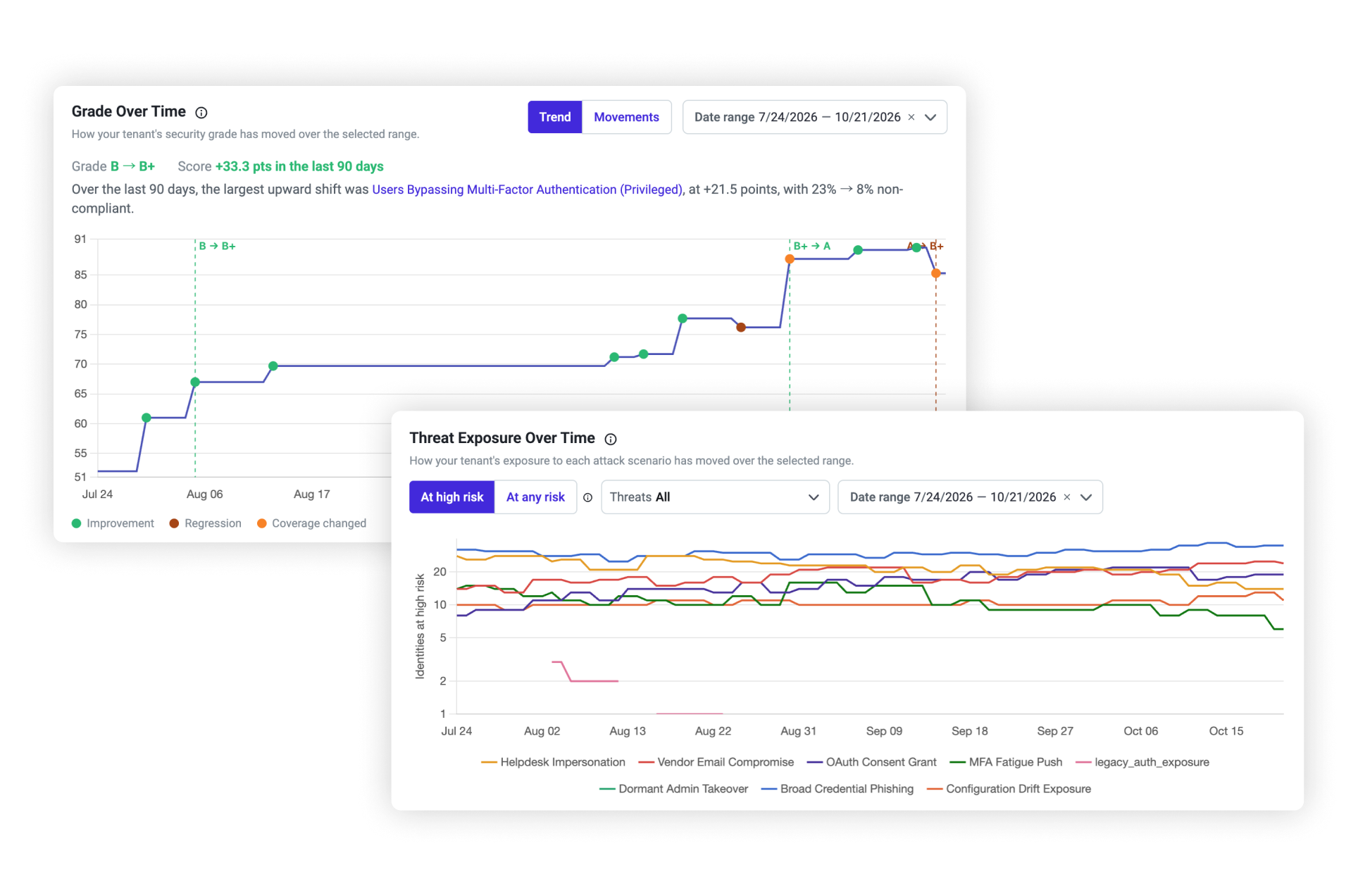
Identity Threat Protection now shows how your ISPM security grade and threat exposure change over time.
A point-in-time grade tells you where you stand today, but not whether your remediation work is paying off. Now admins can see how their posture has moved across a date range and how exposure to each attack scenario has changed along the way.
With this release:
— Track your security grade and score over time, with markers for improvements, regressions, and coverage changes
— See identities at high risk or at any risk for each attack scenario, such as Helpdesk Impersonation, Vendor Email Compromise, and MFA Fatigue Push, and filter by threat
— Review up to 180 days of history, or less if you deployed Identity Threat Protection more recently
Security teams can now show leadership measurable progress and catch regressions as they happen.
- 2026年10月29日Identity Security新機能
Helpdesk Reset Risk Factors
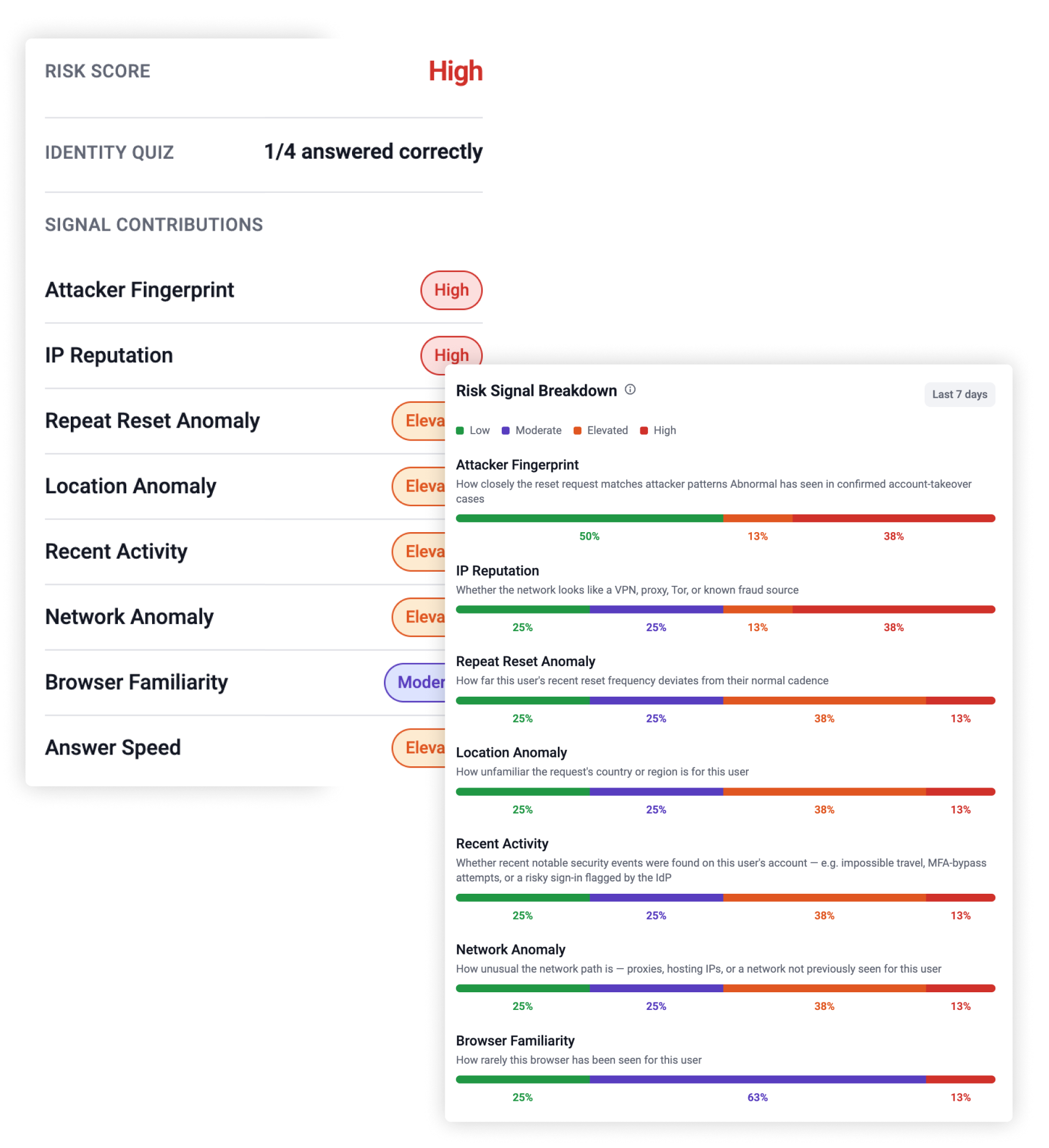
Identity Threat Protection now shows the risk signals behind each Adaptive Identity Reset risk score.
A risk rating is only useful if your team can see what’s behind it. Now help desk and security teams can expand any reset and see which signals contributed to the score, without having to guess why a request was flagged.
With this release:
— Expand any reset to see the signals behind its risk score, alongside the identity quiz result
— Review each signal’s rating (Low, Moderate, Elevated, or High), with plain-language definitions of what each one measures
— See the overall reset risk score on the same four-tier scale
Help desk teams can act with confidence on every reset request and explain why a request was flagged.
- 2026年10月27日AI Data Analyst新機能
New and Enhanced AI Data Analyst Experience
AI Data Analyst is the conversational AI data analyst built into the Abnormal platform: ask a question by email or work conversationally in the portal, and get an answer grounded in your own Abnormal environment, typically within 15 minutes. Every response ties back to your actual threats blocked, people protected, and risk surfaced.
With this release:
Schedule recurring or one-time reports with smart defaults, or turn any question into an ongoing report with Schedule as Custom Report. Pick a frequency and AI Data Analyst derives the reporting window.
Track every report and conversation in one place with the new Report Repository, including versioned downloads and full history.
Manage reporting across every tenant from a single view, built for MSSPs and multi-tenant customers.
AI Data Analyst turns the questions your CISO and security team ask every day into answers you can act on, and turns those answers into reports that keep running on their own.
- 2026年10月26日AI Phishing Coach改善
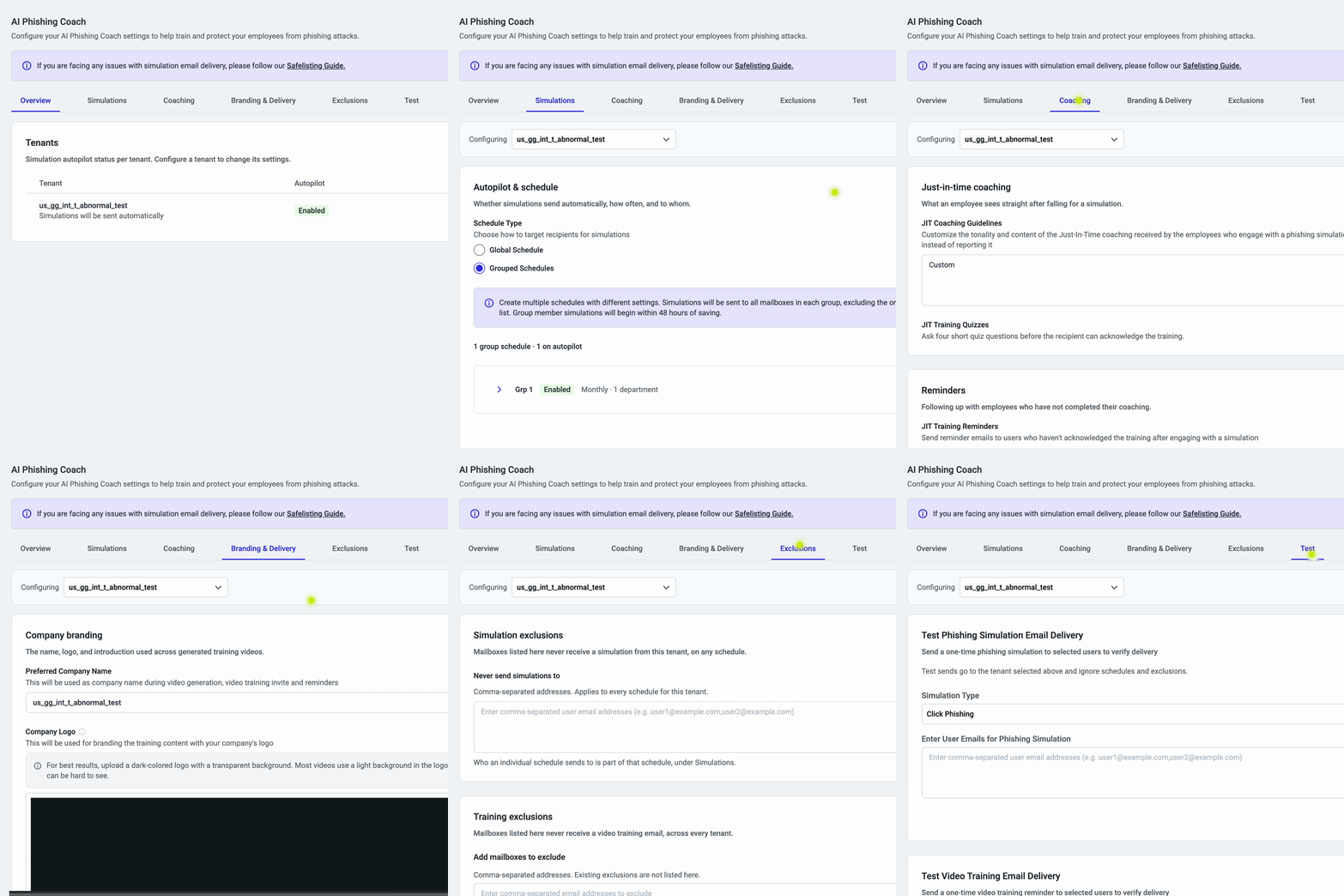
Simplified Settings for AI Phishing Coach
The AI Phishing Coach Settings page is now simpler to navigate, with every control grouped into six tabs by topic. Instead of clicking through a tenant table and nested drawers, admins start on an Overview of every tenant’s autopilot status and go straight to Simulations, Coaching, Branding & Delivery, Exclusions, or Test. Every setting is still there, at most two clicks away, with saved configurations unchanged.
With this release:
Settings are grouped by topic, starting with an Overview of every tenant’s autopilot status
- Tenant Level / Account Level labels show what each change affects
- One Save covers edits across every tab, with the option to discard them
Setting up and fine-tuning AI Phishing Coach has never been easier, especially for organizations managing multiple tenants.
- 2026年10月26日プラットフォーム新機能
Segmented SaaS: Separate Abnormal Tenants on One Email Tenant
Segmented SaaS is built for organizations whose business units, subsidiaries, regions, or agencies share one email tenant but need to be managed separately. Each segmented tenant has its own admins, views, alerts, and data, giving these organizations a clear path to meeting business and compliance requirements for separation without running multiple cloud email tenants.
With Segmented SaaS:
Create a separate Abnormal tenant for each group, with users assigned by email domain, directory group, or a list of user principal names
Give each tenant its own admins, so every team sees only its own users, alerts, and data
Keep one integration across every segmented tenant, with nothing new to authorize
Segmented SaaS lets security teams align Abnormal with how their organization is structured and governed, while keeping a single email tenant to manage.
2026年10月19日 の週
- 2026年10月23日Detection改善
今週の検知アップデート
Weekly Detection Enhancements - Week of October 23
Improved detection of malicious links by factoring URL verdicts into message scoring, with new coverage for Google Sites-hosted attacks
Launched a visual detection model that catches brand-impersonation attacks hidden in email screenshots and other image-based content
2026年10月12日 の週
- 2026年10月16日Detection改善
今週の検知アップデート
Weekly Detection Enhancements - Week of October 16
Improved graymail classification of promotional messages disguised as replies, distinguishing them from genuine conversations
- 2026年10月13日Security Posture Management改善
CIS Microsoft 365 v7.0.0 Support in Security Posture Management
Security Posture Management now checks your Microsoft 365 configuration against the latest CIS Microsoft 365 Foundations Benchmark, v7.0.0.
As Microsoft 365 changes, CIS revises its benchmark: it adds controls, rewrites others and retires ones that no longer apply. This release brings SPM’s checks up to v7.0.0 and labels every change. Security teams can see which findings are new, which have refreshed guidance and which checks are going away.
With this release:
- 28 new checks based on the latest CIS guidance, marked NEW
- 121 existing checks moved to v7.0.0. The 47 with refreshed guidance are marked UPDATED
- 14 checks that CIS withdrew are marked DEPRECATED and will be removed in 30 days
- A v7 filter on the Evaluations page lets you review the new benchmark on its own
Teams that report against CIS can trust that SPM results match the current benchmark, without remapping controls by hand. The tags also make it easier to explain changes in posture results to auditors and leadership.
Read More
2026年10月5日 の週
- 2026年10月9日Detection改善
今週の検知アップデート
Weekly Detection Enhancements - Week of October 9
Strengthened detection of emails from newly registered domains, expanding coverage of live domain-age and registration signals