
Sensitive data leaves organizations over email every day. Employees send benefits forms, contracts, financial records, customer information, source code, and other confidential material for legitimate business reasons. But the same channel can also carry unauthorized sensitive information that turns into breach notifications, regulatory inquiries, and client fallout.
Legacy email DLP solutions were built to catch that second category, but they struggle to distinguish between a legitimate workflow and real exposure. Gartner® notes that “the DLP market is evolving to address the well-known limitations of traditional approaches to DLP, which relied heavily on resource-intensive, data-centric content inspection and often led to performance issues with high numbers of false positives.”1 For example, a nine-digit number may be a Social Security number in one message and an order number in the next. Every false positive then requires an analyst to review the message and decide whether to clear it or maintain the hold.
That creates a costly tradeoff. Narrow policies miss real violations, while broad policies turn routine business into a queue of holds and manual investigations. Over time, teams can end up tuning controls for manageability rather than risk, not because the exposure has gone away, but because the review burden has become unsustainable.
Email DLP Rules, now in Early Access, gives security and compliance teams a way to define, validate, and enforce outbound email policies with less manual overhead than legacy solutions require.
Inside Email DLP Rules
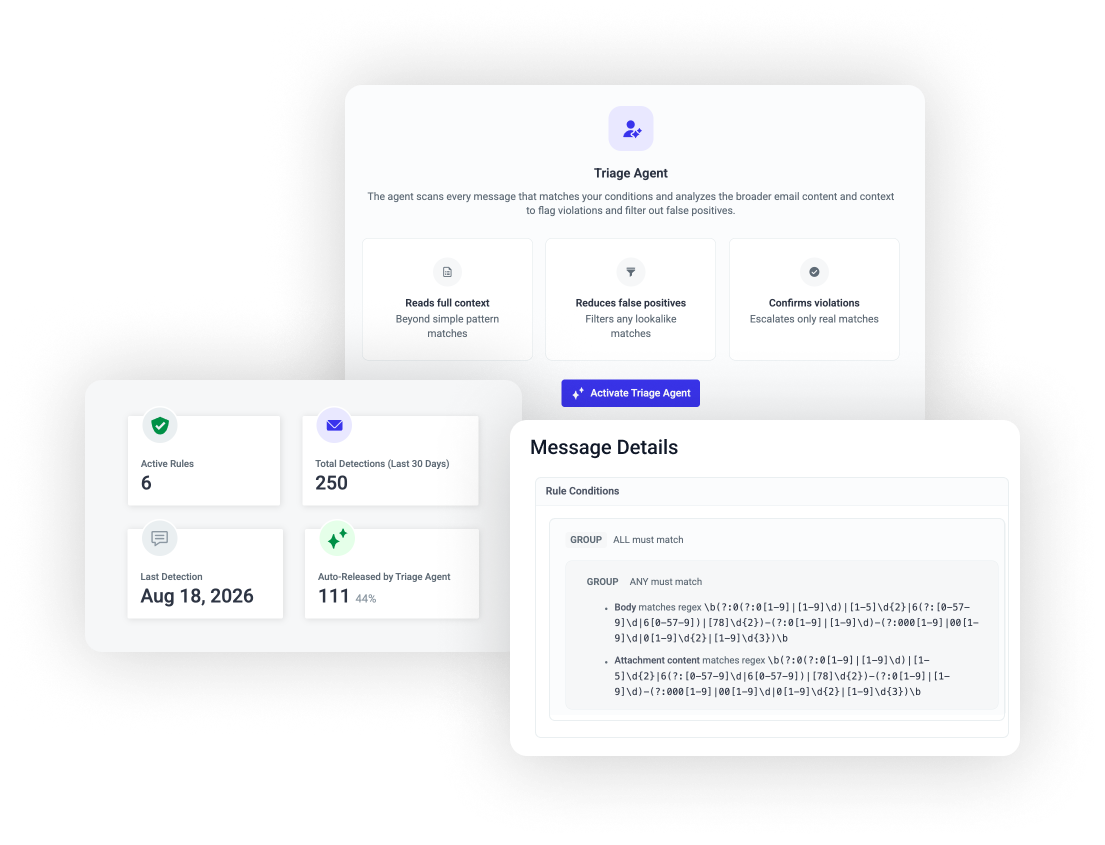
Email DLP Rules is one of the latest extensions of the Abnormal Behavioral Security Platform, and it's built around two layers working together. The first is a policy engine, where teams define the data and business rules that matter to them. The second is the Triage Agent, an AI layer that reviews matches against that policy's intent and the message's real context before deciding whether it's a genuine violation. Together, they can deliver the precision security teams need, without the manual burden that's historically come with it.
Rules That Reflect How the Business Works
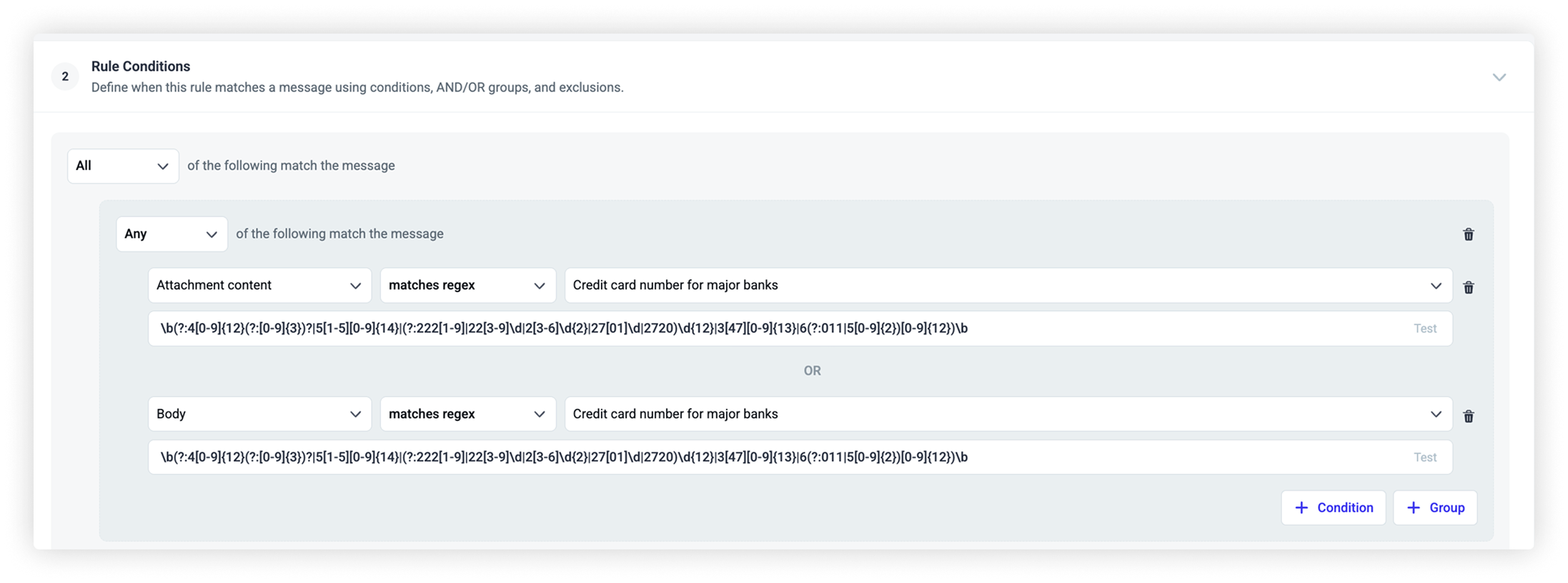
Email DLP Rules gives teams a rule builder for outbound email, supporting regex, phrase matching, metadata conditions, and Boolean logic, along with prebuilt templates for common data types like financial information and personally identifiable information (PII). Rules scan message content and supported attachments, and teams can combine conditions with AND/OR logic, nest condition groups, and add exclusions, so a policy reflects how the business actually operates.
For example, a rule flagging bank account numbers can exclude messages sent to the company's own payroll processor, so a routine, expected data flow doesn't get treated the same as an unplanned one.
Teams can validate rules against sample emails before launch, then roll them out by department or workflow, giving them the flexibility to control the pace of enforcement.
A Triage Agent That Evaluates Matches in Context
.png)
The Triage Agent is the contextual review layer on top of Email DLP Rules. During rule creation, it generates a plain-language description of the rule’s intent and editable exclusions, giving teams a way to capture business context and nuance that policy logic alone can’t express. Those exclusions directly shape how the Triage Agent evaluates matches, so its judgment reflects the organization’s specific policies and risk tolerance. Once a rule is live, the Triage Agent evaluates each matched message against the rule's intent, the sender-recipient relationship, and the surrounding message content to determine whether it is a likely violation.
Consider a rule built to catch credit card numbers. One message is a payment confirmation sent to a recurring vendor. Another is an employee sending a customer's card number to their own personal webmail account with no clear business reason attached. A pattern-only system treats both the same way. The Triage Agent can distinguish between them, releasing the routine vendor confirmation and flagging the one with no legitimate business context for further admin review in the Outbound Log. It also explains its reasoning in plain language, so teams can see why a message received a given verdict and adjust the policy when needed.
What This Changes for Security Teams
Legacy email DLP solutions carry real operational burdens. Abnormal’s own research found that the average organization spends more than 400 hours a year managing false positive alerts from legacy tools meant to prevent data loss.2 To manage large queues of false positives, analysts spend time reviewing benign messages, while teams add continuous exceptions and policies get narrowed until they miss the risk they were meant to catch.
Email DLP Rules is built to make outbound enforcement practical, not just visible:
For CISOs: A more defensible way to understand and control sensitive data leaving the organization.
For security teams: Fewer benign matches to review, so attention goes to the messages that actually warrant investigation, and greater flexibility to refine and expand policies with limited operational overhead.
For policy owners: A way to express business exceptions without piling on brittle rule logic.
The real shift is operational: teams get enough confidence in each verdict, without adding overhead or risking disruption to legitimate email.
To learn how Email DLP Rules can help your organization prevent outbound data loss, connect with your Abnormal representative to request early access.
1Gartner, Market Guide for Data Loss Prevention, Andrew Bales, Franz Hinner, Anson Chen, Paulo Aresta, Brent Predovich, April 9th, 2025 GARTNER is a trademark of Gartner, Inc. and/or its affiliates.
2Abnormal AI, 2025 State of Misdirected Email Prevention.
The above is intended to outline our general product direction. It is intended for information purposes only, and may not be incorporated into any contract. It is not a commitment to deliver any material, code, or functionality, and should not be relied upon in making purchasing decisions. The development, release, and timing of any features or functionality described for Abnormal AI’s products remains at the sole discretion of Abnormal AI and is subject to change.