Microsoft Exchange Online Protection (EOP) provides the baseline email filtering included with Exchange Online mailboxes. Understanding its scope helps security and IT leaders evaluate existing coverage, identify configuration gaps, and decide where additional email security controls may be appropriate. Incorrect assumptions about that scope can create blind spots between mail flow paths and security layers.
The gap between what EOP filters and what modern attackers actually send has grown wider as routing complexity, authentication nuance, and evasive payloads reshape the inbound threat surface. This article provides a closer look at where baseline filtering holds up, where it quietly steps aside, and how those seams get exploited so you can learn what a mature Microsoft 365 email defense really requires.
This article draws insights from Abnormal's ThreatStream webinar on Microsoft 365 Direct Send abuse. Watch the full recording to see real attack examples and detection strategies.
Key Takeaways
Secure email gateway (SEG) routing rules can create inspection gaps when organizations bypass EOP filtering for gateway traffic.
Direct Send can expose a separate mail path that organizations need to evaluate and restrict when it is unnecessary.
Email authentication results do not always translate directly into rejection, particularly in complex routing environments.
Image-based, encrypted, and gated content can reduce the effectiveness of static scanning and sandbox analysis.
Abnormal's behavioral AI is designed to help identify sophisticated email threats that traditional signature-based controls may miss.
What Is Microsoft Exchange Online Protection?
Exchange Online Protection is Microsoft's built-in baseline filtering service for Exchange Online mailboxes, included with Microsoft 365 subscriptions that use Exchange Online mailboxes, according to Microsoft EOP documentation. It handles anti-spam filtering, anti-malware scanning, mail flow rules, and basic threat protection for Microsoft 365 environments and cloud email environments.
EOP processes inbound and outbound messages through connection filtering, content analysis, sender reputation checks, and email authentication protocols. These protocols include Sender Policy Framework (SPF), DomainKeys Identified Mail (DKIM), and Domain-based Message Authentication, Reporting, and Conformance (DMARC).
As an included first layer, EOP filters commodity threats such as spam, known malware signatures, and bulk email effectively without an additional license or extensive configuration. The smaller share of traffic that gets past these static controls, however, often carries greater risk. BEC was the second-costliest crime category in 2025, with approximately $3.05 billion in reported losses, according to the Federal Bureau of Investigation's (FBI) Internet Crime Complaint Center (IC3), a trajectory that Abnormal's IC3 report analysis of the prior year also tracked.
EOP is explicitly a baseline layer, with advanced threat protection sitting above it. Its capabilities may not identify sophisticated phishing attacks, business email compromise (BEC), or zero-day threats that lack known indicators. EOP now honors sender DMARC policy by default, with important exceptions, but organizations need to recognize where signature-based detection limits make behavioral analysis useful as a complementary email security layer. Understanding this distinction helps prevent over-reliance while also avoiding unnecessary, redundant purchases.
How Does Microsoft Exchange Online Protection Work?
EOP evaluates messages through connection, content, authentication, policy, quarantine, and post-delivery controls.
Email Filtering Pipeline
EOP processes messages through multiple filtering stages that evaluate infrastructure, content, and sender reputation.
Connection filtering assesses IP reputation and checks block lists before accepting messages. Anti-malware scanning looks for known viruses, while anti-spam policies analyze content and sender reputation to filter unwanted messages. Microsoft groups these components under built-in security features for cloud mailboxes, including anti-phishing policies with spoof intelligence, the Tenant Allow/Block List, and preset security policies.
Mail flow rules can route, modify, or reject messages that meet defined criteria. These controls give administrators flexibility, but the pipeline relies heavily on known indicators and signatures and can struggle with novel attack techniques. Rules that override filtering can also alter how later stages evaluate a message, making connector and transport-rule reviews an important part of EOP administration.
Authentication, Quarantine, and Delivery
EOP combines authentication results with other signals to determine how a message should be handled before and after delivery.
EOP validates SPF, DKIM, and DMARC records for incoming messages and flags unusual authentication results that may indicate email spoofing attempts. Rather than reporting those checks separately, EOP folds SPF, DKIM, DMARC, sender reputation, and its own analysis into a composite authentication value, or compauth, written into the message's Authentication-Results header. A compauth failure by itself does not necessarily block a message.
Messages that policies flag can route to quarantine for review. Administrators control quarantine policies, while end users may access certain quarantined messages depending on configuration. Zero-hour auto purge (ZAP) adds post-delivery remediation: malware and high-confidence phishing verdicts can move delivered messages to quarantine, while lower-confidence spam and phishing verdicts follow the action specified in the anti-spam policy. Message trace capabilities support investigations into delivery decisions and threat handling.
Common Configuration Challenges With Microsoft Exchange Online Protection
The most consequential EOP gaps often involve gateway configuration, Direct Send exposure, and the difference between detecting authentication failures and enforcing policy.
Disabled Protections in SEG Environments
Gateway deployments can weaken EOP coverage when mail flow rules intentionally skip Microsoft filtering.
Microsoft gateway guidance documents a bypass pattern in which spam confidence level (SCL) -1 mail flow rules skip EOP filtering for gateway traffic. Microsoft recommends Enhanced Filtering for Connectors, also called Skip Listing, on the partner inbound connector instead. Its guidance warns that skipping this step "inevitably results in misclassification of inbound mail into your organization." That can leave environments where neither the secure email gateway nor EOP fully inspects certain traffic.
Because many third-party anti-spam providers share IP addresses across customers, a broad bypass rule can admit spoofed or phishing mail from the same ranges. Teams that followed instructions to whitelist gateway traffic may find that EOP performs less filtering than expected.
Direct Send Exploitation
Direct Send creates a separate route to Exchange Online that attackers may abuse when tenants leave the pathway unrestricted.
The feature allows devices and applications to send email directly to mailboxes through the company's smart host without authentication. Microsoft designed it for multifunction printers (MFPs), scanners, and legacy applications. As Jesus Garcia, Solutions Architect at Abnormal, explained in Abnormal's ThreatStream webinar: "Direct send traffic, it never does (get inspected). The Microsoft tenant is configured to accept emails via this smart host."
Attackers need a publicly available smart host address and one valid internal recipient address. Smart host names follow a predictable tenantname.mail.protection.outlook.com format, and a simple PowerShell script can submit the message. This traffic reaches Exchange Online without traversing the gateway path defined by mail exchanger (MX) records.
Microsoft reported increased use of documented spoofing campaigns that exploit complex routing and misconfigured Microsoft 365 tenants. It scoped the finding to organizations whose MX records do not point directly to Office 365.
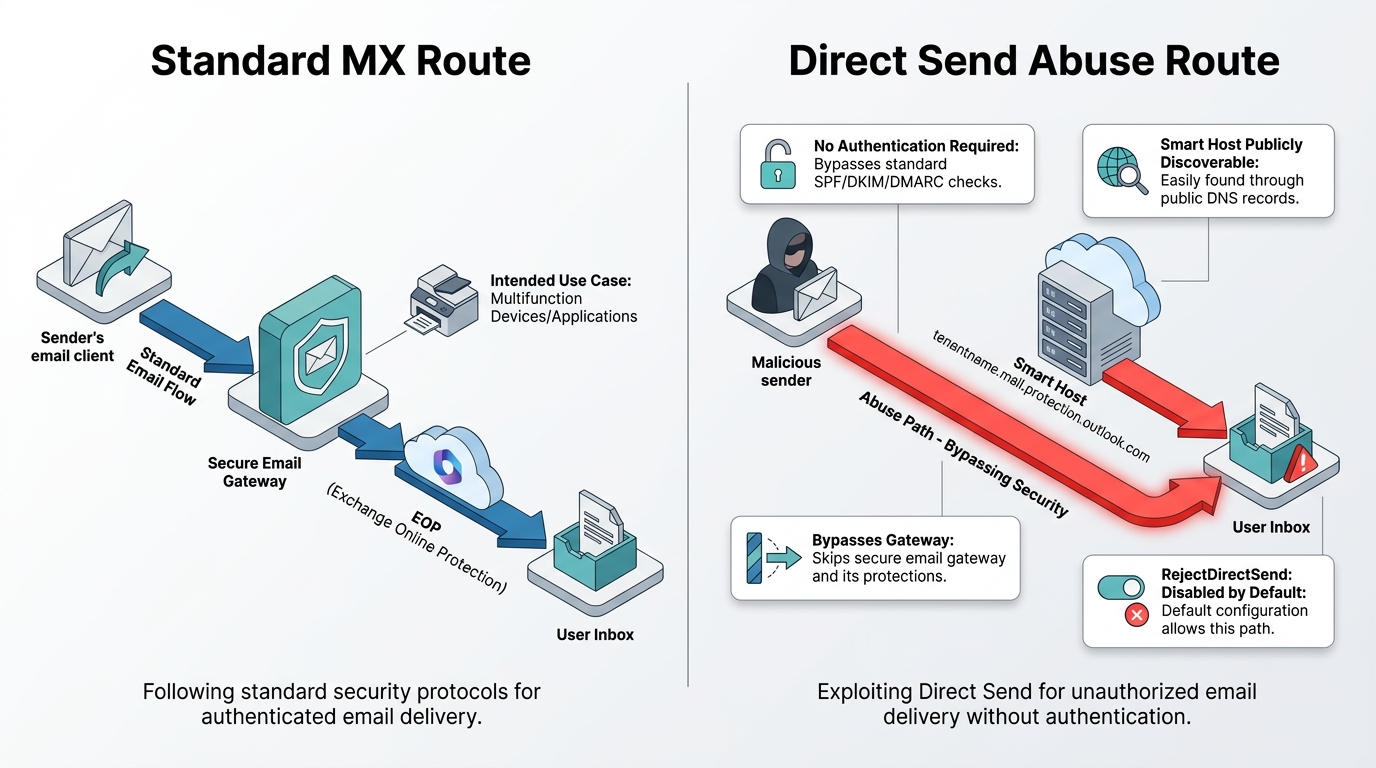
The RejectDirectSend organization setting entered public preview in June 2025. The Microsoft Direct Send control blocks anonymous inbound messages whose MAIL FROM address matches an accepted tenant domain and does not match an inbound connector. Microsoft disables it by default. Organizations that still need Direct Send can authenticate a partner connector with a certificate or source IP.
Authentication Bypass
Authentication enforcement can still permit delivery when sender policy, composite authentication, or routing conditions do not produce a blocking action.
Microsoft's anti-phishing defaults honor a sender's DMARC policy when EOP identifies a spoofed message. A p=reject policy produces a Simple Mail Transfer Protocol (SMTP) rejection, while p=quarantine routes the message to the Junk Email folder by default, and administrators can configure it to use quarantine. Senders publishing p=none receive no DMARC-specific action. A composite authentication failure also does not directly result in a block.
Routing creates another exception. When mail passes through a third-party gateway first, EOP may record compauth reason code 905, which means EOP did not enforce DMARC because of complex routing. Attackers can exploit the space between detection and enforcement, particularly against tenants whose mail passes through another service before reaching Microsoft 365.
What EOP Doesn't Protect Against
EOP may struggle with credential phishing from newly registered domains, image-based lures, and evasive email payloads that provide few known indicators for signature and reputation filtering.
Sophisticated Phishing and BEC Attacks
Sophisticated phishing and BEC attacks can appear legitimate because they rely on language, context, and social engineering instead of known malware.
EOP may struggle with zero-day credential phishing and business email compromise attacks. These attacks use clean domains, legitimate-looking content, and social engineering tactics rather than malware signatures. Static scanning often struggles to evaluate the context, intent, or behavioral deviations that distinguish malicious requests from routine business communications.
In a customer environment discussed during Abnormal's ThreatStream webinar, attackers impersonated internal government domains at a state, local, and education organization. The messages used HTML attachments containing Advanced Encryption Standard (AES)-encrypted payloads to evade static analysis. The campaign combined uninspected routing, unenforced authentication failures, and encrypted content. This layered evasion illustrates how sophisticated campaigns can move beyond the indicators signature-based tools typically evaluate.
QR Code and Image-Based Attacks
QR code phishing can conceal a destination inside an image and move the user's interaction from managed email controls to a mobile device.
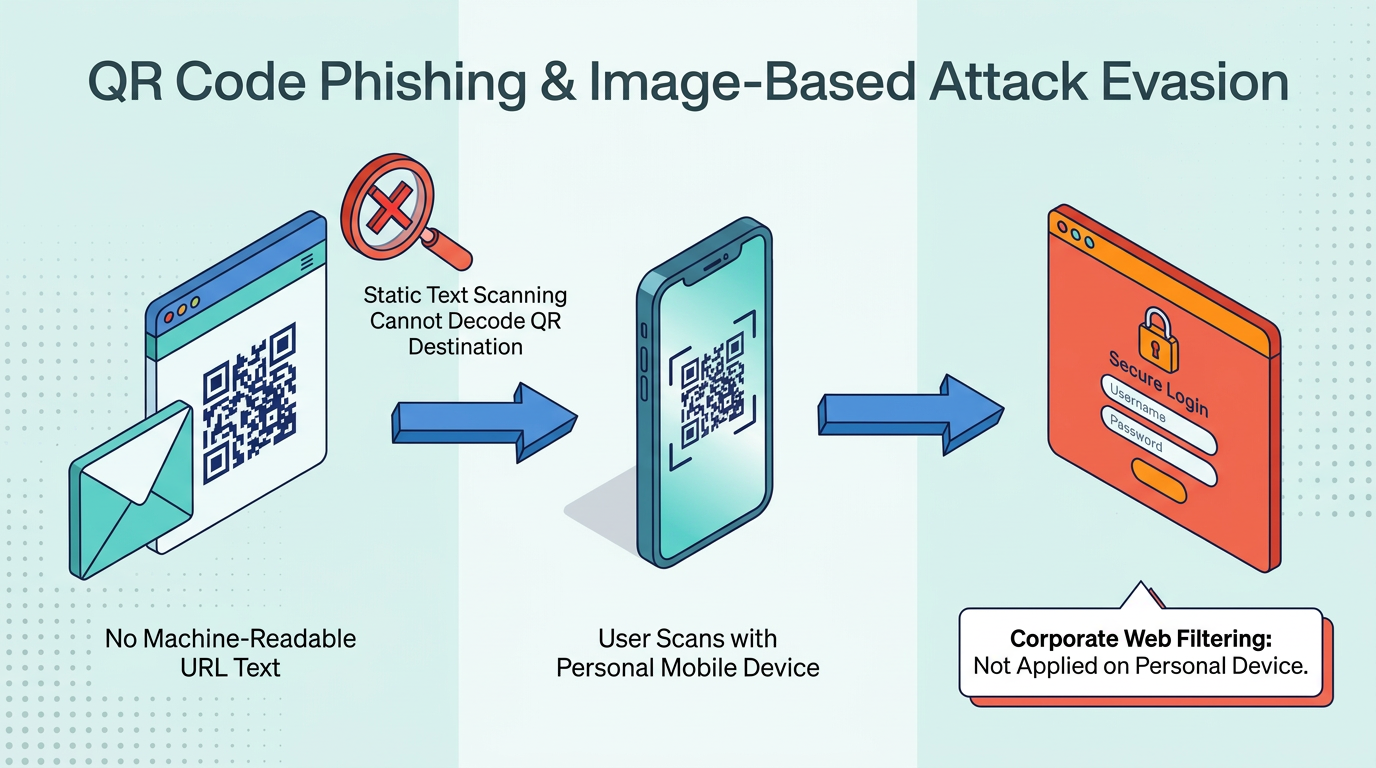
QR code phishing attacks encode the malicious URL in an image that users scan with their phones. This technique can circumvent email-based URL analysis because text-based scanning during mail flow may have no machine-readable destination to match. Static signature detection may also struggle to decode and evaluate the QR code destination, leaving the recipient to assess its legitimacy.
The technique shifts part of the attack surface from the email client to the user's mobile device, where corporate security controls may not apply. The email itself may contain no visible text link for a traditional content filter to evaluate.
Evasive Payload Techniques
CAPTCHA challenges, encryption, and HTML smuggling can prevent static tools from reaching or interpreting the same content a recipient sees.
Attackers use Completely Automated Public Turing tests to tell Computers and Humans Apart (CAPTCHAs) to hide payloads from non-human traffic. Traditional URL analysis tools often struggle to interact with these challenges in the way a user does. A recipient can pass the test and proceed to credential harvesting pages that the email security tool did not evaluate.
Encrypted payloads present a related challenge. As Garcia asked during Abnormal's ThreatStream webinar: "How effective are those sandbox evasion techniques and static signature-based scanning tools when the payload is encrypted?" Static scanning loses effectiveness when attackers obfuscate payloads that decode only in the victim's browser. HTML smuggling kits can wrap their logic in obfuscated JavaScript that executes after delivery, leaving little recognizable content for a mail-flow scan to match.
Exchange Online Protection vs. Microsoft Defender for Office 365
EOP provides baseline filtering, while Microsoft Defender for Office 365 adds advanced attachment, link, impersonation, investigation, and response controls.
Defender for Office 365 Plan 1 adds Safe Attachments, Safe Links, user and domain impersonation protection, and mailbox intelligence. Plan 2 includes automated investigation and response, Threat Explorer, Campaign Views, and attack simulation training.
Organizations facing targeted attacks or operating in high-risk industries often benefit from Defender's additional capabilities. Microsoft's anti-phishing documentation also states that baseline protection for cloud mailboxes does not include impersonation protection.
Organizations using third-party SEGs may bypass EOP spam filtering with SCL -1 rules and then lack equivalent coverage for alternate routing paths or internal email threats. Security teams should evaluate each mail flow path in their Microsoft 365 environments, including the connectors and preset policies that determine whether Defender features act on gateway traffic. The decision to upgrade depends on threat exposure, existing controls, and risk tolerance.
Best Practices for EOP Configuration
Five focused configuration checks can help organizations align EOP's actual behavior with their intended email security architecture.
Teams can confirm that partner inbound connectors preserve EOP filtering.
Teams can test whether authentication policies enforce the intended DMARC actions.
Teams can inventory and restrict systems that still rely on Direct Send.
Teams can review transport rules for broad or outdated filtering exceptions.
Teams can test the production mail path against current attack techniques.
These checks provide a practical framework for reviewing the detailed controls below.
Validate Protections and Mail Flow Rules
Connector settings and transport rules should preserve the protections that administrators expect EOP to apply.
Teams can confirm that Enhanced Filtering for Connectors is active for each partner inbound connector that accepts gateway traffic. They can then review the transport rule set for rules that assign SCL -1 to traffic from those connectors, because those rules can cancel the filtering that Enhanced Filtering was intended to preserve. The Standard and Strict preset security policies also remain off until an administrator enables them.
Transport rules created for legitimate purposes can become email security bypasses as infrastructure changes. Safe-sender rules that whitelist entire IP ranges carry particular risk because gateway providers may share those ranges across customers. Migration rules also deserve review after the gateway, connector, or routing path they supported has changed.
Test Email Authentication Enforcement
Authentication testing should verify policy outcomes rather than stopping at the presence of SPF, DKIM, or DMARC results.
A composite authentication failure can still result in delivery when other assessments do not indicate that the message is suspicious. The receiving and sending sides also use separate configurations, so teams need to check both. On the receiving side, teams can verify that anti-phishing policies enable the Honor DMARC record policy setting. On the sending side, organizations can publish p=reject for organizational domains where operationally appropriate.
Testing can include gateway-routed mail so teams can identify complex-routing exceptions before attackers do.
Restrict Direct Send Traffic
Reducing Direct Send exposure starts with identifying which devices and applications still depend on unauthenticated delivery.
Microsoft's device guidance states that most customers do not need Direct Send and recommends authenticated client SMTP submission for printers, scanners, and line-of-business applications. Organizations can inventory the devices and applications that rely on Direct Send, migrate supported senders to SMTP authentication or an authenticated connector, and then enable RejectDirectSend.
Systems that cannot migrate immediately can authenticate a partner connector with a certificate or source IP. Teams can also validate that connector scope is narrow enough to admit only the expected senders. This approach preserves necessary device workflows while reducing the opportunity for anonymous messages to spoof an accepted tenant domain.
Consider Threat-Informed Testing
Threat-informed testing shows whether production controls evaluate the techniques used in current phishing campaigns.
Test cases can reflect current attack techniques, not only historical malware signatures.
Useful scenarios include QR code lures, CAPTCHA-gated links, encrypted or smuggled attachments, and Direct Send spoofs of the organization's domain. Teams can run these tests against the same connectors, rules, policies, and delivery paths that production users receive. The results can help security teams distinguish configured controls from controls that actively inspect each relevant route.
Extend EOP With Behavioral Email Defense
Closing EOP coverage gaps starts with mapping mail flow, correcting bypass rules, enforcing authentication policy, and adding complementary detection where static controls have limited context.
A defense-in-depth approach can help teams evaluate additional layers that address EOP's architectural limitations. Abnormal evaluates behavioral and identity signals and uses social graphing to understand patterns such as workflow cadence, recipient behavior, timing, engagement flows, and vendor interactions. As Ryan Schwartz, Senior Manager of Product Marketing at Abnormal, noted during Abnormal's ThreatStream webinar: "We're taking all of these different signals into account and making a determination whether this deviation from that normal behavior that we've baselined for this company is truly indicative of an attack."
Abnormal's API-based architecture can help provide visibility across relevant email paths. It works alongside the existing security stack rather than replacing it. This approach helps surface sophisticated email threats that signature-based tools may miss, including spoofed internal requests with few known indicators.
Gartner recognized Abnormal as a Customers' Choice in the 2026 Gartner® Peer Insights™ Voice of the Customer for Email Security. The recognition supports its complementary role in helping organizations extend existing email security infrastructure with behavioral context.
Request a demo to see how Abnormal's behavioral AI is designed to identify evolving email attacks that legacy defenses may miss.
Frequently Asked Questions
Is Exchange Online Protection the Same as Microsoft Defender for Office 365?
No. Defender for Office 365 adds Safe Links, Safe Attachments, and impersonation protection to EOP. Licensing also differs: EOP ships with any Exchange Online mailbox, while Defender requires a Plan 1 or Plan 2 add-on or a bundle such as Microsoft 365 E5. Organizations that expect impersonation coverage or automated investigation as part of their baseline typically need to confirm which Defender tier, if any, is active in the tenant.
Does EOP Block Direct Send Abuse by Default?
No. Microsoft disables RejectDirectSend by default. Administrators need to enable the setting explicitly in the Exchange admin center or through PowerShell, and only after confirming that no production device or application still depends on unauthenticated smart host delivery. Message trace and mail flow reports can help identify the senders that would break if the control were turned on without a migration plan.
Why Can QR Code Phishing Evade EOP?
Because QR code phishing can encode a malicious URL in an image, leaving no machine-readable text for mail-flow analysis. The destination only resolves once a user points a phone camera at the code, which typically moves the click to a personal device outside the corporate network and its web filtering. Detection generally requires image analysis that can decode the QR payload and evaluate the resulting URL in the same way a browser would.