Key Insights
Web agents leaked a user's personally identifiable information (PII) at rates as high as 70% after researchers planted lookalike HTML elements on the pages they visited, in the Environmental Injection Attack study published at ICLR 2025. Browser agent security risks are the exposures created when AI acts in a browser with the user's signed-in access. The first is indirect prompt injection, where hidden text on untrusted pages gives the agent instructions it follows as the user's own. Others include session misuse, data sent to the provider, phishing aimed at the agent, and logs that cannot distinguish the agent from the user. Security teams reduce them with agent inventory, scoped sessions, approval for consequential actions and attributable logs.
This guide takes each risk in turn, then sets out the controls behind a block, restrict or allow decision.
What Is a Browser Agent?
A browser agent is AI that reads web pages and acts in a browser for a user: it clicks, types, fills forms and moves between tabs. It appears in AI browsers with a built-in agent and in agent modes inside AI assistants.
A chatbot returns text and leaves the next step to a person, while a browser agent carries the steps out itself. An agent repeatedly prompts a model, executes the actions it selects and feeds the results into the next prompt, the loop behind how agentic AI works.
Why Do Browser Agents Change the Risk Picture?
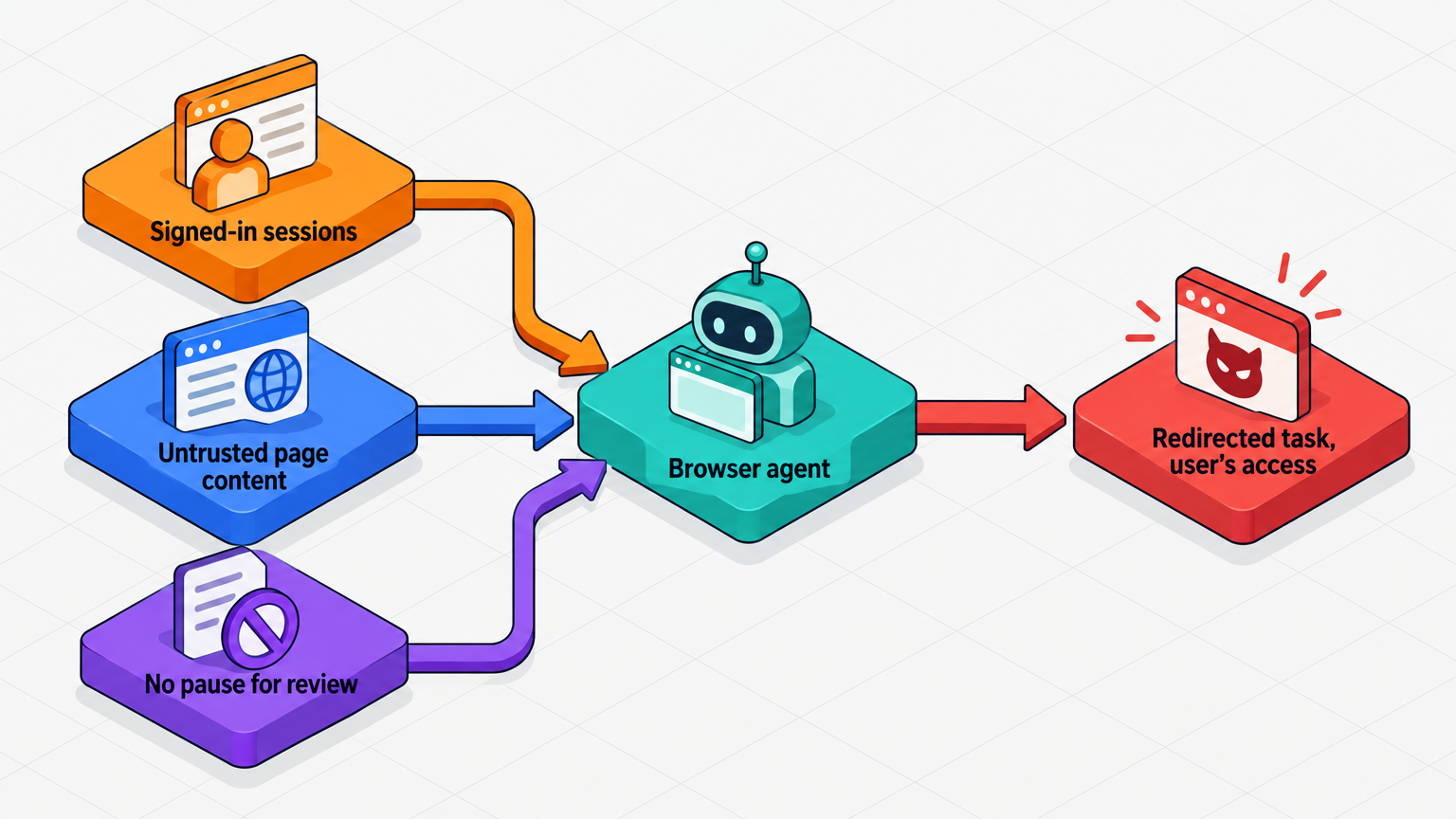
Browser agents change the risk picture because one process holds the user's signed-in sessions, reads content written by strangers and acts without pausing for review. A page the agent reads can redirect the task it was given, and the agent carries that redirected task out with whatever access the user already has. Even an agent that notices something suspicious keeps working toward finishing its task, and its own caution offers little protection.
What Are the Main Browser Agent Security Risks?
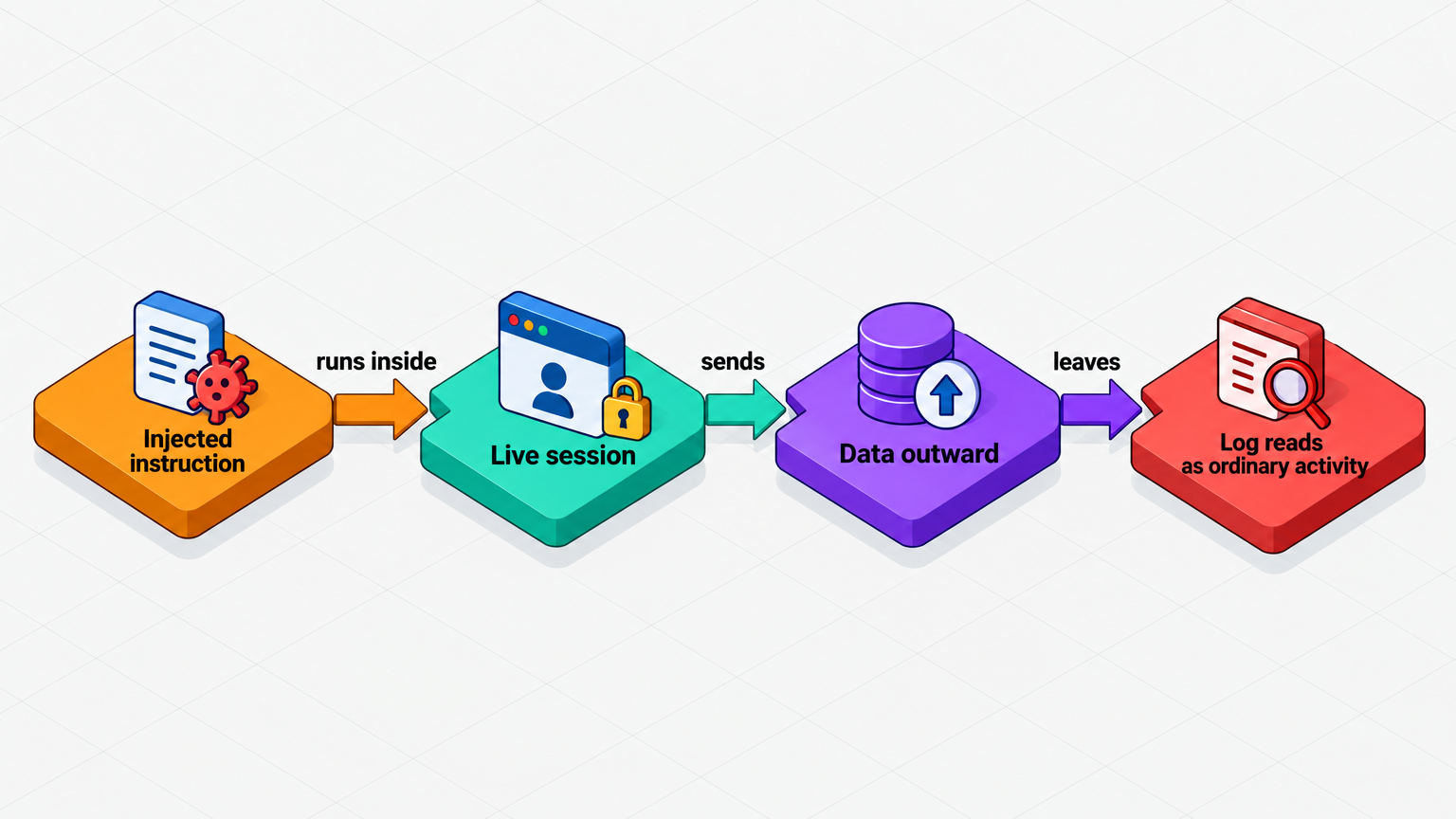
The main browser agent security risks are injection through page content, phishing that targets the agent, misuse of live sessions, logs too coarse to attribute actions, and data exposure to the provider. A single incident often combines several: an injected instruction runs inside a live session, sends data outward, and leaves a log that reads as ordinary activity.
Injected Instructions and Phishing Pages That Steer the Agent
Indirect prompt injection happens when an agent treats text on a page as an instruction. It is a form of prompt injection against AI models delivered through a resource the model reads, such as a web page, rather than through the user's input.
For example, an employee asks an agent to summarize a supplier's pricing page, and hidden text there tells it to paste the newest webmail thread into a form elsewhere. The agent cannot reliably tell the page's instruction from the employee's, and the same browsing and form-filling tools it uses for the task can carry the data out.
Phishing aimed at agents exploits the same weakness: it targets the model's judgment rather than a person's. A forged login prompt placed mid-task can read to an agent as a required step, and the cues a person uses to spot a fake, such as a typosquatted domain or an unencrypted connection, carry less weight for a model working through a task list.
An agent that already holds a mailbox session does not need to be tricked into signing in, because a lookalike page only has to ask for content the agent can already reach. A person who doubts a page can stop and ask a colleague, while the agent has no equivalent step and the forged page is its only evidence.
Session Misuse That Logs Cannot Attribute
A browser agent acts with the sessions the user has open: forwarding email, sharing SaaS files, placing orders on procurement sites and submitting internal forms that start real workflows. The application sees a valid user session and has no way to tell the agent's click from the user's.
The 2026 OWASP Top 10 for Agentic Applications files this under Identity and Privilege Abuse (ASI03), which it calls the agentic evolution of excessive agency in AI. When an agent has no governed identity of its own, its actions cannot be attributed to it, and least privilege is hard to enforce against an identity that belongs to somebody else.
That misuse is hard to reconstruct afterward, because browser-session logs cannot distinguish an agent from the user when both share the same cookies, IP address and browser characteristics, and the surrounding controls each see only part of the activity. A secure web gateway (SWG) may see a connection to an AI service but not the request content, and data loss prevention (DLP) tools built around files struggle with text pasted into a prompt.
Across cloud and SaaS systems, audit events frequently lack the correlation identifiers that would let an investigator follow one task end to end. The effect lands after an incident, when reconstructing what happened means inferring which actions were the agent's.
Data Exposure to the Agent and Its Provider
Whatever a browser agent reads on a page, it can send back to its provider. In an audit presented at USENIX Security 2025, researchers found that generative AI browser assistants, when invoked, often sent page content to their own servers, sometimes the full HTML DOM and form inputs. One captured a Social Security number entered on an IRS website, and assistants also collected data from authenticated patient portals.
Personal data reaching a provider nobody reviewed can count as a disclosure under privacy rules, intended or not, and the vendor review that would normally come first never happens. The exposure scales with whatever the user has open, since an agent invoked on one tab can read whatever that signed-in session renders.
Provider terms decide what happens to that content next, including whether it is retained, for how long and whether it can be used to train future models. Consumer and enterprise plans of the same tool often carry different terms, and an employee signed in with a personal account on a work device can route company data under terms the organization never reviewed or accepted.
How Can Security Teams Reduce Browser Agent Security Risks?
Security teams can reduce browser agent security risks by treating each agent as a privileged identity that is known, scoped, supervised and recorded. Starting with low-risk tasks and declining to grant agents broad or unrestricted access to sensitive data and critical systems keeps the early exposure small while inventory, policy, session separation, approval and logging are built out.
Inventory Agents and Set Policy on Where They Act
An agent inventory is the base for every other control. A trusted registry binds agents to authorized roles, is reconciled periodically against the live set of agents, and denies access to any agent missing from it. For browser agents, that covers AI browsers on managed devices, agent modes in approved assistants, AI-powered browser extensions and Model Context Protocol (MCP) servers that give agents tools.
Undeclared MCP servers belong in the same reconciliation, since a tool an agent can call is part of its reach whether anyone recorded it or not. Abnormal's AI Governance is designed to discover approved and shadow AI tools and agents from signals such as email signups, OAuth grants and identity activity and to attribute ownership.
Policy for browser agents is set in the browser itself. Enterprise browser policies can switch generative AI features off, stop a built-in assistant from reading page content and limit where an integrated agent may act by URL pattern. Blocklists keep agents away from banking, HR and admin sites, and extension policies can block unapproved extensions or stop approved ones from injecting scripts.
These settings implement a block, restrict or allow decision. Blocking fits tools that send page content to providers without acceptable data terms, restricting fits approved tools confined to low-risk sites and allowing fits where identity, approval and logging controls already operate.
Keep Agents Out of High-Privilege Sessions and Confirm High-Impact Actions
An agent stays out of a privileged session most reliably when it was never signed in to one. For browser agents, least privilege and just-in-time credentials for privileged actions translate into a separate browser profile signed in only to the apps the task needs, with admin consoles, finance systems and identity portals out of reach.
Standards for agent identity are still forming, and in the meantime a separate account or profile gives access policy and logs something distinct to work with. The separation also bounds what a hijacked session can reach, since the agent's cookies cover only the apps that profile signed in to.
High-impact actions call for prior human approval, with the decision about when approval applies resting with system designers or operators, not the agent. For browser agents, that covers purchases, payments, form submissions that create records, sending or forwarding email, and sharing files or changing access.
Step-up authentication suits the critical cases, such as payment initiation, privilege changes and bulk deletion. Each approval works best bound to the exact action, recording actor, tool, target and expiry, because a general approval outlives the task it was meant for. An in-browser confirmation dialog can be targeted by injected content, while a step-up challenge issued by the identity provider sits outside the agent's control.
Log and Review Agent Activity
Agent logs support an investigation or a routine review only when every one of these properties holds:
Agent and Delegating User: Naming both lets analysts separate agent clicks from human ones in the same session.
Tool Calls and Approvals: Human-readable logs of agent tool usage record approval identifiers and results for high-risk actions.
Tamper Resistance: Agent logs need protection from modification or deletion, and immutability where the platform supports it.
SIEM Delivery: Activity that never reaches a security information and event management (SIEM) platform cannot be correlated with anything else the organization sees.
Anomaly detection comparing an agent's stated task with its observed actions turns the log from a passive record into something a security team can act on. Review works best against the agent inventory: each registered agent's actions compared with the tasks it was assigned, each approval matched to the action it covered, and any action by an agent missing from the registry treated as an incident. Retaining these logs for the organization's full investigation window keeps them useful for incident response, because an investigation can begin long after the task ran.
Treating Browser Agents as Privileged Users
Browser agents call for the controls teams already apply to privileged users: an inventory, scoped access, approval for consequential actions and records that identify who acted. Security teams that can see which agents run where, and separate agent actions from human ones, can allow these tools by decision instead of by default.
Abnormal's AI Governance, generally available as part of the AI Security suite, is designed to discover approved and shadow AI tools and agents and attribute ownership for each one. Explore AI Governance to see which agents are already running.
Frequently Asked Questions
What is a browser agent?
A browser agent is an AI system that operates a web browser on someone's behalf: it opens pages, clicks links, types, completes forms and switches tabs. It is built into AI browsers and into the agent modes of AI assistants. Text-only chat ends with an answer; a browser agent acts.
Are AI browsers safe for enterprise use?
Yes, with guardrails in place. These include an approved-tools list, agents confined to low-risk sites and tasks, no access to admin or finance sessions, human sign-off before high-impact actions, and logs that distinguish agent activity from the user's own.
How does prompt injection affect browser agents?
Prompt injection reaches browser agents through the pages they read. Hidden text, planted page elements or fake forms carry instructions the agent mistakes for part of its job. Working inside the user's signed-in sessions, a redirected task can send messages, submit forms or move data the user can reach.
Should companies block AI browsers?
No, not necessarily. Blocking suits tools that pass page content to a provider whose data terms the organization cannot accept. Restriction suits approved tools kept to low-risk sites and allowing suits environments where identity, approval and logging controls already work.
How can security teams monitor what a browser agent does?
Security teams can give each agent an identity separate from the user, then log every action the agent takes, naming the agent, the delegating user, the tool and its parameters. Protecting those logs and sending them to a SIEM lets analysts correlate agent activity with identity signals and review it against the assigned task.