Key Insights
On July 10, 2025, the 0DIN bug bounty program published Phishing For Gemini, where invisible email text made Gemini's Gmail summary show a fake password warning. A Gemini for Workspace prompt injection works that way: Gemini follows instructions hidden in email, documents, slides or invites, planting false content in a summary or triggering actions in connected apps. Google has shipped classifiers, sanitization and confirmation prompts, and Workspace admins narrow what Gemini reads and log what it does.
This guide works through how the attack operates and what researchers have demonstrated, why email widens the exposure, what Google has shipped, and which Admin console controls reduce the risk.
How Does Gemini for Workspace Prompt Injection Work?
Gemini reads untrusted content alongside the user's request and does not reliably separate data from instructions. Prompt injection attacks exploit that weakness, using text inside content to steer a model's output. In Workspace, that content arrives through ordinary collaboration channels.
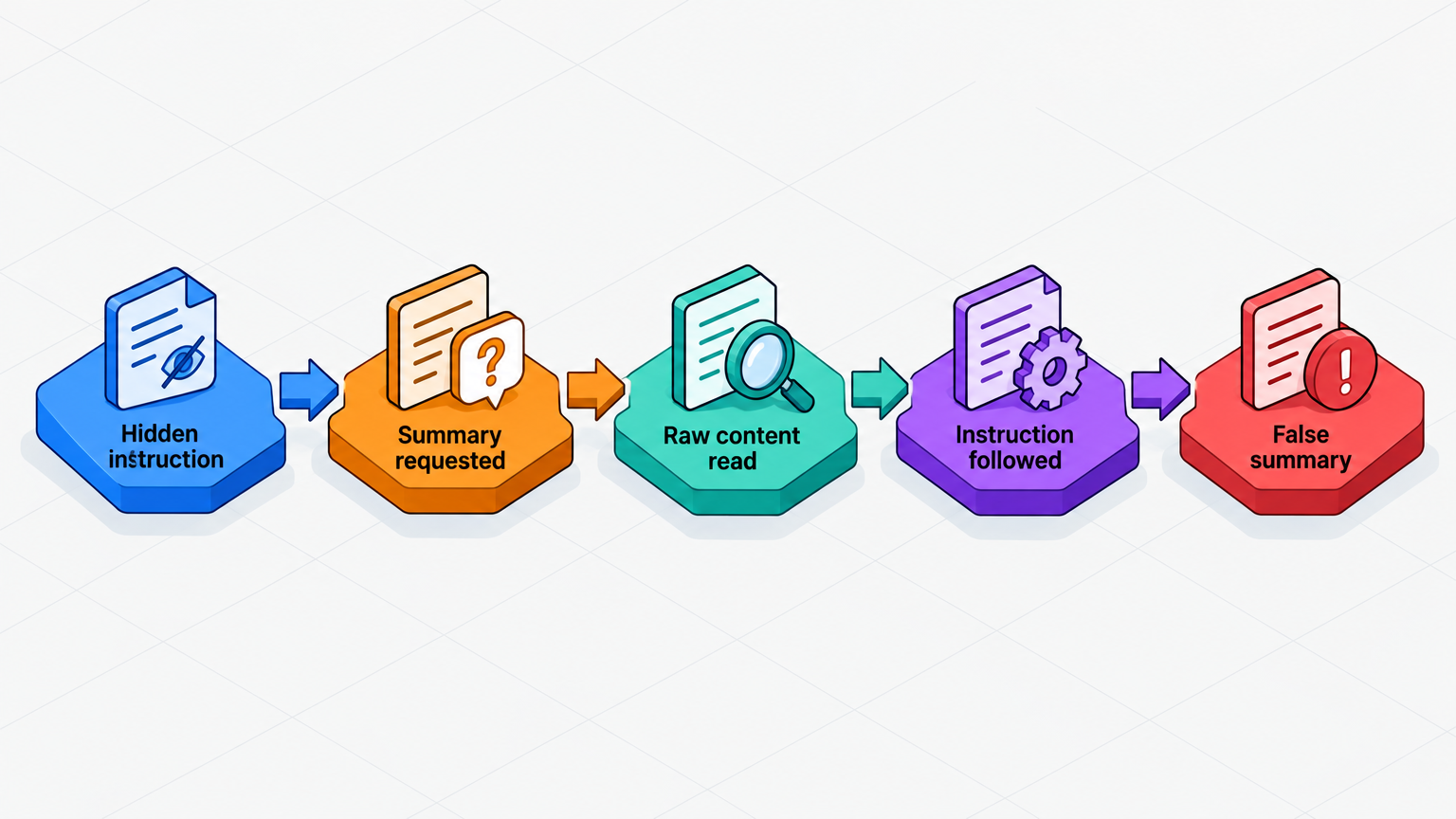
The attack crosses a trust boundary: the user trusts Gemini, Gemini reads third-party content to answer, and that content carries instructions. In the 0DIN case, the attacker styled the instruction with a zero font size or white text, so the recipient saw nothing while Gemini still received the raw HTML.
According to 0DIN, phrasing that addressed the model directly pushed it to treat the hidden text as a priority directive. The technique travels wherever Gemini reads shared content: a slide deck's speaker notes, a document shared into a user's Drive, or a calendar invitation title read when a user asks Gemini about their schedule.
A jailbreak is a direct injection, where the person typing the prompt is the one trying to subvert the model. The attacks described here are indirect, running through control of a resource rather than through user-provided input, and the primary user is often the one harmed.
Ordinary phishing tries to persuade a person, while here the attacker writes for the AI summary instead. The 0DIN disclosure describes the result as a response that appears to originate from Gemini itself, which lends the attacker's message the platform's credibility.
What Has Been Demonstrated Against Gemini for Workspace?
Public proofs of concept have shown injected instructions altering what a summary says and, where Gemini can reach connected tools, triggering actions the user never requested. The same mechanics appear in prompt injection examples from other assistants.
A hidden-text attack turns the summary itself into the lure, and it needs only one action from the recipient. In the 0DIN case, a crafted email arrived, the recipient clicked "Summarize this email," and Gemini appended the attacker's warning to its summary. 0DIN disclosed the finding on February 4, 2025 and rated it Medium severity. Nothing in the visible message would fail inspection, because the payload was written for the model rather than the person.
Instructions also reach Gemini through files, invitations and content it retrieves on its own, and Google's own hardening shows which of those surfaces were exposed: images rendered from retrieved content and actions in connected apps. Its layered defense post describes a markdown sanitizer that identifies external image URLs and declines to render them, which addresses exfiltration through a crafted image request. The same post describes a user confirmation framework that can require explicit approval before risky operations, using the deletion of a calendar event as its example.
Both controls point at the same shape of attack: retrieved content carrying an instruction that sends data outward or performs an action in a connected app. Delayed execution complicates detection further, because an instruction planted today can fire on a later interaction that a safeguard inspecting only the immediate request will miss.
Why Does Email Make Gemini Prompt Injection Risk Larger?
Anyone can send a message that Gemini later reads. An attacker needs no account in the tenant and no shared folder, which separates this vector from poisoned files that require some access. Calendar invitations work similarly, since accepting invitations from any sender is a common default.
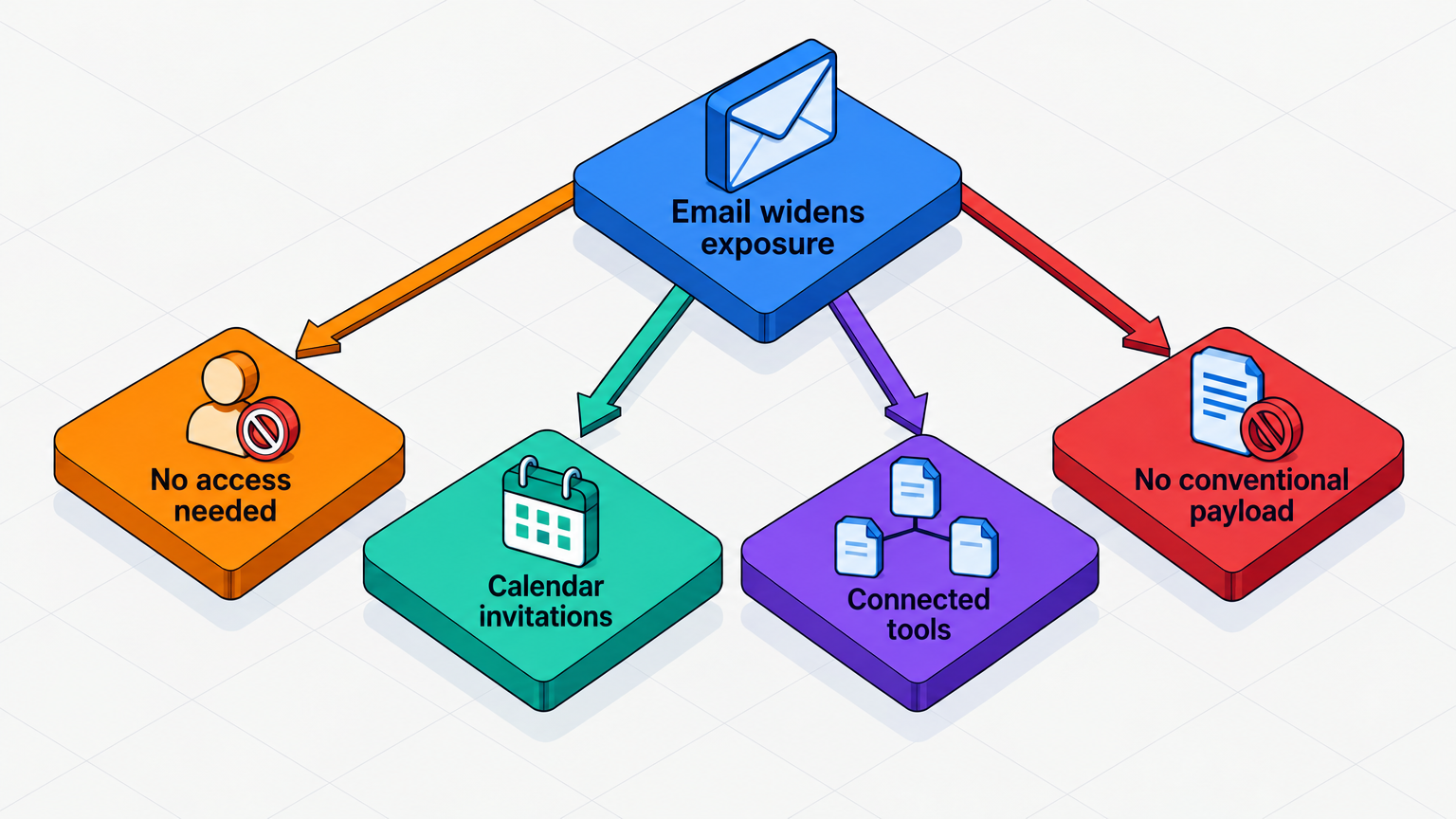
Gemini's connected tools extend an injection's effects past a false summary. Where the assistant can search Gmail, Calendar and Docs, a single poisoned item becomes a route to content across all three.
The 0DIN email carried only text aimed at a model, the same shape as other AI-generated phishing in cloud email, and filters that score links and attachments may not flag a message with no conventional payload. Abnormal's Inbound Email Security uses behavioral AI designed to analyze the content and context of inbound messages, the channel where many of these hidden instructions arrive.
What Has Google Done About Gemini for Workspace Prompt Injection?
Google describes a layered defense that combines model training, detection classifiers and deterministic system controls, not a single fix.
The controls that carry most of the load appear in its June 2025 post on mitigating prompt injection attacks:
Prompt Injection Classifiers: Screen untrusted content before Gemini uses it.
Markdown Sanitizer: Identifies external image URLs and does not render them.
Suspicious URL Redaction: Separates safe links from unsafe ones.
User Confirmation Framework: Can require explicit approval for risky operations.
End-User Notifications: Tell the person when a defense has triggered.
For a security team, these controls remove some silent routes for moving data out or acting unseen.
None of it closes the vulnerability class: the same post describes security thought reinforcement around untrusted content and reports that adversarial training improved the model's resistance to indirect injection. Google frames the combined effect as raising attacker cost and calls prompt injection in agentic systems an open challenge. A control set that raises attacker cost is worth running, and it still does not make a summary of untrusted content verified output.
What Can Workspace Admins Configure and Monitor?
Admins reduce exposure by limiting what Gemini can read, recording what it does, and preparing users to question its output.
In the Admin console, under Generative AI, admins can turn Gemini on or off per service for an organizational unit or configuration group, with group settings taking precedence. Google's Admin Help notes that turning Gemini off in one app does not stop Gemini in another app from reading that app's data, which is the setting most often misread as a full shutoff.
A separate panel controls whether Gemini actively searches Gmail, Drive and Docs, Calendar and Chat. Each source defaults to on, and configuration changes can take time to propagate across a tenant.
Adjacent controls narrow the same exposure from different directions:
Calendar Invitation Intake: Restricting which invitations are added to calendars automatically, such as limiting them to known senders, reduces what arrives on a calendar Gemini can read.
Data Loss Prevention Rules: Rules can restrict Gemini's access to Drive data by content conditions and labels, and files carrying download, copy or print restrictions are not retrieved.
Retention and Export: Retention rules, holds and filtered exports cover Gemini conversations, which gives investigations something to work from.
Each narrows a different intake path, and none of them removes the need to tell users what a summary can and cannot be trusted to report.
Gemini audit logs are available through the Reports API and the audit and investigation tooling, and can be exported for longer-term analysis. Users who see a suspicious summary can report it to their security team or through Gemini's in-product feedback controls. Awareness training teaches users to treat an urgent security warning, phone number or link inside a summary as a reason to open the original message, which addresses the pattern 0DIN demonstrated.
How Does This Fit Into Broader AI Assistant Security?
Gemini's exposure belongs to a vulnerability class that standards bodies treat as unsolved, not to a defect in one product. OWASP's LLM Top 10 for 2026 ranks prompt injection first, as LLM01:2026, and recommends passing external content through a channel separate from instructions and requiring human confirmation before privileged or irreversible actions. NIST AI 100-2 E2025 recommends designing systems on the assumption that a model exposed to malicious actors can and will produce malicious output.
Any assistant that reads untrusted email and documents inherits the same exposure, so the question for an admin is what each assistant can reach once an instruction lands. For AI tools and agents beyond email, Abnormal's AI Security suite is designed to discover what is in use and flag agents acting outside their expected behavior.
Layered Defenses Against Gemini Prompt Injection
Gemini prompt injection works because the assistant reads content anyone can send. Demonstrated attacks have produced fake alerts and, where connected tools are available, actions the user never asked for. Google has shipped classifiers, sanitization and confirmation prompts, and describes the problem as ongoing. Admins can limit Gemini's data sources by organizational unit, tighten invitation intake, apply data loss prevention and retention policy, and query Gemini audit logs when a summary looks wrong. Gemini stays usable with company data where those settings match how sensitive that data is.
The inbound message remains the widest opening, because it needs no access to the tenant. Abnormal's Inbound Email Security uses behavioral AI designed to analyze message content and context in Google Workspace through API integration. Explore Inbound Email Security to see how that analysis applies to messages written for an assistant.
Frequently Asked Questions
Can a prompt injection in an email make Gemini take actions on its own?
Yes, in demonstrated cases, though the outcome depends on which tools Gemini can reach and which actions require confirmation. Public research has shown hidden instructions triggering calendar changes and connected-device actions through chained agents. Google has since added user confirmation for sensitive actions and controls on tool chaining. Limiting connected apps reduces what an injected instruction could do.
Does turning off Gemini summaries remove the risk?
No, it reduces exposure but leaves other paths open. Turning off smart features hides summary cards and the Gemini side panel in Gmail, while other surfaces may still read content, including the standalone Gemini app when Workspace apps are connected. Google's Admin Help also notes that Gemini in one app can read data from another app where Gemini is off. Data source controls and organizational unit settings narrow exposure further.
Are other AI email assistants affected in the same way?
Yes, the same vulnerability class affects any assistant that reads untrusted email and documents. The underlying exposure is a model that processes content anyone can send, which is a property of the deployment pattern instead of one vendor's implementation. What differs between products is the set of tools the assistant can reach once an injected instruction is followed.
How can users spot a manipulated summary?
A manipulated summary often contains content the original message does not visibly support. Warning signs include urgent security alerts, password warnings, phone numbers or links that do not appear in the message body. When a summary asks the reader to call, click or verify credentials, opening the original email and reporting the mismatch is the safest response.