Session hijacking prevention addresses a gap that authentication alone cannot close. Once a user signs in, the server issues a token that carries their identity across later requests, and anyone who presents it gets the same access. Passwords and multifactor authentication (MFA) verify who signs in, but not who holds the token later. Defending against session theft means protecting the token from creation to destruction.
Key Takeaways
A session token grants the same access as the user it represents, so it needs protection equal to sign-in itself.
Transport encryption, hardened cookies, and short session lifetimes address different theft vectors.
Device-binding and proof-of-possession mechanisms revalidate trust after the session token is issued.
Because some tokens will still be stolen, watching for suspicious session behavior and revoking compromised tokens quickly limits what an attacker can do.
Why Session Hijacking Prevention Must Continue After Authentication
Authentication verifies a user at sign-in, while the session token carries that trust forward. The browser stores the token as a cookie and presents it with each request until the server renews, expires, or invalidates it.
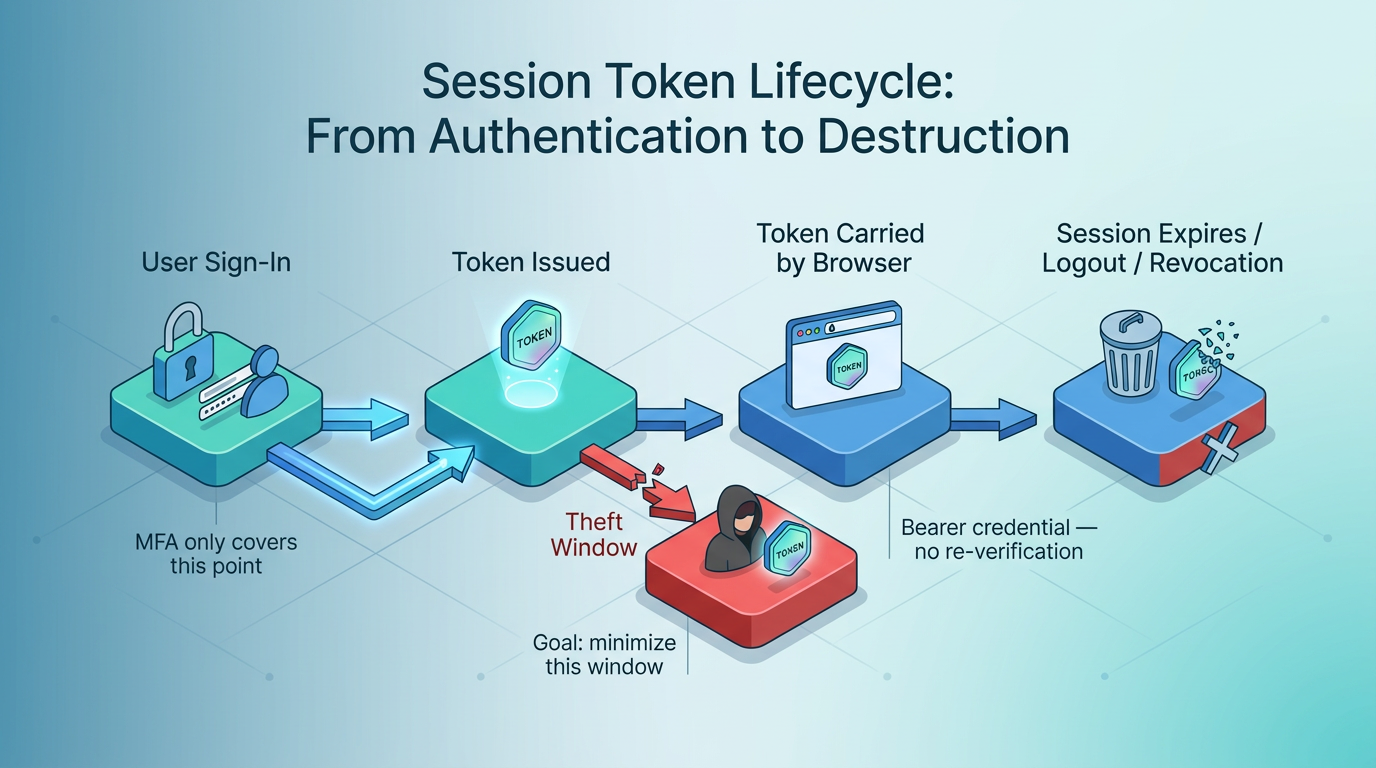
Malware can read post-authentication cookies from an infected browser and send them to an attacker, who replays them from another browser. The server sees a validated session, so no login or MFA challenge occurs. Unlike a stolen password, a stolen token has already passed authentication.
Session Hijacking Risks and Real-World Lessons
A hijacked session turns existing trust into direct access to data and account actions, exposing user data and enabling fraudulent transactions or unauthorized account changes. A resulting personal-data leak may also bring regulatory penalties.
These are documented techniques. A Cybersecurity and Infrastructure Security Agency (CISA) advisory on ALPHV describes Blackcat affiliates using Evilginx2 to capture MFA credentials, login credentials, and session cookies through adversary-in-the-middle phishing. According to CISA's LummaC2 advisory, the malware exfiltrates credentials, session cookies, and MFA details, with more than 21,000 forum listings selling LummaC2 logs between April and June 2024. One technique steals the token during login; the other harvests it afterward. Prevention has to cover both.
Layered Session Hijacking Prevention Controls
Encryption stops interception but does not stop endpoint malware. Timeouts limit the damage caused by other theft methods.
Transport Protection Against Interception
Encrypting only the login page is insufficient. Transport Layer Security (TLS) has to cover the entire session because a cookie sent over plain Hypertext Transfer Protocol (HTTP) on a later request is readable by anyone sniffing the network, especially on open Wi-Fi. Certificate validation helps defeat server impersonation by blocking connections that use untrusted certificates. Browsers also display warnings for expired or mismatched certificates.
HTTP Strict Transport Security (HSTS) adds two protections once the browser knows the policy or the domain appears on a preload list. The browser rewrites HTTP requests to Hypertext Transfer Protocol Secure (HTTPS) before they leave the machine, which defeats Secure Sockets Layer (SSL) stripping, and it blocks click-through on certificate warnings. Without preloading, a first visit over HTTP may remain exposed before the browser receives the HSTS policy. A secure configuration also extends HSTS to subdomains because an attacker-controlled subdomain can otherwise target domain-scoped cookies. One script loaded over HTTP on an HTTPS page reopens the sniffing channel.
Hardened session tokens and strict control over where the browser stores and sends them address session fixation, ID prediction, client malware, and theft by injected scripts.
Cookie and Token Protection Against Theft
A session token that can be guessed does not need to be stolen, so secure session tokens use at least 64 bits of entropy from a cryptographically secure random generator. Keeping them out of Uniform Resource Locator (URL) parameters prevents exposure through referrer headers and browser history. Each cookie attribute addresses a specific vector:
Secure: The browser never sends the cookie over unencrypted HTTP, so network disclosure fails even if a stray HTTP request slips through.
HttpOnly: Scripts cannot read the cookie value through the browser's Document Object Model (DOM), which limits token extraction during a cross-site scripting (XSS) attack. Injected scripts can still perform authenticated actions from the legitimate page.
SameSite=Strict (or Lax where usability demands it): The browser limits when cookies are attached to cross-site requests. Strict sends them only on same-site requests. Lax allows some cross-site top-level navigations and helps reduce cross-site request forgery risk.
__Host- Prefix: The cookie must use Secure and Path=/ with no Domain attribute. These requirements prevent broader domain scoping and cookie injection by subdomains.
Storage location matters too: HTML5 local storage is readable by any script on the page, so session tokens kept there face exactly the XSS attacks HttpOnly prevents. Cookie scope also benefits from narrow path and domain settings, which reduce the number of requests and hosts that receive the session token.
Session Rotation and Expiration Against Persistent Access
Even a well-protected token becomes a liability if it lives too long or survives events that should end it. Regenerating the session ID immediately after authentication defeats session fixation, where an attacker plants a known ID before the victim logs in and inherits the session afterward. Effective logout invalidates the session on the server. Clearing the browser cookie alone leaves stolen copies valid.
Between login and logout, two clocks should run:
An idle timeout, often 2 to 5 minutes for high-value applications and 15 to 30 minutes for lower-risk ones.
An absolute timeout that ends the session regardless of activity.
The National Institute of Standards and Technology (NIST) session guidelines, revised in 2025, set two tiers of session limits, both a relaxation from the prior AAL2 threshold of 12 hours and 30 minutes:
Authentication Assurance Level 2 (AAL2): 24 hours overall, 1 hour of inactivity.
Authentication Assurance Level 3 (AAL3): 12 hours overall, 15 minutes of inactivity.
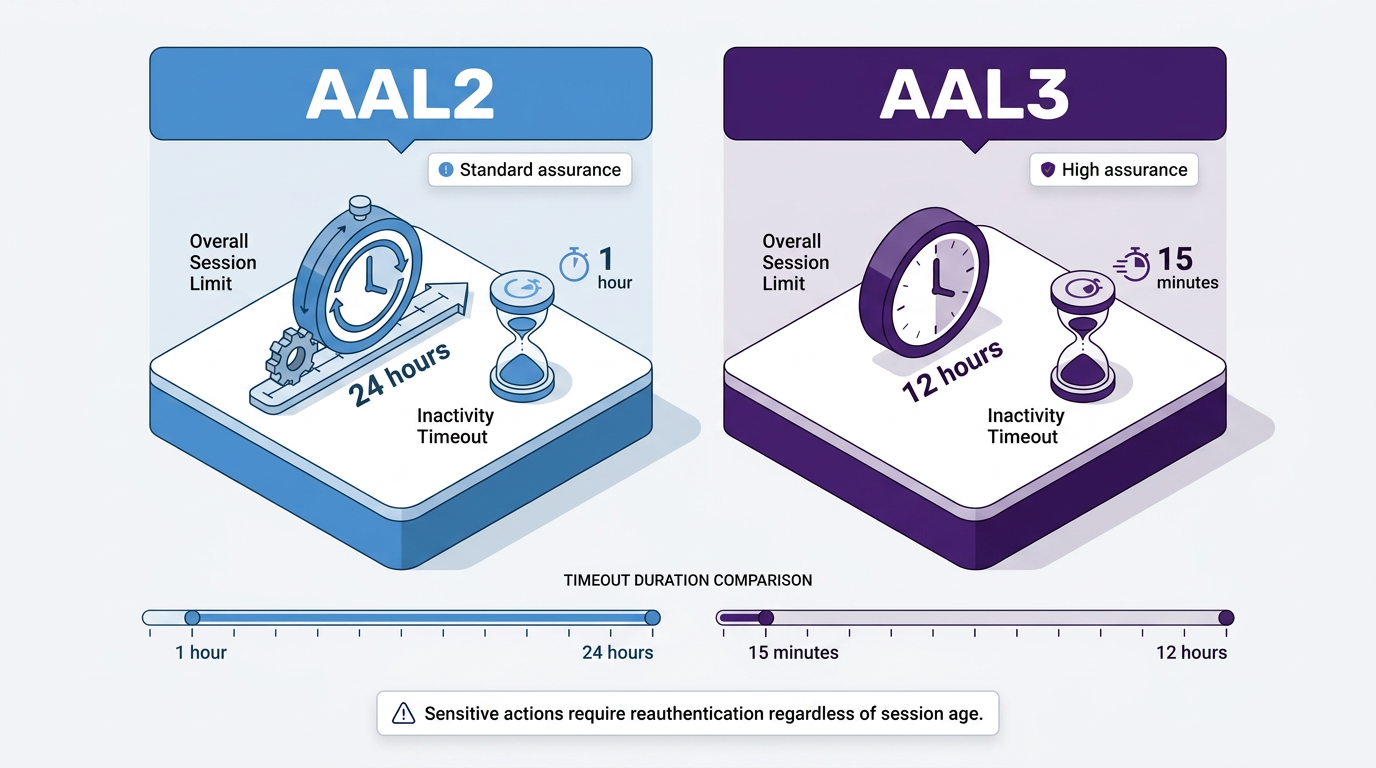
Sensitive actions such as password or email changes warrant reauthentication regardless of session age.
Attack Vector | How the Token Is Compromised | Controls That Reduce or Block the Risk |
|---|---|---|
Session fixation | Attacker plants a known session ID before the victim signs in | ID regeneration at authentication |
Sidejacking (sniffing) | Cookie captured from unencrypted network traffic | Full-session TLS, Secure attribute, HSTS |
Cross-site scripting | Injected script reads the cookie via the DOM | HttpOnly attribute, no tokens in local storage |
Prediction / brute force | Attacker guesses low-entropy or sequential IDs | 64-bit random IDs, short session lifetimes |
Phishing proxy relays login and captures the issued cookie | Device-bound sessions, sender-constrained tokens, phishing-resistant passkeys at login, session anomaly detection | |
Infostealer replay | Malware exports cookies from the browser store for reuse | Device binding, short absolute timeouts, detection and revocation |
Post-Authentication Protections Beyond MFA
MFA and passkeys harden sign-in, but the token issued afterward remains a bearer credential. Passkeys narrow the front door, while the resulting session still requires separate protection.
The MFA Gap After Token Issuance
The same bearer-credential risk applies to OAuth access and refresh tokens harvested from a device or intercepted by a phishing proxy.
Passkeys prevent a phishing site on another domain from obtaining a valid authentication signature. Later requests still require separate proof that they come from the same device. The UK National Cyber Security Centre's Fast Identity Online 2 (FIDO2) paper, which covers phishing-resistant authentication standards, describes how an adversary-in-the-middle attacker can retain a copy of the post-authentication session cookie after proxying a login, whether or not that login used a passkey.
Sender-Constrained and Device-Bound Sessions
Sender-constrained sessions make a copied token useless away from its original device. Token Binding, an earlier TLS-layer approach, faced browser adoption barriers and was abandoned after key vendors dropped support.
Device Bound Session Credentials (DBSC), a World Wide Web Consortium (W3C) draft, backs each session with a device-bound key. The browser proves possession of that key at a refresh endpoint that returns short-lived cookies, so an exfiltrated cookie expires quickly and cannot be renewed elsewhere. Demonstrating Proof of Possession (DPoP) applies the same idea to OAuth and binds tokens to a key through signed headers without certificate infrastructure. Mutual TLS certificate-bound tokens suit clients that can manage certificates.
These mechanisms shrink the replay window. Malware may still act through the legitimate browser, and a valid token can remain useful until it expires. Sender constraints work best alongside short lifetimes, behavioral monitoring, and rapid revocation.
Session Hijacking Detection and Revocation
Some tokens will be stolen despite preventive layers, so monitoring and immediate invalidation belong inside session hijacking prevention rather than after it.
Risk Signals That Reveal Suspicious Session Use
Change provides the strongest signal of suspicious session use. One approach records the Internet Protocol (IP) address, geolocation, user agent, and device characteristics when a session begins, then compares them on later requests. A mid-session shift can indicate hijacking, but legitimate travel, virtual private networks, and carrier address changes create false positives. An attacker using the same country, shared network, or copied user agent can also create false negatives.
Other useful signals include an unusually high concurrent-session count and token use from software that deviates from the user's baseline, such as a shift from a desktop browser to a command-line client. Combining changes across location, device, software, and behavior creates a stronger basis for action and reduces unnecessary disruption for legitimate users.
This analysis depends on logging authentication events and session anomalies. A secure logging design must not record session identifiers or access tokens. Passwords also stay out of logs because recording reusable authentication secrets creates another theft path. Masking or hashing selected contextual values can also support investigation without exposing reusable credentials.
Server-Side Revocation That Ends Attacker Access
How quickly a stolen token dies depends on the session architecture. With stateful sessions, deleting the server-side record kills the token on the next request. Self-contained, stateless tokens such as JSON Web Tokens (JWTs) have no server record by default. Systems can check access tokens against a deny list or use introspection where the architecture supports it. Revoking a refresh token prevents renewal, but an already-issued self-contained access token stays valid until it expires unless the service checks and rejects it. Short access-token lifetimes reduce that residual window.
The most reliable recovery in either model is forced reauthentication: invalidating the session, requiring a fresh login, and issuing a new token leaves the stolen copy unusable. The Continuous Access Evaluation Profile shortens the window further by communicating critical events such as session revocation, credential changes, assurance-level changes, and device-compliance changes to relying services.
When a compromise is suspected, the response follows NIST's incident response framework in sequence:
Contain the attacker's access.
Remove malware and persistence, such as new MFA enrollments or mail forwarding rules.
Invalidate active sessions and refresh tokens.
Reauthenticate the legitimate user.
Review account changes made during the exposure.
Secure Sessions Require Continuous Trust
Every control either keeps a token from being taken, limits where it can be spent, detects someone else using it, or cancels it quickly. A useful audit asks four questions: can tokens be stolen, can they be replayed, would replay be detected, and how quickly would access end? An unclear answer identifies the next layer to strengthen.
Frequently Asked Questions
Can MFA Prevent Session Hijacking?
Only partly. MFA blocks many login attempts using stolen passwords, but it cannot challenge every request from an authenticated session. Short token lifetimes, device constraints, anomaly detection, and fast revocation reduce the remaining exposure.
Which Cookie Settings Help Prevent Session Hijacking?
Secure keeps cookies off unencrypted connections, HttpOnly blocks page scripts from reading them, and SameSite controls cross-site attachment. The __Host- prefix confines a cookie to the host that issued it.
How Should a Compromised Session Be Revoked?
Stateful sessions can be invalidated on the server. For stateless tokens, recovery may include access-token denial, refresh-token revocation, short expiration windows, fresh authentication, and a review for persistence.
Do Passkeys Protect Session Tokens?
Passkeys protect the authentication exchange. Later requests still require separate protection through short-lived tokens, device binding or proof of possession, behavioral monitoring, and reliable revocation.