Phishing simulation training sends employees realistic but harmless phishing messages, then uses their responses to strengthen the organization's defenses. That straightforward premise creates a sensitive test of how an organization responds when a realistic threat appears during an ordinary workday. The exercise becomes valuable when it produces insight that employees can use before a real attacker succeeds.
Key Takeaways
Simulation results only carry meaning when the program team rates each lure's difficulty and factors that rating into its analysis.
Reporting behavior often reveals more about an organization's readiness than clicking behavior, and it responds to training more reliably.
Immediate, constructive feedback after a failed test preserves the trust that makes employees willing to flag suspicious messages.
Simulated phishing is one measurement tool inside a broader awareness and human risk program.
What Is Phishing Simulation Training?
Within an established awareness program, phishing simulation training measures behavior. Its useful output is behavioral data showing who clicked, who entered credentials, who reported the message, and how quickly under normal working conditions, when employees are busy and unsuspecting. Read correctly, that data describes the organization's exposure to social engineering and helps shape later exercises; read as a pass-or-fail verdict on individuals, it describes very little and damages plenty.
Why This Kind of Training Matters
Employees get safe practice at recognizing and reporting social engineering before a real attacker shows up. Reporting is where training shows its clearest measurable effect. According to the Verizon 2025 report, employees who had recently completed training reported simulated phishing at 21%, compared with a 5% base rate among untrained employees. A report gives the security team a chance to warn colleagues and contain a live campaign, which makes it the most protective action an employee can take with a suspicious message.
Simulations reveal how departments respond to invoice pretexts and how roles respond to credential lures. The results identify repeated failures across campaigns and keep the test aligned with what attackers actually send. Attackers now use artificial intelligence (AI) voice impersonation against senior U.S. officials, and lures in general arrive polished and personalized. Countering lures like these takes more than a single annual test; it takes a program that runs continuously.
How Phishing Simulation Training Works End to End
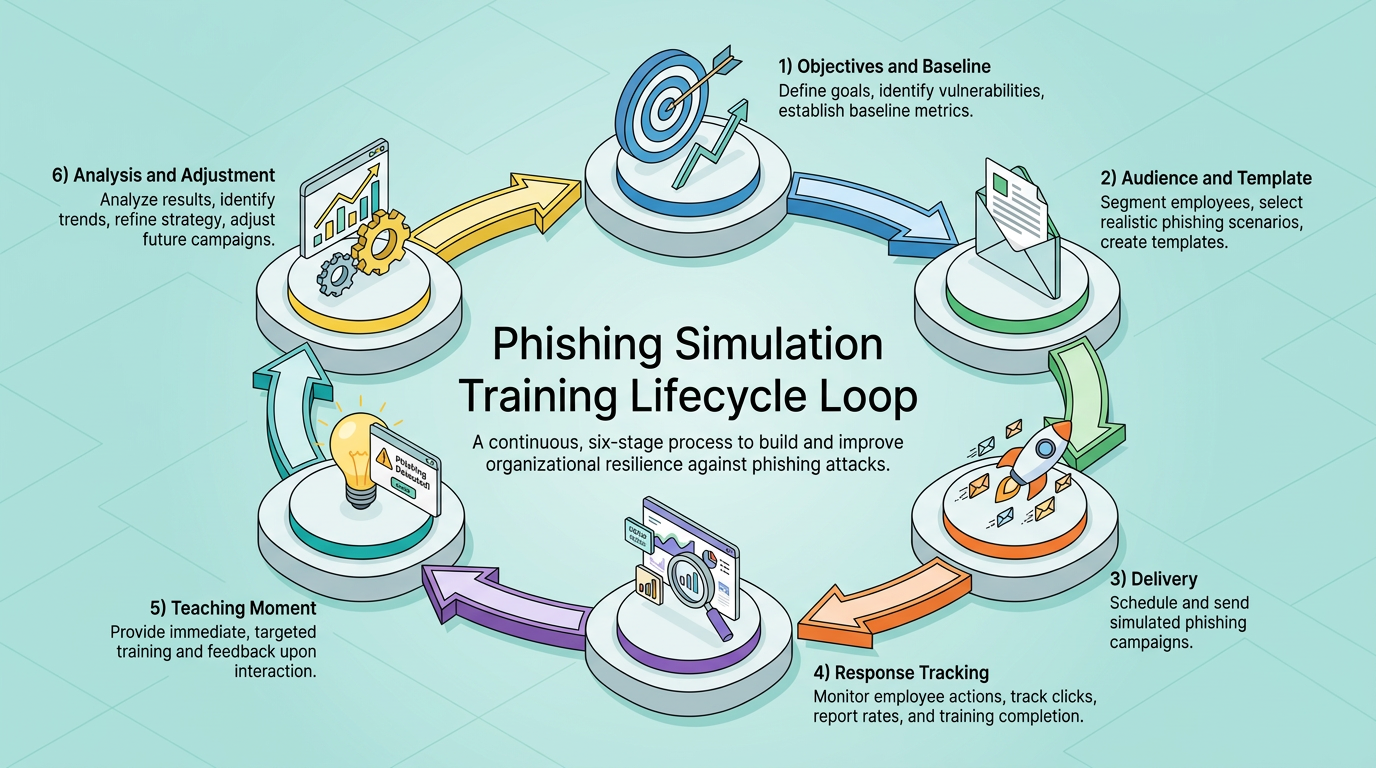
A phishing simulation program runs as a repeating loop in which every stage feeds the next. Each campaign gives the program team information it can use to refine later exercises:
Objectives and Baseline: The team defines what the campaign should reveal, such as current click and report rates for specific groups or work roles.
Audience and Template: The team selects recipients by role or department. It builds a matching scenario around a sender identity and landing page. The payload may be a link or attachment, or it may use a quick response (QR) code, one of the tactics tracked under QR code phishing attacks.
Delivery: The team sends messages without warning and staggers them across varying timelines so conditions resemble a real attack.
Response Tracking: The system records opens, clicks, credential submissions, reports, and the timing of each action.
Teaching Moment: Employees who click see an immediate explanation of the cues they missed, while employees who report get confirmation that they did the right thing.
Analysis and Adjustment: The team uses the results to shape the next campaign's difficulty and themes and adjusts the targeting.
The loop turns training from an annual event into a continuous practice. Reliable conclusions require comparisons across campaigns, and the evidence accumulates with each round.
How to Design Calibrated Phishing Simulations
Good campaign design produces interpretable results by deliberately engineering both realism and difficulty.
Scenario Realism Through Role and Context Alignment
Realism starts with what employees actually see at work. A finance employee who receives a routine-looking vendor invoice on a busy Friday afternoon is being tested on whether trust holds up under real working conditions, not on whether they can spot phishing in the abstract. Effective templates recreate the strategies of contemporary criminals and fit local and industry context: shipping notifications for logistics companies and financial settlement requests for banks. A message that could plausibly land in that inbox on an ordinary Tuesday tests something real. By contrast, a generic template full of grammatical errors and clumsy formatting tests almost nothing; employees pass easily, management records a low click rate, and the number flatters a program that has not measured anything.
Segmentation follows the same logic. Teams receive tailored attempts on varying timelines, matched to their workflows and the pretexts an attacker would choose for them. Payloads should mirror current attacker techniques too. They may use a credential-harvesting login page or an attachment, and they may use a QR code.
Believable scenarios can avoid emotional shock. A vendor invoice tests vigilance without gambling employee trust. Fake bonus announcements and other lure themes that prey on pay and hardship have backfired publicly.
Difficulty Calibration Across Email and Emerging Channels
Two messages can be equally realistic and wildly different in difficulty, so difficulty needs its own rating. The National Institute of Standards and Technology (NIST) Phish Scale framework scores a message on two components: observable cues, the characteristics that either compel a click or tip the recipient off, and premise alignment, which reflects how closely the message matches the recipient's role and responsibilities. More cues make a phish easier to catch, while stronger premise alignment makes it harder. A field study found that click rates rose as lure difficulty increased.
The same logic extends beyond email because each channel changes the available cues. A QR code hides its destination, while an AI-cloned voice on a phone call removes written cues altogether, so each channel shifts what counts as an easy or hard test. Programs that rotate difficulty deliberately and record each campaign's rating can compare results like with like over time. Programs that aim for the lowest possible click rate usually get there by sending easy templates, which produces a comfortable number and a false sense of readiness.
How to Measure and Interpret Simulation Results
A useful assessment combines several behavioral measures and interprets them against the lure's difficulty.
Behavioral Metrics Beyond the Click Rate
Five measures, taken together, describe both exposure and readiness:
Click Rate: The share of recipients who clicked the link or opened the attachment. It measures susceptibility to that specific lure at that specific difficulty, nothing broader.
Credential Submission Rate: The share who went further and entered credentials on the fake landing page. This separates a reflexive click from a would-be full compromise, and it is the more alarming signal.
Report Rate: The share who flagged the message through the approved channel. This is the behavior that protects the organization during a real attack, and the reporting gap between trained and untrained employees suggests it is the behavior training moves most.
Repeat-Clicker Rate: The share of employees who fail across multiple campaigns. Organizational risk concentrates among repeat clickers, which is why this measure matters most for targeting individualized support.
Time-to-Report: Teams track the median gap between delivery and the first reports. Earlier phishing reports give security teams a better chance to warn colleagues before a live campaign spreads.
Read jointly, these numbers tell a story a click rate cannot. A campaign where clicks hold steady but reports arrive faster and more often is a success that a click-only dashboard would score as stagnation.
Evidence Limits Behind Campaign Trends
A falling click rate across campaigns looks like progress, but the trend only means something if the campaigns were comparably difficult. Would that same falling click rate still look like progress if the lures had gotten harder each round? Raw rates are not comparable across templates or channels without accounting for lure difficulty, which can dominate measured training effects.
The research on training itself is genuinely mixed. A randomized controlled trial at a large U.S. health system found embedded training had no significant effect on the behavior of trained employees and no relationship between recently completing awareness training and failing a later test. The field study that validated the Phish Scale reached a similar conclusion: neither lecture-based nor interactive training measurably improved click or reporting rates. A longitudinal study across European companies, however, found phishing success rates fell substantially early in the study.
These findings can coexist. Observational studies rarely control for templates drifting easier or growing familiarity with the simulation style. They may also miss staff turnover, while randomized trials isolate the training itself and tend to find little. A defensible reading treats click trends as descriptions of exposure and puts more weight on reporting behavior, where the evidence of improvement is stronger.
From Simulation Results to Safer Behavior
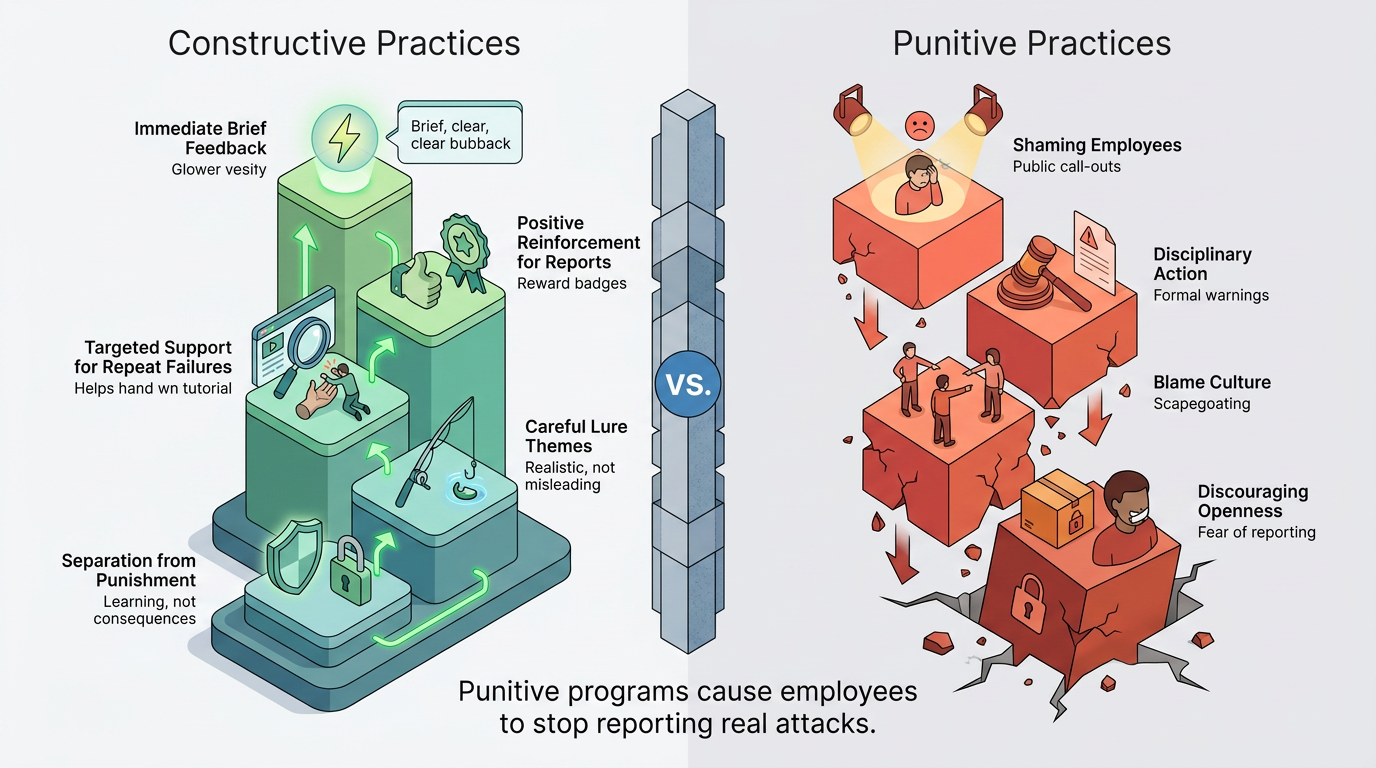
What happens in the minutes after a simulated click determines whether the exercise builds skill or resentment. A few practices separate constructive programs from punitive ones:
Immediate, Brief Feedback: A short landing page names the missed cues at the moment of the mistake. Calm delivery matters; a USENIX Security study found some participants reported increased stress after clicking, which may impair learning from the training the click triggers.
Positive Reinforcement for Reports: Thanking employees who report, including those who clicked first and reported second, reinforces the response worth growing.
Targeted Support for Repeat Failures: Coaching tied to the employee's role and the lure types that keep working gives employees relevant, individualized instruction.
Careful Lure Themes: Simulations that toy with pay, layoffs, or health buy realism at the cost of trust and can trigger employee backlash.
Separation from Punishment: ISACA warns that shaming or disciplining employees after failed tests creates a blame culture and discourages openness about mistakes. Keep individual results in aggregate program data and out of performance reviews because employees who fear consequences stop reporting real attacks too.
Together, these practices turn a single simulated click into a coaching moment instead of a disciplinary one.
Phishing Simulation Training Within Human Risk Management
The SANS Institute's five-stage maturity model (Non-Existent, Compliance Focused, Promoting Awareness and Behavior Change, Long-Term Culture Change, and Optimization and Resilience) places phishing click and report rates within its middle, behavior-change stage, well below the culture-change and resilience stages at the top. Forrester argues more sharply that training completion rates and phishing click percentages are "vanity metrics" that "tell us little about actual risk reduction."
A simulation program earns its keep only as one piece of a larger human risk program that also includes:
Role-based training tailored to specific job functions and risk levels
Security champions embedded directly within teams
Technical controls such as phishing-resistant multi-factor authentication
One-click reporting buttons that lower the friction of flagging a suspicious message
Periodic measurement of how employees actually feel about reporting
None of these controls work well alone; they depend on the simulation program feeding them calibrated, comparable data.
Build a Feedback Loop
A simulation program pays off when each campaign answers a question the last one raised: harder lures, sharper metrics, calmer feedback, and steadier trust. The next campaign should rate lure difficulty, measure reporting alongside clicking, and keep individual results out of discipline. That discipline is what keeps simulations a measurement system instead of a test employees learn to fear.
Frequently Asked Questions
How Often Should Phishing Simulation Training Run?
Organizations should choose a cadence that provides enough observations to compare behavior without making tests predictable, with delivery times and scenarios varied across campaigns.
How Is Phishing Simulation Training Different From General Security Awareness Training?
Phishing simulation is one measurement component within a broader security awareness training program. Awareness training covers policies and general threat education, while simulation specifically tests how employees respond to a realistic lure under normal working conditions. The two work together: awareness training sets expectations, and simulation measures whether those expectations hold up in practice.
Can Phishing Simulations Include Text, Voice, and QR Codes?
Yes. Programs can simulate Short Message Service (SMS), Multimedia Messaging Service (MMS), voice, and QR-based lures when they can conduct the exercise safely and keep training records separate from real incident reports.