Principais insights
Security teams face a straightforward math problem: alert volumes and vulnerability counts keep climbing, and headcount rarely keeps pace. Automation closes that gap by handling the repetitive parts of triage, evidence gathering, and documentation so analysts can focus on decisions that require judgment. The workflows that pay off fastest share a few traits: high volume, stable inputs, and outputs a person can review quickly.
This guide covers the top security workflow automations you should invest in, the operating model that keeps automation reviewable, and the practices that keep a rollout maintainable.
This article draws from insights shared in Abnormal's webinar on human-centered AI in the SOC. Watch the full recording to hear directly from security leaders implementing these strategies.
Key Takeaways
Alert triage and vulnerability management automation are high-impact starting points for reducing analyst workload.
Human-in-the-loop design helps prevent automation failures by preserving judgment for consequential decisions.
Shadow mode validation belongs before automated action because it surfaces edge cases and false positive patterns before those patterns can cause harm.
Successful automation shifts analysts from reactive queue maintenance to threat hunting and proactive defense.
Security Workflow Automation Explained
Security workflow automation uses software-driven processes to execute repetitive security tasks with minimal manual effort, from enriching alerts with contextual data to routing vulnerability tickets to the right teams. The goal is to free analysts from low-value work so they can concentrate on decisions that require human expertise.
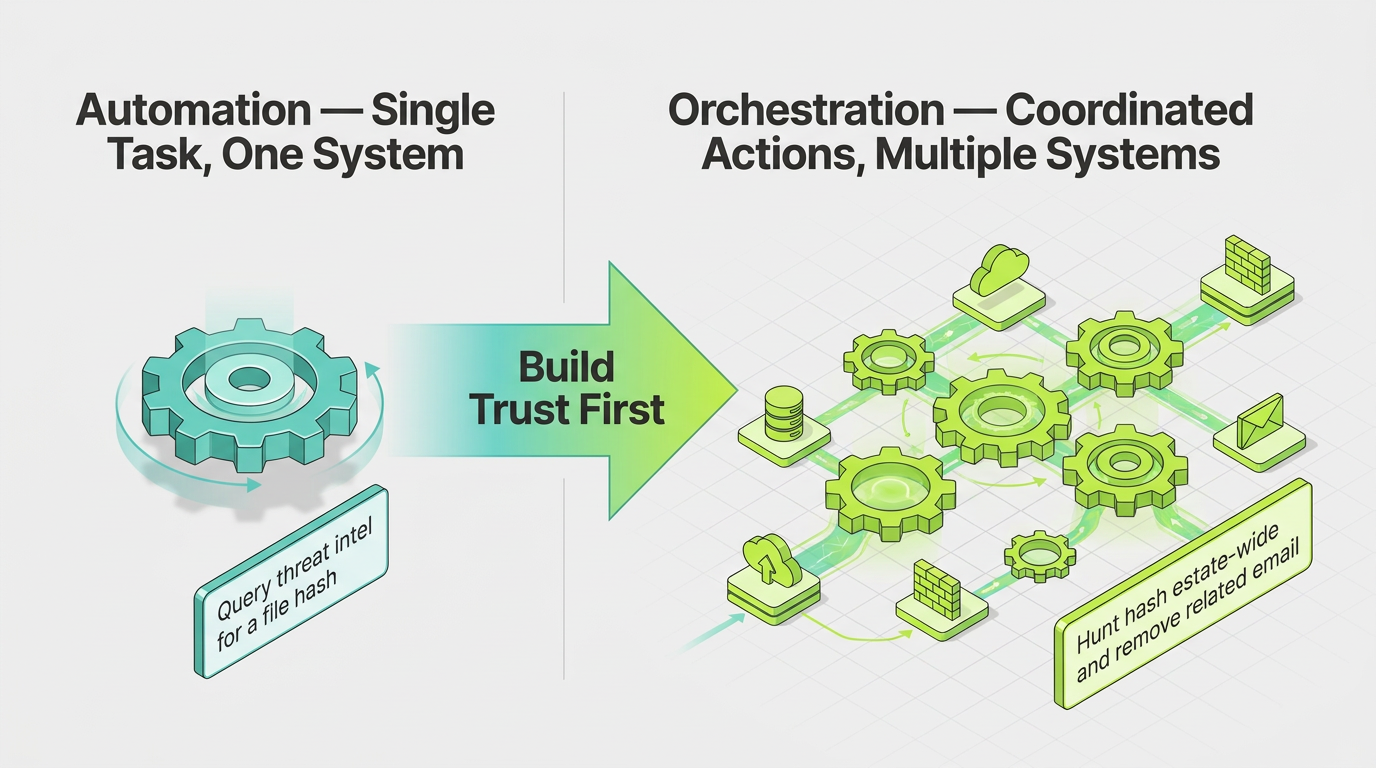
Automation and orchestration are related but distinct. Automation handles a single task within one system, such as querying threat intelligence for a file hash. Orchestration coordinates decisions across several systems, such as hunting that hash estate-wide and removing the related email. Most workflows start as automation and grow into orchestration as trust builds. For instance, security orchestration, automation, and response (SOAR) platforms package both.
Sreeharsha Dugga, Cyber Defense Operations Manager at Abnormal, described AI's role this way when discussing the security operations center (SOC) roadmap: "For us, it is more of a copilot, not an autopilot. AI drafts the context, timelines, and suggestions. Humans decide on actions." That model pairs triggers and integrations with human checkpoints: automation handles data gathering and routing, and analysts retain control over consequential decisions.
Why Security Workflow Automation Matters
Security workflow automation matters because repetitive investigation and routing work consumes analyst capacity that could support higher-value security activities.
That pressure appears in two connected forms:
Alert Fatigue: Alert fatigue in SOCs forces analysts to review large volumes of low-value findings.
Manual Context Gathering: Constant switching among dashboards, logs, and threat intelligence contributes to SOC analyst burnout and leaves less room for threat hunting or growth.
Together, these demands create substantial pressure on SOC teams. Automation addresses that pressure by collecting evidence, summarizing findings, and routing work before an analyst begins an investigation. Teams working to automate SOC operations cut repetitive review steps, freeing time for proactive work and mentoring junior analysts.
How Security Workflow Automation Works
Effective security workflow automation combines connected tools, defined logic, contextual analysis, and human oversight. The operating model includes four complementary layers:
Integration Layer: An automation platform connects with security information and event management (SIEM), endpoint detection, and data access platforms through APIs, cutting the tool switching that fragments analyst attention.
Workflow Definition: Predefined workflows identify known false positives, assign severity, and route findings by institutional knowledge, keeping automation predictable.
AI Enhancement: Platforms use AI for summarization, context gathering, and duplicate detection, turning raw alerts into findings analysts can evaluate quickly without the AI deciding.
Human-in-the-Loop Design: NIST's AI Risk Management Framework describes human-AI operating configurations ranging from fully autonomous security operations to fully manual. Teams can start in shadow mode, move to human-approved actions, then add rollback-backed automation where risk permits.
Together, these layers create a controlled path from isolated automation to coordinated orchestration.
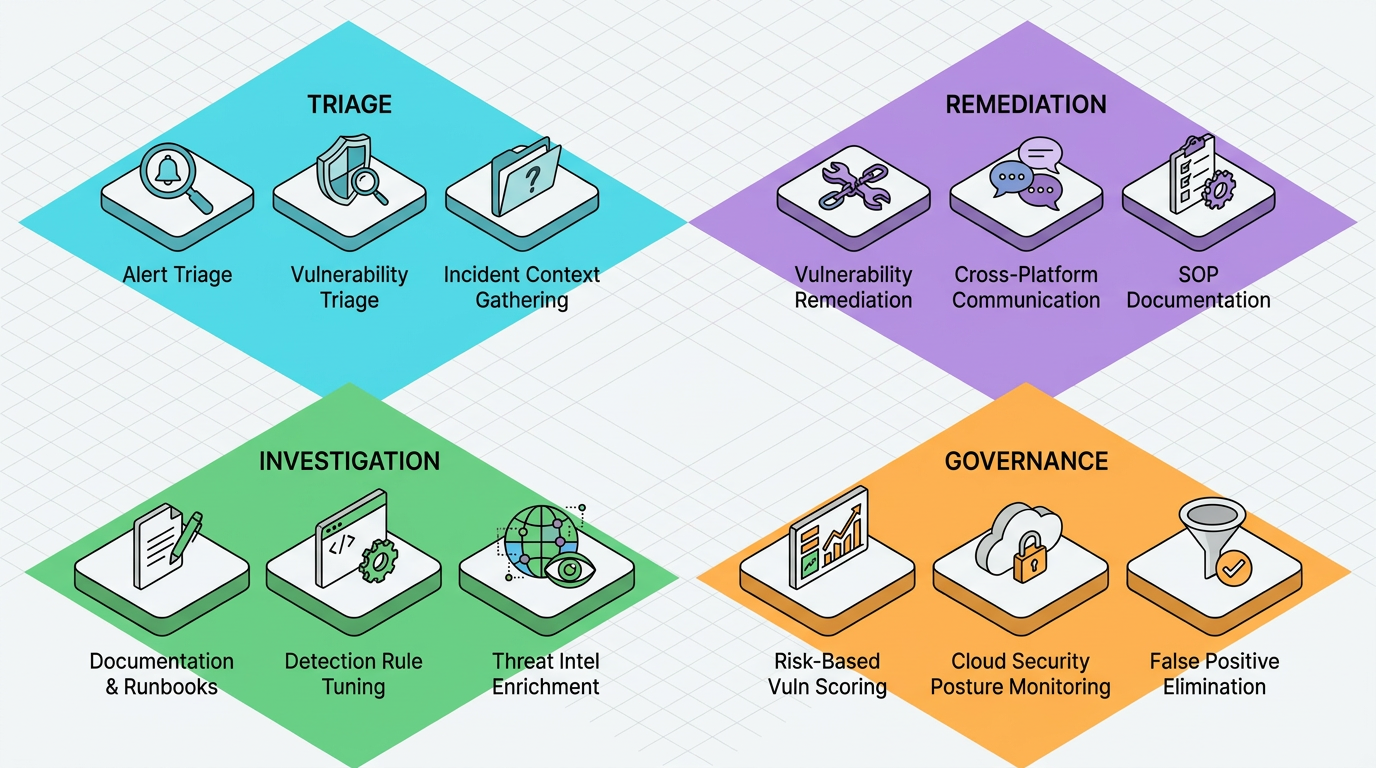
12 High-Impact Security Workflows to Automate First
The highest-impact workflows reduce repetitive investigation, routing, and documentation work without transferring consequential judgment to software.
1. Alert Triage and Prioritization
Alert triage automation prepares and ranks incoming findings so analysts can focus on cases that warrant deeper investigation. Useful workflow steps include enrichment, correlation with historical activity, duplicate detection, severity scoring, and assignment to the correct queue. This scope keeps triage distinct from permanent false positive suppression, which requires separate governance and appears later in the list.
Triage gains value when email-layer detection already understands normal communication patterns. Abnormal's behavioral AI models vendor interaction patterns and recipient behavior to flag a request that deviates from established norms, such as an unexpected change in payment instructions, giving automation richer context than static signatures alone, though analysts still determine how to handle findings.
2. Vulnerability Triage and Ticket Routing
Vulnerability management programs can automate the intake and routing of findings without automating the remediation decision itself. A unified workflow can aggregate findings from workstations, cloud security resources, and code bases, normalize the records, apply an initial risk classification, identify the responsible team, and open a ticket with the available evidence attached.
This workflow is mainly queue management: preventing findings from sitting unassigned or bouncing between teams. Analysts spend their time validating context and deciding whether the proposed fix fits the environment; scoring and execution remain separate workflows.
3. Incident Context Gathering
Incident context gathering assembles the evidence an investigator needs before analysis begins. During an incident response process, analysts often move among email records, logs, identity data, threat intelligence, and case-management systems. Automation can retrieve those records, normalize timestamps, build a timeline, and attach relevant historical findings to the case.
For an email investigation, that might include analyzing email message headers, checking a URL, and validating the sender-recipient relationship. The analyst gets an organized evidence package instead of assembling fragments manually, and the workflow stops short of determining intent or approving containment.
4. Documentation and Runbook Generation
Documentation automation can create incident-specific records and runbooks from approved workflow definitions. AI tools can assist with drafting standard operating procedures (SOPs), converting logic to JavaScript Object Notation (JSON), and formatting notes, with the team reviewing output against compliance requirements before publishing.
This produces documentation tied to an incident or procedure, separate from broader policy lifecycle management like ownership and version history. That separation lets engineers improve runbooks without touching governance documents: engineers validate operational accuracy, and compliance owners approve the controls.
5. Vulnerability Remediation
Vulnerability remediation automation handles the mechanical steps to prepare a fix after a team validates and prioritizes a finding: reading the ticket, opening a feature branch, applying the change, running tests, and creating a pull request. Engineers review the code and rollback plan before approving the merge.
Dugga's team uses this pattern to move work from an approved ticket to a reviewable pull request, cutting repetitive steps while preserving oversight. Because remediation can affect production stability, automation prepares the fix and evidence, but the engineer remains accountable for whether the change is safe.
6. Detection Rule Tuning
Detection rule tuning automation evaluates proposed logic changes without moving them straight into production: comparing a revised rule against live or recorded traffic in shadow mode, collecting the findings it would have generated, and surfacing differences against the existing logic for analysts to review.
This supports detection engineering through repeated comparisons: analysts decide whether a rule fits the environment's threat model, and teams preserve test results and version history as part of the record, giving engineers a consistent basis for refining logic.
7. Threat Intelligence Enrichment
Threat intelligence enrichment adds structured context to detections before analysts begin manual research: mapping observed behavior to the MITRE ATT&CK framework, searching approved sources, and attaching relevant tactics to the alert, giving contextualized information rather than raw indicators of compromise.
As Dugga noted describing how his team addresses common SOC challenges, AI can support enrichment and ATT&CK mapping, though analysts still evaluate whether intelligence applies to the event — useful for vendor email compromise or generative AI attacks, where context matters as much as an indicator.
8. Cross-Platform Communication
Cross-platform communication automation keeps responders informed as a case changes state: sending notifications, opening collaboration threads, routing approvals, and escalating unresolved tasks by predefined ownership rules. This cuts manual copying between systems and keeps status changes from getting trapped in one console.
The workflow should function purely as a delivery mechanism — distributing a verdict or notifying a team that a task has exceeded its response window. Authorization for resolution still follows the required decision process. Clear templates and case identifiers keep communication searchable and auditable.
9. SOP and Process Documentation
SOP and process-documentation automation manages the lifecycle of policies after teams create them, tracking owners, review dates, and approvals. When a control or framework requirement changes, it flags affected documents and notifies the responsible owners.
This is governance and maintenance, not technical instruction: a runbook tells someone how to perform a task; a process document establishes who owns it. Separating the two lets compliance teams maintain reviewable records and lets engineers update instructions through their own approval path.
10. Risk-Based Vulnerability Scoring
Risk-based vulnerability scoring helps teams decide which validated findings deserve attention first, combining known exploitation, exploit probability, asset criticality, and exposure rather than a single severity value. The resulting score updates ticket priority and shows analysts the factors behind the ranking.
Local prioritization matters more as vulnerability volume grows and public enrichment gets more selective: the NVD now prioritizes CVEs in the CISA Known Exploited Vulnerabilities catalog and federal agency software, leaving many findings without prompt enrichment. An internal model helps analysts focus on vulnerabilities combining exploitation risk with business impact.
11. Cloud Security Posture Monitoring
Cloud security posture monitoring identifies configuration drift, stale accounts, orphaned service identities, and other cleanup candidates across cloud environments, comparing findings with baselines and creating a review task before an issue contributes to an incident.
This supports proactive cloud security monitoring by making configuration review continuous rather than occasional, and still accounts for business context: an apparently unused permission might support a scheduled process. Owners confirm whether a resource is still needed and approve cleanup through a recorded workflow.
12. False Positive Elimination
False positive elimination turns repeated analyst verdicts into governed suppression logic. Unlike triage, which ranks each incoming alert, this identifies patterns that consistently produce low-value findings and proposes a durable rule or routing change, tested against historical cases before an owner is assigned.
This belongs later in the roadmap, since poor suppression logic can hide real activity: teams need stable case data and a controlled change process before converting recurring decisions into lasting rules. Expiration dates and periodic review keep old exceptions from staying active after conditions change.
Best Practices for Implementing Security Workflow Automation
Security workflow automation works best when teams start with bounded use cases, verify integrations, and define accountability before enabling actions.
Here's how to support a controlled rollout:
Start Small and Prove Value: Identify a core use case with measurable analyst-time payback to build organizational confidence.
Verify Integration Readiness: Confirm each system exposes a working API in a usable format, and strip duplicate logs and debug noise first.
Define Approval Thresholds: Different remediation types can use different confidence thresholds and rollback requirements; this AI-driven auto-remediation guide covers matching automation to risk.
Address Privacy and Audit Requirements: Data minimization limits unnecessary personal information, with SIEM logging recording the actor, approval, and time for each action.
Prepare Analysts for New Workflows: Training helps analysts use and review AI-assisted workflows; tools like the AI phishing training coach free teams for higher-value investigations.
These practices make automation easier to test, audit, and expand across the security program.
How to Measure Security Workflow Automation Success
Metrics should show whether each workflow returns analyst capacity without reducing decision quality or control.
Teams can evaluate performance across four areas:
Time Savings: A workflow baseline records manual effort for enrichment, routing, and documentation, so teams can compare it against the automated process.
Response Outcomes: Mean time to detect, respond, and contain cover different parts of the process; false positive trends show whether faster handling also improves signal quality.
Analyst Adoption: Satisfaction and adoption belong on the same dashboard, since analysts may bypass automation that adds approval friction.
Capacity Reallocation: Time devoted to threat hunting and security awareness training shows whether automation supports strategic work.
Together, these measures show whether a workflow improves both performance and the quality of work returned to analysts.
Build a Sustainable Security Automation Program
Automation delivers sustainable value when teams treat it as a controlled operating model with defined requirements. The roadmap depends on four operating elements:
Sequenced Workflows: Move from high-volume triage toward more sensitive functions, like remediation and durable suppression.
Reliable Integrations: Connected systems need stable data and a defined maintenance process.
Clear Ownership: Named owners stay accountable for logic, approvals, and outcomes.
Reviewable Controls: Evidence records and a rollback path support recovery when a workflow misfires.
"We are not replacing the analyst. We are replacing the toil and elevating the expertise, trust, and the outcomes," Dugga said. This is a practical test for future decisions: automate repetitive preparation, then preserve human judgment wherever an action could materially affect systems or security posture.
Abnormal supports that model where it matters most: the inbox. Behavioral AI baselines vendor interaction patterns, recipient behavior, and workflow cadences to surface socially-engineered attacks that often evade traditional email security tools, while AI Data Analyst turns raw detection data into executive-ready reporting without manual queries. Security Posture Management adds continuous visibility into Microsoft 365 misconfigurations, and AI Phishing Coach converts real attacks Abnormal stops into tailored training, giving SOC teams more capacity for the judgment work automation can't replace.
Abnormal was named a Customers' Choice in the 2026 Gartner® Peer Insights™ Voice of the Customer for Email Security, the only vendor to earn the distinction three consecutive times. Book a demo to see how Abnormal can help your team automate the toil and focus analysts on the decisions that matter.
Frequently Asked Questions
What Is the Difference Between Security Automation and Security Orchestration, and When Should Teams Transition From One to the Other?
Security automation executes individual tasks within a single system, such as querying a threat intelligence feed for a file hash. Orchestration coordinates multiple automated tasks across platforms to achieve a broader objective. Teams should move to orchestration only after individual tasks prove accurate and reliable; starting with orchestration first tends to create brittle, hard-to-diagnose dependencies.
How Do You Implement Shadow Mode Validation for Security Workflows Before Moving Them Into Production Enforcement?
Shadow mode validation duplicates the candidate workflow and logs its proposed actions to a review queue instead of executing them, letting teams compare those outputs against actual analyst verdicts over a defined period. This surfaces edge cases and missing context the workflow still needs. Engineers then adjust the logic and promote the workflow to human-approved mode, using a window long enough to capture representative traffic variation.
What Criteria Should Teams Use to Determine Which Security Workflows Are Safe to Automate Versus Which Require Human Decision-Making?
Teams should weigh consequence severity, decision reversibility, and pattern stability, reserving human approval for actions affecting production infrastructure, user access, or permanent controls. Workflows handling standardized data collection and routing typically qualify for automation, since errors there cause delays rather than damage. The strongest candidates combine high volume with low decision complexity for the best risk-to-gain ratio.
How Can Security Teams Measure Whether Automation Is Actually Reducing Analyst Burnout Rather Than Just Increasing Alert Processing Speed?
Teams can track qualitative indicators alongside throughput: stress surveys, voluntary turnover and sick-leave patterns, and whether analysts have time for skill development. These reveal whether automation actually reduces cognitive load rather than just accelerating the same triage cycle — and whether reclaimed time goes toward training and mentoring.
What Integration Requirements and Data Quality Standards Need to Be in Place Before Deploying Security Workflow Automation?
Organizations need working APIs that expose data in consistent, parsable formats with proper authentication and rate limiting, plus standards that remove noise and normalize timestamps. Teams should validate field mappings, test error handling, confirm permission scopes, and set retention policies aligned with privacy requirements, and monitor for API or vendor changes that could break workflows after launch.