Key Insights
According to the Verizon 2026 Data Breach Investigations Report, phishing simulations delivered by voice or SMS produced a median click rate roughly 40% higher than the same lures sent by email. The attack surface has moved into the pocket, and the same phone that receives corporate mail also receives the smishing lure or the QR code that redirects to a credential page.
Mobile email security protects sensitive data on phones and tablets. They also protect communication and identity. People use these devices while moving between locations, networks, apps, and tasks, often with less time and screen space to evaluate a message. That convenience shortens the distance between receiving a convincing request and taking an unsafe action.
This article walks you through the layered defenses that hold up in that environment: message and identity controls, device and network posture, work-personal data separation, governance choices, and incident response when a phone goes missing or an account is exposed. Weak points in any one layer can quietly widen the path from a single tap on a small screen to persistent account access an attacker keeps long after the device is recovered.
Key Takeaways
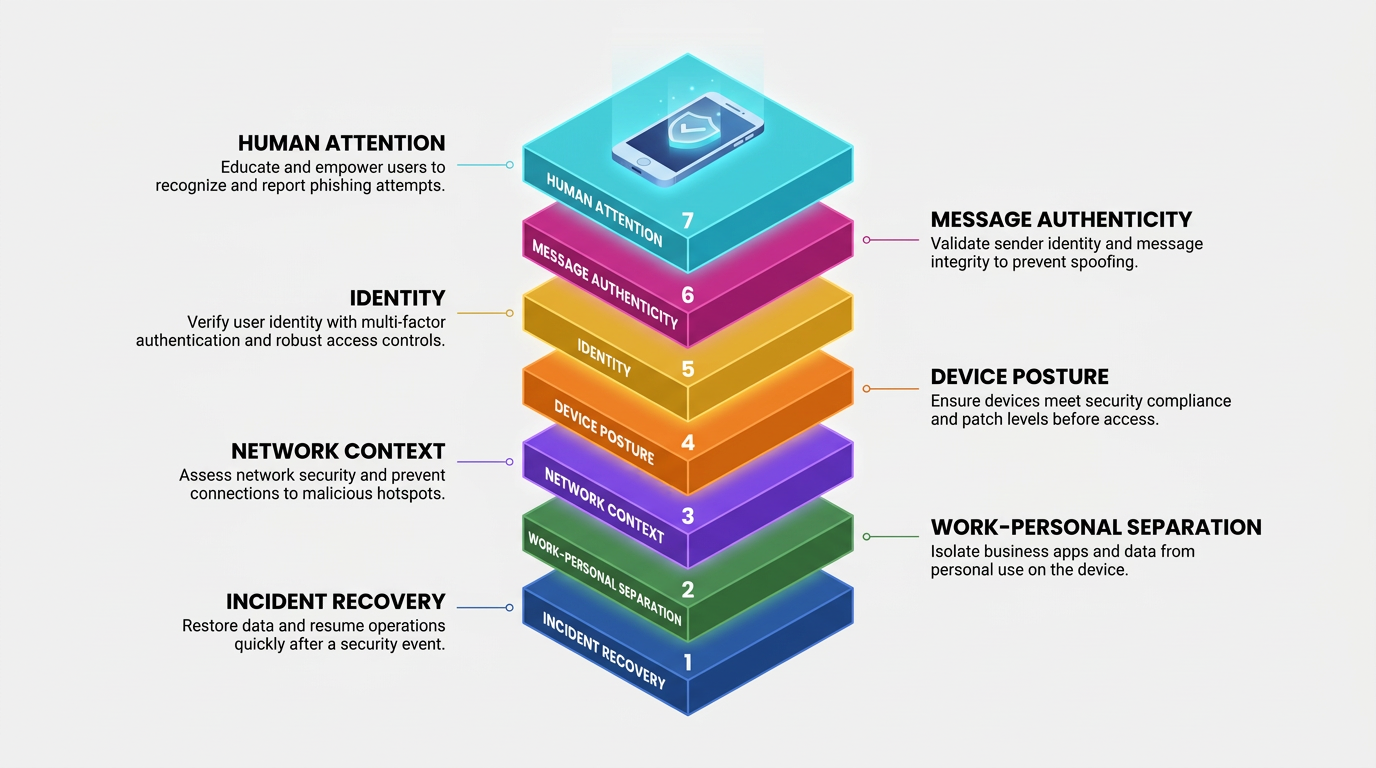
Mobile email security works as a layered system in which human attention, message authenticity, identity, device posture, network context, data separation, and incident recovery cover one another's gaps.
Message-authenticity controls assess whether email comes from an expected domain, while account authentication limits what happens if a convincing message reaches the user.
Organizations can separate work and personal email data through app-level management or containers without placing an employee's entire personal phone under enterprise control.
A prepared response to a lost or compromised device addresses both the phone and any account access that may continue elsewhere.
What Is Mobile Email Security and How Does It Work?
Mobile email security controls span the message, account, device, network, and recovery path so that one missed warning does not lead directly to lasting access.
The Converged Mobile Attack Surface Hides Critical Trust Signals
On a desktop, email, text messages, and browser logins often appear in separate interfaces with room for full addresses and destination details. On a phone, those channels share a small screen, where display names can crowd out sender addresses and link previews can truncate destinations. QR codes can hide a URL inside an image, while authentication results such as Sender Policy Framework (SPF) and DomainKeys Identified Mail (DKIM) checks remain largely invisible.
A user may need to expand sender details or inspect raw headers to find a summary of Domain-based Message Authentication controls (DMARC). A 2023 USENIX usability study found that sender-origin details in a widely used mobile email interface sat behind two easy-to-miss taps inside collapsed sender information, meaning the signal a user needs to spot an impostor is rarely on screen by default.
These interface limits matter because mobile attacks often move between channels. Smishing attacks may imitate package notices, toll demands, job offers, or bank alerts. Consumers reported losing $470 million to text-message scams in 2024, five times the 2020 total, according to Federal Trade Commission (FTC) Consumer Sentinel data. Some begin with a friendly message containing no link, then introduce the malicious destination after the user replies. The lure, destination, login, and approval prompt may be only a few taps apart while the user is distracted.
Control Layers Connect Each Threat to a Practical Defense
The layered model addresses different points between message delivery and account compromise:
Human Attention: Inspection and reporting habits slow risky decisions about senders, links, QR codes, and attachments.
Message Authenticity: Domain authentication, transport encryption, and signatures help determine whether a message is what it claims to be.
Identity: Phishing-resistant authentication and token controls limit credential replay, proxy relay, push bombing, and subscriber identity module (SIM) swaps.
Device Posture: Patching, screen locks, encryption, and app vetting reduce local exposure.
Network Context: Treating networks as untrusted limits interception and cloned portal risks.
Work-Personal Separation: Managed apps and containers keep work email out of personal apps, backups, and storage.
Incident Recovery: Locking, wiping, session revocation, and account review contain what earlier layers miss.
A lure may pass one layer because it comes from a legitimate domain, but identity and device controls can still prevent lasting access. Human attention remains important because hidden sender addresses, typosquatted domains, truncated URLs, urgency, and personalization can make an impostor appear routine. The other layers reduce the consequences when limited attention or a convincing pretext defeats that first review.
Authentication and Message Authenticity Controls for Mobile Email Security
Phishing-resistant authentication protects the account. Domain and transport controls protect parts of the message path, as do content controls.
Phishing-Resistant Authentication Blocks Replay and Impersonation Paths
A Fast Identity Online (FIDO) credential, whether a hardware key or passkey, uses a public-private key pair registered to a specific website origin. During sign-in, the authenticator signs a challenge only when the requesting origin matches the stored one. A lookalike domain or proxy therefore cannot obtain a useful signature, even if the user misses the deception.
Three authentication methods lack that origin binding, each in a different way:
One-Time Codes: A person can enter a time-based one-time password (TOTP) or SMS code into a fake page, where an attacker relays it to the genuine site.
Push Approvals: The prompt may not prove where the request began; number matching reduces prompt bombing but does not fully bind approval to the correct session.
Reverse Proxies: A reverse proxy can relay a genuine sign-in page, let the user complete MFA, and keep the resulting session cookie.
None of these methods bind the approval to the legitimate origin the way a FIDO credential does. The Cybersecurity and Infrastructure Security Agency (CISA) takes an especially firm stance on the weakest of them, stating in its mobile communications security guidance, "Do not use SMS as a second factor for authentication."
Passkeys work with biometric verification or a device personal identification number (PIN). Biometric verification may use a fingerprint or facial recognition. Synced passkeys inherit the protection of the platform account that stores them, so organizations and users still need to protect account recovery and remove credentials associated with lost devices.
Domain, Transport, and Content Protections Solve Different Trust Problems
Sender Policy Framework controls (SPF), DomainKeys Identified Mail (DKIM), Transport Layer Security (TLS), and Secure/Multipurpose Internet Mail Extensions (S/MIME) each confirm a different part of the message path, and each leaves a different gap:
Protection | What It Confirms | What It Leaves Open |
|---|---|---|
SPF, DKIM, and DMARC | Which servers a domain authorizes to send on its behalf, message integrity, and how receiving servers should handle a failed check | Whether the individual sender behind an authenticated domain is trustworthy |
TLS | Encryption of the connection between mail servers in transit | The message's content or trustworthiness after it is delivered |
S/MIME | A cryptographic signature and encryption tied to one sender, offering stronger person-level assurance | Broad mobile adoption, since it requires certificate deployment and configuration |
An attacker who registers a legitimate domain and uses a familiar display name can still pass SPF, DKIM, and DMARC, because these controls authenticate the domain, not the person sending from it.
Message controls evaluate the message path and claimed domain, while account controls limit access when a deceptive message reaches the user. Neither removes the need to inspect unexpected requests in context.
Device, App, Network, and Data Controls
Device condition, app behavior, network context, and data separation limit how much an attacker can gain from one successful tap.
Device Posture and App Hygiene Reduce Local Email Exposure
A mobile mail app may store messages, attachments, cached credentials, refresh tokens, and session cookies. Modern encrypted storage becomes accessible only after the user enters the screen-lock credential. That credential is therefore central to inbox protection.
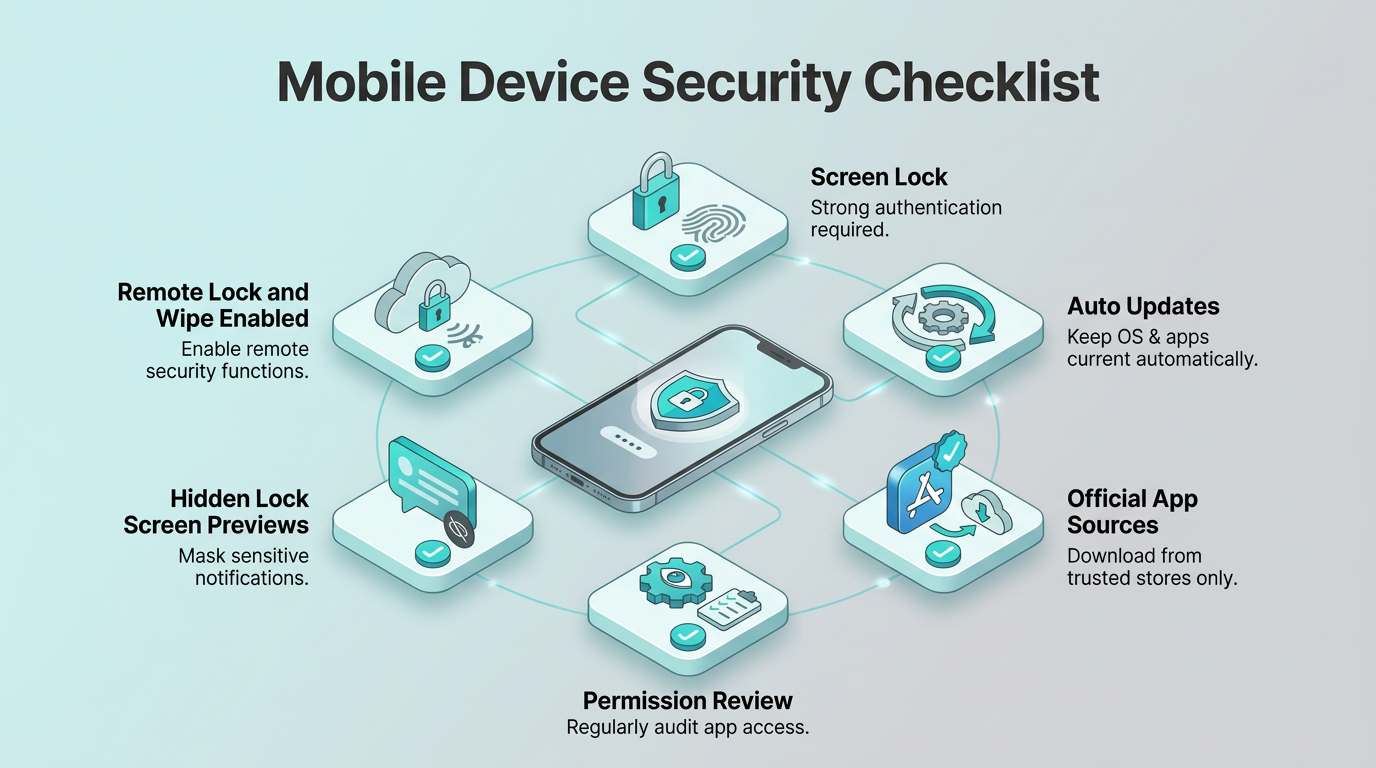
A few settings provide most of the benefit:
Screen Lock: A strong PIN paired with biometrics keeps encrypted storage sealed.
Update Cadence: Automatic operating system and app updates close known security holes.
App Sources: Official stores review apps before publication, while sideloading bypasses that process.
Permissions: Camera, contacts, storage, location, microphone, and notification access should match an app's purpose.
Lock Screen Previews: Hidden message previews prevent nearby people from reading email on a locked device.
Remote Actions: Users should enable remote lock and wipe before a device goes missing.
Mobile threat defense (MTD) tools can also check for malicious apps, QR code phishing attacks, risky networks, and unsafe configurations. These checks complement platform protections by identifying conditions that users may not notice. Secure settings and ongoing checks reduce local exposure and the chance that an unsafe device retains email access.
Network Context and Work-Personal Separation Limit Data Leakage
Users should treat every network between a phone and its mail server as untrusted. Several network conditions shape that approach:
Fraudulent Access Points: A fraudulent access point can copy a legitimate network name, while a cloned captive portal can collect credentials before the mail connection begins.
Encrypted Connections: Hypertext Transfer Protocol Secure (HTTPS) protects traffic but cannot make a deceptive login page trustworthy.
Private Tunnels: A virtual private network (VPN) protects traffic inside its tunnel but does not inspect phishing pages or prevent session theft.
Automatic Connections: Cellular networks carry exposure, including interception of text messages, while automatic Wi-Fi and Bluetooth connections can join systems the owner did not choose.
The safer access decision depends on the identity, device, app, and destination rather than confidence in a particular network.
Managed mail apps and containers keep work attachments out of personal storage, block copying into personal apps, and exclude business data from personal cloud backups. Under bring-your-own-device security policies, these controls can protect work information without placing the entire personal phone under enterprise control. This separation also supports selective removal of business data if the employee leaves or the device becomes unsafe.
Organizational Governance and Safe Mobile Email Use
Governance defines which devices and apps may access email, while practical habits help users evaluate the messages that technical controls allow through.
Ownership and Access Policies Match Control to Privacy Needs
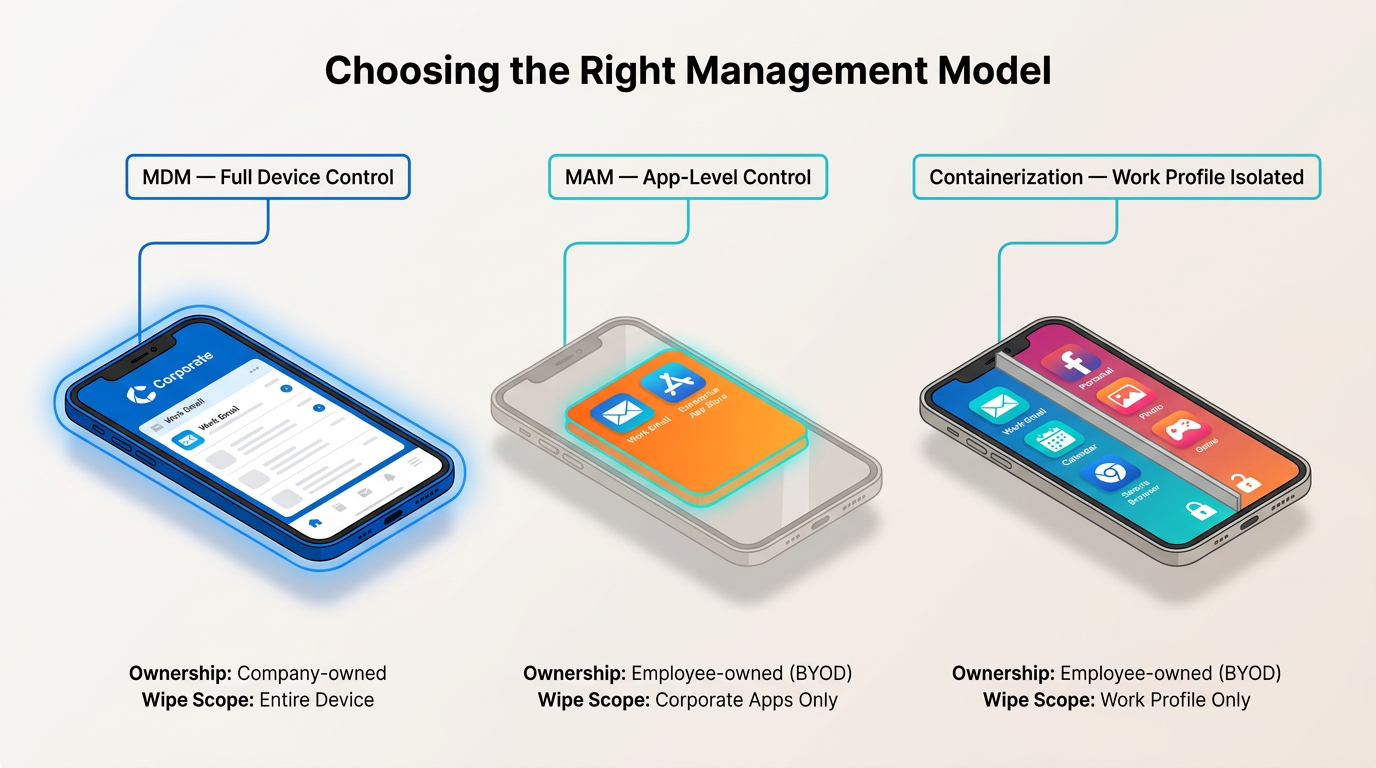
Device management sits on a spectrum, from control over the whole phone to control over just the work apps on it:
Mobile Device Management (MDM): Places the whole device under enterprise policy, covering the operating system, installed apps, and wipe options.
Mobile Application Management (MAM): Controls only managed apps and their data. An organization can require an app PIN, restrict copying, limit where attachments open, and remove work data without erasing personal content.
Containerization: Uses app-level controls or an operating-system-based work profile to create a stronger boundary between work and personal data.
Which approach fits depends on who owns the device. Here are some examples:
Corporate-Owned, Personally Enabled: Full device control fits when the organization owns the phone and permits personal use.
Bring Your Own Device:Bring-your-own-device security policies often favor MAM or a separate work profile to limit employer access to personal data.
Wipe Scope: Selective wipe removes work data, while full wipe resets the entire phone.
Privacy Notice: Enrollment information should explain what the organization can collect, monitor, and erase.
Conditional access can then evaluate identity and device conditions before issuing access. Identity checks may require phishing-resistant authentication. Device checks confirm patching, encryption, jailbreak status, and serious MTD warnings. Separately, app checks can require an approved mail client that applies data-protection rules.
Focused Inspection and Reporting Slow High-Risk Decisions
A focused mobile review can follow five practical checks:
Sender Details: A sender check starts by expanding the display name to reveal the full address and examining the domain.
Link Destinations: A long press can reveal a destination without opening it; the meaningful part is the actual domain, not a brand name elsewhere in the address. Users can approach shortened links and unclear destinations by typing the known website address directly.
Image-Based Logins: Users should treat an unexpected image that leads to a login page as suspicious rather than trusting the surrounding message.
Unexpected Attachments: Attachments warrant confirmation through another channel, particularly when the file type or request does not fit the conversation.
MFA Prompts: A prompt that arrives without a sign-in attempt may indicate that someone already has the password. Denying and reporting the prompt, followed by an account review, is safer than approving it.
Training should reflect messages people receive on phones, including delivery notices, toll demands, smishing attacks, QR sign-in pages, and unexpected MFA prompts. A one-tap reporting option inside the mail app reduces delay, while a clear method for forwarding suspicious texts covers incidents that begin outside email.
Mobile Email Security Incident Response and Recovery
Mobile email incident response addresses the device first, then closes account access and reviews any changes an attacker may have made.
Immediate Containment Locks the Device and Defines the Scope
The first hour after loss or suspected compromise should follow the process below:
Lock and Report: Remote lock the device and report the incident immediately. Locking protects encrypted storage, while reporting lets a help desk or security team act on the account at the same time.
Suspend the Carrier Line if Applicable: For a personal device covered by bring-your-own-device security policies, suspending the carrier line can reduce fraudulent use and SIM-related risk.
Cut Off Account Access on a Managed Fleet: If a tapped phishing link or an unrecognized MFA approval suggests account access already exists, even with the device still in hand, the organization can mark it non-compliant and cut off email at the next policy check.
Inventory Reachable Services: Email, financial accounts, social accounts, cloud storage, and workplace apps may need review if they remained signed in or shared the same recovery channel. Incidents that begin as smishing attacks may also require review of the phone number and any accounts that use SMS for recovery.
This account-side response matters because possession of the phone is not always the main problem.
Session Revocation and Account Review Complete Recovery
A selective wipe removes managed work data, while a full wipe returns the device to factory settings. Neither action ends copied sessions or tokens, and the stakes for leaving them active are high: CISA's token theft countermeasure guidance warns, "An adversary that steals a token will be able to circumvent multi-factor authentication (MFA) to hijack a user account and impersonate a user."
Administrators therefore still need to close out account-side access. Here's how to do it:
Session and Token Revocation: Invalidate active sessions and refresh tokens, remove signed-in devices, and revoke certificates issued to the lost phone.
Third-Party App Review: Check connected third-party apps and unfamiliar authorization grants, since these can preserve access after a password change.
Recovery and Forwarding Review: Look for forwarding rules, external forwarding addresses, altered recovery information, and unfamiliar sent or deleted messages.
Passkey Replacement: Remove and replace passkeys registered to the lost device, and check weaker fallback methods.
These mobile email security controls address access that may continue independently of the physical phone.
The final review should identify the specific control failure and turn that finding into a concrete policy change. Correcting that condition reduces the chance of the same failure recurring.
Build Security That Travels with the User
Mobile email security works when authentication, message controls, device safeguards, data separation, and recovery reinforce one another. Each layer reduces a different risk created by small screens, connected apps, changing networks, and persistent account sessions. The most useful next step is to identify the weakest layer on the phones currently in use and schedule a specific improvement before an incident exposes it.
Abnormal strengthens that layered approach where mobile risk concentrates: the inbox and the identity behind it. Behavioral AI models workflow cadences, vendor interaction patterns, and recipient behavior to surface socially engineered messages, credential phishing, and account takeover attempts that legacy tools often miss, whether the user opens the message on a laptop or a phone.
Abnormal was named a Customers' Choice in the 2026 Gartner® Peer Insights™ Voice of the Customer for Email Security, the only platform to earn this recognition three years in a row. Book a demo to see how Abnormal can close the gaps mobile users are most likely to walk into.
Frequently Asked Questions
Is Biometric Authentication Enough to Protect Mobile Email?
No. Biometrics make routine access easier, but a strong PIN still protects encrypted storage when the device locks. Updates, app vetting, account authentication, and session controls address risks that biometric authentication cannot stop.
What Should Users Do When Remote Wipe Is Unavailable?
Users should report the incident and remotely lock the device when possible. The organization can then invalidate sessions and refresh tokens, remove signed-in devices, review connected apps, and suspend the carrier line when SIM-related risk applies.
What Should Users Check Before Installing a Mobile Mail App?
Users should obtain the app from an official store and confirm that requested permissions match its purpose. For work email, the organization may also require an approved mail client that applies its access and data-protection rules.