Key Insights
The Dutch data protection authority (Autoriteit Persoonsgegevens) published a warning about OpenClaw on February 12, 2026, urging organizations not to use OpenClaw and similar experimental AI agents, which it said pose major risks of data breaches and account takeovers. OpenClaw security risks come from an agent that runs shell commands, reads files, drives a signed-in browser and speaks for its user across email and chat, while taking instructions from content anyone can send it.
For chief information security officers (CISOs) and security architects, the standout risks are broad local and account access, credentials stored in plaintext on the host, an open skills marketplace attackers have already poisoned, and prompt injection through email and web content. Each one appears in public advisories or vulnerability records, and each maps to a specific control.
This guide explains what OpenClaw is, how its threat model exposes enterprises, and which incidents are already on record. It then outlines the discovery, policy, permission, and monitoring controls security teams can apply now.
What OpenClaw Is and Why Employees Adopt It
OpenClaw is an open-source, self-hosted agent that employees adopt because it works from the chat apps they already use and can act on their behalf. A single gateway connects it to channels such as Microsoft Teams, Slack and WhatsApp, and from there it can run shell commands, operate a browser, send messages and start work when new email arrives.
OpenClaw's broad access is both its appeal and its risk. An employee who wants help clearing an inbox or drafting replies has to grant the same access an attacker would want, and the agent then acts with that access whenever a message or document asks it to. The project has also gone by the names Clawdbot and Moltbot, and all three names appear in advisories and in the files it leaves on disk.
How OpenClaw Security Risks Reach the Enterprise
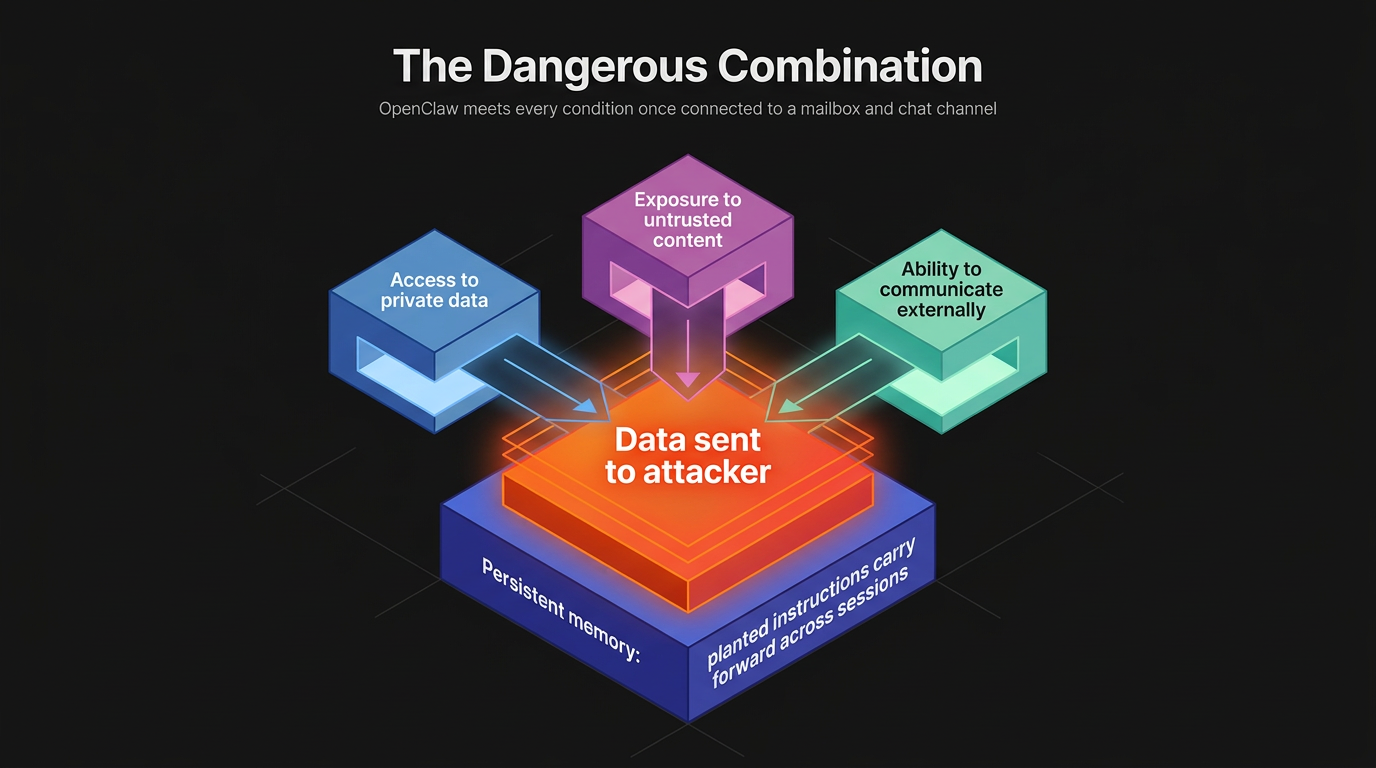
OpenClaw combines three capabilities that are dangerous together: access to private data, exposure to untrusted content and the ability to communicate externally. An agent with all three can be tricked into sending private data to an attacker, and OpenClaw meets every condition once it connects to a mailbox and a chat channel. Its persistent memory adds a fourth problem, because notes it keeps between sessions can carry a planted instruction forward long after the message that delivered it.
Broad Access and Plaintext Credentials
Each OpenClaw instance is a non-human identity holding the combined privileges of its host account and every service connected to it. An agent that can run shell commands has the reach of the account it runs under, and one that can drive a signed-in browser can act inside any session the user already opened. OpenClaw's gateway exposure runbook denies shell execution, with approval always required, only in its hardened baseline, and a default installation does not carry that restriction.
Those privileges also sit in files on the host, and the configuration and credentials an agent uses are exactly what commodity malware looks for. CERT-EU's cyber brief recorded an infostealer infection, reported February 17, 2026, that led to the theft of OpenClaw configuration files, cryptographic keys and personal AI context. A stolen gateway token or service credential gives an attacker access to the agent without ever touching the agent.
Malicious Skills and Prompt Injection
Skills extend what the agent can do, and attackers have already used them to deliver malware. CERT-EU's brief reported that on February 2, 2026, Koi researchers disclosed at least 341 malicious skills published to ClawHub, OpenClaw's skills marketplace, and to GitHub, delivering info-stealing malware aimed at crypto keys, SSH credentials and browser passwords. A skill that looks like a productivity add-on can therefore become the installer for a credential stealer, and registry scanning only reduces that risk.
Prompt injection attacks let text in an email, web page or document redirect OpenClaw, and no current technique fully prevents them. The UK National Cyber Security Centre (NCSC), in its blog on prompt injection, states that such attacks "may never be totally mitigated in the way that SQL injection attacks can be." For OpenClaw, every message that can start a session is an input an attacker can write, which turns a phishing email into a possible instruction to the agent.
Documented OpenClaw Incidents and Vulnerabilities
OpenClaw's public record includes a high-severity token-theft vulnerability, a poisoned skills marketplace and stolen configuration files. The National Vulnerability Database (NVD) record for CVE-2026-25253, published February 1, 2026, lists 2026.1.29 as the fixed version for a flaw in which a crafted link could leak the gateway token. Each entry shows a different path to the same assets, the gateway token and connected-account credentials:
Incident or CVE | Date | Impact | Source |
|---|---|---|---|
CVE-2026-25253 | February 1, 2026 | Crafted link leaks gateway token | NVD |
Malicious ClawHub skills | February 2, 2026 | Info-stealing malware delivered as skills | CERT-EU |
Infostealer config theft | February 17, 2026 | Configuration files and keys stolen | CERT-EU |
None of the three required an attacker to defeat a security control in the usual sense. One abused a trusted link, one abused a trusted marketplace, and one copied files from a compromised host. Reducing what each instance holds and who can reach it therefore matters more than any single patch.
How Security Teams Can Reduce OpenClaw Security Risks
Security teams reduce OpenClaw risk by finding every instance, deciding which uses are allowed, constraining what each agent can touch and watching what it does. Most of that work uses OpenClaw's own configuration and audit commands, backed by existing endpoint, network and identity tooling.
Discover Instances and Set a Usage Policy
Endpoint, network and identity signals each catch installations the others miss. Endpoint tools can look for the gateway process, its service entries and its configuration directory under any of the project's three names.
On the network, the gateway listens on TCP port 18789 by default, and identity signals include chat-platform bot installs and OAuth grants and signup emails from model providers. Abnormal's AI Governance, generally available, is designed to discover sanctioned and shadow AI through signup emails, OAuth grants and identity signals and can help teams sanction, tolerate or unsanction each tool.
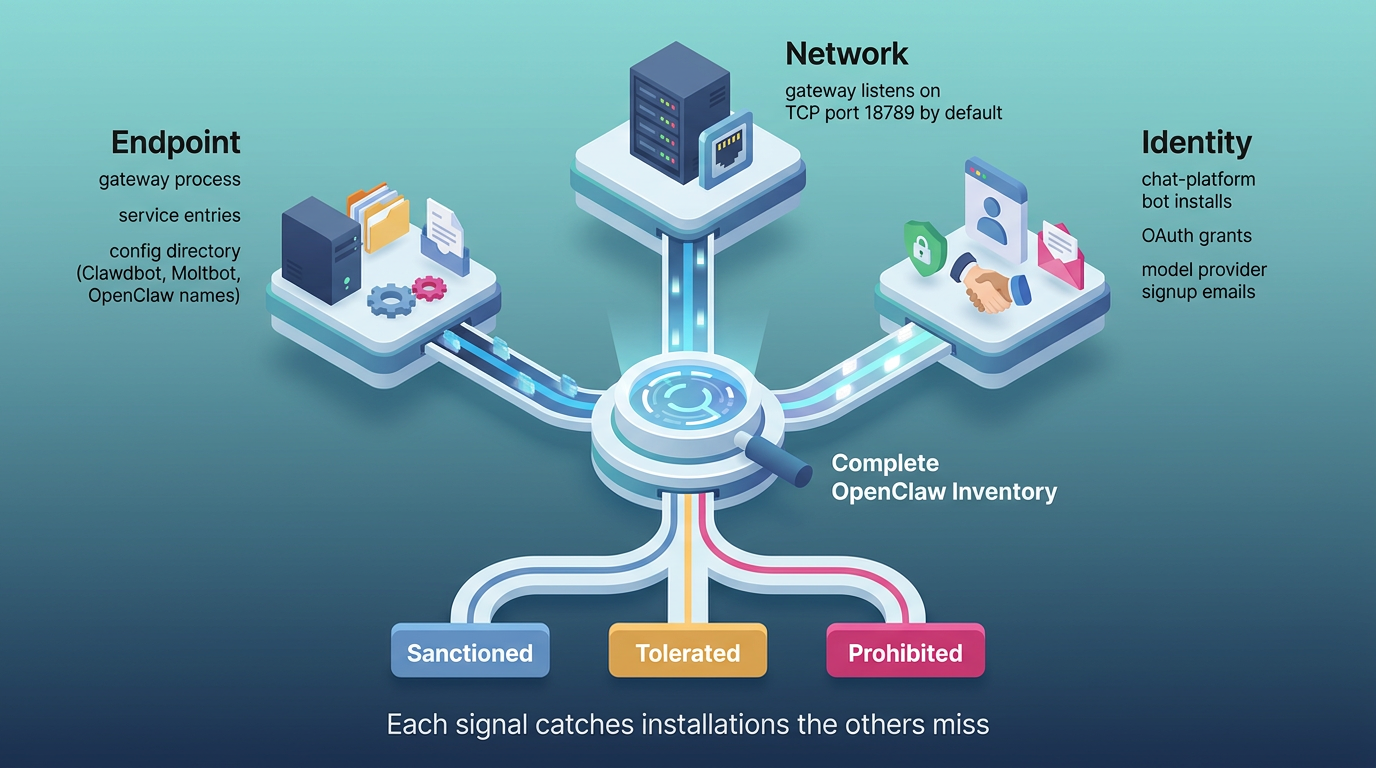
A written policy should then mark OpenClaw as sanctioned, tolerated or prohibited, and a skill vetting procedure gives that policy force:
Approved List: Security approves named skills and pinned versions, and employees install only from that list.
Scan Status: Reviewers reject any skill whose registry scan is flagged, pending or failed.
Manual Review: Reviewers read every instruction the skill gives the agent and the user, and reject any skill that asks users to run terminal commands or install helper tools.
No Overrides: Policy forbids installing a skill before its scan completes.
Each new version of an approved skill needs the same review, because a registry check confirms what was published rather than what now sits on the host.
Restrict Permissions and Monitor Agent Activity
Sanctioned instances should run on the runbook's minimum safe baseline, which binds the gateway to loopback, requires token authentication with a long random token, uses the messaging tool profile, denies shell execution with approval always required and disables elevated tools. Binding the gateway to loopback means only processes on the same machine can reach it, which takes the gateway off the network where a scanner or a crafted link could find it.
Mutually untrusted users need separate gateways and credentials, and connected services should use dedicated, least-privilege accounts. Remote access should run through an SSH tunnel or Tailscale rather than a public port.
Continuous checks catch configuration drift, and teams can schedule openclaw security audit --deep to rerun the project's own checks. If a gateway may be overexposed, the runbook calls for stopping public forwarding and rotating gateway tokens and affected integration credentials.
Responders should also review audit logs, run history, tool calls and configuration changes. Abnormal's AI Agent Security, in private preview as part of Abnormal's AI Security suite, is designed to inventory the credentials agents hold and attribute an owner to each agent for responders to work from.
Bringing Autonomous Agents Under Enterprise Control
Each OpenClaw risk has a matching control: the hardened baseline and least-privilege accounts for broad access, token rotation for stored credentials, an approved skill list for malicious skills and approval gates for prompt injection. None of those controls reaches an instance the security team has not found, and discovery with a named owner for every installation has to come first.
Explore the AI Security platform to see how Abnormal's AI Agent Security (in private preview) is designed to inventory agents such as OpenClaw, map their credentials and permissions, and support automated response and containment when one becomes risky.
Frequently Asked Questions
Is OpenClaw safe to run on a corporate device?
No, not in its default configuration on a device that holds work credentials. OpenClaw becomes manageable on a dedicated or virtual machine with no corporate sign-ins, sandboxing enabled, read-only workspace access, a scoped account for each connected service, and human approval before shell commands run. Security teams should treat any approved installation as a privileged non-human identity with a named owner and a tested plan for revoking its tokens.
How can security teams detect OpenClaw on their network?
Detection works best when endpoint, network and identity data are correlated. Endpoint tools can look for the gateway process, its service entries and configuration folders left under the Clawdbot and Moltbot names, as well as OpenClaw. Network monitoring can flag new connections to model provider APIs from user devices, and identity teams can review new OAuth consents, chat-platform bot installs and provider signup confirmations tied to corporate addresses.
Are ClawHub skills safe to install?
No, not by default, because a registry scan is a signal, not a guarantee. Before approving one, a reviewer should check who published it, compare the access it requests with the task it claims to do and read every instruction it gives. A note-taking skill that wants shell access or a separate helper download should fail that review.
Should companies ban OpenClaw outright?
No, not as the only measure, because a policy ban can push use onto personal devices that still connect to work email and chat, where the security team has no visibility. A prohibition on corporate devices works better when paired with a sanctioned route, such as an isolated test machine, and enforced through detection, while teams handling regulated data may reasonably prohibit it until isolation and approval controls are proven.