
NOTE: Demo visuals include blurred data or synthetic placeholders to protect customer privacy.
Edward Suarez, a digital customer success manager on the digital CS team, built the adoption and renewal readiness dashboards inside CSM Workbench. This is Episode 3 of the CSM Workbench series, and it carries a CSM from an at-a-glance list of accounts to the full context needed for a renewal conversation.
What the Dashboards Do
The workbench opens on an account overview. Edward calls it the front door: it gives him at-a-glance information across all of his accounts, but it is not where he spends his day. He built two dashboards for that: the adoption view and the renewal view. Each one pulls account data from separate systems and puts it in a single place to work from.
The Disjointed Systems Problem
The need for those views starts with the size of the job. Edward works a large book of business as a digital CSM. Adoption status and renewal notes are typically split across disjointed systems, so assembling a clear view of any one account costs time he would rather spend on the account itself.
Three frictions kept showing up:
Renewal manager notes live in the CRM while CS notes live in the customer success platform, so getting the full picture of an account means jumping between tools.
Customers buy a set of modules, and some of them never get turned on. Nobody is at fault, but it keeps customers from getting the most value from what they have licensed.
Preparing outreach meant opening each account by hand, comparing licenses against configuration status, and tracking down the right contacts.
How the Dashboards Run
That is where the two dashboards come in. The adoption dashboard lays out every module a customer has licensed against its current configuration status, so anything that never got turned on is visible in one place. From there, the tool helps Edward draft customer instructions that explain what a specific module does, why it is worth turning on, and what the setup takes. The renewal dashboard sits alongside it and brings renewal manager notes together with CS notes, so renewal prep happens in one view instead of across separate systems.
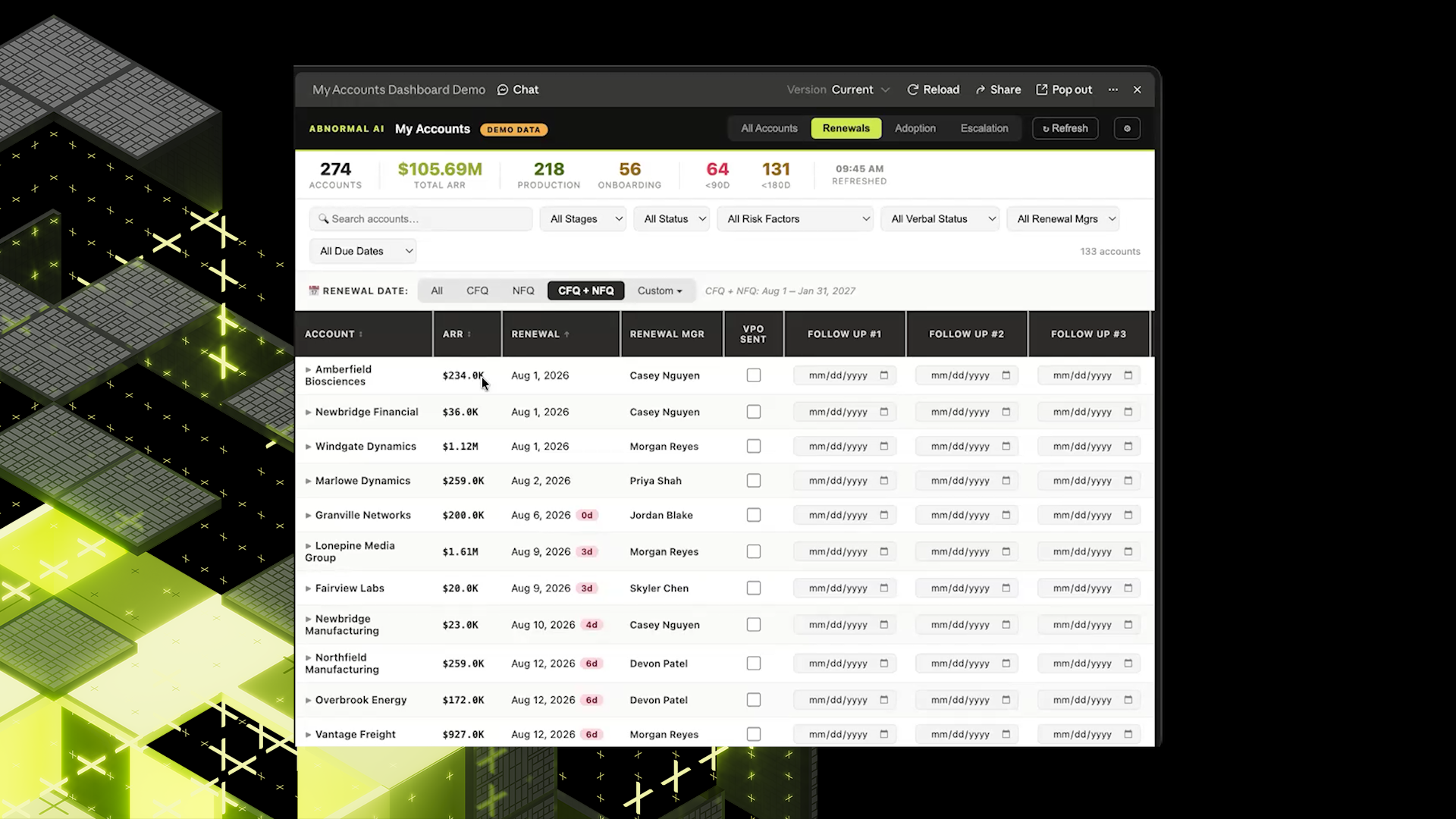
Image desc: Renewal prep in one view: renewal notes, CS notes, and outreach tracked together instead of split across separate systems.
The design asks nothing of anyone else. As Edward put it, "this is built on read access to systems that we already use. It's not asking anyone to change where they track account data or any of their workflows."
The workbench brings the adoption and renewal work together. It:
lays out each licensed module against its current configuration status.
helps draft customer instructions covering what a module does, why it is worth turning on, and what the setup takes.
brings licenses, configuration status, and the relevant account contacts into one place.
unifies renewal manager notes from the CRM with CS notes from the customer success platform in a single view.
tracks renewal outreach and customer feedback in the same dashboard.
Why It Matters for Teams
The payoff reaches everyone involved in a renewal. CSMs see the full picture of an account at a glance, which is what a renewal conversation requires. Renewal managers and CSMs keep working in the systems they already use, so nothing changes about where they log notes. Adoption gaps show up in one view instead of turning up one account at a time, and customers get context on modules they have licensed but never turned on, including what setup involves.
Time Back on Renewal Reviews
Early users describe the effect. A few people on Edward's team are using the dashboards now, and the reaction has been consistent. They report significant time savings on their daily renewal reviews. Team members add that customers on the other side of the workflow are receiving useful communications about optimizing their deployment.
For Edward, the change shows up most in the adoption work. Before, it was a manual process of reviewing accounts, comparing licenses with configuration status, and identifying key contacts. Now he gets all of that information in one place.
What Episode 3 Adds
Looking back across the series, Episode 1 gave CSMs a ranked list of accounts. Episode 2 turned that list into a drafted action plan. Episode 3 supplies the context needed to work that plan without hopping between tools. Edward's build follows the principle that runs through all three episodes: build on read access to the systems people already use, and let the tool assemble the picture rather than asking anyone to change where they put their data.