Accidental data loss can turn a routine workday into a lasting business disruption. The damage can rival that of a deliberate intrusion, and an organization's ability to respond often determines whether the effects are temporary or permanent.
Key Takeaways
Many incidents involve a human element, such as making an error or falling prey to social engineering, and the same mistake can destroy, corrupt, expose, or make information unavailable.
Accidental data loss can interrupt operations, trigger regulatory notification duties, and damage customer trust.
Effective prevention requires layered controls that limit damage and reduce errors at their source.
A backup only counts as protection once a tested restore proves it can meet the organization's recovery objectives.
What Is Accidental Data Loss?
Accidental data loss is the unintended destruction, alteration, corruption, disclosure, or loss of availability of data caused without malice by human action or system failure. Accidental data loss includes deleted files, spreadsheets overwritten with the wrong version, databases corrupted mid-migration, sensitive reports emailed to the wrong person, and records locked behind a lost encryption key.
The term sits alongside several neighbors worth separating. Data leakage is the disclosure of information outside the organization's control, often with the data still intact. A data breach involves unauthorized access to protected data, and under the General Data Protection Regulation (GDPR), the definition explicitly includes accidental destruction, loss, and alteration, so one incident can be both an accident and a reportable breach. Temporary unavailability, such as an outage that resolves once systems restart, can still constitute a temporary loss of availability; it becomes a permanent loss of availability when the data cannot be restored.
Intent separates accidental from malicious acts, while both can cause equal harm. An employee who deletes the only copy of customer records by mistake and an insider who destroys them deliberately leave the organization in the same position.
How Accidental Data Loss Happens
Human-caused accidental loss generally begins in one of two ways, and the distinction matters because each calls for different safeguards:
A Slip: A correct goal executed badly. Slips happen to experienced employees doing routine work.
A Mistake: A flawed decision executed exactly as planned. Mistakes happen when the plan itself is wrong, often because a setting, tool, or procedure was misunderstood.
Execution Errors That Misplace, Delete, or Expose Data
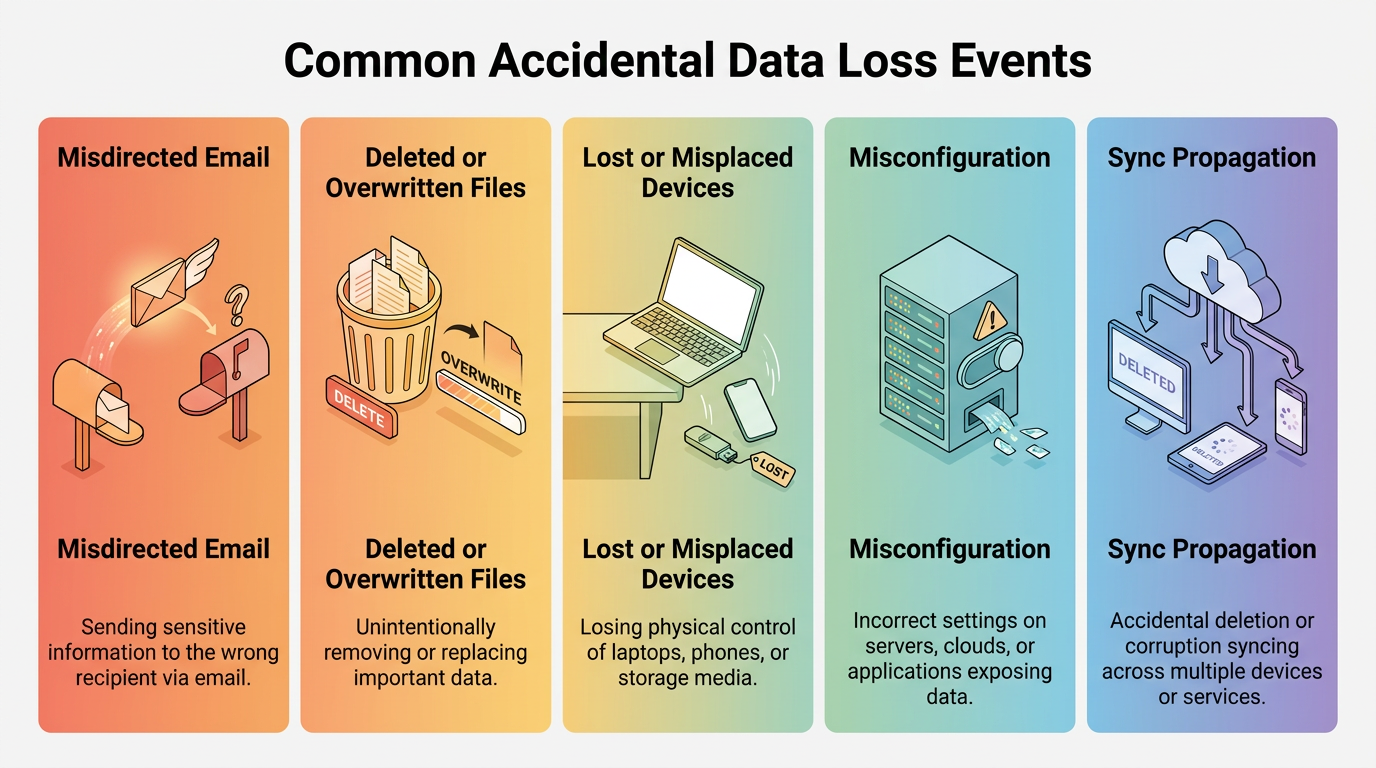
Slips and lapses account for some of the most common loss events in breach data, and several recurring patterns show up again and again:
Misdirected Email: Auto-complete picks a similar address, the sender doesn't notice, and confidential data leaves the organization in one keystroke — an error that can feel like an unavoidable part of using email.
Deleted or Overwritten Files: Files get deleted from shared drives during routine cleanup, or a newer document gets replaced with a stale copy.
Lost or Misplaced Devices: Laptops and universal serial bus (USB) drives disappear in transit.
Multitasking and fatigue erode attention, especially during long stretches of routine work when confirmation matters most. When employees face more security decisions than they can manage, decision fatigue sets in, and they respond by avoiding decisions or choosing the easiest option. Impulsive action also becomes more likely. More rules can produce more errors. These are execution failures because the intended task is legitimate, but attention breaks at the moment when a choice becomes irreversible.
Planning and Process Errors That Corrupt or Remove Data
Mistakes look different: the action goes exactly as intended, but the intention rests on a wrong belief. Misconfiguration is the dominant example. An administrator sets a storage bucket to public believing it is private, shortens a retention policy believing old data is backed up elsewhere, or grants broad permissions believing they are scoped. Many real-world misconfiguration incidents begin with a gap between what the employee believes a setting does and what it actually does.
Unsafe migrations and unverified changes belong in the same category. Moving data between systems without validating the copy, deploying a schema change without a rollback plan, or decommissioning a server before confirming its contents were preserved can each remove data permanently while every step looks correct. System and tooling failures are a separate cause category. Drives can fail or controllers can corrupt writes. Sync tools may also propagate a deletion to every replica.
Procedural gaps tie these together. Human-error outages can result when employees fail to follow established procedures or work from procedures that are unclear or wrong. Shadow tools compound the problem, because data created in unsanctioned apps and personal accounts sits outside every retention policy and backup job the organization runs.
The Business Risks of Accidental Data Loss
The cost of an accidental loss starts with the missing data and compounds from there. Unavailable records interrupt the processes that depend on them, so an accounting folder deleted on Monday becomes delayed invoices by Wednesday. Recovery itself consumes employee time, while investigation and legal review consume more. Customer communication adds further work. If personal data was involved, regulatory notification requirements may apply, and customers who learn their information was mishandled may take their business elsewhere; reputational damage tends to outlast the technical fix.
The scale is easy to underestimate because no single accident makes headlines. According to the Ponemon Institute's 2026 Cost of Insider Risks report, negligent or mistaken insiders caused 53% of insider incidents, more than malicious insiders and credential thieves combined, and negligence cost the average organization $10.3 million per year. Careless mistakes, repeated across an organization, outweigh sabotage.
How to Prevent Accidental Data Loss
Effective programs pair controls that limit how much damage a mistake can do with controls that make the mistake less likely.
Data Controls That Limit Damage and Preserve Recovery Options
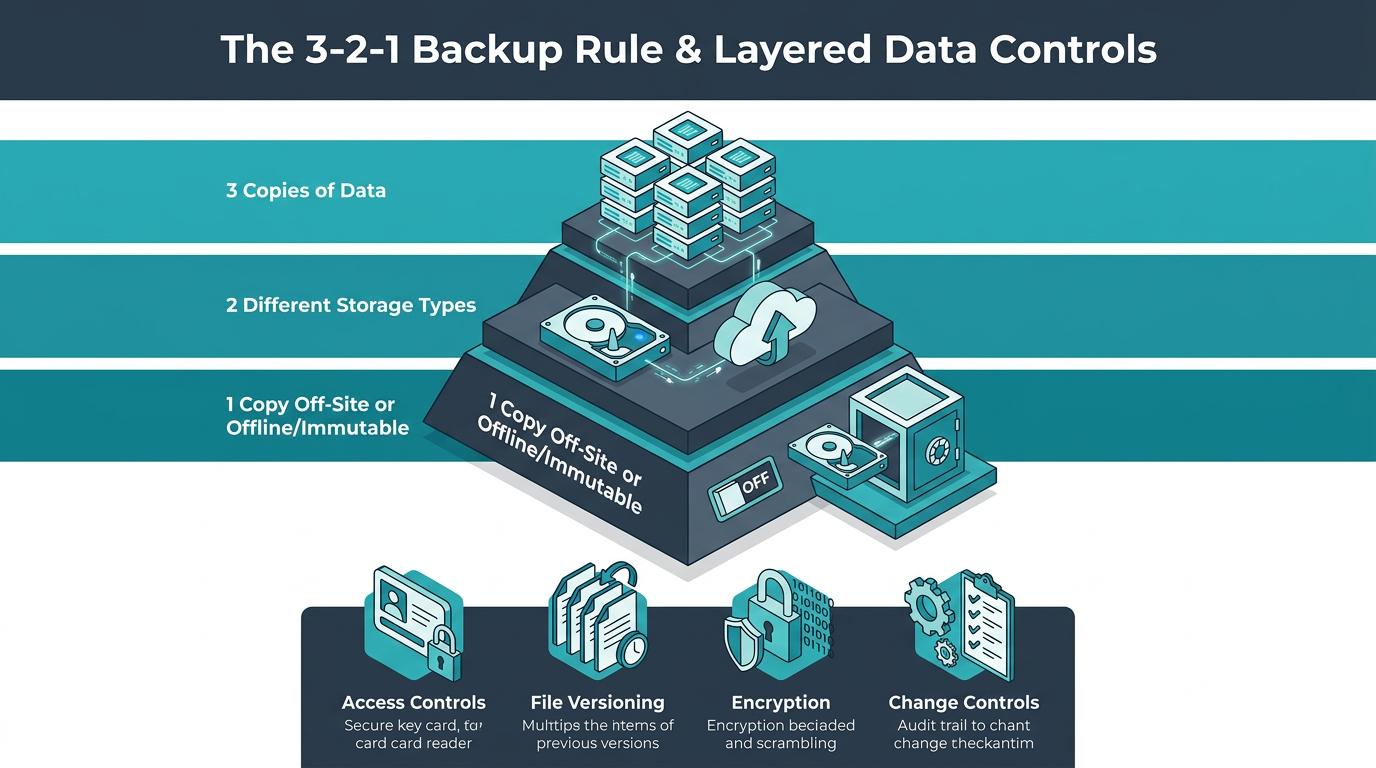
The first layer assumes mistakes will happen and shrinks their blast radius, through a handful of complementary control types:
Access Controls: Least-privilege access and role-based access control mean a slip can only reach the data that employee's role requires.
Recoverability Controls: File versioning preserves prior copies when a file is overwritten, while retention safeguards and delete protection keep removed items recoverable for a defined window.
Encryption and Monitoring: Encryption limits exposure from lost devices and discarded media, while monitoring surfaces unusual deletion activity early.
Change Controls: Risky operations route through review before they run.
Backups are the layer of last resort, and the 3-2-1 rule is a standard starting point: organizations maintain three copies of important data on two different types of storage media, such as a local drive and the cloud, with one copy stored off-site away from the business location. Off-site separation protects against fire, flood, and site-level failure. The rule can be extended with one copy kept offline or immutable so that a sync error, ransomware attack, or an over-permissioned account cannot reach it. Regular integrity checks and restore tests add assurance. Restore tests turn a backup hypothesis into a proven control.
Human-Centered Controls That Reduce Error at the Source
The second layer redesigns the moments where errors occur and catches mistakes at their source:
Confirmation Prompts: Prompts before destructive actions catch slips at the point of action.
Safer Defaults: Soft delete instead of permanent delete gives a mistake a second chance to be caught.
Recipient Checks: Flags on external or unusual addresses catch misdirected messages before they send.
Peer Review: A second reviewer catches planning mistakes before execution, for high-risk permission edits, retention modifications, and migrations alike.
Together, these controls create a pause where one employee's misunderstanding could otherwise become a system-wide change, and they reduce reliance on memory during repetitive or time-pressured work, when attention is most likely to drift.
Procedures deserve the same design attention. Because unclear or hard-to-follow processes can cause human-error incidents, clear runbooks with verification steps do more than exhortations to be careful. Approval paths should be manageable; the Compliance Budget research describes a limited budget of effort for security compliance, and when controls exceed that threshold, employees may choose workarounds instead of following official requirements. Training still has a role, but a targeted one: teaching employees what specific settings and actions actually do closes the knowledge gaps behind misconfiguration, which awareness posters never will.
Accidental Data Loss in Cloud and SaaS Environments
Cloud and software as a service (SaaS) providers and customers divide responsibility according to the service model, configuration, and contract. Providers generally protect hardware and facilities. Platform availability also falls to providers, while retention settings, access permissions, versioning, and recovery often stay with the customer. That division explains why extremely durable storage still loses data: durability protects against hardware failure, but a valid delete command is executed faithfully and replicated to every copy.
Losing an encryption key renders data unreadable even when every byte survives, while disabled versioning or an expired retention window can make a deletion permanent. Safeguards include clarifying customer responsibilities, maintaining offline or cloud-to-cloud backups, enabling delete protection or object lock, and documenting provider recovery windows.
Recovery After Accidental Data Loss
A backup becomes useful only at the moment a restore from it meets the organization's actual needs, which means recovery has to be designed against explicit targets and rehearsed before anything goes wrong.
Recovery Objectives That Define an Acceptable Restore
Three linked objectives define what counts as an acceptable restore:
Recovery Point Objective (RPO): The point in time to which data must be restored, or in plain terms, how much recent work the organization can afford to lose.
Recovery Time Objective (RTO): How long systems can remain down in recovery before the damage becomes unacceptable.
Maximum Tolerable Downtime (MTD): The outer limit: the total disruption a business process can absorb without lasting harm to the mission.
Because the RTO must ensure the MTD is never exceeded, the RTO is normally set shorter than the MTD.
These numbers come from a business impact analysis, which identifies critical processes and the systems they depend on. It also calculates the cost of losing each hour or each day of data. The objectives then drive concrete engineering choices. A four-hour RPO requires backups at least every four hours. A tight RTO may require warm standby systems or replicated storage; tape restores may be too slow. The analysis also sets escalation priorities based on which systems the business needs first.
Recovery Steps That Turn an Incident Into Improvement
An administrator cleaning a shared drive deletes a folder holding the finance team's active files. Detection comes first because retention windows are ticking; a finance analyst reports the loss within the hour. The team pauses sync jobs so the deletion does not reach replicas, prevents an automated purge, and preserves audit logs showing who deleted what and when.
The team picks the most recent backup from before the deletion, checks its recovery gap against the RPO, and restores it to an isolated location first. Validation catches corruption or missing subfolders before anything touches production. The team then restores the live system, confirms with finance that the files open and reconcile correctly, and communicates the few hours of work lost inside the recovery gap.
The last step converts the incident into improvement. The review finds the administrator's account held delete rights across the entire shared drive, so the team scopes permissions to owned folders and extends the soft-delete retention window. It also adds a confirmation prompt on bulk deletions.
Compliance Duties After Accidental Data Loss
The affected data and the nature of the event determine regulatory obligations regardless of intent, and the three regulations most likely to apply each set their own trigger and clock:
Regulation | What Triggers It | Notification Deadline
|
|---|---|---|
General Data Protection Regulation (GDPR) | A personal data breach, defined to include accidental destruction, loss, alteration, and disclosure | 72 hours to the supervisory authority, unless the event is unlikely to pose a risk to individuals; affected people are told when the risk is high |
Health Insurance Portability and Accountability Act (HIPAA) | An impermissible disclosure of protected health information, presumed a breach unless a risk assessment shows otherwise | 60 days to notify affected individuals |
Regulation S-P (amended) | Unauthorized access to or use of customer information at a covered financial institution | 30 days to notify, alongside a required written incident response program |
The Health Insurance Portability and Accountability Act (HIPAA) also requires covered entities to maintain data backup and disaster recovery plans, separate from its breach-notification duty above. European guidance lists accidental examples that qualify under GDPR, such as a misdirected email or medical data deleted without a backup.
Even when analysis concludes that notification isn't required, organizations generally need to document the incident and the reasoning, so the recovery record is also the compliance record.
Make Recovery a Designed Outcome
Resilient organizations expect ordinary human mistakes and build systems that keep those mistakes recoverable. Layered controls shrink the blast radius, while safer defaults catch slips at the moment of action. Restore tests prove backups work before anyone needs them. A worthwhile self-check: if a critical folder disappeared today, would your team detect it inside the retention window and restore it within your objectives? Would the team then change the process that let it happen?
Frequently Asked Questions
What Is the Most Common Cause of Accidental Data Loss?
The human element broadly, but that label hides distinct mechanisms. Misdelivery is a common error type and includes sending data to the wrong recipient. Misconfiguration is also common, while publishing errors occur as well. Each mechanism calls for a different safeguard, which is why training employees more rarely reduces incidents on its own.
Can Data Loss Be Accidental and Still Count as a Data Breach?
Yes. Under GDPR, a personal data breach explicitly includes accidental destruction, loss, alteration, and disclosure, and HIPAA presumes a breach when protected health information is impermissibly disclosed regardless of intent. Whether obligations follow depends on the data involved, the applicable regulation, and the risk to the individuals affected.
Does Cloud Storage Prevent Accidental Data Loss?
No. Durability and recoverability solve different problems. A cloud platform may keep stored objects intact while customer-controlled retention, permissions, versioning, and encryption keys determine whether deleted or inaccessible information can be recovered. Independent backups and tested recovery settings therefore remain necessary.
How Often Should an Organization Test Data Recovery?
Often enough that every critical data source has a recently proven restore, with frequency scaled to business impact. Annual testing is a common baseline, but systems with tight recovery objectives warrant more frequent exercises. Any restore test should validate both job completion and data integrity.