A Social Security scam email borrows everything that makes a government notice look genuine: the agency seal, formal letterhead, and measured language that fraudsters can now reproduce convincingly. That polish makes a fabricated notice difficult to judge at a glance, and a mistaken response can expose personal information, account credentials, or money. Careful evaluation matters more than visual credibility, and it doesn't require technical skill to apply.
Key Takeaways
The Social Security Administration (SSA) sends only a few kinds of email, and none of them demand sensitive information, immediate payment, or unusual payment methods.
A message's full sender address and a link's actual destination reveal more than any display name, logo, or visible link text.
Urgency, threats, and claimed authority are manipulation techniques, and any one of these signals is reason enough to pause before acting.
The right response depends on the exposure: merely receiving a fake email calls for reporting, while a clicked link, shared credential, or payment calls for targeted recovery steps.
How Legitimate SSA Email Works
Legitimate SSA emails point you toward protected information rather than demand action through the message. If you have a personal my Social Security account, SSA emails once a year, roughly three months before your birthday, to prompt a review of your Social Security Statement online. Courtesy notifications also announce new messages or notices in your account's Message Center. The actual document stays inside the secure account.
Most SSA email comes from addresses ending in ".gov," and SSA currently uses several verified addresses for these communications:
The one documented exception is a third-party e-signature domain. SSA never asks for sensitive or personal information through social media, email, or text message. If you owe SSA money, it mails a letter with payment options and appeal rights.
How to Inspect a Social Security Scam Email
A suspected Social Security scam email, a form of phishing that borrows a trusted institution's identity, reveals its credibility through its full sender address and the real destinations of its links. These checks separate identity claims from verifiable details.
Sender Addresses and Authentication Warnings
Display names are chosen freely by the sender, so the address behind the name is the only part worth reading. Tapping or clicking the sender's name in any mail app expands it to show the full address, and the domain after the "@" sign identifies who actually sent the message. The ".gov" domain belongs exclusively to U.S. government organizations, and private entities cannot register it. One phishing email showed "Social Administration" as its display name while the expanded address revealed an ordinary personal account. Fraudsters imitate legitimate addresses in a few common ways:
Altering or omitting a few characters
Substituting numbers for letters
Relying on slight misspellings that trick the eye
This kind of email spoofing can make a fraudulent sender look nearly identical to the real one, so the address deserves a careful read rather than a glance.
Mail providers check authenticity as well. Federal agencies use email authentication, which lets providers reject messages that forge government domains before delivery and pushes fraudsters toward lookalike domains instead. A question mark near the sender's address can indicate failed authentication. Some providers use a spoof warning banner instead, while others route the message to the junk folder. Any of those signals justifies closing the message.
Link Destinations and Independent SSA Access
Link text and link destination are separate things, and only the destination matters. Hovering a cursor over a link, or long-pressing it on a phone, previews where it actually leads; when the preview doesn't match the visible text, fraudsters may have spoofed the link. One fake "Claim Benefits" email used exactly this trick: its link displayed www.ssa.gov or www.socialsecurity.gov while redirecting to a fraudulent site. Shortened URLs hide the destination entirely, and subdomains can mislead by embedding the trusted agency name inside a look-alike domain the fraudster actually controls. Reading the preview from the final domain backward helps separate the registered domain from any agency name placed in a subdomain. If the destination remains unclear, treating it as untrusted avoids relying on its appearance.
The most reliable approach skips the link entirely. Typing ssa.gov/myaccount into a browser and signing in shows any genuine notice in the Message Center. The same principle covers phone follow-ups: a number you already know is real beats any contact detail the message supplies.
Common Fake SSA Message Scenarios
Fake SSA messages pair a believable claim about your statement, benefits, or Social Security number with pressure to click, download, disclose, or pay. The Federal Trade Commission (FTC) reported people lost $920 million to government impersonators in 2025, up from $866 million in 2024, and the Social Security Administration reported that the FTC received more than 330,000 complaints involving government impersonation that year, a 25% increase over 2024. Fraudsters frequently imitate Social Security in these scams.
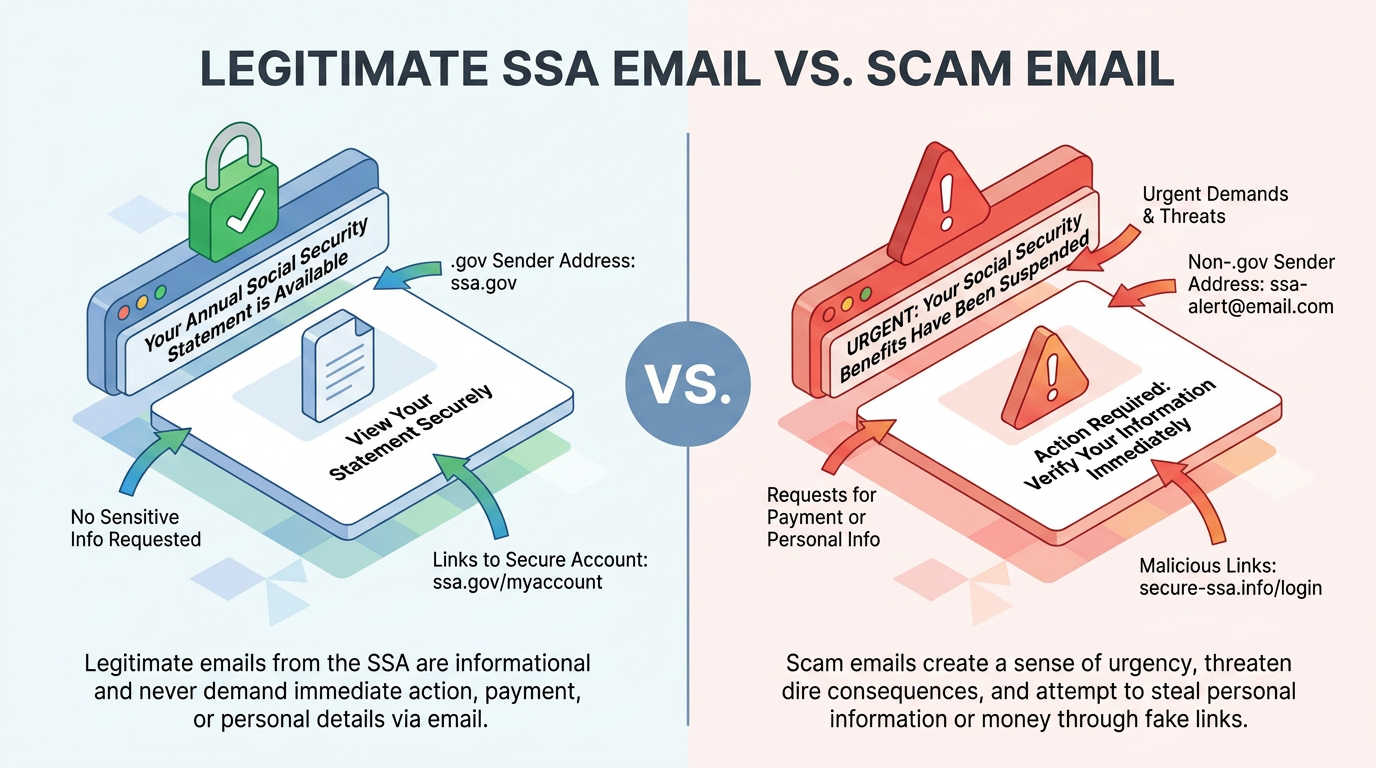
Statement Downloads and Security Update Tools
In February 2026, a 2026 surge involved emails falsely claiming to provide access to the recipient's Social Security statement. These messages copy official language, logos, colors, and formatting, and their links can install malware or open fake websites that collect personal and financial information. A related 2025 variant claimed a potential error on the recipient's account and offered a "Security Update Tool" as the fix, under the subject line "Official Notice: Download Your Social Security Statement Now. -ID: 70S802." Both used non-government sender addresses.
The delivery method exposes each scam. Your actual statement lives inside your online account, and SSA does not send unsolicited attachments or direct download links. An email offering a document to download asks you to do something the real agency never does by email, however plausible the stated reason. Checking the Message Center independently resolves the claim without opening the attachment or following the offered path. If no matching notice appears there, copied design and urgent language do not make the download legitimate.
Benefit-Claim Links and Account Suspension Threats
The second family of fakes runs on hope or fear. On the hope side, the "Claim Benefits!" email urged recipients: "Important: Apply for Your Social Security Benefits Starting in 2025," behind a disguised link. On the fear side, a November 2025 email titled "Alert: Social Security Account Issues Detected" carried an attachment with fake SSA Office of the Inspector General (SSA OIG) letterhead and an "Official Document" stamp. It claimed the agency would suspend the recipient's Social Security number (SSN) within 24 hours and refer the case for criminal prosecution.
Both follow a four-step social engineering pattern: Pretend, Problem or Prize, Pressure, and Pay. Pretending to be an agency you trust supplies authority, and people may comply with that authority reflexively. The problem or prize gives you a personal stake, while the deadline exploits loss aversion because a threatened loss can motivate faster action than an equivalent gain. The payment demand then names methods no government accepts: gift cards, prepaid debit cards, wire transfers, cryptocurrency, cash, or gold bars. The pressure prevents the pause where verification would happen, letting the tactic succeed against many victims at once.
What to Do After a Social Security Scam Email
The safest response to a Social Security scam email depends on whether you only received it or interacted with its sender, link, attachment, or payment demand.
Stopping Contact and Securing Accounts
If any interaction happened, the first step is cutting off the channel by ending replies or callbacks, since any follow-up contact should be treated as part of the same scheme. Investigators typically need a record of what was exchanged, so it helps to preserve:
The original email and any other communications with the scammer, including sender and link details
Any attachment names that came with the message
Transaction records, which establish what was sent, when it moved, and which institution handled it
After opening an attachment or downloading a file, updating security software and running a full scan addresses the malware risk associated with these downloads, and removing anything the scan flags closes the loop. A password entered on a fake sign-in page needs changing right away, along with passwords for any other account where you reused it. If bank, card, or other payment details went to the scammer, or money already moved, contacting the relevant financial institutions right away gives them a chance to protect the accounts and dispute or reverse what they can.
Someone who touched nothing has a shorter path: reporting the message and then deleting it.
Matching Recovery Steps to the Exposure
A disclosed SSN calls for the longest checklist. The federal recovery site generates an identity theft report and a personal recovery plan matched to the exposed information. Placing credit freezes at each of the three bureaus makes it harder for anyone to open new accounts in your name, and the freezes are free, don't affect your credit score, and last until you lift them.
A lighter option, the fraud alert, requires contacting only one bureau, which must notify the other two, and tells businesses to confirm your identity before extending credit. The initial version lasts one year, and confirmed identity-theft victims can extend it to seven. Reviewing the earnings in your Social Security Statement catches misuse of your number, and an Identity Protection PIN from the Internal Revenue Service (IRS) blocks anyone else from filing a tax return with it.
Stolen money adds a police report and preserved transaction records to support the claims your bank files. Whatever the exposure, monitoring continues afterward: readers can access free weekly credit reports at AnnualCreditReport.com, and filing taxes early beats a scammer to any fraudulent refund.
How and Where to Report Fake SSA Messages
Reports about Social Security impersonation go to the SSA OIG. Someone who loses money should also report it to the Federal Bureau of Investigation (FBI) and local police, while the FTC accepts fraud reports generally. The SSA OIG accepts allegations through its online form. Staff may gather more information or open a case. They may also refer the matter to SSA or another federal agency, or close it. Federal regulations prevent the office from disclosing the outcome of an individual report, so silence after filing is normal.
FTC reports submitted at reportfraud.ftc.gov enter a nationwide law enforcement database; the agency investigates patterns rather than resolving individual complaints. Analysts at the FBI's Internet Crime Complaint Center (IC3) likewise review and route filings without contacting the filer. Readers can also forward phishing emails to the Anti-Phishing Working Group at reportphishing@apwg.org.
Confidence Comes From Independent Verification
No message, however official it looks, obligates you to decide anything inside the email that delivered it. The claim either survives a check through an address you typed yourself or a number you already had, or it doesn't. Scam formats will keep shifting across texts, calls, and social platforms, but the pause-and-verify habit transfers to every one of them and costs only a few minutes.
Frequently Asked Questions
Does the Social Security Administration Send Emails?
Yes, but sparingly. Account holders get a yearly nudge to review their statement, and people who opt in receive notices that something new is waiting in their online account. The substance always sits behind the login; the email only announces it.
What Email Addresses Does Social Security Use?
Nearly all legitimate SSA mail comes from addresses ending in ".gov," such as no-reply@ssa.gov. The single documented exception is a third-party e-signature domain the agency uses. Any other sender domain deserves suspicion no matter how the message looks.
Can Social Security Suspend an SSN by Email?
No. The agency does not suspend Social Security numbers at all, by email or otherwise, and it never threatens arrest or demands immediate payment. A suspension threat is itself confirmation that the message is an impersonation attempt.
What Should I Do if I Clicked a Fake SSA Link?
Closing the page without entering anything limits the damage. Scan the device, change any password typed on the destination site, watch financial accounts closely, and report the incident to the SSA Office of the Inspector General to cover the main risks.