Most people treat the inbox as a place where messages pile up. But attackers treat it as a control panel, since password-reset links, bank notices, and payroll alerts all arrive there. A single successful login can be converted into access to dozens of unrelated services within an hour. The password guarding a streaming subscription protects a streaming subscription. Meanwhile, the password guarding an email account protects everything that resets through it.
Email password security will protect the one account nearly every other account depends on. Keeping your email account safe means protecting the full login lifecycle and responding quickly after something looks wrong. This guide explains how attackers get into your email inbox, the password and authentication choices that hold up against them, and the recovery steps that contain the damage when something slips through. By the end, you will know how to make your inbox hard to break into and easy to take back.
Key Takeaways
The email account is a recovery master key because most online services reset passwords by email, so whoever controls the email account can take over the accounts behind it.
A long, unique password for the inbox beats a short one padded with symbols, and current standards now prohibit both forced complexity rules and scheduled password changes.
Security keys and passkeys stop the phishing and interception attacks that defeat text-message codes, but they only deliver that protection when weaker fallback methods are removed.
Verified recovery details, reviewed sessions, and a rehearsed response sequence turn a stolen credential from a full takeover into a contained incident.
What Is Email Password Security and Why Does It Matter?
Email password security matters more than the security of any other single account because the email account is how a person proves identity to everything else.
Email Access Extends Beyond the Inbox
An email account holds far more than conversations. Years of receipts, tax forms, medical portal notices, travel confirmations, and work threads sit in searchable folders, and together they form a map of which banks, employers, and other services the owner uses. An attacker who reads that map knows exactly where to go next and can write messages that sound like the owner, because the owner's own writing is right there as a template.
That is the mechanism behind business email compromise (BEC), in which an attacker uses a hijacked or convincingly spoofed mailbox to redirect payments and invoices. The money moves because the attacker controls the channel that finance teams and vendors already trust.
Account Recovery Creates a Wider Chain of Risk
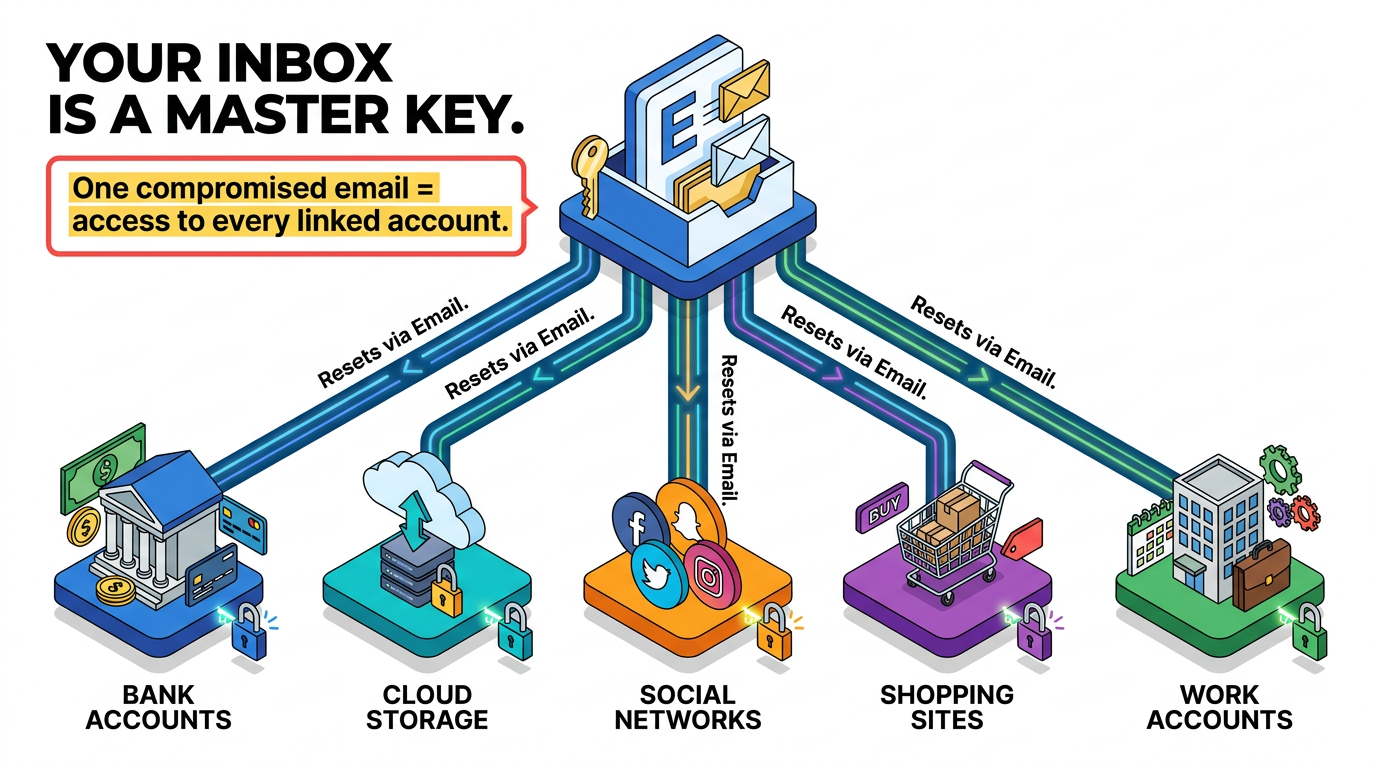
Nearly every online service handles a forgotten password the same way: it emails a reset link. That convenience makes the email account a recovery master key. An attacker who can read incoming mail requests a reset on a shopping site, clicks the link, and sets a new password. The attacker can repeat the process for a bank, a cloud storage account, or a social network and often deletes the notification emails along the way. None of those other passwords ever had to be guessed.
Multi-factor authentication (MFA) recovery frequently runs through the same email account. A 2023 study of deployed MFA recovery procedures concluded that the security of many MFA recovery flows is only as strong as the email account connected to them. The email account sets the ceiling for how secure the second factor on every linked service can be.
How Can Attackers Defeat Email Password Security?
Attackers rarely crack a strong email password directly. They guess weak ones at scale, replay passwords leaked from other sites, or trick the owner into handing over the credential or the signed-in session.
Password Spraying and Brute-Force Guessing
Brute-force guessing throws many passwords at a single account. Password spraying inverts the approach: the attacker takes a few very common passwords, such as a season plus the current year, and tries each one against thousands of accounts. Each account sees only one or two failed attempts, so nothing trips the lockout, yet across a large population some fraction of users will have chosen exactly those passwords.
Spraying is common among well-resourced groups and opportunists. A joint advisory from CISA, the FBI, and the NSA in October 2024 described state-sponsored actors using brute force and password spraying to compromise accounts in healthcare, government, IT, engineering, and energy organizations. The technique works anywhere a few people picked predictable passwords and MFA was not enforced.
Credential Stuffing and Password Reuse
Credential stuffing starts with someone else's breach. When a forum or retailer leaks its user database, attackers compile the email-and-password pairs into lists and replay them, using automation and rotating proxies, against email providers and other high-value services. Only a small share of the pairs still work, but the lists run to millions of entries, so a small share is plenty.
The attack succeeds because reuse is how people cope with many logins. Someone juggling 50 accounts reuses the passwords they type most often, and the email password is typed constantly. When the reused password was also the email password, a leak from a low-value site becomes a master-key compromise.
Phishing, Malware, and Stolen Sessions
Phishing bypasses a password's strength by asking for it. Newer adversary-in-the-middle (AiTM) kits sit as a proxy between the victim and the real login page and relay the genuine sign-in flow so everything looks normal. The kit captures the username and password, then takes the session cookie issued after the victim completes MFA. With that cookie, the attacker is already signed in and never has to enter a code.
Infostealer malware reaches the same result without a fake page. Once running on a device, it harvests passwords saved in browsers and can steal active session cookies before shipping the data to an operator who sells it in bulk.
5 Best Practices for Email Password Security
Current guidance favors long passwords that are unique and screened against breach data. It drops the symbol requirements and scheduled changes that older advice treated as essential.
1. Length and Uniqueness Beat Composition Rules
The National Institute of Standards and Technology's (NIST) digital identity guidelines, finalized in July 2025, require a minimum of 15 characters for passwords used on their own and eight when the password is one factor within MFA, and they direct providers to allow at least 64 characters. The same guidelines ban composition rules outright: "Verifiers and CSPs SHALL NOT impose other composition rules (e.g., requiring mixtures of different character types) for passwords." CISA sets the bar slightly higher for individuals, describing a strong password as at least 16 characters and used for only one account.
The turn against complexity rules comes from how people respond to them. Forced to combine capitals with digits and symbols, most people capitalize the first letter and append a 1 or the current year. Cracking tools apply those same substitutions automatically, so predictable patterns barely slow guessing down.
A passphrase of five to seven unrelated words gives most people a long password they can remember, and NIST allows spaces and any printable character so the words can be typed naturally. Unrelated is the operative word: a song lyric or famous quote sits in cracking dictionaries, while five random words do not. For accounts nobody needs to memorize, a password manager can generate a 20-plus-character random string with no meaning to recall and no pattern to guess.
2. Password Changes Follow Compromise Evidence, Not a Calendar
Scheduled password rotation is now prohibited: "Verifiers and CSPs SHALL NOT require subscribers to change passwords periodically. However, verifiers SHALL force a change if there is evidence that the authenticator has been compromised." Rotation for its own sake pushes people toward small, predictable increments, and it does nothing about an attacker who already read the inbox and set up a forwarding rule.
For an email account, the triggers that justify an immediate change are concrete: a breach notification from any service where the same password was used, a breach alert from a manager or browser, a sign-in alert from an unfamiliar device or location, or the realization that the password was typed into a page that turned out to be fake. Any one of those calls for a new, unrelated passphrase rather than a variant of the old one.
3. Password Managers Handle Uniqueness at Scale
A password manager makes a unique password for every account practical by generating a random string for each new login, holding it in an encrypted vault behind a single master password, and filling it at sign-in so length and randomness cost the user nothing. Autofill also adds a quiet anti-phishing check: a manager withholds saved credentials when the current domain does not match the one stored for the account, so a lookalike page receives nothing even when the misspelled URL slips past a tired reader.
Concentrating every credential behind one master password raises the stakes for that password. It needs to be a long, memorized passphrase used nowhere else, and the manager account itself needs MFA. Any recovery keys or backup codes issued at setup belong on paper in a safe or sealed envelope, not inside the vault they are meant to recover.
4. Phishing-Resistant MFA Blocks Stolen Credentials
MFA keeps a stolen email password from being enough on its own, and phishing-resistant methods keep the second factor from being stolen alongside it.
SMS codes are the weakest common option: SIM-swap fraud and real-time capture by a phishing proxy both defeat them, which is why CISA's guidance is to migrate away from SMS-based MFA. Authenticator apps improve on SMS by generating time-based codes on the device, but codes and push prompts remain phishable in real time and invite MFA fatigue, which number matching mostly closes.
Security keys and passkeys stop phishing outright. Both implement Fast Identity Online (FIDO) standards using a key pair bound to the legitimate site's domain, so a lookalike site never receives a valid signature and a proxy relaying the real page collects nothing usable. CISA calls FIDO/WebAuthn the only widely available phishing-resistant authentication and classes SMS, app codes, and push notifications as not phishing-resistant. The trade-offs across common methods look like this:
Method | Phishing-Resistant? | Main Weakness | Fallback and Recovery Consideration
|
|---|---|---|---|
SMS code | No | SIM swap or real-time capture by a proxy | Recovery through the phone inherits the SIM-swap risk |
Authenticator app | No | Codes and pushes relayed in real time; push bombing | Device loss requires backup codes or a re-enrollment path |
Hardware security key | Yes | Physical loss or theft | A second registered key or offline backup codes cover loss |
Passkey | Yes | Weaker fallback methods left enabled; sync account compromise | Recovery often falls back to email or SMS unless those are removed |
Because attackers steer victims to the weakest enabled path, delete SMS as a second factor once a passkey or key is registered, register a second key or passkey as backup, and keep backup codes offline.
5. Recovery Details and Session Reviews Contain the Damage
Recovery settings and activity logs decide whether an attacker who gets in can stay, so they deserve the same attention as the password itself. An attacker inside an email account often changes the recovery email or phone number first, which redirects security alerts to them and closes the legitimate owner's path back in. A short verification checklist is worth running periodically:
Recovery Email Is Live and Protected: An account the owner controls, with its own long password and MFA.
Recovery Phone Is Current: Not a number returned to a carrier or left with a former employer.
Backup Codes Exist Offline: A printed set in a safe place covers the day the phone is lost.
Security Questions Are Random: NIST rejects knowledge-based answers because they surface in breach data and social profiles, so use a random string stored in the password manager where a service still requires them.
Providers like Google and Microsoft expose views of signed-in devices, recent activity, and security events. Reading that page monthly, and immediately after any alert, is the closest thing an individual has to intrusion detection. The signals worth acting on are specific:
Unfamiliar Sign-Ins or Recovery Changes: A device the owner does not own, a sign-in from a city they have never visited, or a recovery email or phone added by someone else.
Mailbox Anomalies: Sent messages the owner did not write, read receipts on mail they never opened, or a suddenly empty trash folder.
Persistent Access Paths: Forwarding rules and filters that redirect "invoice," "password," or "verification" messages, long-lived app passwords that bypass MFA, and OAuth-granted third-party apps all survive a password change because they never relied on it.
Catching any of these early shrinks the window an attacker has to pivot into linked accounts, and each one points to a specific control that needs to be revoked rather than a vague suspicion to investigate later. The value of a monthly review is compounding: the sooner an unfamiliar session or hidden rule is spotted, the smaller the cleanup and the shorter the list of downstream accounts that need attention.
What to Do After an Email Account Is Compromised
Recovering from an email compromise works best as a fixed sequence, because an earlier step can undo protection a later step depends on:
Work From a Clean Device: Keylogging malware can capture a new password typed on the same infected laptop, so switch to a phone or a freshly scanned computer before starting.
Reset the Password and Upgrade MFA: Replace the password with a new, unrelated passphrase. If MFA was off, turn it on with a passkey or authenticator app; if it was on and the attacker still got through, upgrade to a phishing-resistant method.
Sign Out of All Sessions: Use the provider's "sign out of all devices" control so any active sessions are ended before making later changes.
Restore Recovery Details: Set the recovery email and phone back to addresses and numbers the owner controls, and remove any MFA method the owner did not add.
Delete Rules and Filters: Reverse forwarding rules, delete or archive filters, mailbox delegation, and any changes to the signature or reply-to address.
Revoke App Passwords and Connected Apps: Delete every app password and remove any third-party app granted mailbox access during the compromise window.
Then check the sent folder and trash for reset confirmations from other services, and update the passwords and MFA on any account that resets through the inbox.
Build Protection That Survives a Stolen Password
Every layer in this model assumes the one before it will fail. A long, unique passphrase makes the password hard to guess or replay. Phishing-resistant MFA makes a stolen one useless. Verified recovery details and reviewed sessions make a stolen session short-lived. A rehearsed response makes a full compromise recoverable. The email account is the recovery key for everything else, and treating it that way is what keeps a single leaked credential from becoming a cascade.
Frequently Asked Questions
How Long Should an Email Password Be?
At least 15 characters when it is the only factor protecting the account, and 16 or more is a comfortable target. A passphrase of five to seven unrelated words gets there naturally and is easier to remember than a shorter string of symbols. Length carries more weight than character variety, and the email password should never be reused anywhere else.
Should an Email Password Be Changed Regularly?
No. Scheduled changes push people toward small, predictable variations and are not a substitute for changing the credential when there is evidence of compromise. Change the password when there is a reason: a breach notification from a service that shared it, an unfamiliar sign-in alert, or a suspicion that it was entered on a fake page. The replacement should be entirely new, not a tweak of the old one.
Is SMS Authentication Secure Enough for Email?
It beats having no second factor, but it is the weakest common option. Text messages can be redirected through SIM-swap fraud, read in transit, or captured in real time by a phishing proxy. For an account as sensitive as email, an authenticator app is a reasonable minimum, a security key or passkey is the strongest choice, and SMS is best removed as a fallback once something stronger is in place.
What Are the First Signs of a Compromised Email Account?
Unfamiliar sign-ins and unauthorized recovery-detail changes often appear first. Messages in the sent folder the owner did not write provide another early signal. Missing mail or a forwarding rule that appeared on its own may follow. Password-reset notifications from other services often do too, since an attacker with mailbox access typically moves on to the accounts that reset through it.