An email security signature can make a message feel familiar before the recipient has considered whether the request deserves trust. A recognizable name and company logo can create a gap between what the message looks like and what its technical signals establish. Orderly contact details can reinforce it.
The Federal Bureau of Investigation's Internet Crime Complaint Center (FBI IC3) 2025 report counted 191,561 phishing and spoofing complaints, and its summary puts business email compromise (BEC) losses at $3.046 billion. The scale of those losses makes the overlooked space at the bottom of an email worth closer attention.
This article looks at what a signature can and cannot prove, where its familiar cues create openings for attackers, and why the standards that authenticate a sending domain stop short of the rendered block. It also lays out a governed approach to reducing that exposure across the lifecycle of a signature. Left unmanaged, the signature block quietly becomes one of the highest-yield reconnaissance sources and impersonation aids an attacker can find inside a legitimate inbox, and closing that gap is often the difference between a fraudulent wire request that gets caught and one that clears the bank.
Key Takeaways
A signature block is editable message content. It gives attackers reconnaissance data and borrowed credibility. Embedded links and images add a delivery surface, as does hidden markup.
Domain authentication confirms which servers and domains handled a message, but it cannot tell a recipient whether the rendered signature is truthful.
Limiting the personal and organizational data in signatures, and controlling their HTML centrally, shrinks both the reconnaissance value and the delivery surface.
Durable protection comes from a governed lifecycle that assigns ownership, minimizes exposure, layers technical controls, and prepares a response for misuse.
What an Email Security Signature Is and What It Can Prove
A visual signature block is ordinary message content: a name, title, phone number, logo, links, or a confidentiality disclaimer, all typed or pasted into the body as text and HTML. Anyone with a mail client can reproduce it. A polished logo, standardized layout, familiar disclaimer, or uninspected trust badge therefore proves nothing about who sent the message.
A digital signature uses cryptography to establish origin and integrity. Secure/Multipurpose Internet Mail Extensions (S/MIME) commonly uses a private key tied to a certificate, while OpenPGP uses a public-private key pair and its own identity and trust model. Both compute a cryptographic signature over the message. When the recipient's client validates it, the result establishes that the key holder signed the content and that no one altered the body afterward.
That protection has boundaries. S/MIME signatures apply to the message body, not the headers, so the visible From display name sits outside the signed scope. A valid signature also says nothing about whether a body link is safe or a remote image tracks the recipient.
How Email Signature Blocks Become a Three-Part Attack Surface
Signature blocks expose information about people and processes and lend visual credibility to messages. Their active or remote content also enters the inbox.
Reconnaissance Artifacts Reveal People, Roles, and Processes
Every field in a standard signature is a fact an attacker would otherwise have to find. Names and titles map the org chart, while direct dial and mobile numbers open a voice channel. Departmental and office details expose operating patterns, as can working hours. An assistant's signature that names the executive they support discloses a reporting line.
An attacker can harvest finance-team names and titles from a supplier thread and note the controller's direct number. They can also identify the office that processes payments. That supports a payment-change request using internal vocabulary or vishing: a caller approaches a help desk knowing the supposed caller's manager, department, and extension.
What belongs in a signature therefore depends on the sender's role. A defensible default includes:
High-Risk Roles: For executives, assistants, finance and payroll staff, and anyone with privileged system access, a name, organization, and switchboard number are usually enough. Direct mobile numbers, floor locations, system ownership, and reporting lines provide useful impersonation material.
General Staff: A name, role, organization, and one general contact route serve most business purposes without exposing unnecessary details.
Calibrating signature contents to role is one of the cheapest impersonation controls available, since every field removed from a high-risk sender's block is one less detail an attacker can weaponize in a payment-change request or help-desk call.
Visual Trust Signals Make Impersonation More Convincing
Recipients judge a message quickly and often focus first on the sender name. Logos and copyright statements can also raise trust. Familiar formatting can reinforce that effect. A copied signature block delivers these cues in one paste. The result can make an unfamiliar request look like part of an established conversation.
Attackers pair that copy with sender-side tricks:
Display-Name Spoofing: Puts a real employee's name in front of an attacker-controlled address.
Lookalike Domains: Domains such as co-pany.com and company-usa.com resemble a legitimate domain at a glance.
Compromised Account: Needs no visual trick because the genuine signature is already present.
AI-Drafted Pretexts: Artificial intelligence (AI) can mirror internal tone and phrasing well enough to pass a quick read.
A domain may authenticate correctly even when its display name misleads the recipient, and a copied signature can make the mismatch easier to overlook.
Treat every familiar signature as unverified context. The request warrants scrutiny when it involves an unexpected payment change or credential prompt. A rush for access or data also warrants scrutiny. Would you catch a payment change or credential prompt if it arrived wrapped in your own signature?
HTML Delivery Surfaces Carry Embedded and Remote Content
An HTML signature can do things plain text cannot. Anchor text is decoupled from its destination, so "View our portal" can point anywhere. An open redirector can also show a trusted domain in the hover preview while the final hop lands on a phishing page. A one-pixel remote image reports when and from where a message was opened; some clients block remote images until clicked, while others load them automatically.
Cascading Style Sheets (CSS) can hide text from the reader while text-based filters still parse it. Some filters treat quick response (QR) codes in footers as images, and not every tool scans images. A January 2026 FBI advisory describes malicious URLs embedded in QR codes to move victims from corporate endpoints onto mobile devices outside standard email controls. A personal phone often lacks the link scanning and browser protections of a managed laptop.
Mail platforms counter some of this activity:
Image Proxies: Strip the recipient's Internet Protocol (IP) address and location from image fetches.
Script Stripping: Clients remove scripts and most active markup.
Time-of-Click Scanning: Flags known malicious destinations at the moment a link is clicked.
Suspicious-Link Banners: Warn the reader before they reach a flagged page.
A dismissed banner, however, still leads to the site, and none of these controls can determine whether a link or logo is honest.
Why Email Authentication Cannot Verify a Visual Signature
Sender Policy Framework (SPF), DomainKeys Identified Mail (DKIM), Domain-based Message Authentication, Reporting, and Conformance (DMARC), and Brand Indicators for Message Identification (BIMI) protect sending-domain and message-handling signals. They do not verify the truth of a rendered signature block. These server and Domain Name System (DNS) checks are invisible to the reader.
Domain Authentication Verifies Technical Sending Signals
SPF publishes the infrastructure authorized to send mail for a domain in DNS, and receiving servers check the envelope sender against that list. That envelope address is not the From line a recipient sees, and forwarding through an intermediate server routinely breaks the check.
DKIM carries a cryptographic signature in a message header, with the public key published in DNS. It validates selected headers and a signed hash of the body. A receiver can then detect covered content that changed in transit. Because the signature travels with the message, DKIM often survives the forwarding hop that defeats SPF.
DMARC connects those checks to what the recipient sees. It requires the domain in the visible From header to align with a domain that passed SPF or DKIM, and it lets the domain owner instruct receivers to monitor failures. The owner can also direct receivers to quarantine or reject them. Together, the three standards make exact-domain impersonation harder without evaluating identity claims inside the body.
BIMI sits on top of that stack. It lets a domain with an enforcing DMARC policy publish a logo that participating mailbox providers display next to authenticated messages. Only some providers support BIMI, and the system depends on DMARC authentication and enforcement. It does not verify email contents, so a displayed brand logo cannot establish that the visible signature block is accurate.
Human Trust Loopholes Survive Successful Authentication
DMARC aligns domains, not display names, so a message can clear every authentication check and still misrepresent who wrote it. These cases authenticate correctly while presenting misleading identity signals.
Passes SPF, DKIM, and DMARC | Still Visible to the Recipient
|
|---|---|
Lookalike domain: the attacker publishes valid SPF, DKIM, and DMARC records for it. | A domain that reads as correct at a glance, with matching branding. |
Display-name spoofing: the attacker's own domain authenticates cleanly. | The client shows "Jane Smith, Acme Corp" as the sender. |
Compromised legitimate account: mail genuinely originates where it claims to. | The real sender name, the real domain, and the real signature. |
Any of the three above, with the genuine signature block pasted in. | A familiar logo, layout, and contact details under an unfamiliar request. |
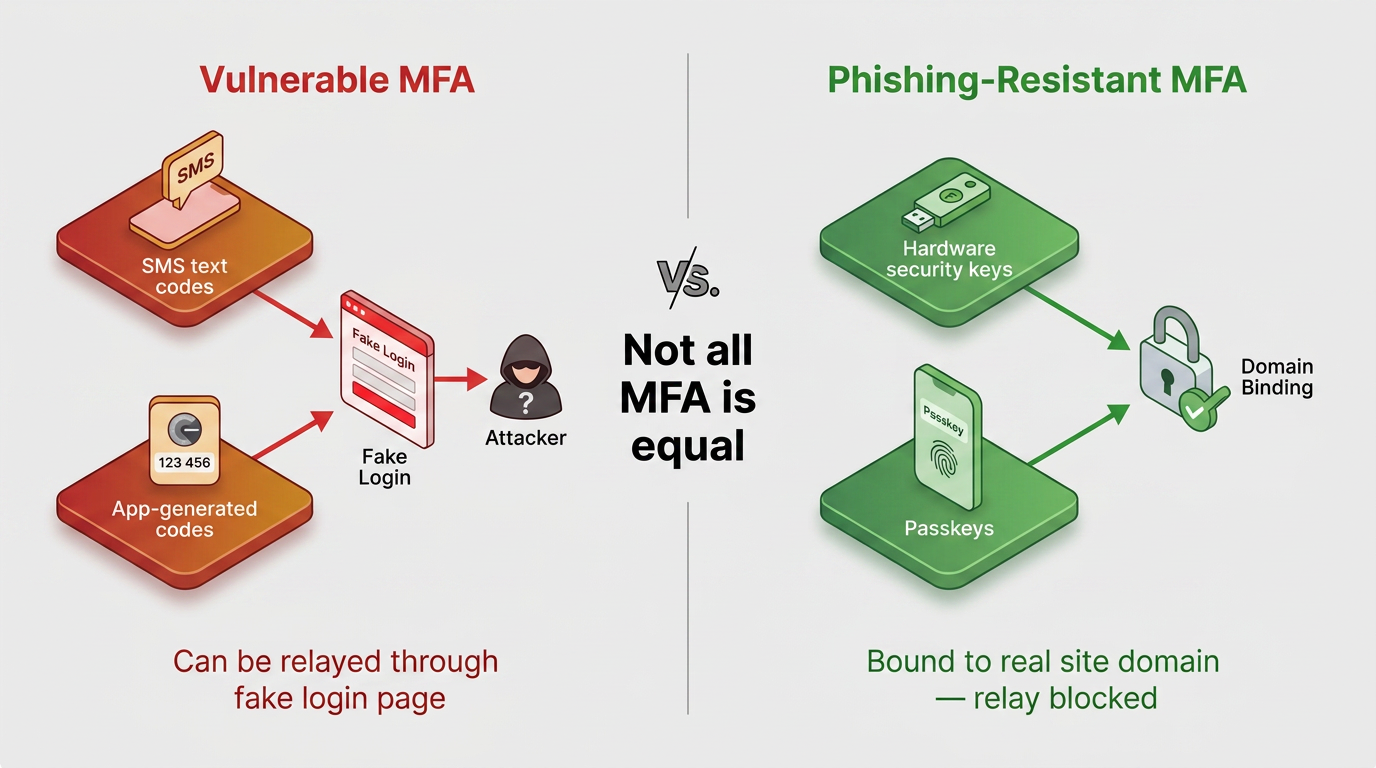
Call a known number to verify the requester and close the remaining loop. For wire changes, organizations can also use a phone personal identification number (PIN) and require dual approval above a set threshold. Attackers can compromise or intercept email. They can also reroute it, so verification must use information or access the suspicious message does not control.
How to Fix Email Security Signature Risks
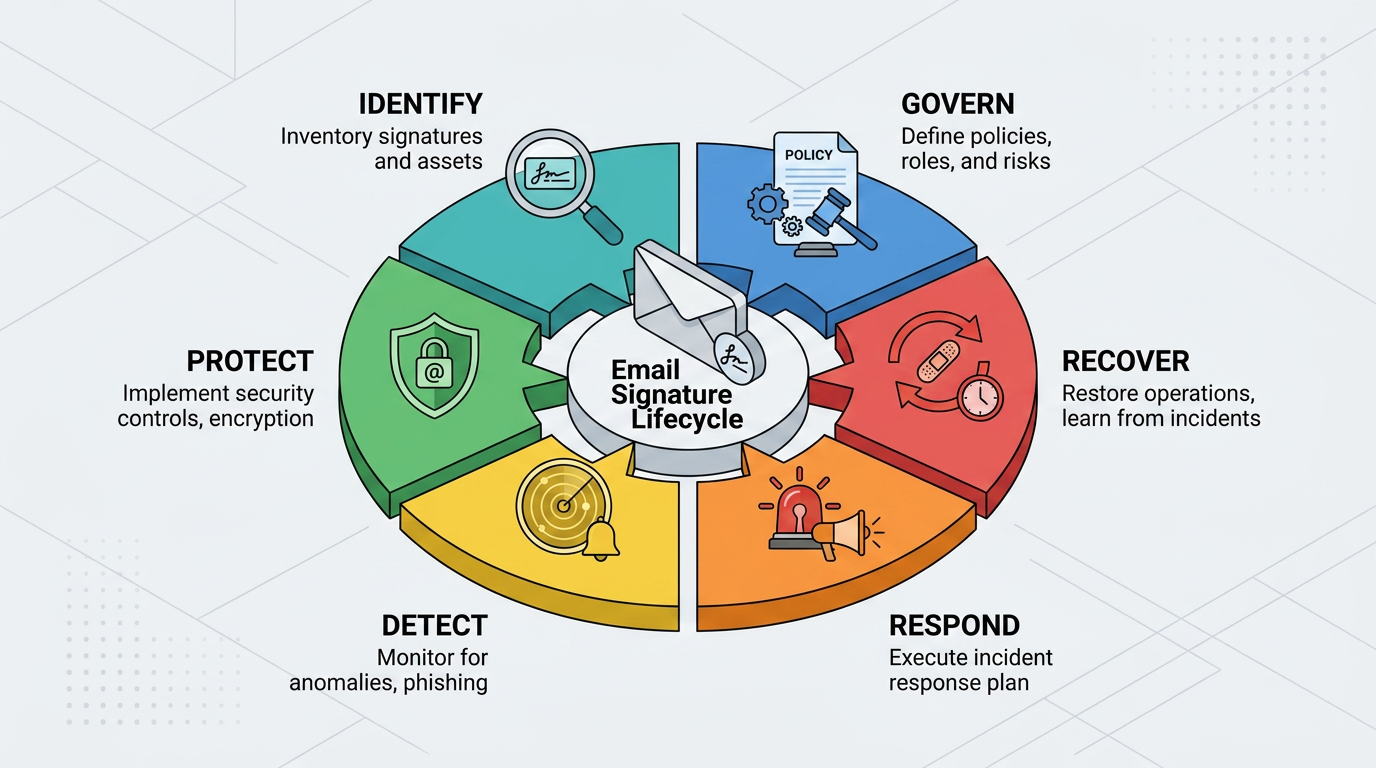
The remediation lifecycle maps onto the six functions of the National Institute of Standards and Technology's (NIST) Cybersecurity Framework (CSF): Govern, Identify, Protect, Detect, Respond, and Recover.
Governance Sets Content, Legal, and Administrative Boundaries
Governance starts with an approved enterprise template treated as a baseline configuration item. The template needs a named owner, role-restricted administrative access, documented change approval, and an audit trail retained for a defined period, such as 180 days. These controls make each version accountable and limit who can change organization-wide content.
Each field earns its place based on business purpose, sender role, recipient context, and harvest risk. A direct mobile number for a payroll lead sent to external suppliers fails that test, while a switchboard number passes.
Regulation shapes what must stay in a signature:
US Commercial Email: The Federal Trade Commission's (FTC) CAN-SPAM guidance requires a valid physical postal address and an opt-out mechanism.
Canada's Anti-Spam Legislation (CASL): Adds sender identification with contact information valid for at least 60 days.
UK Company Law: Requires the registered number, office address, and place of registration.
Sector Rules: Require a firm's name in Financial Industry Regulatory Authority (FINRA) correspondence and Health Insurance Portability and Accountability Act (HIPAA) transmission safeguards.
UK GDPR Data Minimization: Per the Information Commissioner's Office (ICO) data minimisation guidance, limits personal data to what is adequate, relevant, and necessary.
Server-side footer rules improve deployment consistency and prevent users from removing content, though they append below the whole thread and miss Sent Items. Less controlled options include administrator-pushed defaults, which remain editable. Client-side signatures offer no central control and more easily accumulate unapproved HTML and stale fields.
Layered Protection Reduces Technical and Human Exposure
Layered protection combines several controls:
DMARC Enforcement: Enforcing DMARC at reject, with SPF and DKIM aligned, blocks the most common exact-domain spoofing, though enforcement is not airtight.
Template Protection: Controlled HTML and approved link destinations, with images hosted only on organization-controlled servers.
Account and Email Gateway (SEG) Controls: Time-of-click scanning, remote-image controls, multifactor authentication (MFA) on every mailbox, and administrative privileges limited to template owners.
A periodic audit of live signatures confirms that:
Externally visible signatures carry no direct mobile numbers or floor locations.
Titles and departments match the current directory.
Every anchor destination resolves where it did at approval, with no new redirector.
Each QR code has a generation record naming its owner and destination, and images load only from approved hosts.
Disclaimers appear wherever the region or sector requires them.
No signature variant circulates without a change record.
Awareness works best when tied to roles. Finance staff practice recognizing payment-change requests wrapped in familiar signatures, help-desk staff rehearse calls from people who know internal details, and executives learn how attackers reuse their signatures and writing styles in AI-assisted pretexts. Everyone learns the display-name check and out-of-band rule.
Generic simulations may not change behavior on their own, so signature-specific scenarios offer more practical value. A strong reporting culture, tracked by reports per campaign, also helps organizations assess whether people recognize and escalate suspicious messages.
Detection and Response Contain Signature-Based Compromise
Useful detection signals include:
An unexpected template change
A new destination behind approved anchor text
Unusual sending volume or timing
DMARC reports showing failures from unknown infrastructure
Signature variants that differ from the approved version
Each can feed a security information and event management (SIEM) system as an alert. A template change without a matching change-control record warrants immediate escalation because it can affect every message using the template.
Confirmed alerts run through this sequence:
Preserve the offending messages and their headers first. Also retain the administrator and mailbox audit logs.
Containment follows, with active sessions revoked and credentials reset under MFA re-enrollment.
Gateway and web-filter blocks cover malicious links and image hosts. They also cover QR destinations, and the template rolls back.
Notification reaches affected recipients through a channel other than the compromised mailbox.
Legal and regulatory escalation applies when the incident involves personal data or regulated correspondence.
Recovery closes it out by checking every deployed signature against the approved template and keeping affected accounts and the template under watch. Documented lessons inform updated controls and training.
Safer Signatures Start With Verifiable Trust
Signature security rests on four habits: exposing only the data a purpose requires, separating visual familiarity from verified identity, deploying signature content through a governed server-side path, and rehearsing what happens when a signature is copied or altered. A practical starting point is an audit of the signatures leaving the domain today, measured against business purpose, sender role, and recipient context.
Most of that audit has to happen outside the inbox, since none of the technical protocols above read the signature itself. Abnormal's behavioral AI is designed to help close that gap by comparing a message's sender identity, device, and communication pattern against what's normal for that relationship, so a familiar-looking signature attached to a display-name trick, a lookalike domain, or a compromised account can still surface as anomalous.
Abnormal was named a Customers' Choice in the 2026 Gartner® Peer Insights™ Voice of the Customer for Email Security, reflecting how security teams have paired this kind of behavioral detection with the governance steps above. Book a demo to see how it fits alongside a governed signature program.
Frequently Asked Questions
Can an Email Signature Be Spoofed?
Yes. A visual signature is editable text and HTML, so anyone can copy it from a received message and paste it under a fraudulent one. It authenticates nothing about the sender. A spoofed signature arrives most often alongside a display-name trick or a lookalike domain. A compromised legitimate account can produce the same result.
Do SPF, DKIM, and DMARC Protect Email Signatures?
Only indirectly. These standards confirm that a message came from infrastructure authorized for its domain and that covered content was not altered in transit. DMARC can help receiving systems reject unauthenticated exact-domain forgery when alignment is correct, the policy is set to reject, and the receiver honors it. The standards do not examine the display name, rendered logo, links, or signature text, and a compromised account passes all three.
What Information Should a Secure Email Signature Include?
The minimum that serves the message's purpose: name and organization, with role-specific additions justified individually. Add a general contact route when the purpose requires it. Legal requirements can add mandatory items, such as a physical postal address for United States commercial email or registered company details in the UK. Disclosures tied to a sender's role, entity, and jurisdiction may also be required.
Is a Digital Signature the Same as an Email Signature Block?
No. A digital signature is a cryptographic value that proves who signed the message body and that it was not changed afterward. A signature block is contact information appended as content. The first can establish origin and integrity; the second establishes only that someone typed it.