Key Insights
A 2026 ISACA AI Pulse Poll of digital trust professionals found that 38% of organizations have a "formal, comprehensive AI policy," up from 28% in 2025. The rest leave those questions to an AI acceptable use policy they have not written, the employee-facing document that names approved tools, defines what data may go in, and says what to do when something goes wrong.
This guide walks through the decisions an AI acceptable use policy must address, from the approved tool list to the review date. It also supplies a template written as a real policy rather than legal boilerplate, with placeholders for the choices each organization makes. Each decision ties back to the National Institute of Standards and Technology (NIST) AI 600-1 generative AI profile and the UK National Cyber Security Centre (NCSC) guidance on shadow AI, and separates what those sources recommend from what each organization enforces.
What Is an AI Acceptable Use Policy?
An AI acceptable use policy is the set of employee-facing rules for choosing, using and reporting on AI tools at work. An AI security policy covers how the security team secures and monitors the AI systems the organization builds or deploys. A general acceptable use policy covers devices, email and networks but rarely says what may go into a prompt or what an agent may do with a user's access.
Each of these risks can follow from an employee doing ordinary work, without breaking any rule the organization already has:
Data Leakage: Prompts can expose customer data or trade secrets to vendors that retain or train on inputs.
Hallucinations: Employees can act on, send or publish false output that reads as accurate. The NIST AI 600-1 profile calls this "confabulation."
Bias: Output can carry harmful bias into decisions about customers or staff.
Intellectual Property (IP) Exposure: Output can reproduce copyrighted material, and purely AI-generated work may not be protectable.
None of these need a careless employee. They follow from using a tool as designed, which is why the rules must be written down rather than assumed.
How to Write an AI Acceptable Use Policy Step by Step
A working group inventories the AI tools in use, classifies data, defines approved, restricted and prohibited uses, sets agent and embedded-feature rules, establishes incident reporting and exceptions, then reviews the result with legal, privacy and human resources (HR). The chief information security officer (CISO) should own the policy and lead that group, which also draws on security operations and IT. Scope covers contractors, consultants and other third-party personnel, as NIST AI 600-1 action GV-6.1-010 recommends.
Step 1: Inventory the AI Tools in Use
An inventory covers approved tools alongside the shadow AI employees adopted on their own. According to Verizon's 2026 Data Breach Investigations Report, 67% of users access AI services on corporate devices with non-corporate accounts, a slight decrease from the previous year. Security operations can pull procurement and single sign-on (SSO) records for the sanctioned tools, then look for personal accounts, free tiers, browser extensions and AI apps connected through OAuth grants, using the same methods as for the wider shadow SaaS problem.
Before approving a tool, the team reviews its terms on prompt retention, training on inputs, data location, subprocessors and deletion at contract end and gives it a named business owner. Abnormal's AI Governance is designed to discover approved and shadow AI tools and attribute ownership of each one.
Step 2: Classify the Data Employees May Use with AI
Data rules should follow data classes rather than examples, because an example list goes stale the moment someone encounters a case it doesn't name. A common scheme uses public, internal, confidential and restricted classes. Public data is allowed in any approved tool, internal data only in approved enterprise tools, confidential data only in tools approved for it that do not train on inputs, and restricted data nowhere. Customer data, personal data, and IP such as source code usually sit in the confidential or restricted class.
Take a sales manager who wants to summarize a customer call transcript. The transcript holds customer names and pricing, which makes it confidential, so the rule sends it to an approved enterprise tool rather than a consumer chatbot. The policy should reuse the class names from the organization's existing guidance on sensitive information disclosure.
Step 3: Define Approved, Restricted, and Prohibited Uses
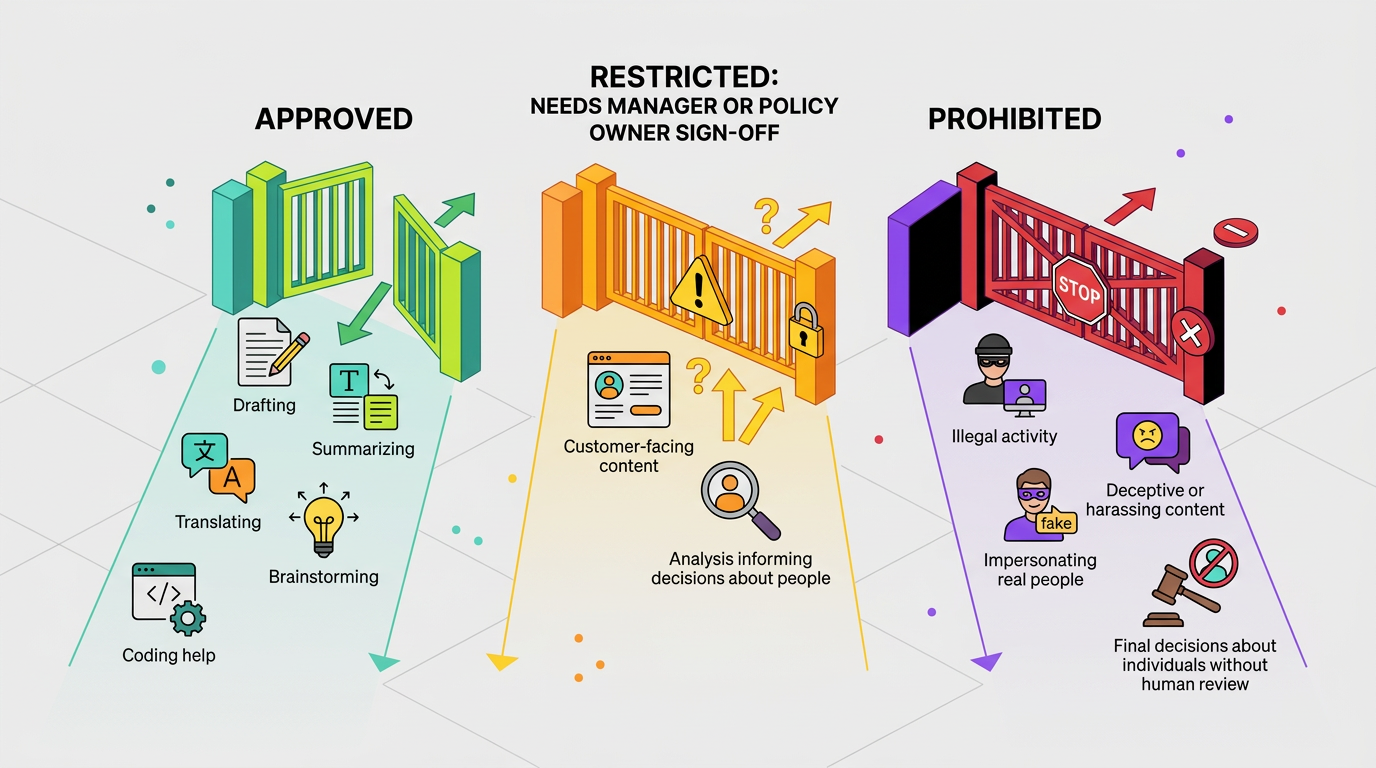
Approved uses include drafting, summarizing, translating, brainstorming and coding help in approved tools. Restricted uses, such as customer-facing content and analysis that informs decisions about people, need sign-off from a manager or the policy owner. Prohibited uses cover illegal activity, deceptive or harassing content, impersonating real people and final decisions about individuals made without human review.
The employee who uses AI output is accountable for its accuracy, bias and copyright. Before output leaves the team, that employee checks facts and figures against a source, reads the text for unfair treatment of any group, and confirms no text or code is copied from a third party.
Step 4: Set Rules for AI Agents and AI Features in Existing Apps
The policy should give each agent only the minimum access a task needs, for the shortest time required, limit the actions it can take and avoid long-lived credentials. Those limits matter because agents and embedded AI features act with the user's own permissions. High-impact actions, such as deleting records or sending external messages, need prior human approval. For embedded features, IT reviews them before enabling, and security approves any plugin or integration connected to company data.
Step 5: Define Incident Reporting and Exceptions
Incident rules should state what to report, where and how quickly. Reportable events include confidential or restricted data entered into an unapproved tool, an agent acting outside its permissions, harmful AI output and a suspected compromised account.
The internal deadline has to leave room for any external one, because privacy regulators set their own breach notification windows, some measured in hours rather than days. Setting the internal deadline in hours leaves that room, and AI reports route into the existing data loss prevention program. Exceptions need a written request, a named approver, compensating controls and an expiry date.
Step 6: Review with Legal, HR, and Privacy
Legal signs off on IP, copyright and vendor contract terms covering training on inputs, prompt retention and deletion at contract end. Privacy signs off that each data class answer holds under applicable privacy law and that the internal reporting deadline leaves time to meet any regulatory breach notification window. HR signs off that enforcement follows the disciplinary process, that any monitoring is disclosed and that good-faith reporting is protected.
The finished policy maps to the NIST AI Risk Management Framework through its GOVERN function, covering documented policies, roles, training and third-party AI risk. For EU operations, Article 4 of the consolidated EU AI Act requires providers and deployers to take measures supporting AI literacy among staff who use AI systems.
AI Acceptable Use Policy Template
Bracketed placeholders mark the decisions each organization must make:
Purpose: This policy sets rules for using AI tools at [Company Name] to protect customer data, company information and intellectual property while letting employees use AI productively.
Scope: This policy applies to all employees, contractors, consultants and temporary staff who use AI for [Company Name] work, on any device or account.
Approved AI Tools: Use only the tools listed at [approved tool list], signed in with your company account. To request a new one, submit [request form] to [Security Team], who will review its retention, training use, data location and contract terms within [timeframe].
Data Rules by Class: Classify information before you enter it into any AI tool.
Public: Published information may go into any approved tool.
Internal: Internal information may go only into approved enterprise tools.
Confidential: Customer data, personal data, financials and source code may go only into tools approved for confidential data, for the stated purpose.
Restricted: Never enter [restricted categories, such as credentials and regulated data] into an AI tool.
Acceptable Uses: You may use approved tools to draft, summarize, translate, brainstorm, analyze approved data and assist with code.
Prohibited Uses: You must not use AI to break the law, create harassing or deceptive content, impersonate a real person, bypass security controls, or make final decisions about hiring, pay or discipline.
AI Agents, Integrations and AI Features in Existing Apps: Get approval from [Security Team] before connecting any agent, plugin or integration to company accounts or data. Agents receive minimum permissions and need your approval before sending external messages, deleting records or moving money, and IT reviews new AI features before enabling them.
Human Review of AI Output: Check AI output for accuracy, bias and copyright before you use it. You are accountable for anything you send, publish or submit. Disclose AI assistance in [specified cases].
Reporting Incidents: Report suspected exposure of confidential or restricted data, agent misuse or harmful output to [security channel] within [24 hours] of noticing it. A good-faith report will not lead to discipline for the mistake itself.
Exceptions: Request exceptions in writing from [Policy Owner]. Each approved exception lists its compensating controls and expires after [period].
Enforcement: Violations are handled through [HR process] and scaled to intent and impact, from coaching to removal of tool access to disciplinary action.
Review Date: [Policy Owner] will review this policy by [date] and earlier after a major incident, a new regulation or a significant new AI tool.
Assign an owner to every bracket before publishing.
How Do You Roll Out and Enforce the Policy?
Rollout works best when employees can reach an approved tool faster than an unapproved one and enforcement is consistent. In its September 2026 post on the hidden risks of shadow AI, the UK National Cyber Security Centre (NCSC) recommends a positive security culture, secure alternatives and understanding why staff turn to unapproved tools. It argues that shadow AI is unlikely to disappear. Each step either removes a reason to go around the policy or makes a breach cheap to report:
Communication and Acknowledgment: Leaders announce the policy with the approved tool list and the reason behind each rule, and employees confirm they have read it at onboarding and after each update.
Short Training: A brief session on the organization's own tools and data classes, which can also count toward EU AI literacy measures.
Approved Alternatives: Security offers an enterprise option for common tasks before blocking consumer tools.
Monitoring and Technical Controls: SSO for approved tools, data loss prevention (DLP) rules on AI destinations and blocking of high-risk tools.
Coaching at the Moment of Use: A warning when someone opens an unapproved tool or pastes restricted data, with coaching for good-faith first mistakes and HR for repeated or deliberate violations.
Review Cadence: Review at least once a year, with earlier updates as new AI capabilities emerge.
Blocking consumer tools without first offering an approved alternative sends employees to their personal phones, where neither the policy nor the logs reach them.
Govern AI Use Instead of Banning It
When employers only ban AI, employees turn to personal accounts the security team cannot see. A policy built on an inventory, data classes, agent rules and a fast reporting path gives them a route that stays inside the organization's view.
Abnormal's AI Governance is designed to discover approved and shadow AI tools and attribute ownership of each one, while AI Employee Guardrails, currently in private preview, is intended to guide or block risky AI actions in the moment. Both belong to the AI Security suite. Explore AI Governance to see what an inventory turns up.
Frequently Asked Questions
Do we need a separate AI acceptable use policy?
Yes, because a general acceptable use policy rarely addresses prompts, data classes, agent permissions or review of AI output. Some teams add an AI annex to the existing policy instead, which works equally well as long as employees can find the rules quickly and the AI rules have their own owner.
Can employees use personal AI accounts for work?
Yes, but a policy should limit them to public information, since personal accounts sit outside company sign-on, contracts and logging, and consumer terms may let the vendor retain or train on inputs. An approved enterprise account for the same tool removes most of the reason to use it.
How often should the policy be updated?
At least once a year, with an earlier review whenever legal, business or technical conditions change. Off-cycle triggers include a new category of tool, a vendor changing its data terms, new regulation and any significant incident.
What happens if an employee breaks the policy?
Consequences should scale with intent and impact, so a good-faith mistake reported quickly calls for coaching and containment, while repeated or deliberate violations go through the standard HR disciplinary process. NCSC culture principles warn that punishing innocent mistakes discourages reporting.
What should employees do when an AI feature appears in software they already use?
Employees should treat it as a new tool and keep confidential or restricted data out until IT confirms it has been reviewed, since vendors sometimes enable these features by default long after the application's original security review. Reporting unfamiliar features helps, though IT still relies on admin settings and vendor notices to catch every change.