CAPTCHA phishing uses the verification challenges employees trust every day, CAPTCHAs, bot checks, and human-interaction gates, to hide credential theft from both victims and security tools. The attack looks routine because the CAPTCHA itself is real. What changes is what happens after a human, and only a human, completes it.
For security teams, that distinction matters because CAPTCHA phishing can pass sender authentication, originate from a legitimate or compromised platform, and still route automated scanners away from the actual credential-harvesting page. Catching it means correlating signals across the message, its links, and the destination infrastructure, rather than trusting any single sandbox verdict.
This article draws from insights shared in "Stop Chasing Alerts: Automating Email Security with Behavioral AI." Watch the webinar to hear more from Abnormal's Dan Nickolaisen and Novant Health's Eric Danneker on how behavioral AI helps security teams detect and respond to attacks that bypass traditional controls.
Key Takeaways
CAPTCHA phishing hides credential theft behind a real verification challenge, so a human victim and an automated scanner can see two entirely different versions of the same page.
These attacks can pass sender authentication and reputation checks because they frequently run through legitimate or compromised infrastructure rather than obviously malicious domains.
SafeLink smuggling and connection profiling let attackers redirect security scanners to benign content while a human visitor reaches the actual credential-harvesting page.
Catching CAPTCHA phishing depends on correlating sender behavior, redirect chains, and account activity, not on trusting a single URL verdict.
What Is CAPTCHA Phishing?
CAPTCHA phishing is a form of credential phishing that uses a real or convincing CAPTCHA, bot check, or human-verification step to make a credential-harvesting page appear legitimate and to filter out automated security analysis before it reaches that page.
Traditional phishing relies on urgency: a fake invoice, an account lockout warning, a message designed to make someone click before they think. CAPTCHA phishing works differently, relying instead on trust employees have built up over years of solving CAPTCHAs on legitimate sites. Three dynamics make the tactic effective:
Trust Exploitation: Employees associate CAPTCHAs with security checkpoints, not attack infrastructure, so they proceed without questioning why one appeared.
Cognitive Commitment: Each additional verification step represents invested effort, which can make someone less likely to abandon the process partway through.
Security Theater: A CAPTCHA reinforces the impression that the destination has already been vetted, even when it has not.
These effects compound when attackers pair a CAPTCHA with familiar branding and a plausible request, such as a document to download or an account to verify. Security awareness training should teach employees to evaluate the full context around a CAPTCHA, including the sender, the request, and the destination domain, rather than treating the presence of a CAPTCHA itself as a signal of legitimacy.
How CAPTCHA Phishing Attacks Work
A CAPTCHA phishing attack strings together several stages so that only a persistent human visitor, not a scanner, ever reaches the credential-harvesting page.
In the webinar, Abnormal's solutions architecture team walked through a live example of this pattern. The message originated from an aws-apps.com sending domain, infrastructure with a clean reputation that passed sender authentication without issue. The email carried an Adobe-branded logo and a single link: a prompt to download remittance advice.
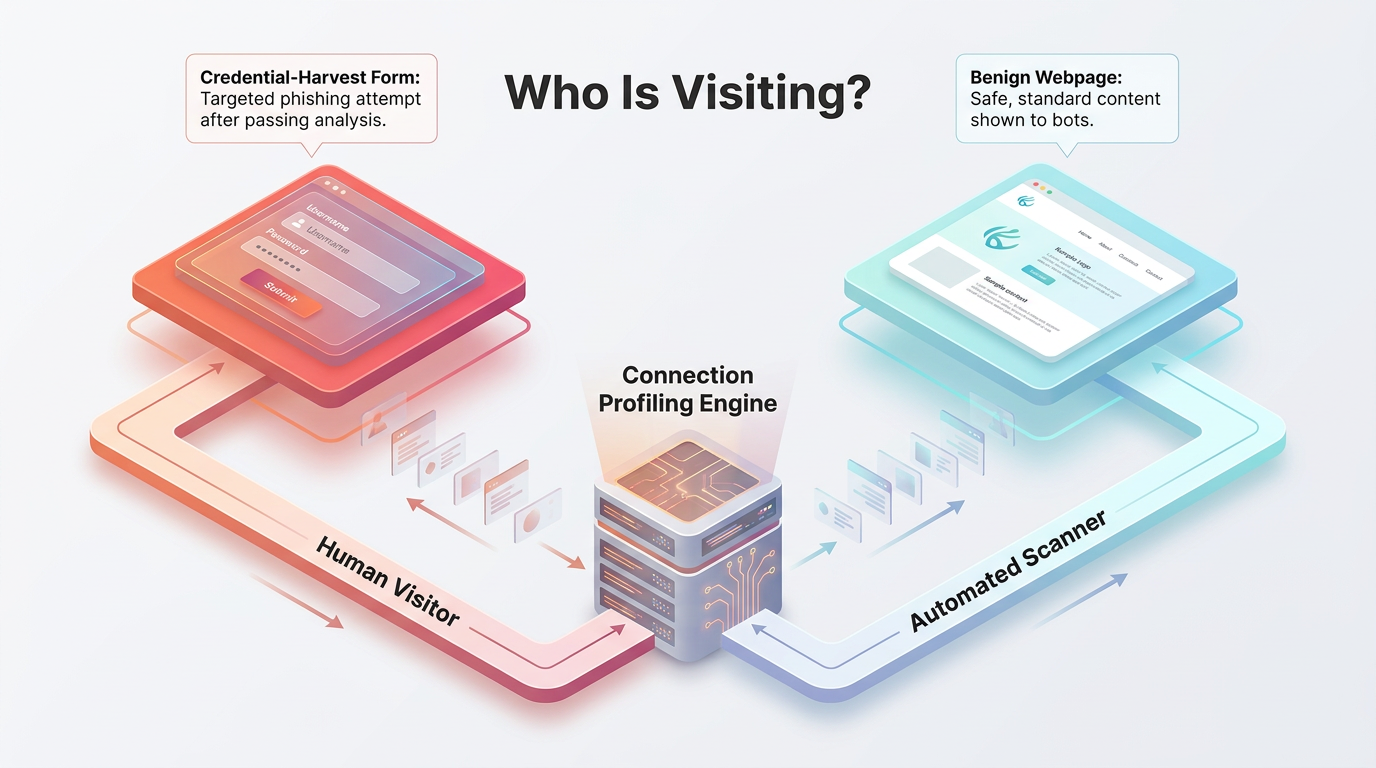
Clicking that link led to pastorchurch.org, a legitimate church website that had been compromised and repurposed as the attack's first hop. Reputation checks on that URL came back clean, because the domain's history genuinely was clean. From there, the page profiled the incoming connection. A human visitor saw a "please wait while we perform background security checks" loading screen, then landed on a page impersonating Adobe. After entering an email address and solving a CAPTCHA, that visitor was redirected to a second domain and presented with a Microsoft-branded security check served through Cloudflare Turnstile. Only after clearing that second challenge did the page prompt for Microsoft credentials.
A sandbox or scanner visiting the same pastorchurch.org link never saw any of this. Connection profiling on the page redirected it to apple.com instead, specifically to a MacBook Air product page unrelated to the attack. The sandbox recorded a benign result because, from its vantage point, the result genuinely was benign.
This is the mechanism that makes CAPTCHA phishing difficult for one-time payload analysis to catch: the page's behavior depends on who is visiting, and the CAPTCHA is what separates those visitors into two groups.
Why These Attacks Evade Traditional Detection
CAPTCHA phishing is built to exploit the assumptions behind reputation checks, email authentication, and automated payload analysis, not to break them outright.
A message can pass Domain-based Message Authentication, Reporting, and Conformance (DMARC), Sender Policy Framework (SPF), and DomainKeys Identified Mail (DKIM) because it genuinely originates from authorized infrastructure. A linked domain can show a clean reputation because it is a real, previously legitimate site that happens to be compromised. And a sandbox can return a clean verdict because the page it reached was never the malicious one to begin with. None of these checks are wrong. They are answering a narrower question than the one security teams actually need answered.
SafeLink smuggling adds another layer to this problem. In a second example from the same webinar, a message reached its recipient with a link already rewritten by a third-party email security vendor's own URL-scanning service (mail-anyone.net), even though the recipient's organization wasn't a customer of that vendor. The rewritten link pointed to a character-entry page hosted on dynamics.com, which read as legitimate to a reputation check evaluating that surface-level destination. Only after a visitor entered the requested characters were they redirected again, prompted with a second CAPTCHA, and then asked for Microsoft credentials.
Checking a link like this against public scanning tools illustrates the gap. A urlscan.io submission for the first-example URL returned the sandboxed redirect to apple.com rather than the credential page a human visitor actually reached, and VirusTotal showed only 12 of 98 vendors condemning it at the time, a gap that persisted for months. Automated, one-time payload checks were, by design, evaluating a different page than the one served to victims.
Technical Indicators of CAPTCHA Phishing
Because CAPTCHA phishing is built to defeat payload analysis in isolation, detection depends on correlating signals across the message, its links, and the infrastructure behind them, rather than trusting any single check.
Message and Link Indicators
These indicators are visible directly in the email and its redirect chain, before any destination infrastructure is tested.
Sender-Domain Misalignment: A mismatch between the sending domain and the domains found in body links can signal impersonation, particularly when a message claims to represent a known brand but links to unrelated hosting infrastructure.
Unusual Sender Patterns: A first-time sender making a credential request, especially one introducing a new link destination, warrants scrutiny beyond basic domain reputation, including display name, brand identity, and typical send frequency.
BCC Distribution Patterns: Hidden mass distribution combined with sender novelty and credential-related language can indicate a campaign rather than expected business communication.
Multi-Stage URL Redirects: Tracing a link through every intermediate hop, including response codes and required interactions, often surfaces a destination that a single-hop check would miss entirely.
Infrastructure and Context Indicators
These indicators emerge once a security team tests the destination's behavior rather than treating a single reputation lookup as conclusive.
SafeLink Smuggling Artifacts: A rewritten URL that references another organization's security infrastructure, rather than the final destination, often conceals a hostname unrelated to the sender's claimed service.
Legitimate Platform Abuse: A valid SSL certificate and established domain reputation confirm that a connection is encrypted and that infrastructure has history, not that a specific page's intent is benign.
Connection Profiling Behavior: Comparing responses from sandbox IPs against controlled, user-like connections can reveal a destination that changes its redirect or content based on who is visiting.
Behavioral Context Anomalies: Whether a recipient normally receives messages from a given sender, domain, display name, or brand, and whether that brand's links usually point where this one does, can surface a suspicious combination that no single static signature would flag.
CAPTCHA Phishing vs. Traditional Phishing
CAPTCHA phishing differs from traditional phishing in both its psychological approach and its use of human verification to limit what automated analysis can observe.
Aspect | Traditional Phishing | CAPTCHA Phishing |
|---|---|---|
Primary Tactic | Urgency and fear | Trust in security mechanisms |
Infrastructure | Often suspicious domains | Legitimate platforms, often compromised |
Email Authentication | Often fails | Can pass when attackers abuse authorized infrastructure |
Sandbox Evasion | Limited | Connection profiling and interaction gates |
User Psychology | Panic-driven decisions | A false sense of security |
Traditional phishing pressures someone to act before thinking. CAPTCHA phishing does the opposite: it slows the interaction down and uses that slower, more deliberate path to build false confidence at each step.
How to Defend Against CAPTCHA Phishing
An effective CAPTCHA phishing defense layers behavioral analysis on top of existing email controls rather than replacing them, since secure email gateways (SEGs) and native cloud protections still handle the commodity threats that make up most inbound volume.
Legacy detection often struggles here because it evaluates a URL, a sender, or a payload in isolation. A behavioral approach instead builds a profile of what normal communication looks like for each employee and vendor relationship, then flags departures from it. Behavioral AI can help surface questions a static check never asks: Does this sender normally communicate with this recipient? Does the linked domain align with how this brand typically communicates? Has a familiar display name suddenly appeared from a new address? Abnormal's platform is designed to evaluate these signals together across cloud email, drawing on identity, relationship, and communication-pattern data rather than payload analysis alone.
Connecting email detections to identity and security information and event management (SIEM) data closes an additional gap. A CAPTCHA phishing message that leads to a credential submission often produces a follow-on signal, such as a suspicious sign-in event, that is easy to miss if email and identity tools operate separately. Integrating detections across Microsoft 365, Google Workspace, and SIEM workflows gives analysts the context to connect a phishing click to the account activity that follows it.
Security teams can also reduce the manual burden CAPTCHA phishing creates for the abuse mailbox. When employees report a suspicious message that automated analysis couldn't reproduce, that report is often the first real evidence a human ever saw the malicious page. Abnormal's AI Security Mailbox is designed to ingest, triage, and respond to these reports, reducing the manual review work that would otherwise fall entirely on analysts.
Responding to a Suspected Attack
A CAPTCHA phishing response should move quickly through detection, containment, and identity remediation, since these attacks are built specifically to reach credential submission.
Triage should validate the sender identity, the full redirect path, and which recipients received the message, pulling in identity teams as soon as there's a possibility that a user entered credentials or approved an unexpected authentication prompt. Responders should preserve the original message, headers, URLs, screenshots of each redirect stage, and any related sign-in records, since this evidence is often the only record of what the credential-harvesting page actually looked like.
When credentials may have been compromised, remediation can include signing the affected user out of active sessions, resetting credentials, reviewing multifactor authentication (MFA) methods, and monitoring for suspicious mailbox rules or forwarding changes. Automating these steps helps contain an account takeover before it escalates into lateral phishing or broader compromise. Before restoring normal access, teams should confirm the user has regained full control of the account and that no unauthorized persistence, such as a new mail filter or forwarding rule, remains behind.
The Business Cost of Missing These Attacks
A small volume of missed CAPTCHA phishing messages can generate a disproportionate amount of downstream security work, since each one that reaches an inbox creates both credential-exposure risk and analyst investigation time.
In deployment data Abnormal shared during its webinar on behavioral AI, organizations of roughly 3,000 employees saw over $100,000 in residual risk from email attacks their existing SEG left undetected, tied to an estimated 1,100 to 2,400 missed attacks per year. That residual risk shows up twice: once as exposure sitting in user inboxes, and again as the abuse mailbox and investigation work security operations center (SOC) analysts take on to find and remediate it manually.
Pegasystems, an Abnormal customer referenced in the same webinar, reported zero missed attacks or false positives over a one-month period after deployment, alongside more than 900 hours saved monthly in SOC process and operational time, a result the company has tied to automating the kind of abuse-mailbox triage AI Security Mailbox is designed to handle.
Results like these depend on attack volume, existing controls, and staffing model, so security leaders evaluating their own exposure should treat published figures as a reference point and build an estimate from their own missed-attack and abuse-mailbox data rather than assuming a universal outcome.
Catching CAPTCHA Phishing Means Looking Past the Verdict
CAPTCHA phishing works by giving automated analysis a different experience than the one a human victim sees, which means detection has to look beyond any single URL verdict or reputation score. Correlating sender behavior, redirect chains, and communication context gives security teams a way to catch these attacks even when payload analysis alone comes up clean.
Abnormal was named a Customers' Choice in the 2026 Gartner® Peer Insights™ Voice of the Customer for Email Security. Request a demo to see how behavioral AI can help surface CAPTCHA phishing attempts that traditional sandbox and payload analysis may miss.
Frequently Asked Questions
How Does CAPTCHA Phishing Evade Sandbox Analysis?
The CAPTCHA and any connection-profiling steps in front of it can prevent automated tools from ever loading the credential-harvesting page, since sandboxes and scanners are often redirected to benign content instead.
What Is SafeLink Smuggling, and How Does It Relate to CAPTCHA Phishing?
SafeLink smuggling is a technique attackers use within CAPTCHA phishing campaigns to hide a malicious destination inside a URL rewritten by a legitimate email security vendor's own scanning service, so reputation checks evaluate the wrong page.
Can Multi-Factor Authentication Stop CAPTCHA Phishing?
Multi-factor authentication, or MFA, provides meaningful protection, but sophisticated CAPTCHA phishing campaigns can capture session tokens through adversary-in-the-middle techniques, which is why conditional access policies and account-takeover monitoring remain important alongside MFA.
Should Security Teams Block All External CAPTCHAs?
Broad blocking is generally impractical, since legitimate services use CAPTCHAs extensively. Teams get more value from identifying suspicious combinations of sender behavior, request context, and verification flow than from treating any CAPTCHA as inherently malicious.