Email security measures protect the one system that touches every part of a business: the inbox where trusted identities and routine communication converge. It is also where employees handle financial approvals. An attacker who convinces one employee that a message is genuine can redirect a payment without ever breaching a firewall. Businesses therefore need a coordinated approach that makes successful deception harder and limits the consequences when it happens.
Key Takeaways
Effective email defense layers identity, access, content, and response controls so each catches what another misses.
Domain authentication delivers the most value when rolled out in stages, from monitoring to full enforcement.
Awareness training reduces risk only when it reinforces technical safeguards rather than standing in for them.
A documented, rehearsed response process limits both operational disruption and financial damage.
Email Risks and Why Layered Defenses Work Better
Business email compromise (BEC) combines these methods for direct financial fraud; the Federal Bureau of Investigation's Internet Crime Complaint Center (FBI IC3) recorded $2.77 billion in reported BEC losses in 2024. Businesses therefore need controls that prevent impersonation, protect account access, limit malicious content, detect compromise, and support recovery.
Layered Email Controls for Messages and Accounts
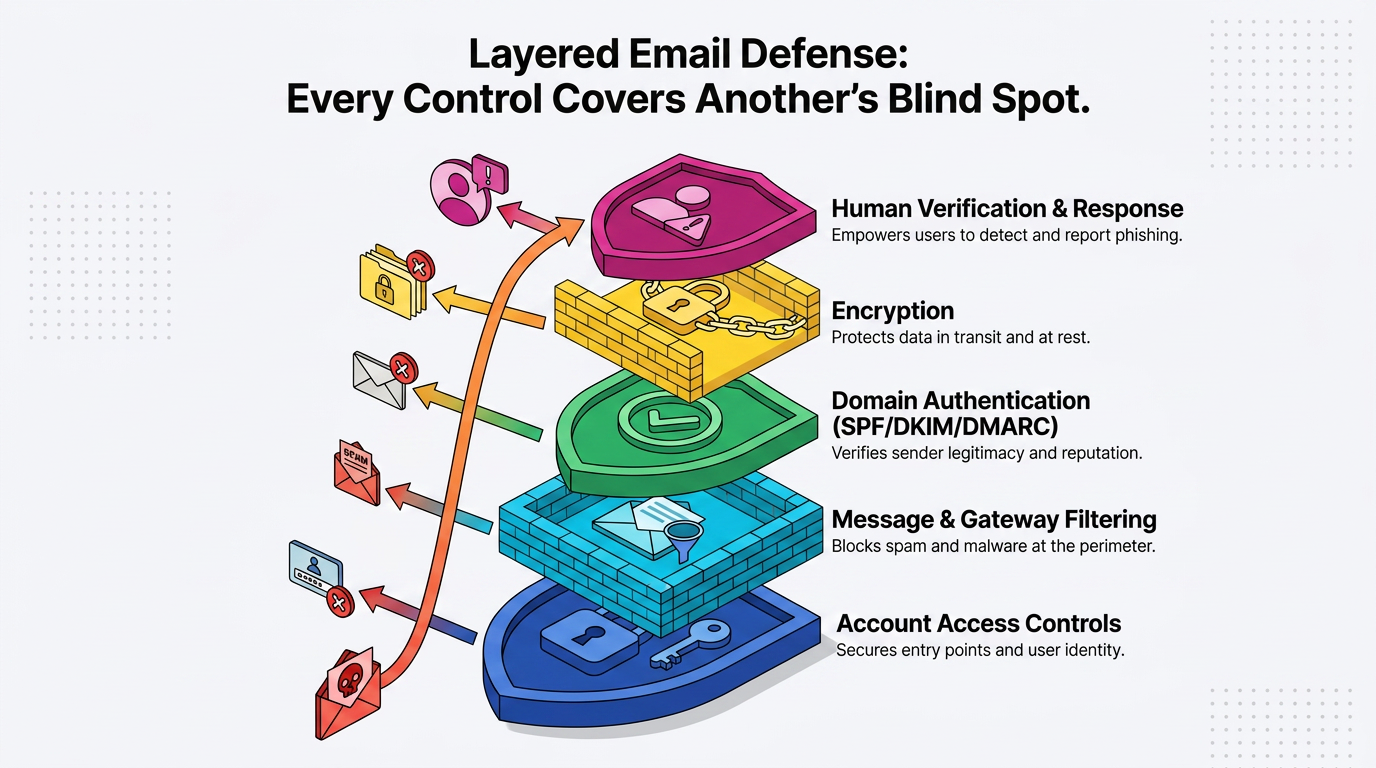
Businesses need overlapping controls for accounts, message delivery, content, and sensitive data, because every control has a blind spot an attacker can find.
Account Access Controls That Resist Credential Theft
Stolen credentials are the most direct route into a business mailbox, so authentication strength is where account hardening should start. Multi-factor authentication (MFA) raises the bar, but a fake login page can capture a one-time code and relay it to the real service. Phishing-resistant security keys close that opening because the credential is bound to the legitimate site. Where security keys are unavailable, number matching on push notifications limits approval fatigue.
A fraudulent invoice shows how the layers interact. An attacker may register a lookalike domain and email accounts payable updated bank details. A tuned filter should flag the unfamiliar domain, while a banking-change verification rule provides a second check. If the attacker instead uses a genuine mailbox with stolen credentials, phishing-resistant login becomes the layer that should have stopped the attack.
Passwords still matter underneath MFA. Effective controls favor length and screen against known-compromised passwords. They also rate-limit failed sign-in attempts. Administrators can further reduce exposure by:
Disabling legacy email protocols outside MFA enforcement
Granting mailbox and admin privileges on a least-privilege basis
Removing access when an employee leaves
Each closes a different way a stale or over-privileged account can be reused against the business.
Message and Data Controls That Limit Exposure
An email gateway (SEG) inspects mail in transit before delivery. It filters spam and analyzes attachments and links. It also applies policy before a message reaches an inbox. A SEG cannot detect a correct password entered by the wrong person, and MFA cannot judge whether a PDF carries malware. In practice, these controls work together by evaluating different parts of the same delivery path.
Promptly patching mail servers and clients closes the exploit paths that malicious attachments depend on. Browsers also require prompt patches. Forwarding restrictions work in reverse: attackers who briefly control a mailbox often set a quiet rule that copies mail to an outside address, so blocking automatic forwarding to external addresses removes that persistence trick.
Audit logging helps teams detect and investigate activity that preventive controls miss. Records of senders, recipients, timestamps, and message interactions give investigators a trail. Administrative safeguards require MFA and role-based access control through dedicated admin accounts. Outbound policies can flag or hold mail carrying regulated data such as payment or contract records. They also cover health records and catch messages sent to the wrong recipient.
SPF, DKIM, and DMARC from Monitoring to Enforcement
Sender Policy Framework (SPF) and DKIM (DomainKeys Identified Mail) authenticate sending infrastructure and protect message integrity. Domain-based Message Authentication, Reporting, and Conformance (DMARC) tells receiving servers how to treat mail that fails the checks.
SPF and DKIM as Complementary Authentication Signals
SPF is a DNS record listing the IP addresses authorized to send mail for a domain. A receiving server checks the connecting IP against the record for the envelope sender, not the visible From address. SPF has two practical limits:
Evaluation stops at a protocol-defined DNS lookup cap, which stacked cloud-service include chains can exceed.
Forwarding breaks the check because a forwarder's IP is not in the original record.
Either limit can turn a correctly configured domain into one that fails checks it should pass.
With DKIM, the sending system attaches a cryptographic signature that receivers validate against a public key published in DNS under a named selector. A valid signature proves the content was not altered in transit and ties the message to the signing domain. Because the signature travels with the message, DKIM survives forwarding where SPF fails. Selectors still need housekeeping because providers rotate keys, and mismatched selector names cause verification failures.
Together, the checks cover different delivery conditions. SPF validates the sending path, while DKIM protects a signed message as it moves through that path. This complementary design gives DMARC more than one authentication signal to evaluate.
DMARC Alignment, Reporting, and Staged Enforcement
DMARC connects those hidden checks to the From address recipients see. A message passes when SPF or DKIM passes and the passing domain aligns with the visible From domain. The published policy then requests how receivers should handle failures:
p=none: Requests reporting only
quarantine: Sends failures to spam
reject: Asks receivers to refuse them
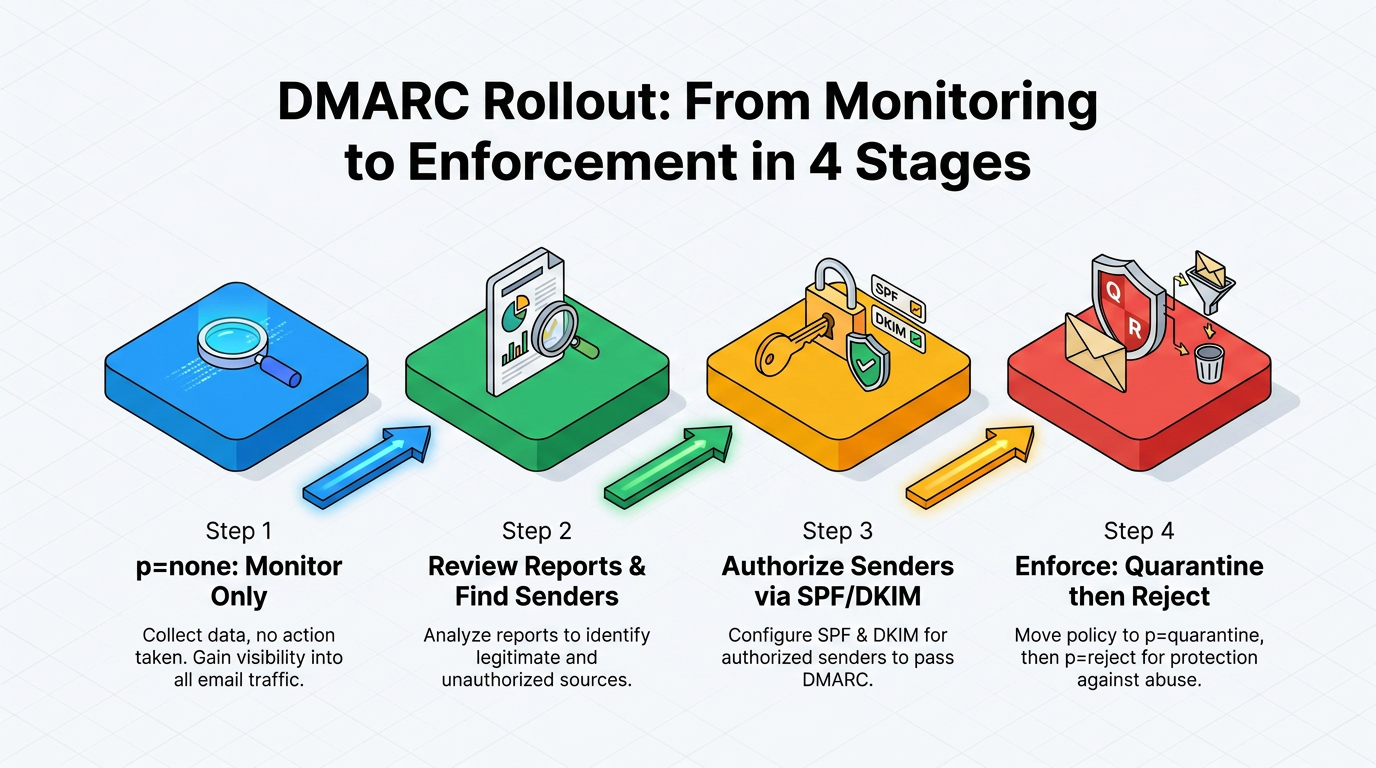
Most businesses send mail from more places than they realize. For example, a marketing platform sending newsletters on the company's behalf may fail DMARC even when its own checks pass, and enforcement applied too early could push those campaigns into spam. Reporting makes staged enforcement workable by showing which services send mail for the domain before the business begins blocking failures.
A sensible rollout follows a fixed order:
Start in monitoring mode.
Review reports to find third-party senders.
Authorize each sender through SPF or a DKIM signing key.
Tighten to quarantine, then rejection.
Forwarding and mailing lists routinely break SPF. DKIM alignment may then be the only path to a pass. Reviewing both signals before enforcement protects legitimate delivery while helping participating receivers block unauthorized use of the domain.
Encryption for Email in Transit and End to End
Transport Layer Security (TLS) protects connections between mail servers; end-to-end encryption protects the message itself. TLS is opportunistic, so servers encrypt a hop when both sides support it but may fall back to plaintext when one does not. Even an encrypted hop leaves the message readable on servers in the path. Mail Transfer Agent Strict Transport Security (MTA-STS) prevents compliant sending servers from falling back to plaintext, which can defer delivery and eventually cause it to fail if secure transport remains unavailable.
For content that must stay confidential regardless of path, Secure/Multipurpose Internet Mail Extensions (S/MIME) and OpenPGP encrypt the message body so only the intended recipient can read it. Enforced TLS is generally enough for routine correspondence. Message-level protection earns its cost for financial or legal content, and health content may warrant it as well. Both methods require equipped recipients, so sensitivity and recipient capability determine when the setup is worthwhile.
Training and Human Verification as Supporting Controls
Awareness programs reduce risk only when they reinforce technical controls. A randomized controlled trial of employees at a health system, presented at the IEEE Symposium on Security and Privacy, found embedded phishing training cut click likelihood by about 2%, while annual one-off training showed no measurable relationship to failure rates. That result shifts the focus from completing a yearly exercise to reinforcing safer decisions during routine work.
Sustained practice with immediate feedback and warning banners works better alongside technical safeguards. Programs also benefit from measuring whether employees report suspicious messages, as well as whether they click, because click rates provide an incomplete picture. The highest-value habit is procedural: teams verify unusual payment or account-change requests through a known channel, never through contact details in the message itself.
Incident Response for Phishing and Business Email Compromise
A documented response process contains compromise faster and improves the odds of clawing back a fraudulent transfer.
Detection, Evidence Preservation, and Containment
A common case illustrates what the response team must uncover: an attacker phishes a finance employee's credentials, sets a quiet forwarding rule, reads invoice threads, and sends updated banking details from the genuine mailbox. A missed forwarding rule or unrevoked session can let the attacker return even after the organization identifies the fraud.
Incident teams benefit from coordinating somewhere other than email because an attacker controlling the service could monitor the investigation. The team scopes the compromise by identifying affected accounts, malicious messages, new inbox rules, and application grants. This review establishes the intrusion's extent and the systems the team must contain.
Teams preserve evidence before cleanup. They capture logs and message headers before remediation can alter or remove them, and they retain the relevant rule configurations. The response team then follows a clear containment sequence, in order:
Revoke active sessions and tokens first, so a changed password actually locks the attacker out.
Reset credentials on affected accounts.
Enforce or upgrade MFA.
Remove the malicious messages from every inbox that received them.
Block the associated domains, addresses, and indicators across email and network systems.
Financial Recovery, Service Restoration, and Lessons Learned
When money has moved, the bank comes first. Finance staff contact the originating financial institution as soon as they recognize fraud and request a recall or reversal. The IC3 guidance then directs the business to file a complaint with IC3 and include complete banking details. Acting quickly gives financial institutions the earliest opportunity to trace or stop the transfer.
Restoration runs alongside financial recovery. System owners remediate and patch affected systems. Administrators then reset remaining passwords, and the team restores access only after testing. Continued monitoring helps identify signs of adversary response or another attempt to enter through missed access.
The post-incident review converts damage into fixes. The team turns the lure into a training scenario and establishes an out-of-band approval rule for banking changes. It also updates the response plan with what it learned about roles and communication timing. This step connects recovery to prevention so the next response reflects the weaknesses the incident exposed.
New Threats and Requirements Reshaping Email Defense
AI-generated phishing, deepfake voice and video, QR-code lures, and stricter mailbox provider rules raise the value of phishing-resistant access and authenticated mail. Large language models produce fluent, personalized lures at scale, while deepfakes extend BEC beyond the inbox. Callback verification on a known number lets employees validate requests without relying on a channel the attacker controls.
QR codes work around the SEG by moving the click onto a personal phone, so filtering has to inspect QR content along with links. High-volume senders should also authenticate mail with SPF, DKIM, and DMARC, support TLS, and monitor spam rates against mailbox-provider requirements. These changes make identity checks and authenticated delivery more important as deception spreads across devices and communication formats.
A Stronger Email Security Program Starts with Coordination
Account protection, domain authentication, encryption, filtering, human verification, and rehearsed response work as one system, each layer covering another's blind spot. A useful next step is auditing the connections rather than counting components: do authentication reports reach the people tuning filters, and does the response plan name who acts first?
Layered defenses close much of that gap, but the identity- and behavior-based attacks described here, including BEC and account takeover, often slip past authentication checks and filters that were never designed to model how an account normally behaves.
Abnormal's behavioral AI is designed to help close that remaining gap by learning how each employee, vendor, and account typically communicates, then surfacing deviations that rules-based tools can miss. Abnormal was named a Customers' Choice in the 2026 Gartner® Peer Insights™ Voice of the Customer for Email Security, recognition tied to this kind of behavior-based detection working alongside the controls above. Book a demo to see how it fits your existing stack.
Frequently Asked Questions
What Are the Most Important Email Security Measures for a Small Business?
The highest-value measures are MFA on every account, SPF, DKIM, and DMARC on every sending domain, spam and attachment filtering, prompt patching, reliable backups, a simple way for staff to report suspicious messages, and a short written response plan.
Is DMARC Enough to Stop Email Spoofing?
No. DMARC enforcement directs participating receivers to quarantine or reject unauthenticated messages using the exact protected domain, but it does not prevent transmission or address lookalike domains, compromised legitimate accounts, or display-name tricks that show a trusted name over an unrelated address.
How Often Should Businesses Review Email Security Controls?
Monitoring should be continuous, with focused reviews after any change: new infrastructure or sending services, staff joining or leaving, rising authentication failures, policy updates, or a security incident.