Email server security often fails in the same quiet way: a DNS record drifts, a legacy protocol stays enabled, a certificate expires, and no one notices until a fraudulent invoice lands in an executive's inbox. By then, the damage is already priced in.
Mail systems sit at the intersection of identity, infrastructure, and reputation, which makes them one of the most probed surfaces on the internet. The ten practices below show how the layers of a durable email defense fit together, from domain authentication to recovery drills, with a verification step for each.
Key Takeaways
Durable email defense comes from identity, domain, transport, infrastructure, detection, and recovery controls that compensate for one another when one fails.
DMARC builds on SPF and DKIM: reports should be reviewed during an initial monitoring phase before moving the DMARC policy to enforcement, such as p=quarantine or p=reject.
Controls drift as Domain Name System (DNS) records and certificates change or roles are reassigned, so scheduled tests with written pass/fail criteria matter as much as first configuration.
Recovery readiness, meaning tested backups and a rehearsed account-compromise playbook, determines how much a successful phish costs.
What Is Email Server Security?
Email server security is the set of controls that keeps a mail system's identities, sending domain, message transport, infrastructure, and stored content out of unauthorized hands. Hosted email leaves DNS, administrators, tenant configuration, filtering, and log review with the customer; self-managed servers keep every layer in-house.
10 Email Server Security Best Practices
1. SPF, DKIM, and DMARC Establish Domain Trust
Anyone can type your domain into a From: header. Sender Policy Framework (SPF), DomainKeys Identified Mail (DKIM), and Domain-based Message Authentication, Reporting, and Conformance (DMARC) let receiving servers tell your mail from an impostor's. Sending Internet Protocol (IP) addresses also need matching forward and reverse records, or large receivers may throttle the mail.
Here's how the three mechanisms compare:
Mechanism | What It Checks | What It Misses
|
|---|---|---|
SPF | The SMTP MAIL FROM envelope sender against the domain's permitted server list | The visible From: header; can fail after forwarding |
DKIM | A cryptographic signature tied to a key published in DNS | Domain alignment with the visible From: header on its own |
DMARC | Whether an aligned SPF or DKIM result matches the visible From: domain | A genuine domain sending under a spoofed display name |
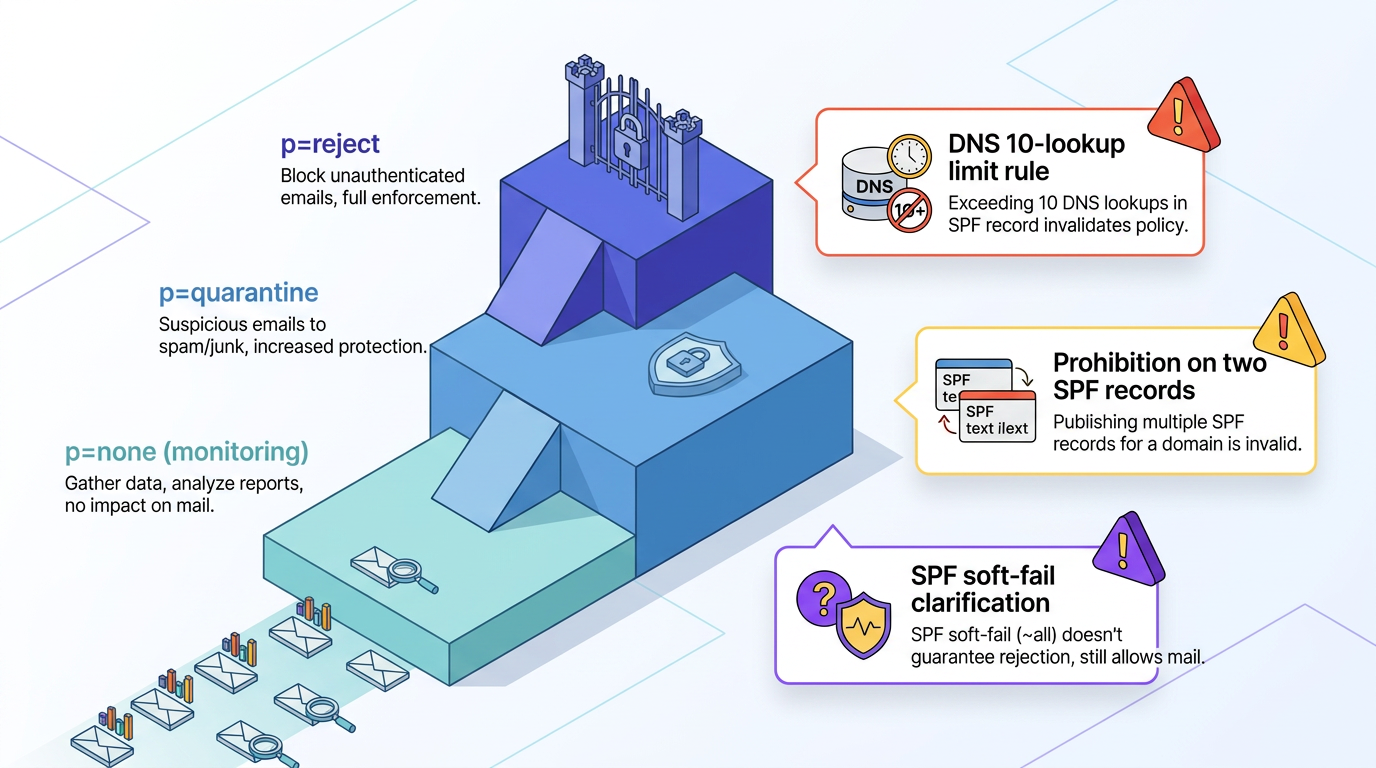
Publish p=none with a reporting address and review aggregate reports until every authorized sender is accounted for. Then move to p=quarantine and finally p=reject. Several configuration constraints matter:
Records exceeding the 10-DNS-lookup limit fail evaluation.
Two SPF records on the same name are not permitted.
SPF soft fail is not a DMARC pass; DMARC fails when neither aligned SPF nor aligned DKIM passes. The receiver then applies the published policy.
A test message showing authentication headers confirms that the mechanisms pass and align.
2. Phishing-Resistant MFA and Least Privilege Protect Access
Stolen credentials remain a frequent way into an organization, though Verizon's 2026 Data Breach Investigations Report found vulnerability exploitation (31%) has overtaken credential abuse (13%) as the leading initial access vector. Ordinary multi-factor authentication (MFA) helps, but push prompts and one-time codes can be relayed through a proxy site or worn down by repeated prompts. The Cybersecurity and Infrastructure Security Agency's (CISA's) MFA guidance holds that "The only widely available phishing-resistant authentication is FIDO/WebAuthn authentication," with number matching as an interim step.
Administrative accounts deserve the strongest option first because they can change tenant-wide controls, authentication policies, and mail flow. Role-based access and separate administrative identities further limit exposure by keeping helpdesk staff out of settings they do not need and preventing routine mailbox activity from exposing privileged sessions.
Disabling basic-auth Post Office Protocol (POP) and Internet Message Access Protocol (IMAP) in favor of modern authentication removes paths that bypass MFA in hosted tenants and self-managed servers alike. The same review should also cover:
Other legacy clients
Inactive accounts
Departed staff
Stale delegations
Privileges that no longer match a person's role
Documented access reviews make those decisions repeatable rather than dependent on memory. Would a departed employee's forwarding rule surface in your next review, or wait for someone outside the company to notice it first?
3. TLS and Enforced Transport Policies Protect Messages in Transit
Transport Layer Security (TLS) protects a message between servers; end-to-end message encryption, such as Secure/Multipurpose Internet Mail Extensions (S/MIME) or OpenPGP, protects message content in transit. Stored mail needs separate encryption-at-rest protection so messages remain protected on local media after delivery. STARTTLS is opportunistic, however: a man-in-the-middle (MITM) attack can strip the encryption advertisement and cause the sender to fall back to plaintext.
Mail Transfer Agent Strict Transport Security (MTA-STS) closes that gap through a DNS TXT record and an HTTPS well-known policy file naming the domain's mail hosts. Senders that honor the policy refuse to deliver without encryption or to a host presenting an invalid or expired certificate. DNS-Based Authentication of Named Entities (DANE) provides similar protection through Domain Name System Security Extensions (DNSSEC)-signed TLS Authentication (TLSA) records, and both controls can run together, with TLS reporting (TLS-RPT) adding periodic summaries of failed connections that expose policy or certificate problems.
Deployments should require TLS 1.2 or higher and disable SSLv2, SSLv3, 3DES, RC4, and other weak protocols or ciphers.
4. Secure Configuration and Segmentation Reduce the Attack Surface
An exposed mail server offers attackers a menu of services; hardening shortens it. For self-managed servers, hardening starts from a published benchmark for the operating system and mail product, then layers in compensating controls:
Runs on a dedicated host under a nonprivileged service account
Disables SMTP VRFY and EXPN commands, which can otherwise reveal whether an address exists
Keeps temporary files in a protected directory
Limits available services and network paths to what's required
Network segmentation provides a second boundary. Placing the server in a separate zone limits what a compromise can reach, especially domain controllers and file shares. Firewall rules can then restrict management access and permit mail traffic only through expected relays, gateways, or administrative networks. This separation matters most when patching cannot happen immediately.
Hosted email shifts the host layer to the provider but leaves the tenant configuration with the customer, including:
Risk-based access controls
Disabled legacy authentication, such as SMTP AUTH
External forwarding restricted to approved domains
Defined baselines with documented deviations for required cloud-service settings
Changes to connectors and administrator roles need the same scrutiny as changes to forwarding policies and a physical server.
5. Risk-Based Patching Closes Exploitable Server Flaws
Mail servers get exploited in bulk once a flaw becomes public and can remain compromised for months on unpatched hosts. Risk-based patch management therefore puts internet-facing mail software at the front of the patch queue, with flaws confirmed as exploited in the wild receiving priority. The work starts with an inventory of every mail-related asset and version, including relays, gateways, connectors, hybrid components, and supporting operating systems. End-of-life servers cannot receive security fixes and warrant isolation or replacement.
A workable cadence tests routine updates in staging that exercises mail flow, authentication, filtering, connectors, and rollback procedures, while keeping an emergency path for actively exploited flaws that skips the normal queue with a recorded owner and post-deployment validation.
Where a fix cannot go in immediately, blocking the vulnerable endpoint at the firewall buys time, but the exception needs an expiration date and continued monitoring. Hosted platforms handle the core mail software, though customers still patch connectors, hybrid components, and client software.
6. Layered Filtering Blocks Spoofing, Malware, and Dangerous Content
Filtering works best as a stack because each layer addresses a different evasion path, moving from broad rejection to deep inspection:
DMARC Enforcement: An inbound server that honors senders' DMARC policies rejects spoofed mail before content analysis.
Content Scoring: Filters spam before it reaches deeper analysis.
Malware Scanning and Attachment Controls: Block executables, scripts, and archives that cannot be inspected.
Message Sandboxing: Detonates what remains in an isolated environment.
URL Rewriting: Rechecks links at click time, since a page that was clean at delivery may later change.
Hosted tenants tune the provider's filtering stack while self-managed servers typically depend on a gateway in front. In either model, policies should distinguish between content that is blocked, quarantined, or delivered with a warning so protections don't weaken when a legitimate business file type occasionally needs an exception.
Overlapping controls remain necessary because sandboxes see only the behavior a sample chooses to show, and redirect chains can defeat URL heuristics. Display-name spoofing, where a free account carries an executive's name, passes SPF, DKIM, and DMARC because the sending domain is genuine. Impersonation detection and external-sender tagging address that gap.
7. Centralized Logging and Monitoring Reveal Account Abuse
Mailbox compromises leave traces in logs long before anyone reports a fraudulent invoice. Mailbox auditing and tenant-wide audit logging are often left off, so the first step is confirming both are enabled and flowing to a central store. Centralization prevents an attacker who controls one mailbox or server from easily erasing the only record of their activity.
Events worth collecting include:
Sign-In Events: Each attempt should record source IP, client type, and location.
Mailbox Access: Logs should show which items a session read.
Rule and Forwarding Changes: New inbox rules and external forwarding addresses need capturing.
Administrative Actions: Role grants, connector changes, and policy edits belong in the same store.
Message Traces: Delivery path and disposition support later investigation.
Alerting turns those records into signals such as impossible travel, access through an unexpected client, a sudden role grant, or forwarding to an outside domain. Correlating sign-in events with mailbox and administrative activity helps distinguish an ordinary connection from an account takeover. Alerts also need assigned owners and escalation paths so important signals do not remain unread.
Retention should extend beyond the 90-day default on some self-managed servers, since fraud may remain undiscovered for months, and access to the log store should be restricted and monitored separately from routine mail administration.
8. Audits and Security Tests Confirm Controls Still Work
Configurations drift, DNS records get edited when teams launch another software as a service (SaaS) tool, and certificates expire, so security testing should follow a documented, risk-based schedule. Each test needs a written pass condition that makes the result objective and repeatable. Higher-risk changes, such as adding a sender or replacing a mail host, justify testing outside the routine cycle.
Four test types cover the main defensive layers:
Authentication Testing: Sends a message from every authorized source, confirms SPF and DKIM pass with alignment, and counts SPF DNS lookups against the ten-lookup limit.
Transport Testing: Verifies each inbound host's certificate and TLS version against the published policy.
Filtering Tests: Repeat the blocked-attachment and known-test-URL submissions.
Message Traces: Confirm the expected disposition.
A restoration from backup closes the cycle by testing the control that matters after preventive measures fail. Findings go into a tracker with an owner, due date, severity, and expected correction, and the next cycle rechecks previous fixes rather than assuming a closed ticket proves the control still works.
9. Backups and Incident Playbooks Support Reliable Recovery
Teams must get mail back after destruction and contain an account after takeover. Backups belong somewhere a compromised administrator credential cannot reach, with recovery time and recovery point objectives agreed in advance. A restoration exercise on the calendar confirms whether those objectives are realistic and whether the team can locate the required recovery point, restore mailbox content, and validate its integrity in the expected time. Hosted email includes retention and recovery features, but they do not replace an independent backup copy that the tenant's own administrators cannot delete.
Access to backup administration and deletion functions should remain separate from routine mail administration so one compromised role cannot destroy both production data and recovery copies.
Account containment follows a set order:
Disable or temporarily block the account when needed.
Revoke active sessions and tokens, then reset the credential out of band.
Remove malicious inbox rules and forwarding while preserving timestamped logs before cleanup.
A dated restoration record and a walked-through containment drill provide evidence that both recovery paths work, and clear ownership prevents evidence collection and business communication from working against account restoration. After an incident or exercise, a review should feed findings into the next test cycle, update the playbook, and identify any access, logging, or backup gap that delayed containment.
10. Training and Verification Procedures Limit Human-Led Fraud
Technical controls should remain the primary defense, with training as the final layer. A randomized field trial at UC San Diego Health found no significant relationship between completing annual security awareness training and clicking a phishing link. Programs that hold up make reporting one button, send feedback to everyone rather than only those who failed, and match the lures staff receive. The National Institute of Standards and Technology's (NIST's) Phish Scale was built with the same intent and helps organizations "focus less on punishing employees and more on educating them."
Training becomes more useful when it supports a clear procedure. Fast, constructive feedback reinforces the action the organization wants without turning simulations into punishment.
Procedure carries more weight than awareness for the highest-value fraud. Any request to change payment details, add a vendor account, or move an urgent wire gets confirmed through a known phone number, never by reply, and approval separation provides another check when one employee both receives and authorizes a financial request. Reporting rates, time-to-report on simulated lures, and follow-through on the required callback procedure give the exercise a measurable business-process result rather than only a click rate.
How to Roll Out Email Server Security Best Practices
Rollout works best in sequence: inventory, quick risk reduction, authentication, transport, hardening, monitoring, and recovery validation. A company with a hosted tenant, one on-premises relay, and four third-party sending services would work through the sequence in order:
Inventory domains, hosts, senders, and administrators.
Apply phishing-resistant MFA to administrators, disable legacy protocols and external auto-forwarding, and enable audit logging.
Bring SPF under ten lookups, enable DKIM for each sender, and move its DMARC enforcement from p=none to quarantine and reject after legitimate sources align.
Enforce TLS 1.2, publish MTA-STS, and harden and patch the relay.
Tune alerts and complete filtering, access, and restoration tests.
Each stage assumes the one before it is solid, so a team that jumps to TLS enforcement before its authentication records are clean ends up hardening transport for mail that shouldn't be trusted in the first place.
Build Security That Can Be Verified
Email defenses hold up when each layer is configured with the others in mind and checked on a schedule rather than trusted from memory. Aligned authentication, enforced transport, patched servers, monitored mailboxes, and a dated drill record all produce evidence a team can evaluate. A practical next step is to identify the weakest layer and define one measurable change before the next test cycle.
Frequently Asked Questions
What Is the Most Important Email Server Security Practice?
Phishing-resistant MFA is usually the priority because stolen credentials are a common entry point. It protects only sign-in, however. Domain authentication protects recipients, while monitoring catches activity MFA misses. The weakest of those controls should determine the immediate priority.
How Often Should an Email Server Be Patched and Tested?
Routine updates should follow a documented, risk-based cycle with staging, while actively exploited flaws in internet-facing mail software warrant emergency patching. Authentication, TLS, filtering, access, and restoration tests should follow a documented schedule and repeat after major changes.
Are Email Server Security Practices Different for Cloud and On-Premises Email?
The controls are the same, but the division of labor differs. In hosted email, the provider patches and isolates the platform, while the customer owns DNS, administrator identities, tenant configuration, filtering, log review, and independent backups. Self-managed servers also require operating system patching, segmentation, hardening, and certificate management.